So that pings Google which apparently has a server very close to you, and no real jitter of interest there. Are you experiencing game issues? Can you mtr direct to the game server? Or if the game server doesn't respond at least ping the last hop that does respond.
Is there a way to trace my xbox outbound/inbound connection? Like to where does it connect?
That page in LuCI will show you what connections are actively being used, you'll probably see a connection that's kind of obvious. @mindwolf suggested to look for udp port 3075 for the CoD games.
Interesting...?
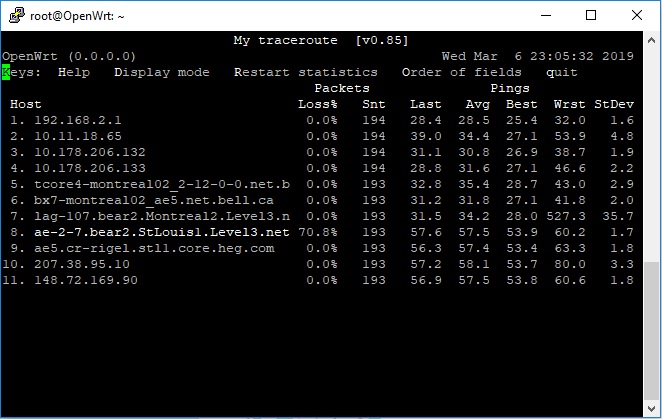
There were multiple connections being used by my console, but this ip had the most data packets being transferred.
Note: Im located in Montreal Canada, and the ip destination is in Germany.
Yep 70% packet loss and 36ms standard deviation of ping time with worst case 527ms ping is a pretty crappy situation. I'm not entirely clear on whether this is just the routers at the end of Level3's big fiber line between Montreal and StLouis not really caring to respond to pings, or whether it really is packet loss and variation in the overall traffic.
The solution might be to play via a VPN that somehow forces your packets to be rerouted around this particular bottleneck. If you can play on a server on the east coast of the US instead of in Germany that'd also be good.
Yup sounds weird, I think I might have to consider something like Netduma where if forces me to connect only to a specific region.
I dont know... I'm thinking about trying it for a couple of games and see the results.... since it looks that it connects to a new different host every game
this was on my second game.
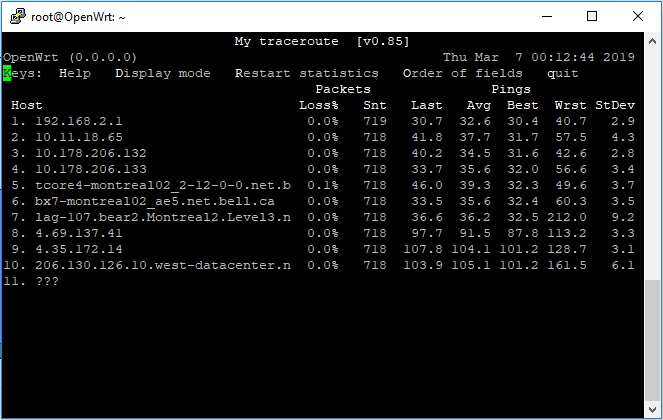
Looks like it was a coincident that first game had a high lost packets and apparently it was stLouis....
will keep testing them for tonight and save the results
It's still a really big jump from hop 7-8 with accompanying variation, which is bad
I don't know your game, but isn't there some way you can select a server based on location or measured ping or something in the lobby?
I see what you talking about there (big jump from hop 7-8) .
Unfortunately there is no option in regards to selecting a server based on location or ping, but to be honest Im happy with the results so far since at least I can get some right now 
From what I read is that Netduma software was built and based on OpenWRT, so I dont know, maybe there is a solution out there, I will have to dig about it I guess 
This is most likely irrelevant, only if all hop after would show the same packet loss and high rtts. This rather indicates that the affected hop uses rate-limiting and de-prioretization for ICMP generation, which is typical for core routers, as ICMP is generated by the CPU and not handled by the typically fast routing ASIC.... There is a great NANOG presentation out there about the pitfalls of traceroute interpretation by Richard Steenberg if I recall correctly, that is worth googling.
See https://wwhttps://www.nanog.org/sites/default/files/10_Roisman_Traceroute.pdf
While traceroute are slightly more implicated to interpret than everybody assumes at first (me included) the sign of an bad path is high rtts variability and packet loss for all hood after the affected on. If packet loss is restricted to a single hop, in all likelihood it is just that hop that can't be bothered to generate/respond to ICMP packets in a reliable and timely fashion....
Hi! im looking to do the same you did. Could you make an step guide on what you did?
Im starting to search what device can i use to flash openwrt and make this.
You flashed what version of openwrt? TC/netem is already installed on openwrt releases?
if you're looking for just a cheap network swiss army knife to put between your gaming box and your regular router, you could use a gl-inet ar300m-lite for about $18 on amazon it's got openwrt out of the box.
netem is not already installed but it's as easy as about 4 or 5 clicks in Luci to update the list of packages and then type netem and click search, and click install.
want to use a Gigabit device and wired to my main pc.
i may go with this one TL-WR1043N. And just use it with openwrt and keep using my main router 5ghz connected to via wire also.
Just so you're clear on how this works, you will have to process all the packets through the CPU of the device you choose, they can not go through the hardware switch. Because of this, if you want Gigabit rates you need something very substantial, the absolute minimum device for this would be a WRT32x and you'd probably do well to have a full blown x86 PC. So this is not something you can drop $50 on and expect to do a good job. The device you mention would probably handle at most 100Mbps, the fact that it has gigE ports is irrelevant because the switch is not hardware switching the packets.
thanks for your advice!
I see this device uses Atheros AR8327N as switch and their overview says "The 8327N supports line rate NAT (Network Address Translation) offloading
the processor and improving throughput."
Maybe im wrong but this should make the job, right? Should handle gigabit speeds well?
(https://wikidevi.com/files/Atheros/specsheets/AR8327_AR8327N.pdf)
edit: mmm reading again what you said. You say openwrt firmwares only use CPU for processing and not the hw nat capabilities?
That's right, this device is woefully underpowered. Hardware NAT compatibility isn't even the issue here. It's inherently impossible to use HW acceleration for the processing you want to do, which involves sending the packets through the QDISC system so that you can alter the rate/delay/etc that they're sent at. It's like if you buy a transportation service so you can get driven slowly to work at low risk in a luxury limo, but the same transportation service offers helicopter rides.... the horsepower of the helicopter rotor engine is not relevant to whether your limo can carry you up steep hills.
great. Clear explanation thanks.
What type of device do you think should work at least at 300mbps. What cpu speed ranges to take in mind?
TL-WR1043ND has CPU at 720MHZ