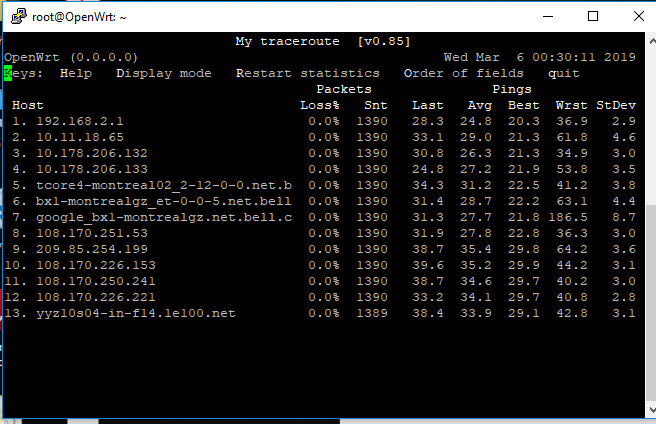
You can try a traceroute to the server your game is using and ping one of the points near the end of the chain.
Or, run mtr which simultaneously pings the whole chain 
You can try a traceroute to the server your game is using and ping one of the points near the end of the chain.
Or, run mtr which simultaneously pings the whole chain
Will read about and do it tongiht... thanks buddy 
you can easily see the CHOOPA servers for COD while looking at the realtime graphs. For me it's usually 50ms, but the matchmaking servers are DemonWare which are located in Dublin, Ireland. I too try playing around with netem and had similar results. One big difference was upping my base ping to 60ms(38ms base). It did add some "smoothness" to certain aspects of gameplay.
Any luck with monitoring the ping? I'm curious to see if you have jitter when you melt down.
I failed to find out how can I do tracerout or find out where was my connection going to with my xbox, I did read about mrt but sadly I couldnt figure it out, Since I hate asking for steps how to do it, I guess Im gonna have to ask for it this time.
How can I do it?
On the other hand, last night I played all my games while sticking to pings between 90-100 and it went very well.
Im so happy with the results last night, and cant wait to improve it more.
Run the command on your Windows PC while playing, use the server address of your game server, have it ping every 2 seconds so no one gets angry and watch the pings at each hop to see if they become unstable when you play.
Noted.... Thanks for the tip buddy.
Will be doing it tonight 
You can also install and run mtr on OpenWrt. But that is potentially introducing variance into the routing performance, so certainly not ideal for a test like yours.
Thats what I tried at first, but couldn't figure out how to use it
On the router just type: mtr google.com to get the mtr results for google.com for example.
mtr gives you packet loss, count, Last, Avg, Best, Wrst, StDev
the last 5 columns are measures in ms of the time it takes to ping that particular hop on the route. StDev is a statistical measure of typical variation size. If you run this while you play and you find a hop that has a high level of variation (using StDev) then that hop is causing jitter in your packet travel time which results in randomly being out-of-sync by something like that amount. If either client-side or server side prediction are being used to determine if you are getting a hit, and you have fairly high variability in ping, then whatever delay is assumed by the client or by the server based on say avg ping time, will be off by some random amount due to the variation.
That's particularly true when you have a fast connection that normally has low bufferbloat but is uncontrolled at the router, and then someone fires up a big download or opens the netflix page or whatever, and saturates your connection for a second... your normal ping of say 50 +- 10 might jump for a second or two to 300. But it will not stay there, so during that burst you'll be way off, and then after the burst you'll be back to normal. But the server which may be calculating an average, may now think you're lagging more than you are for a while....
So variation, particularly occasional large variations, are worse than consistent but laggy connection.
The solution here if this is your problem is to look into enabling DSCP based QoS on your ISP router, or set up your own x86 based router and wifi and enable SQM on that so all the traffic is controlled.
If, on the other hand, the variation comes from a hop in the middle somewhere.... you may get better results by playing through a VPN to force your traffic to be rerouted around the congested link.
I tried the winmtr but it seems its losing %100 which is weird because at its final destination its receiving the whole packets

ssh into your router, and run mtr at the command line, see if that helps
Tried that... I get “Error opening terminal: cygwin.
I think on windows people mostly use PuTTY
Will download that right now
Working right now
Will report back soon
@TheMask Login to LUCI && http://openwrt/cgi-bin/luci/admin/status/realtime/connections. Search for ports 3074:3075. I know Xbox ONE by default for newer COD versions uses port udp 3075.
Side Note: Link to HFSC scripts (choose your own) that I currently use and have better results with for gaming. https://repo.turris.cz/archive/omnia/3.6.2/root/usr/lib/sqm/
PowerShell has ssh built-in also
I can't recommend those hfsc scripts. My blog has an outline of one much more tuned into the actual features that hfsc offers to control latency:
http://models.street-artists.org/2018/01/16/understanding-hfsc-in-linux-qos/
You can use iptables CLASSIFY target rather than TC filters