New to OpenWRT but not tech (retired 40 yr techie). Decided to expand my horizons and dump my years old ASUS with Merlin. Purchased two GL.iNet routers: AC1300 for my Starlink Mini and the MT-6000 for home.
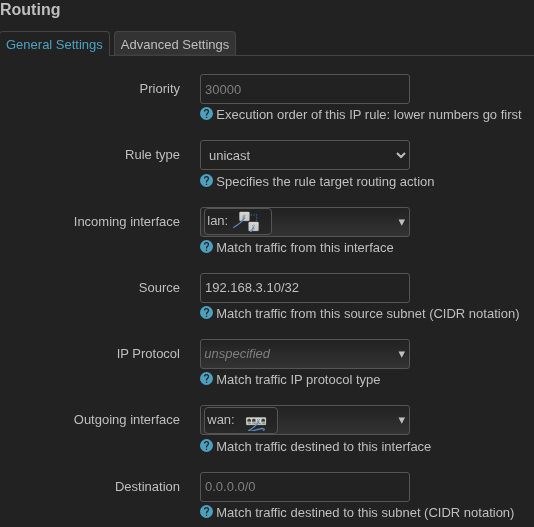
I'm also helping some folks test their new VPN Service EpicVPN that uses VLESS. So I installed v2Ray and Xray-core. VPN is up and running but I need to create a list of IP addresses for my routers that should bypass the VPN and go straight through WAN. Easy on the ASUS as you simply select from the list of devices and assign external destination and WAN interface. Not so easy with OpenWRT.
So, looking for advice or cookbook example to do the exclusions. I'll write up the solution and pass it on to the EpicVPN folks to use in their Quick Start Guide. Thanks for any input.
You can install the full PBR app as outlined by @frollic which has many possibilities (like DNS policies to stop DNS leaks) or do it manually as shown in the link you posted.
AH, sorry - didn't see you changed the IP. Client is 192.168.3.10. I changed it but still shows VPN IP not ISP (Starlink) IP. When setting up wg, I did create a firewall zone that 'allows forward from lan' and covered network is the wg0 interface.
Kinda missing my ASUS -Merlin where to exclude in VPN server, you select IP/MAC from pulldown of all attached devices, enter 0.0.0.0 (or specific IP), select WAN, and save. No messing around with pbr, routing, firewalls. Spoiled with the easy UI.
Seems like it should be easy enough to specify in routing an IP to a destination via wan. But I've tried a dozen ways and nothing works. Steep learning curve with few results so far (2 days).
Please connect to your OpenWRT device using ssh and copy the output of the following commands and post it here using the "Preformatted text </> " button
Remember to redact keys, passwords, MAC addresses and any public IP addresses you may have but do not redact private RFC 1918 IP addresses as that is not needed:
ubus call system board
cat /etc/config/network
cat /etc/config/dhcp
cat /etc/config/firewall
ip route show
ip -6 route show
ip route show table all
ip rule show
wg show
cat /etc/config/pbr
service pbr restart
service pbr status
I made a change to the WireGuard Firewall Zone and my pbr rule is now working to exclude the IP from the VPN. Will try with my VLESS (podkop) now. Thanks for everyone's suggestions.
Update: the pbr rule to exclude also works with my VLESS podkop Proxy VPN! Outstanding!