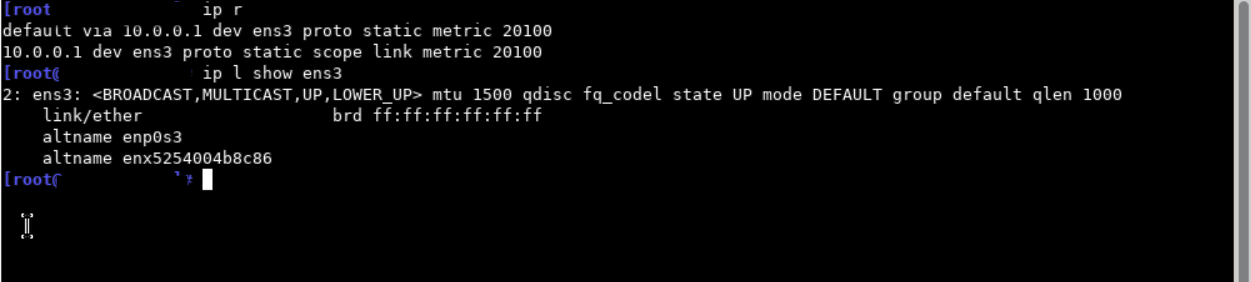
My Ubuntu machine can reach internet using the configuration below(valid ipv4 address,/32 netmask, private ipv4 gateway) : root@workstation:~# cat /etc/network/interfaces # The loopback network interface auto lo iface lo inet loopback
That isn’t generally a valid configuration. What is the goal?
Does your isp provide you with a static ip that is supposed to be configured as static (many are configured with dhcp and the isp provides a static dhcp reservation)?
Typically the gateway must be in the same subnet as the address. So this looks like a situation where there is an rfc1918 transport address for a static ip. I’m not familiar with configuring this scenario but I suspect that it also would not work on most other router environments without other elements.
Hopefully someone who has done this type of config can chime in about how to achieve this goal.
I know that should work somehow but cannot test this at the moment.
Try ip link set dev eth0 arp off in OpenWrt.
The second thing to try is to replace 10.0.0.1 with 0.0.0.0
Is there any kind of authentication in place? Did you register your MAC address perhaps?
What's the access technology? Do you have just a dedicated ethernet cable or something else?
The OP is (claiming to be) successfully sending packets as 5.x.x.x via 10.0.0.1. They also noted they were given this [assumed working] configuration.
OpenWrt allows interfaces to be addressed as a /32. But the user, in addition to an old and altered version of Ubuntu, it seems the configuration is OK with that. I surmise that has to do with the possibility routing is enabled on this device.
Anyways, the user can configure 10.0.0.2/30 (keeping 10.0.0.1 as their gateway), and add 5.x.x.x/32 as an additional IP. They can Source NAT all IPs.
it is a virtual environment and you can apply this configuration on any linux iso image you might boot. tested on ubuntu can test on other distros as well.
My guess that this 10.0.0.1 is a dummy address, I also remember seeing in this place something like 100.64.0.1 and even 1.1.1.1 years ago, but all that was real, not virtual.
So with 0.0.0.0 as a gateway we change to interface based routing, so ip r shows just an interface as a default gateway and OpenWrt should be happy with that. I'm probably missing something with this virtual environment.