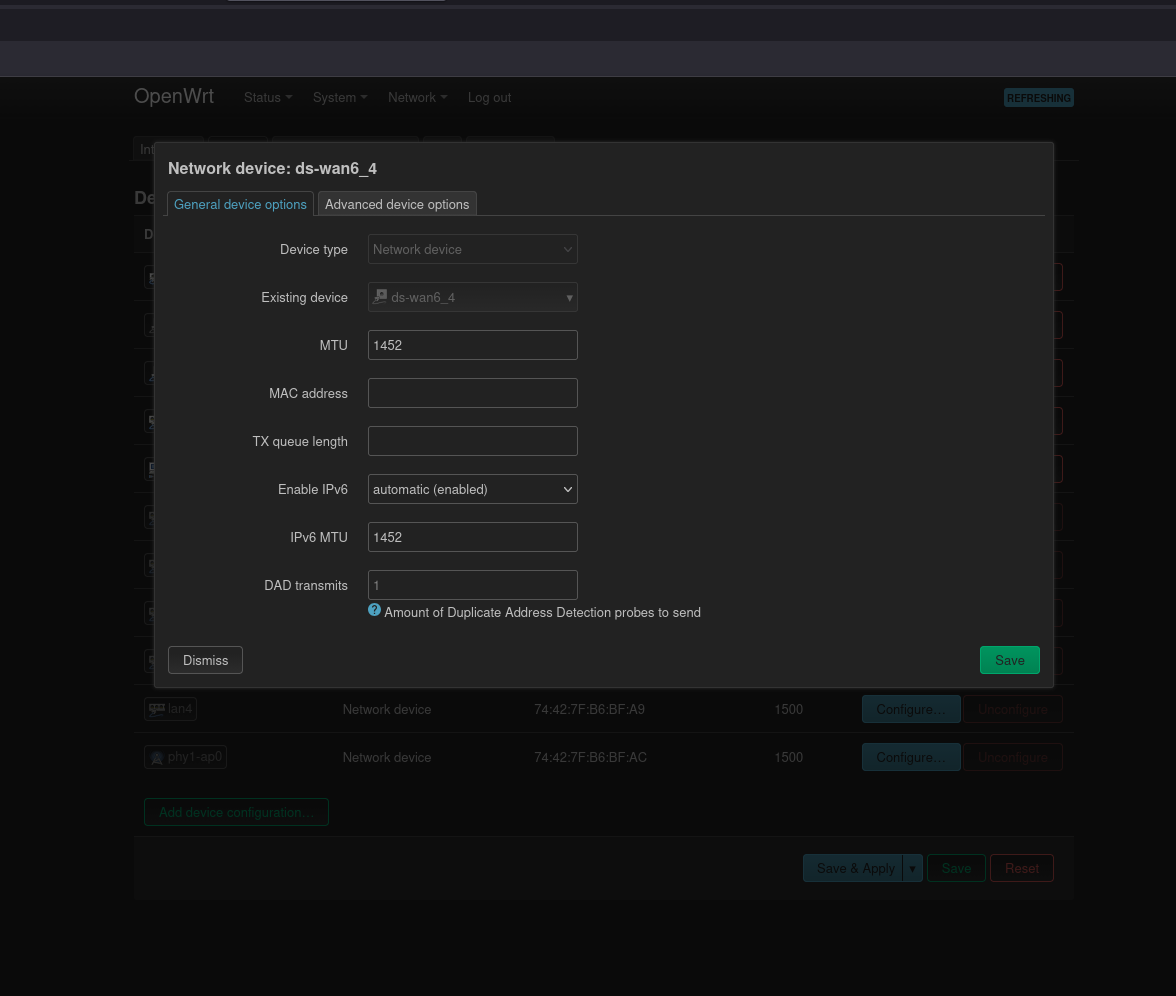
The system defaults to 1280 unless you configure it. The number you provided is the suggestion for DS-LITE over PPPoE. This information is available in other locations.
It's not clear why you linked this thread for your inquiry. Although, there are posts that should answer your inquiry in the thread.
And then any IPv4 ping test performed in OpenWRT stops working:
PING openwrt.org (64.226.122.113): 56 data bytes
ping: sendto: Network unreachable
though IPv6 ping tests are still to working.
when MTU is at 1280 and i run ping test on my PC it looks like this:
user@Debian-PC:~$ ping 8.8.8.8 -M do -s 1252
PING 8.8.8.8 (8.8.8.8) 1252(1280) bytes of data.
1260 bytes from 8.8.8.8: icmp_seq=1 ttl=120 time=5.91 ms
user@Debian-PC:~$ ping 8.8.8.8 -M do -s 1253
PING 8.8.8.8 (8.8.8.8) 1253(1281) bytes of data.
From 192.168.1.1 icmp_seq=1 Frag needed and DF set (mtu = 1280)
ping: sendmsg: Message too long
Your orginal post showed you added -M do. So I surmise that you realize that option wasn't available on the OpenWrt version of ping.
This says you used a ping packet containing only 56 bytes. This indeed indicates some issue (perhaps user error), but it's not related to altering MTU on the DS-LITE interface.
when its not at 1280 but at 1452 for example the internet stops working, any ping test returns destination unreachable.
so setting it to 1452 doesnt seem to work even though i was told that this is supposed to the correct value. or did i set the mtu for the wrong device?
im basically just rying to figure out whats the correct MTU configuration for me (pppoe+ds-lite) but reading the existing docs and posts is confusing me. from my understanding from what i read i was supposed to set ds-wan6_4 to mtu of 1452 but that stops my internet from working.
OK. Please note this is on the OpenWrt, without using the -M settings. It says Network unreachable.
Your test results from the Debian are unrelated.
Try setting your router to the desired MTU and perform the ping test for MTU only from the Debian machine.
(I assume this issue on the OpenWrt is related to your admission in another thread that your WAN interface has no IPv4 address. But that would be off-topic. Also posting different outputs and describing them as somehow related to DS-LITE - continually thru multiple threads, unnecessary. I understand this may be new, but that seems to keep occurring.)
Please let us know the proper test results when you setup your DS-LITE interface as desired.
If you mean the OpenWrt output, you haven't shown evidence that your Internet stopped working. I Private Messaged you regarding the information you posted, and some suggestions on how to post an issue in general.
In any case, I assure you that you're not supposed to keep following documentation (some unrelated to your configuration) and past forum discussions after a successful setup - to then stop your working internet setup. The general goal is not to break your setup. It's especially poor taste to have others guess why.
You can determine the correct MTU number from the test, or
Ask your ISP
That link was provided in another thead because of your inquiry on how to know DS-LITE is configured. It identified the interface your now altering.
Thank you, yeah that makes sense, sorry i constantly did that. Got everything working now, and would now only want to set the optimal MTU if possible.
Ok so i have now set the MTU of ds-wan6_4 to 1452 and run a ping test on my debian machine, results:
user@Debian-PC:~$ ping 8.8.8.8
PING 8.8.8.8 (8.8.8.8) 56(84) bytes of data.
From 192.168.1.1 icmp_seq=1 Destination Net Unreachable
user@Debian-PC:~$ ping 8.8.8.8 -M do -s 1252
PING 8.8.8.8 (8.8.8.8) 1252(1280) bytes of data.
From 192.168.1.1 icmp_seq=1 Destination Net Unreachable
user@Debian-PC:~$ ping 8.8.8.8 -M do -s 1253
PING 8.8.8.8 (8.8.8.8) 1253(1281) bytes of data.
From 192.168.1.1 icmp_seq=1 Destination Net Unreachable
Is 'ds-wan6_4' the only interface where i would need to change the MTU?
Or do i also need to touch other interfaces?
Does this test only work if i have a mtu of 1452 set in openwrt because a mtu of 1280 would limit the test results to around 1232? or does the test work not matter what mtu is currently set?