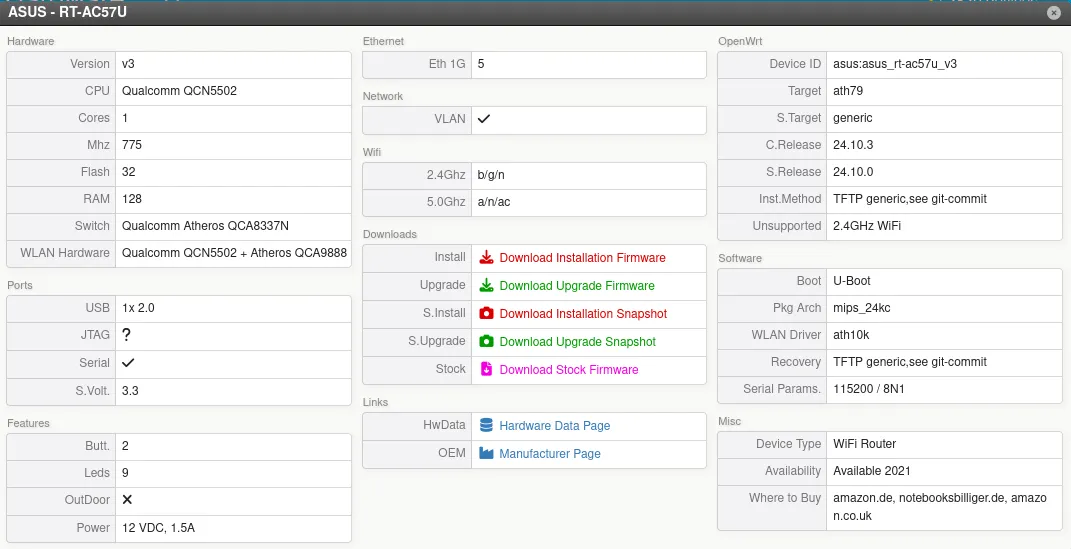
has someone experience in unbricking an Asus RT-AC57U v3?
Specially with a TFTP upload of the firmware?
I already tried everything and it was not possible to start an TFTP upload over ethernet.
Holding reset for 5 seconds and switching on seems to be the right way, because the router goes into a slow blink of the power LED.
But afterwards it does not react on a ping on 192.168.1.1 nor it will start uploading when you try to start an upload with an atftp in Linux.
There is already an aditional switch between to hold the connection of the PC up and the local IP is set to 192.168.1.75 or other IP's.
I tested the traffic with wireshark and there is only one arp packet from the router with the correct MAC and IP 192.168.1.1 nothing more.
When you search at acer.com you will find out that there is no recovery tool for this model and the tool for the v1 has disappeared.
I have already an alternative idea and opened the router to get access to the UART / RS232.
Later on some pictures can follow here, because it look different inside to the v1 version.
The serial connection could be established with 115200 baud 8N1 and an PL2303 adapter.
Here is what it will respond:
U-Boot 1.1.4-gf5a7e7fc-dirty (Dec 12 2019 - 16:21:11)

RT-AC59U bootloader version: 1.0.0.5
apjet01 - JET 1.0DRAM:
sri
ath_ddr_initial_config(277): (ddr2 init)
ath_sys_frequency: cpu 775 ddr 650 ahb 258
Tap values = (0x12, 0x12, 0x12, 0x12)
128 MB
ASUS RT-AC59U gpio init : wps / reset pin
Flash Manuf Id 0xef, DeviceId0 0x40, DeviceId1 0x19
flash size 32MB, sector count = 512
Flash: 32 MB
Maximum malloc length: 128 KBytes
mem_malloc_start/brk/end: 0x85ff4000/85ff4000/86024000
*** Warning - bad CRC, using default environment

Power up PLL with outdiv = 0 then switch to 3
plat_dev_init: read 16384 bytes from offset 9fff1000 of WLANCAL fail! (r = -1)
In:    serial
Out:   serial
Err:   serial
Net:   ath_gmac_enet_initialize...
Fetching MAC Address from 0x8604a71c
ath_gmac_enet_initialize: reset mask:c02200
athr_mgmt_init ::done
JET  ----> S17 PHY *
athrs17_reg_init: complete
SGMII in forced mode
athr_gmac_sgmii_setup SGMII done
: cfg1 0x80000000 cfg2 0x7114
eth0: f0:2f:74:e3:e8:20
eth0 up
eth0
ath_set_tuning_caps: read WLANCAL fail!!! (r = -1)

Please choose the operation:
   1: Load System code to SDRAM via TFTP.
   2: Load System code then write to Flash via TFTP.
   3: Boot System code via Flash (default).
   4: Entr boot command line interface.
   7: Load Boot Loader code then write to Flash via Serial.
   9: Load Boot Loader code then write to Flash via TFTP.                                                             0
   3: Boot System code via Flash (default).

RT-AC59U bootloader version: 1.0.0.5
MAC Address: F0:F2:74:E3:E8:20
## Checking 1st firmware at 9f060000 ...
   Image Name:   MIPS OpenWrt Linux-4.14.221
   Created:      2021-02-15  15:22:37 UTC
   Image Type:   MIPS Linux Kernel Image (lzma compressed)
   Data Size:    1877294 Bytes =  1.8 MB
   Load Address: 80001000
   Entry Point:  80001000
   Verifying Checksum ... OK
   Uncompressing Kernel Image ... OK
## Giving linux ramsize: 134217728 (128 MB)

Starting kernel ...
I will try to initialize an TFTP upload here and will report if this works.
But it would be still interesting to know how it will work without opening the case ...
What is not supported?
This Router is part of OpenWrt!
Besides this is not a call for support - it is an question if someone has experience with a router that does not response to an ping or TFTP upload.
2: Load System code then write to Flash via TFTP.
This is an interesting thing because the router is not expecting an upload - it seems to try to download from an TFTP server here!
I have not configured one and will try this tomorrow, because I already invested to much time today ...
When you say - there was a list of the correct tool for different router somewhere - i miss the link.
But at least there seems no version for an old Windows 7 and I have no newer version in an Virtualbox.
So it must be done in Linux - if the correct method is available.
But I can say that I already flashed the OpenWrt image on the v3 and it did work (using the web interface)!
The problem is that I made the experiment to flash an pineapple image afterwards ...
Yes - the flash of the firmware now works with a "simple" atftp client upload.
I could monitor the firmware flash on the UART / RS232, this time simply with holding reset while power on.
But this time I altered some parameter remembering the standard I have seen yesterday:
IP of the PC is 192.168.1.10
File name for the image is 0101A8C0.img
Then the upload did work and OpenWrt is up and running on the v3 now!
Both connections are working via browser and ssh.