I have two routers, each with their own ISP in a configuration that looks like this:
isp1 ----- router1 [ssid1] (router mode) ----- nas server + wired/wireless clients
_________| (cat6)
isp2 ----- router2 [ssid2] (ap mode)
Both internet connections are metered LTE connections with bandwidth constraints. My goal is to allow clients to connect to ssid1 or ssid2 to deliberately control which LTE connection is used while still having access to my main network which has my NAS server.
I understand that AP mode usually means you're turning off firewall which hinders routing rules and I'd prefer to use separate devices rather than a single device with multiwan. Is such a configuration possible? I'd appreciate any help you all can provide!
Ideally, those ISP connections are direct from the ISP and not through a router... at that point, you can connect * both* to the same router and use mwan3 to allow for load balancing/failover.
If you're looking to have two subnets with one subnet routed over ISP 1 and the other over ISP 2, I think you want to use PBR for that.
Is there any physical/logical reason why you need to have ISP 2 connecting directly to router 2?
Yes, there's a reason but I wasn't including this info as to not muddy the waters. Apologies for that.
I already have multiwan on router1 that's utilizing my two primary ISPs (Starlink and ATT). The goal of the second router is to use my third and slowest ISP (TMobile) for slow downloads without congesting my primary router and it's wireless channel. We live on the road and have a family of gamers so we're always trying to spread the load.
For the sake of discussion router 1 has a LAN IP of 192.168.1.1/24 and router 2 has a LAN IP of 192.168.2.1/24.
Use a VLAN if necessary to separate one Ethernet port of router 2 from all other networks. This goes to the cable which connects into the router 1 lan (nothing special done to network 1, just connect it anywhere bridged into the lan). Set up an interface on the router 2 port with IP 192.168.1.2/24. Note that this automatically installs a route in router 2: 192.168.1.0/24 via ethX.
Then to make the routing symmetric, make router 1 aware that network 2 exists by adding a route to 1's routing table: 192.168.2.0/24 via 192.168.1.2 The device here will be br-lan or whatever device in 1 holds 192.168.1.1.
Next the firewall. If you just put the new interface into 2's lan zone, you will get full connectivity between the two networks, since by default lan-lan forwarding is allowed. If you don't want that, you can use a separate zone and more specific rules.
Running into problems. I think it's because router1 and router2 have only one eth port and both are connected to my netgear smart managed switch. I created a "lan1" interface which consumes the only eth1 port. Neither router can talk to each other and I've been wrestling with ChatGPT all night and am out of ideas. If needed, I can setup VLANs on the switch though.
Yes you need to make the cable to router 2 a trunk that contains both LANs. Then you can attach the interconnect interface to eth1.1 and the local lan to eth1.2. (Yes would need to see the whole file since usually when there is only one port it is eth0.)
isp1/isp2 -- router1 (192.168.1.1/ssid1, bulk of my network using this gateway)
                 | (cat6 to port1)
              GS308E  (ports3+ have other devices that should be using router1 as gateway)
                 | (cat6 to port2)
isp3 ------- router2 (192.168.2.1/ssid2, can hop onto wifi and use the slow metered isp3 for lengthy downloads without congesting router1 but still have access to devices on router1)
No VLANs are currently configured though I had attempted this last night while consulting with ChatGPT with no success. All changes were reverted.
This is my first foray into using subnets and VLANs and am glad to be learning from you all. I really appreciate the help!
Start by configuring one of the managed switch ports to be tagged in both LAN networks. I'm assuming the VLAN numbers would be 1 and 2 corresponding to the router numbers. Of course you can use any number you want.
These are not running OpenWrt right now... they're running GL-Inet's highly modified fork of OpenWrt. You need to ask them for help since the firmware is not from the official OpenWrt project.
However, the good news is that you can install official OpenWrt. Right now your device isn't supported by a stable release, but it is in snaspshot. If you install an OpenWrt snapshot, you'll probably also want to install LuCI (which is not included in snapshots, by default). But from there, we can help you in these forums. https://firmware-selector.openwrt.org/?version=SNAPSHOT&target=mediatek%2Ffilogic&id=glinet_gl-x3000
Sigh... I'm stumped. Not messing with router2 atm, it's disconnected.
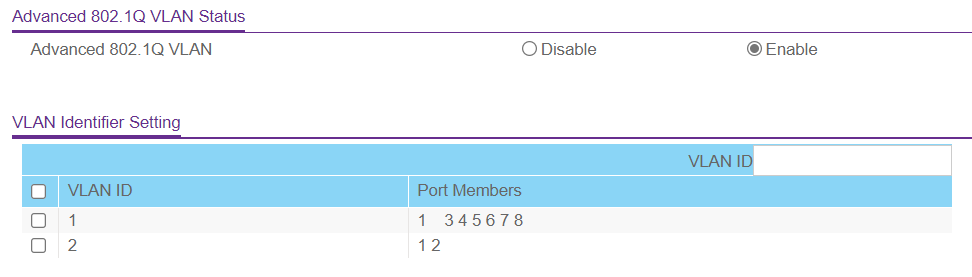
When I plug router1 into another port like port 8 - I can access it via 192.168.1.1 just fine. As soon as I move it to the correct port which is port 1 (per the VLAN screenshots above) - I lose connectivity to router1 in an odd way.
My PC (which is on port 4 and part of VLAN1) will negotiate and acquire an IP of 192.168.1.193 with the 192.168.1.1 gateway. After this, I cannot ping nor access the web interface of 192.168.1.1; I also lose internet connectivity. When I swap the router back to port 8, everything works again.
Also what I found out is that if I switch port 1 to "untagged" on VLAN1 - connectivity is regained.
I'm guessing there's something wrong with the router's ability to handle tagging? Here's how I have it configured:
I've put this on hold for now as we're packing up to move RV sites tomorrow. I've already undone the VLAN, interface and firewall changes from router1 and the VLAN config on the switch. Will try again on Monday or Tuesday.