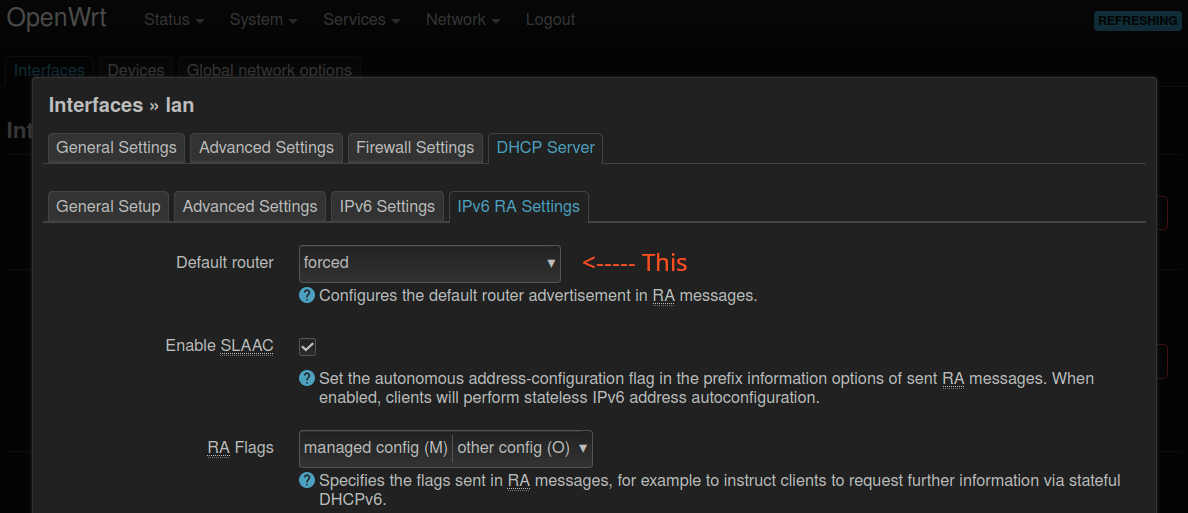
Second: 192.168.2.1 DCHPv4/6 [OpenWrt 22.03.2]
Ipv6 is working fine on the main router but secondary router has no ipv6 connection
how do i configure the second router to get ipv6 working from main router ?
I was using stock firmware on second router and had this setup and didn't adapt accordingly + i want to seperate wifi clients from wired ones so i can SQM limit them.
Some firmwares, including OpenWrt, will not recognize that their IPv6 uplink is in fact an Internet connection if it only has ULA. So, an OpenWrt router behind an IPv6 NAT will not announce the default route through itself until you set the default route announcement in the LAN settings to forced in /etc/config/dhcp:
Please run the following commands (copy-paste the whole block) and paste the output here, using the "Preformatted text </> " button:
Remember to redact passwords, MAC addresses and any public IP addresses you may have
ubus call system board; \
uci export network; \
uci export dhcp; uci export firewall; \
ip -6 addr ; ip -6 ro li tab all ; ip -6 ru
Run this on both routers. Also please verify the connection between routers. Is there a cable from R1 lan port to R2 wan port? Is there any switch between them?
I see that you do have at least a /64 routable prefix from the ISP (ends in fbe0::), which means you don't need NAT6 and you really should not use NAT6. Check ifstatus pppoe-wan and ifstatus wan_6 (if it exists) to see if the prefix is larger.
I'm basing that on seeing a /64 assigned to the first router's lan. Since a /64 can't be further delegated by a second router, conventional IPv6 access from the second router's lan fails. However if you were to set the first router's lan ip6assign to /60 that may work, if the prefix from the ISP is large enough-- which I can't tell from here.
If you really only can get a /64 from the ISP, then it would be best to use relay mode in the second router, so that clients of the second router are taking their IP6 from the same /64 that exists in the first router. This gives all the endpoint clients in your network their own unique, public GUA, non-NAT IPv6 address.
The correct one would be ifstatus wan6, since OP is using the option ipv6 1 under wan interface and there is wan6 defined.
However from the routing table output we can see that the prefix is just the /64, which is pretty lame for an ISP.
Thankfully there is the solution of NDP-Proxy, to share the /64 of the R1 to the downstream router, if the ISP doesn't delegate a larger prefix.