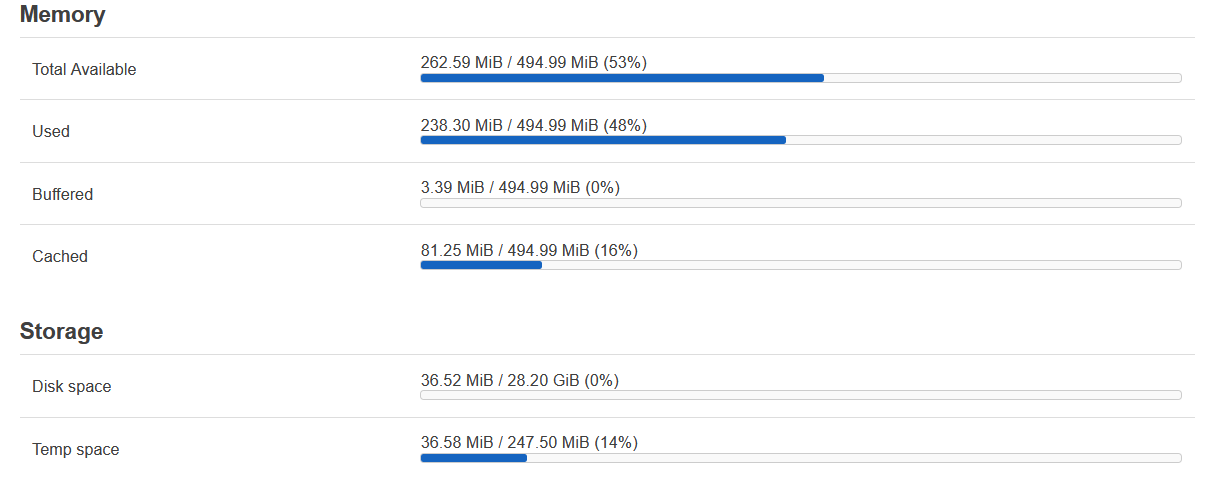
I am a novice, I would appreciate some help please.
I am using WRT1900ACS V2 , Powered by LuCI openwrt-24.10 branch (25.313.53093~ae2aec8) / OpenWrt 24.10.4 (r28959-29397011cc)
By using OpenWrt wiki, I have installed a USB drive as internal storage and installed adguard home. Now I cannot update software. When I rung opkg update I get code 7 error.
Following is the output
Downloading https://downloads.openwrt.org/releases/24.10.4/targets/mvebu/cortexa9/packages/Packages.gz
*** Failed to download the package list from https://downloads.openwrt.org/releases/24.10.4/targets/mvebu/cortexa9/packages/Packages.gz
Downloading https://downloads.openwrt.org/releases/24.10.4/packages/arm_cortex-a9_vfpv3-d16/base/Packages.gz
*** Failed to download the package list from https://downloads.openwrt.org/releases/24.10.4/packages/arm_cortex-a9_vfpv3-d16/base/Packages.gz
Downloading https://downloads.openwrt.org/releases/24.10.4/targets/mvebu/cortexa9/kmods/6.6.110-1-0a0bf8358eff18b8c118787b94fe51ba/Packages.gz
*** Failed to download the package list from https://downloads.openwrt.org/releases/24.10.4/targets/mvebu/cortexa9/kmods/6.6.110-1-0a0bf8358eff18b8c118787b94fe51ba/Packages.gz
Downloading https://downloads.openwrt.org/releases/24.10.4/packages/arm_cortex-a9_vfpv3-d16/luci/Packages.gz
*** Failed to download the package list from https://downloads.openwrt.org/releases/24.10.4/packages/arm_cortex-a9_vfpv3-d16/luci/Packages.gz
Downloading https://downloads.openwrt.org/releases/24.10.4/packages/arm_cortex-a9_vfpv3-d16/packages/Packages.gz
*** Failed to download the package list from https://downloads.openwrt.org/releases/24.10.4/packages/arm_cortex-a9_vfpv3-d16/packages/Packages.gz
Downloading https://downloads.openwrt.org/releases/24.10.4/packages/arm_cortex-a9_vfpv3-d16/routing/Packages.gz
*** Failed to download the package list from https://downloads.openwrt.org/releases/24.10.4/packages/arm_cortex-a9_vfpv3-d16/routing/Packages.gz
Downloading https://downloads.openwrt.org/releases/24.10.4/packages/arm_cortex-a9_vfpv3-d16/telephony/Packages.gz
*** Failed to download the package list from https://downloads.openwrt.org/releases/24.10.4/packages/arm_cortex-a9_vfpv3-d16/telephony/Packages.gz
Errors
Failed to send request: Operation not permitted
Failed to send request: Operation not permitted
Failed to send request: Operation not permitted
Failed to send request: Operation not permitted
Failed to send request: Operation not permitted
Failed to send request: Operation not permitted
Failed to send request: Operation not permitted
Collected errors:
-
opkg_download: Failed to download https://downloads.openwrt.org/releases/24.10.4/targets/mvebu/cortexa9/packages/Packages.gz, wget returned 4.
-
opkg_download: Check your network settings and connectivity.
-
opkg_download: Failed to download https://downloads.openwrt.org/releases/24.10.4/packages/arm_cortex-a9_vfpv3-d16/base/Packages.gz, wget returned 4.
-
opkg_download: Check your network settings and connectivity.
-
opkg_download: Failed to download https://downloads.openwrt.org/releases/24.10.4/targets/mvebu/cortexa9/kmods/6.6.110-1-0a0bf8358eff18b8c118787b94fe51ba/Packages.gz, wget returned 4.
-
opkg_download: Check your network settings and connectivity.
-
opkg_download: Failed to download https://downloads.openwrt.org/releases/24.10.4/packages/arm_cortex-a9_vfpv3-d16/luci/Packages.gz, wget returned 4.
-
opkg_download: Check your network settings and connectivity.
-
opkg_download: Failed to download https://downloads.openwrt.org/releases/24.10.4/packages/arm_cortex-a9_vfpv3-d16/packages/Packages.gz, wget returned 4.
-
opkg_download: Check your network settings and connectivity.
-
opkg_download: Failed to download https://downloads.openwrt.org/releases/24.10.4/packages/arm_cortex-a9_vfpv3-d16/routing/Packages.gz, wget returned 4.
-
opkg_download: Check your network settings and connectivity.
-
opkg_download: Failed to download https://downloads.openwrt.org/releases/24.10.4/packages/arm_cortex-a9_vfpv3-d16/telephony/Packages.gz, wget returned 4.
-
opkg_download: Check your network settings and connectivity.
Thanks in advance