Hi the speedtest package is 10.5 mb and I don't have enought space to run it on my openwrt , any option to make storage bigger on openwrt so i can upload this backage? Thanks

USB port, if your device got one.
you could try https://github.com/luizluca/speedtest-shell too.
If you're strapped for space, speedtestpp clocks in at roughly 66 kB installed.
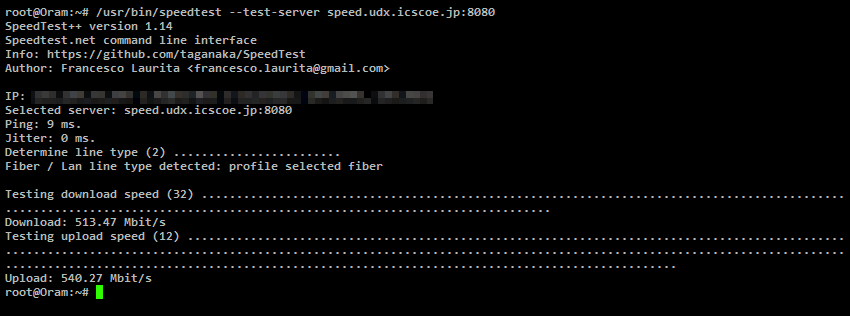
(My line is particularly sluggish today.)
Edit in 2024 since this post still gets a lot of attention: speedtestpp fell out of development and was dropped for OpenWrt's packages. Its successor, speedtestcpp, is significantly larger, almost to the point where it defies its raison d'être.
Depending on your architecture, you could scp the official speedtest.net CLI utility (if its available) - it appears to be much less than 10.5 MB.
I installed package but I can't see the interface , i need to install another package?
speedtestpp is a command line utility, you need to SSH into the router to use it.
Ok i did SSH what is the command to write there?)
@takimata posted a screen shot of it ?
How to make SSH from a puplic ip ? Connection refused
how is this related to your initial question ?
yes, firewalls have a tendency to do that, shame on them.
That's actually already more elaborate than necessary. A simple speedtest is enough.
I installed package you said , but because I'm in other location i need to do SSH through puplic IP can you tell me steps to do SSH remotely ?
What part of "blocked by firewall" is tricky to understand?
If you're remote, how did you install it ?
Or did someone do it for you ?
I can acces to router by the port 80 from a puplic ip address. But i was trying to do SSH by using this puplic ip it says connection refused but i used to succeed doing SSH localy. ,,,,, i want to do SSh remotely , do you know how i can do this?)
I have access to router remotely
You can't, if your ISP blocks it, but there's a luci package for running cli commands via luci, find it, and install it.
Or you haven't done your home work with the firewall.
Then you're already connected thru its Public IP - simply run the command.
Then you'd additionally configure your router for access on the other ports you desire.
I have AT command on my router. , what is the command line for doing speedtest? I installed package speedtestpp
?
Are you having an issue running this command?
I just did port forwarding for SSH port and now it works simple) and i did SSH by ( puplic ip, port) and i manged to access router by command line. And did speedtest