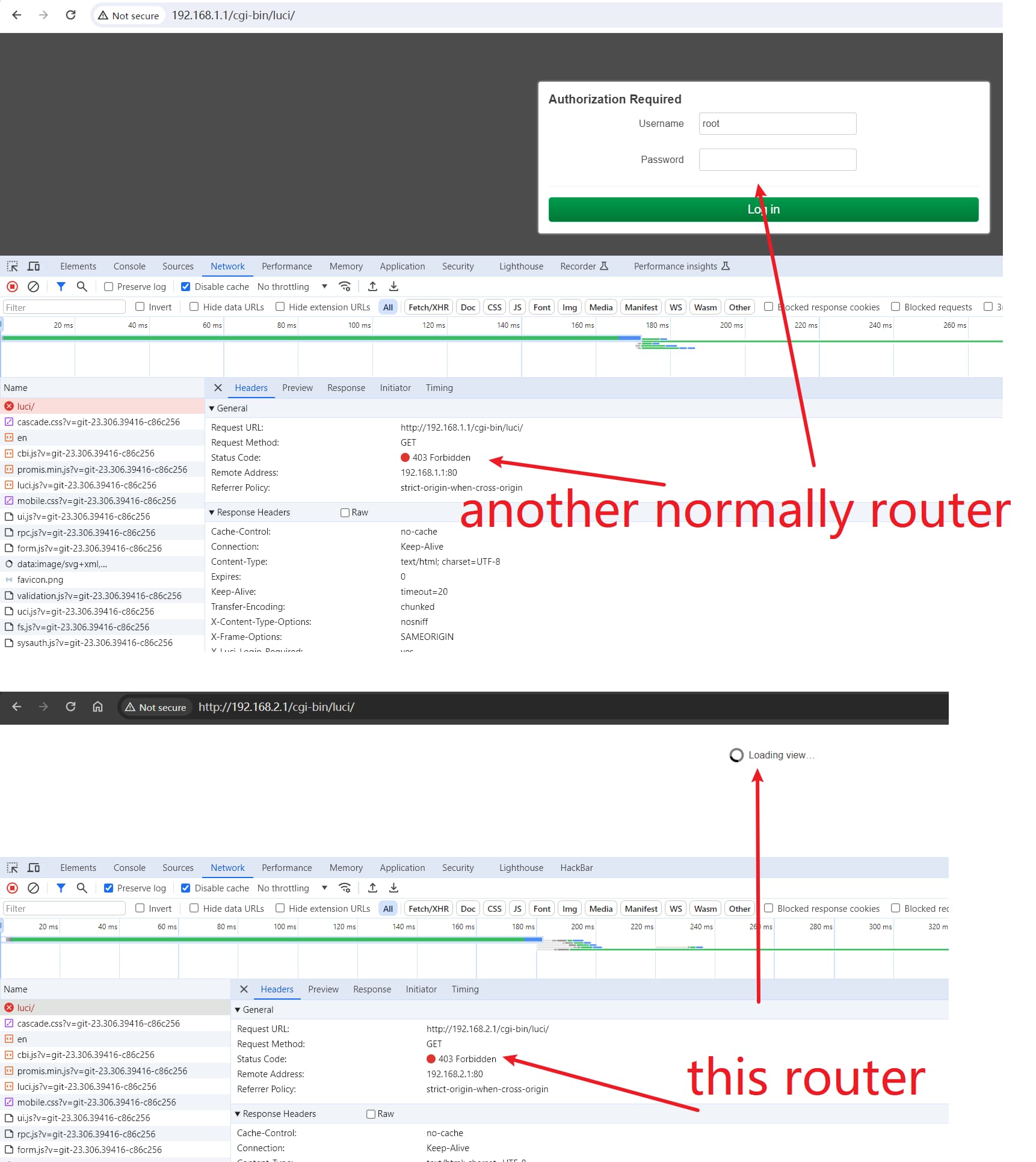
When i using the latest version of OpenWrt(MiRouterAC2100-OpenWRT 23.05.2), The LAN default subnet is 192.168.1.1/24 . When I modify the LAN subnet to 192.168.2.1/24 , accessing the web interface at http://192.168.2.1 returns a 403 error. Upon inspecting the response headers, I noticed the presence of "X-Xss-Protection: 1; mode=block". Despite attempting to disable browser caching, disabling LAN firewall, and accessing the web interface from different devices, the issue persisted with all attempts returning a 403 error. Additionally, SSH connection to 192.168.2.1 is working perfectly fine.
/etc/config/network:
# cat /etc/config/network

config interface 'loopback'
        option device 'lo'
        option proto 'static'
        option ipaddr '127.0.0.1'
        option netmask '255.0.0.0'

config globals 'globals'
        option ula_prefix 'fd77::/48'
        option packet_steering '1'

config device
        option name 'br-lan'
        option type 'bridge'
        list ports 'lan1'
        list ports 'lan2'
        list ports 'lan3'

config interface 'lan'
        option device 'br-lan'
        option proto 'static'
        option ipaddr '192.168.2.1'
        option netmask '255.255.255.0'
        option ip6assign '60'

config interface 'wan'
        option device 'wan'
        option proto 'dhcp'

config interface 'wan6'
        option device 'wan'
        option proto 'dhcpv6'
Please connect to your OpenWrt device using ssh and copy the output of the following commands and post it here using the "Preformatted text </> " button:
Remember to redact passwords, MAC addresses and any public IP addresses you may have:
ubus call system board
cat /etc/config/network
cat /etc/config/firewall
cat /etc/config/uhttpd
I am accessing the router backend (192.168.2.1) with my computer (192.168.2.144). And before changing the subnet, my computer:192.168.1.42 access router 192.168.1.1 it's ok.
Yes, I tried Chrome/FireFox, and use Incognito mode. The issue still persists.
I have double-checked for any subnet conflicts. I have another router with the subnet 192.168.3.1/24 , as well as two additional virtual network interfaces (192.168.8.1/24 and 192.168.192.1/24 ). There are no IP conflicts.
Unplug your router from all network connections and power. Then connect just one cable between your router's lan port and your computer and reconnect power to your router. Make sure your computer has no other network connections -- turn off wifi if necessary. Wait for your computer to get an IP address from the router, and then try again.
It's official image. And I have checked the SHA256, the file is fine.
I have another router, also using OpenWRT, with the official image. It has been working normally for a year. However, when I checked just now, accessing the backend of that router also resulted in a 403 error. But the HTTP login page's username and password input box can be loaded, and I can log in to the backend and use it normally without any issues.
Now, with this router, I'm getting a 403 error, but the frontend HTTP login page fails to load and keeps spinning. Please see the image below.
This is not normal behavior. If you're using a completely default official OpenWrt image, there must be another explanation for the issue you're experiencing.
Have you reset your router to defaults since we have been discussing the issue? If not, please try it again. Then change only the lan IP address and nothing else and try again.
In fact, please use a different IP subnet... the subnet you are using should be fine, but I wonder if you are running into some strange conflict in your specific situation.
Great, I was able to log in using a non-Chrome browser on my phone, although it still returned a 403 status code. Nevertheless, I was able to log in and use it normally, just like and I successfully changed the subnet. However, I'm still unable to log in using my computer. I don't know why.