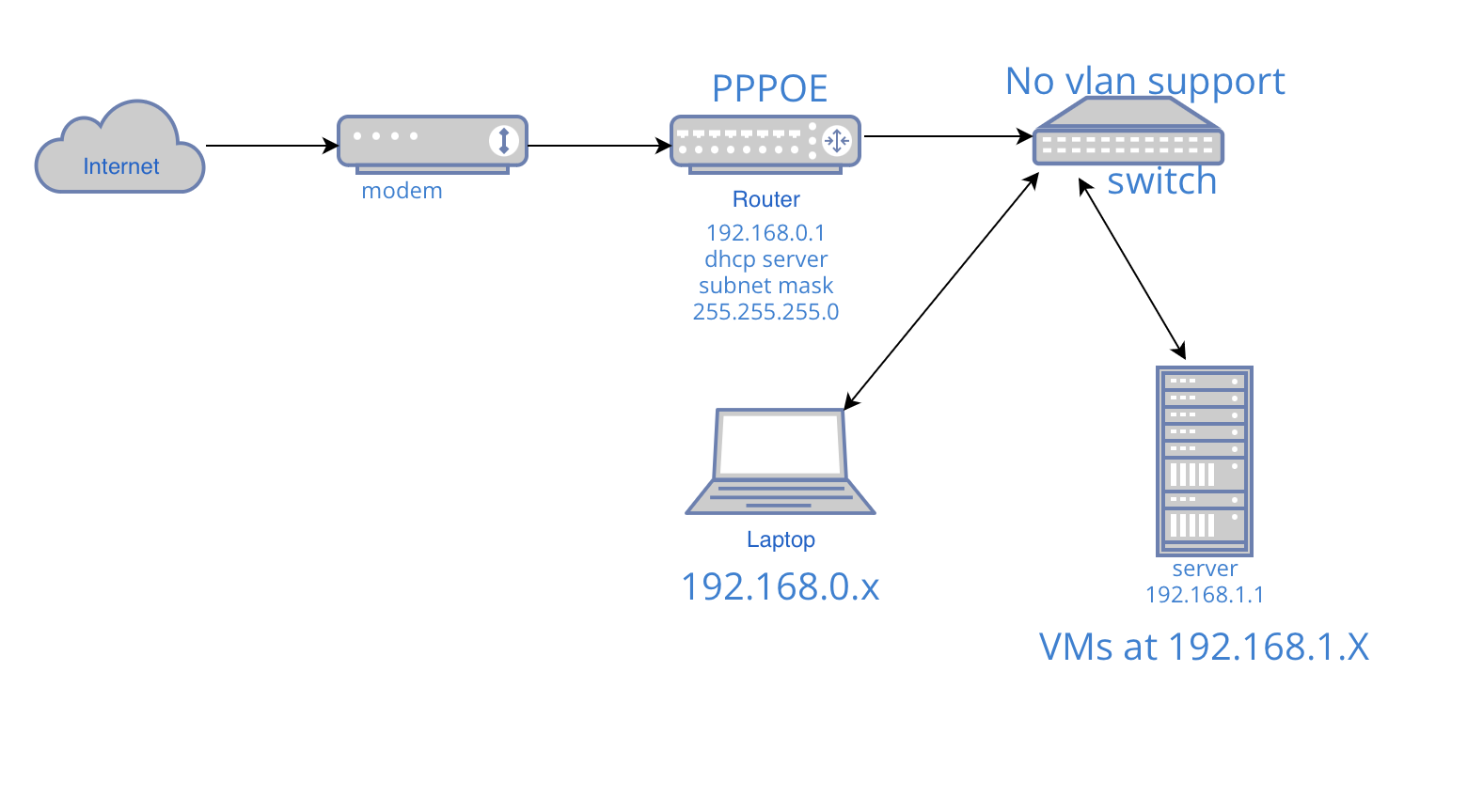
I'm trying to get my proxmox server running properly in my local network, I think it's better to give the server a dedicated subnet for convenience. However, I am using Friendly NanoPi_Rtc which only have one lan port. So naturally I use switch to connect all the lan devices, and the switch doesn't support vlan (i am using my old router with dhcp disabled as a switch).
The problem here is that my router is 192.168.0.1 with all devices in 192.168.0.X. I want to setup a subnet 192.168.1.X to my proxmox server for VMs and still being able to connect to them in my 192.168.0.X subnet.
it’s just modem to router to switch… and all my devices are connected to the switch. Is routing the traffic of 192.168.1.X to gateway 192.168.1.1 all I need to do? And do i need to NAT to give internet access to my server?
There is no routing between devices on the same subnet. They are switched (L2). Routing happens when traffic must flow between two or more networks (L3).
Routers in most home environments will run with NAT masquerading enabled on the wan. This will enable internet access to all devices behind the router, including your server if it is on that network. All devices need to know the router's address if they need internet access. If the devices are set to get their addresses via DHCP, this happens automatically. If you've setup static IPs (manually configured on each of the hosts), you must manually enter the IP, subnet mask/size, gateway, and DNS information.
So the server must have an address on the 192.168.0.0/24 network. Your proxmox server can setup a 192.168.1.0/24 network for your VMs.
If your main router supports static routes, you can avoid using NAT masquerading, but if it doesn't, everything must be behind a NAT layer.
With masquerading disabled, you'd enter the address of your VM (192.168.1.x) directly when trying to access from your laptop.
If masquerading is required (i.e. main router doesn't support static routes), you'll access your VMs by entering the address that the sever has on the 192.168.0.0.24, and you'll use port fowarding to reach the VMs themselves.
How is OpenWrt involved here, though? Is that a VM on your proxmox server?
just ordered a vlan switch. if I have vlan switch do i still need an address on 192.168.0.x for my proxmox server? I really want my server address all stay in 1.x
Once you have a managed switch, you will setup 2 (or more) VLANs on your router and then configure the switch accordingly (trunk on the uplink, and then set the other ports as desired as access ports, with the server's port on the second VLAN.
Then, the server can have an address on the 192.168.1.0/24 network.