Low 4 digit uncorrectable errors in a week are not terrible and by them selves are unlikely to explain your issue, but the correctible error count is a bit high for my taste.
In my limited docsis experience, such errors often correlate with local signal quality issues (more global issues often show by reduced modulation values, especially in upstream direction where your modem unhelpfully does not report exact numbers). I would check the cable between your modem and the coax socket as well as whether it is sitting snug in both modem and socket (we expect the issue to be rotten wiring in your MDU, but it is easy to check the one issue under your direct control). Since it likely is the building's structural coax cables I guess you need to keep the issue in comcast's attention, maybe by recruiting neighbours to report issues as well. That said, I consider it foul play by the hotline to try to silence you by saying no one else complained... since they do have information about signal quality and errors for the complete segment ig is telling the argument was not that there are no issues, just that no one noticed and/or bothered to report issues. Absence of complaints is not the same as absence of issues.
Already replaced every cable inside that I can with newer ones, including the Ethernet cables. Even bypassed the wall plate and fed the cable coming into the house direct to modem.
As far as getting neighbors to complain, I don’t think they’re tech savvy enough or would even care about latency spikes. Majority of them are elderly.
The connection gets more than it’s advertised speed in downloads/tests. But monitoring the line when bypassing the router and having it direct to a PC, it occasionally spikes to 200-300ms for 1-3 seconds then stabilizes back down. The more consistent issue is loading up a video stream and the 13ms ping jumps up to 60-100ms. The entire time you’re watching as it’s buffering the video, the ping is constantly jumping. I don’t think that should be happening on a 2gig package when watching/buffering a single 1080p stream? The tech did say he saw ingress noise on the line when testing the end of the coax inside the house, so I’m hoping it’s the RG59.
My only real hope is replacing the RG59 cable, as there’s no way I’d ever get approval to run a new feeder line to the tap, as it runs underground and under driveways, etc. I’ve tried new modems, new routers, new cables and tons of troubleshooting. Kind of how I ended up here, thinking my issue is bufferbloat/QOS related, which it might be. Just not sure.
I know this is hard, but it would make the issue more noticeable for comcast, one customer complaining is a nuisance, multiple complaints is harder to ignore...
This is quite traditional on DOCSIS to "over-provision" links (there was even and old cisco recommendations sheet for ISPs floating around describing this) as it makes customers feel they get something for free (they do not, from the ISP's perspective they are not "over-provisioning" but "under-reporting" the provisioned rates to the costumers).
If this happens on the upstream that would explain a lot. Maybe the next time you notice issues run a packet-loss test:
Packet-loss test english
To test packet loss and directionality thereof the following page is quite useful:
https://packetlosstest.com
Please use the following settings:
Packet Sizes: 142 and 158 Bytes (slider to the left)
Frequency: 20 Pings/Second
Duration: 180 Seconds (slider to the right)
Acceptable Delay: (cosmetic only, the results will show a horizontal line at that value)
Or Select a Preset Approximation: Custom (do not touch, changing the sliders will set this to Custom already)
Wait 2 seconds before recording results? (Keep unchecked)
Using: XXX Server (pick the closest Server location for your test system)Then click the green "Start Test" button.
The test will run for 3 minutes, keep the browser window in focus and leave the computer alone while the test runs.
After it finishes, please take a screenshot of the results and post this to the forum.
This will helpfully try to report whether packet loss happened in down- or upload direction... Thinking of it, it would be good to have two screen shots one from a time without issues and one from a time with issues.
Thanks for your replies, this is on idle:

This is during loading some streams (what usually causes the large ping spikes)

So I got slightly worse packet loss at idle with browser closed (direct modem to pc), no apps running in background besides typical windows services. I think the problem is just too intermittent to properly capture. I’m hoping the tech replaces the RG59 cable and it fixes the issue.
This might also explain why SQM seems worse, when it typically helps fix ping spikes. Sometimes with SQM enabled, I get random spikes from 20ms to 300ms and makes me think SQM isn’t working, but I think it’s a line issue.
Yes sqm does not help much against latency and other ill effects from packetloss... and e.g. tcp with its automatic retransmissions will convert acdropped packet into a latency spike...
Any idea what to do? They no showed again, said they came and tech marked it no issue. I know they’re lying because there’s snow around the small shed for two weeks now where the tap is and there’s no footprints anywhere around it. They also said they came the 24th, but chat history shows they were scheduled today for the 28th. Been ongoing for nearly 2 months trying to get them to replace the RG59 cable which they initially scheduled me for replacement after replacing the tap.
Is it hard to just run my own cable? They’re like $20 on Amazon and I found where it’s runs from outside. It goes into a conduit tube into the cement in the basement, so I’m guessing I would have to pull the old one through and fish a new one through? Anybody know if you need any special tools to attach the coax to the tap?
If you have a good diagnostic page on your modem, that's usually instrumentation enough, the physical connection is just standard screw-on hardware.
I'd make sure that both ends of the connection are either out of the weather, or have good weatherproof boots on them. Once you get it connected, you will need to tune the connection with the proper value attenuator (something like this https://www.amazon.com/dp/B0013L48XA) to balance the downstream SNR and upstream power. (I currently have 10 dB on mine.) If the up power is too low, add attenuation (go from, say, a 9 pad to 10); if it's too high, lower the pad value... Shoot for SNR on the download channels > 40 dB, and the upstream power > 35 dBmV.
Try contacting Comcast Xfinity customer service via their official sub-reddit at https://www.reddit.com/r/Comcast_Xfinity/wiki/index/ (follow the section "Posting publicly & Modmail") .
If the issue is not resolved by the Comcast Reddit team, I think the only option left is to file a FCC complaint at https://consumercomplaints.fcc.gov/ .
Sad but good detective work.
If it is a signal issue there is relatively little you can do:
a) check your modem (try areplacement and repöcament powersupply if you can get your hand on one)
b) check the cabling between modem and socket
c) check the socket
d) check the cabling to the next distribution point
e) check any existing amplifier (connections and settings and splitters/attenuators)
d) check deeper into the ISP cable plant.
Typically your sphere of influence ends at c) or on a SDU maybe at e) (the connection part).
So I guess you need to keep pestering your ISP's hotline... stay polite and professional, the guy/gal at the other end is not responsible for your issues and likely can do little to fix them except requesting a tech to come out, but also stay persistent... (no this is no fun).
As they say it is often easier to ask for forgiveness than for permission, if going that route carefully assess the potential blast radius before making any changes. If you are only risking your own internet access I would be more adventurous, but if there is a realistic chance you might affect your neighbours I would be more hesitant. One challenge is, that IIUC you might need different attenuator after changing the line...
Keep pestering them they do look at number of calls and time to close calls for good in their internal benchmarks, so there is some pressure on closing calls, and at some point actually fixing your problem might be more effective for them than just closing calls.
Well, I said I would contact the FCC if they didn’t resolve it. Now I actually got a text confirmation of the appointment being scheduled for this week. I was never getting a text before for any service calls besides the first one where they replaced the TAP and scheduled me for a separate cable replacement, so I think they were never scheduling any of the follow-ups to begin with.
They already sent me an automated text asking if I want to cancel the appointment. “Through routine monitoring of the health of your network, everything looks good. Would you like to cancel your appointment?”.
I did some Googling for the “No Ranging Response received - T3 time-out;” and it seems most articles are pointing to bad cabling or a bad modem. I’ve actually already tried 3 different SURFboard modems that were all on XFINITY supported device list. They all have the same issue. I’ve tried new routers, new ethernet, modem direct to PC via ethernet, etc. The only thing left I can’t test is running an RG6 cable from the TAP to the house.
The cable from the tap running inside is a Belden M 9106 DUOBOND II BRAID CATV COAX 20AWG 75OHM. Can’t find the data spec sheet, but I don’t understand why the first tech would schedule the cable to be replaced now they’re saying it’s fine. Have a feeling they’re going to tell me it’s fine if they come out and try and charge me for the visit.
Looking at the tap again, it does seem they have RG6 from the tap (F677TSVV), but it’s like 3 inches that then plugs into a barrel connector connecting to the Belden M 9106 DUOBOND that then runs underground. I don’t see the conduit on the ground like I do inside, it just goes into the dirt, so I’m probably in for more headaches dealing with this. You can see below, the right side has a thicker gauge cable (my side), but it plugs into the same thinner cable that then runs underground.
If you look at the connector on the tap that is rusted brown from corrosion, that is how the entire old TAP looked and they told me it was fine before telling them to look at it again and showing pictures.


I don’t know a cableco in NA that has used RG59 in decades in a new/upgraded install. I would be tempted to replace it with a standard cableco RG6 75 OHM cable and be done with it. Any idea when that RG59 was actually installed?
Get a cable close to the run length with proper connectors, connect the RG59 and RG6 ends together with a m/m connector and pull in the RG6.
The condos were built in 1986. I only moved in a year or so ago, so unsure when the cables were installed. But from seeing the tap on the ground, I would guess a really long time ago, as my last place had it mounted on the side of the house, not placed in the dirt.
I’d just run a cable from the TAP through a window to test, but I’m not sure about needing tools, and meters to measure, etc. There’s also some long adapter on my side that connects to the tap, unsure what that is. If I can just unscrew it and screw the new cable it, would be easy to try, as they’re labeled with condo numbers, so I know which is mine. But I’ve read some stuff you need special tools, etc. So I’m unsure about that route.
Ouch! Cross posted and didn’t see the pics. Do you have direct access to the tap? That RG59 run was from original tap install that is likely trenched underground to the residence. I don’t think you will see this running in conduit from residence to the tap pedestal.
I would still run a similar length RG6 over the ground and connect it from tap to home and see if this improves things. Prior to your appt. restore to original.
When the tech arrives make sure he gives you the tap levels and the levels at the terminal end of the RG59 cable that feeds your end. Then ask him if he would give the tap levels with your cable attached. (Watch his meter if possible).
That would explain their apparent hesitancy, pulling a cable is quick enough, but having to do earth work is not going to be quick... and that means talking you out of having this done properly saves your ISP likely a handsome sum of money...
BTW, this is a reason why I hope that we will get the FTTH transition done soonish... (fiber will offer its own set of issues, but the one you seem to be suffering from should not be among them)
Yes, I have access to the tap. There is a conduit tube in the basement that comes out of the cement floor. Out of that tube, it has the same exact cable branding as the cable on the tap outside going into the ground. It’s also the same double coax type of wire (2 coax cables cojoined) as the one shown in the tap photos.
My guess is the conduit tube is there, it’s probably just buried deep near the base of the foundation on the tap side? The tap is about 30 feet away from where the matching cable runs inside and comes out of a conduit tube. The basement floor is underground, tap is above ground, so the indoor side is about 4½ ft below the tap.
Attached a photo of the indoors side of what I think is the same cable ran from the tap. The tube goes into the cement floor in the basement. There’s also another conduit of old telco cables that are cut in a separate conduit tube. Right next to the tap shed outdoors, there’s a telco box with similar cable that is cut telco cable indoors, so I think this is how it’s run.
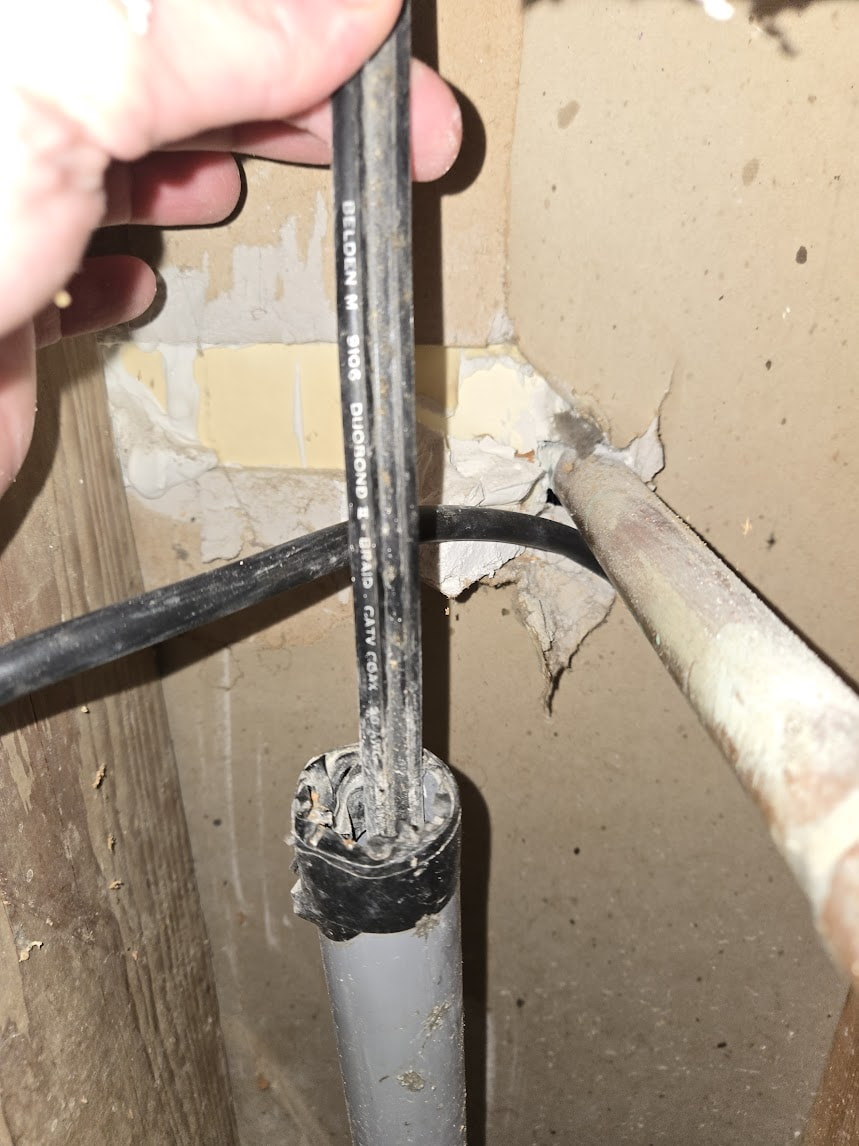
That would likely be a trap (see photo). Leave it in place. Just make sure cable ends come with factory connections, screw in cable ends are just problematic. A 7/16” or 3/8” inch wrench should be all you need.

Yeah, if it requires trench work, I doubt this will get fixed, as there are lots of rules and approval requests for the condo. I was thinking maybe they could dig a few inches with a shovel and expose the conduit, but who knows how deep underground it is. Kind of dumb to have a conduit tube, then bury one end of it underground.
If it’s far underground, I think just drilling a hole through the wall and running a cable that way would probably be easier to do. My unit is right behind the shed where the TAP is, so might have some options. They’ve also let us drill a hole in the wall on the other side of the building during an hvac upgrade that required a vent.
Only way to find out is to see if you can move the cable in the conduit race easily back and forth. Just make sure you don’t lose either end while doing so.
Already tried tugging the cable a little bit out of the conduit inside the basement. It has zero give and doesn’t budge at all. Probably because it’s partially buried outdoors. Or it could be maybe they only ran conduit under the cement and ran the bare cable all the way through the dirt.
Who knows, but my guess would be that this is an old cable from when the house was built in the 80s. There’s no way you could run conduit under the cement floor later on without digging up the foundation. Wouldn’t be practical, especially for 80 condo units. They’re all ran like this, some are even worse than mine with no shed covering and just a small exposed bucket dome that get entirely buried in snow storms and they’re not weather sealed at all. That’s why my old tap was rusted brown from corrosion. They’re all probably like this across the entire condo, but I don’t think most people care or even know what latency is, so nobody complains.
I think this was contracted with XFINITY during the build process of the homes, as they’re the only ones available that service this area. My old house we had 3 different providers we could choose from including FIOS and we only moved 5-6 miles away from the old location. Here, we are stuck with Comcast.
I didn’t think about this also, it could be a congestion issue, since everyone in the complex is using the same provider?