Read-only root access on AX3000T

Hi all
Try to flash OpenWrt to my ax3000t, I'm pretty new to all this.
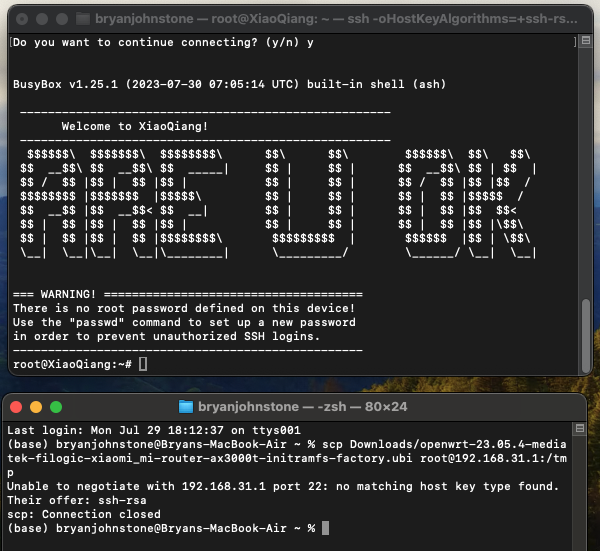
Am at the stage of trying to copy the openwrt-23.05.4-mediatek-filogic-xiaomi_mi-router-ax3000t-initramfs-factory.ubi firmware file to the root /tmp folder, but I keep getting the below error:

I also had to use this line of code earlier in the process because I kept getting a "no matching hosts key found" error:

"ssh -oHostKeyAlgorithms=+ssh-rsa root@192.168.31.1"

So not sure if that's got something to do with it.

Please help me :')

Thank you

You need to do the scp transfer from the device you downloaded the file to, your screenshot shows that you’re trying to do it from an ssh session to the router.

Thanks for your response, but I’m a little lost. I’m doing everything on my Mac. I downloaded the file on my Mac. I don’t have any other devices.

Can I open a fresh terminal window then and try the scp command again and then proceed with the flashing in the original terminal window?

(https://www.youtube.com/watch?v=1pCxK0mo-aY)

I have been following that video guide and it doesn’t work like he shows it. For example I had to run the keys code I mentioned above because if I follow his instructions it doesnt work like he shows it

Yes, that will work

Then I do not know how to do it on Mac PC.

I was use a Windows PC + MobaXterm to upload (drag&drop) the file into the /tmp, Ubuntu failed also.

OK so I try that and then I just get the no matching host key type found error

try:

scp -O -r ....................

or

scp -O ......................
1 Like

This is kind of expected, search for the ssh error message here at the forum.

I am and I don't see anything related to what I'm experiencing

Unfortunately this doesn't work

You need a scp client cmd to match the router's scp server.

That's why I got it work only on Windows + MobaXterm.

Try Dynalink DL-WRX36 Install - #68 by S7venLights

(Not the whole process, just the parts where scp is failing for you)

I followed the steps in Part 1, Option A. Adding the config file (which didn't exist for me initially) cleared up the host key type error, but it still won't run the scp command.

1st terminal window result:
image

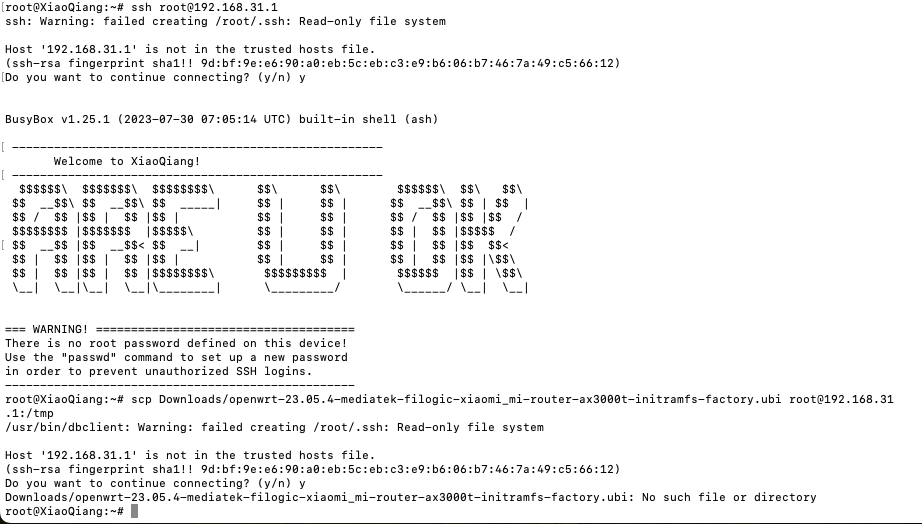
2nd terminal window result (as suggested by jdwl1o1):
image

It keeps saying that 192.168.31.1 is not in the trusted hosts file but it appears to me that it is:
image

This is where the -O @RadioOperator mentioned comes in, it's in the WRX36 post too.

As for the wrong file paths, it's your client, not ours.

The issues you’re having are macOS specific, with apple limiting the ciphers they support.

As frollic said that’s an issue you will have to resolve for yourself

I was able to resolve it by finding support on another forum.

Just needed to cd to the Downloads folder on my computer prior to running the scp command…

Peace :v:

1 Like