Problem with Wireguard and VPS

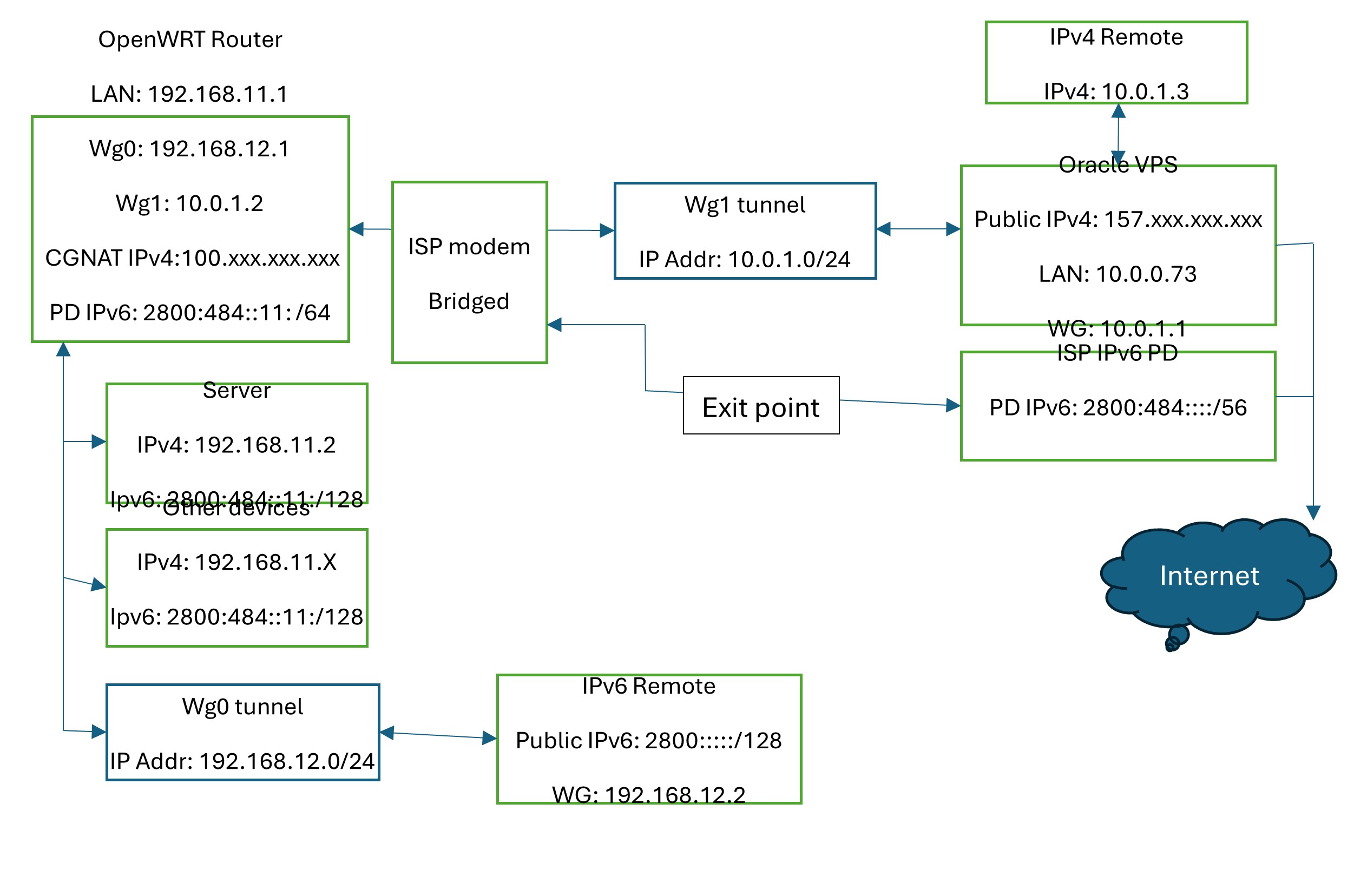
Hi, at this moment i have HFC connection with IPv6/56 PD and public IPv4, but my ISP is migrating connections to FTTH but with IPv6/56 and CGNATted IPv4, so I’m making tests to overcome CGNAT. My connection diagram would be:

I have my VPS with ubuntu in Oracle free tier… I installed wireguard with this config file:

[Interface]
PrivateKey = (VPS private)
ListenPort = 51821
Address = 10.0.1.1/24
MTU = 1420

PostUp = iptables -t nat -A POSTROUTING -s 10.0.1.0/24 -o enp0s5 -j MASQUERADE
PostUp = iptables -I INPUT -p udp -m udp --dport 51821 -j ACCEPT
PostUp = iptables -A FORWARD -i %i -j ACCEPT
PostUp = iptables -A FORWARD -o %i -j ACCEPT
PostDown = iptables -t nat -D POSTROUTING -s 10.0.1.0/24 -o eth0 -j MASQUERADE
PostDown = iptables -D INPUT -p udp -m udp --dport 51821 -j ACCEPT
PostDown = iptables -D FORWARD -i %i -j ACCEPT
PostDown = iptables -D FORWARD -o %i -j ACCEPT

#Router
[Peer]
PublicKey = (router public)
AllowedIPs = 10.0.1.2/32, 192.168.11.0/24

#Remote
[Peer]
PublicKey = (Remote public)
AllowedIPs = 10.0.1.3/32

and for my router i created a new interface with allowedIPs: 10.0.1.0/24 and created a firewall zone with this settings:

And with this traffic rules:

My remote client has this config:

[Interface]
PrivateKey = (Remote private)
Address = 10.0.1.3/32
ListenPort = 51821
DNS = 192.168.11.1

[Peer]
PublicKey = (VPS Public
# PresharedKey not used
AllowedIPs = 10.0.1.0/24, 192.168.11.0/24
Endpoint = 157.xxx.xxx.xxx:51821
PersistentKeepAlive = 25

I can ping successfully from my VPS to my router (10.0.1.2 and 192.168.11.1) and from my router to VPS (10.0.1.3) so i think VPS-Router tunnel is working and I can ping from and to my remote client to VPS, but:

  • I cannot ping to remote client from my router.
  • I cannot ping from my router to remote client (10.0.1.3).
  • When I try to connect to local (even to my router with 192.168.11.1 address) or internet resources from my remote client I have an address unreachable error.

Any idea about what could be happening?

Your wgclient actually is a "server" in ttat it should allow incoming traffic and it should not masquerade (your wgserver is also not setup correctly)

How I setup a WG server and there is also a paragraph about a site -to-site setup as that is what this actually is between your router and the VPS:
WireGuard Server Setup Guide

That said it will help if you show us your configs in text, for that please connect to your OpenWRT device using ssh and copy the output of the following commands and post it here using the "Preformatted text </> " button

Remember to redact keys, passwords, MAC addresses and any public IP addresses you may have but do not redact private RFC 1918 IP addresses (192.168.X.X, 10.X.X.X and 172.16-32.X.X) as that is not needed:

ubus call system board
cat /etc/config/network
cat /etc/config/firewall
ip route show
wg show

I also have an Oracle free VPS which has WireGuard running but I have to look into my notes about your setup.

EDIT:
Did you enable forwarding in the kernel:

Edit the /etc/sysctl.conf file by uncommenting the line net.ipv4.ip_forward=1 to make the setting persistent after a reboot. 

Hi @egc . I already enable forwarding in oracle instance, and this is output of my openwrt device:

ubus call system board
{
        "kernel": "6.6.119",
        "hostname": "router",
        "system": "ARMv8 Processor rev 4",
        "model": "GL.iNet GL-MT6000",
        "board_name": "glinet,gl-mt6000",
        "rootfs_type": "squashfs",
        "release": {
                "distribution": "OpenWrt",
                "version": "24.10.5",
                "revision": "r29087-d9c5716d1d",
                "target": "mediatek/filogic",
                "description": "OpenWrt 24.10.5 r29087-d9c5716d1d",
                "builddate": "1766005702"
        }
}

cat /etc/config/network

config interface 'loopback'
        option device 'lo'
        option proto 'static'
        option ipaddr '127.0.0.1'
        option netmask '255.0.0.0'

config globals 'globals'
        option ula_prefix 'fdf4:b8b0:97fd::/48'
        option packet_steering '2'
        option steering_flows '128'

config device
        option name 'br-lan'
        option type 'bridge'
        list ports 'lan1'
        list ports 'lan2'
        list ports 'lan3'
        list ports 'lan4'
        list ports 'lan5'

config interface 'lan'
        option device 'br-lan'
        option proto 'static'
        option ipaddr '192.168.11.1'
        option netmask '255.255.255.0'
        option ip6assign '64'
        option ip6hint '0011'

config interface 'wan'
        option device 'eth1'
        option proto 'dhcp'
        option peerdns '0'
        list dns '1.1.1.1'
        list dns '1.0.0.1'

config interface 'wan6'
        option device 'eth1'
        option proto 'dhcpv6'
        option reqaddress 'try'
        option reqprefix 'auto'
        option norelease '1'
        option peerdns '0'
        list dns '2606:4700:4700::1111'
        list dns '2606:4700:4700::1001'

config device
        option type 'bridge'
        option name 'br-guest'
        option mtu '1500'
        option macaddr '94:83:XX:XX:XX:XX'
        option txqueuelen '1000'
        option ipv6 '1'
        option mtu6 '1500'
        option sendredirects '1'
        option bridge_empty '1'

config interface 'guest'
        option proto 'static'
        option device 'br-guest'
        option ipaddr '192.168.13.1'
        option netmask '255.255.255.0'
        option ip6assign '64'
        option ip6hint '0013'

config interface 'wgserver'
        option proto 'wireguard'
        option private_key 'XXXXXXXXXX'
        option listen_port '51820'
        list addresses '192.168.12.1/24'
        list addresses 'fdf4:b8b0:97fd:12::1/64'

config wireguard_wgserver
        option description 'Phone1'
        option public_key 'XXXXXXXX'
        option private_key 'XXXXXXXXX'
        option endpoint_host 'XXX.XXX.XXX.XXX'
        option endpoint_port '51820'
        option persistent_keepalive '25'
        option route_allowed_ips '1'
        list allowed_ips '192.168.12.2/32'
        list allowed_ips 'fdf4:b8b0:97fd:12::2/128'

config wireguard_wgserver
        option description 'PC1'
        option public_key 'XXXXXXXX'
        option private_key 'XXXXXXXX'
        list allowed_ips '192.168.12.3/32'
        list allowed_ips 'fdf4:b8b0:97fd:12::3/128'
        option endpoint_host 'XXX.XXX.XXX.XXX'
        option endpoint_port '51820'
        option persistent_keepalive '25'

config wireguard_wgserver
        option description 'PC2'
        option public_key 'XXXXXXXX'
        option private_key 'XXXXXXXX'
        list allowed_ips '192.168.12.4/32'
        list allowed_ips 'fdf4:b8b0:97fd:12::4/128'
        option endpoint_host 'XXX.XXX.XXX.XXX'
        option endpoint_port '51820'
        option persistent_keepalive '25'

config wireguard_wgserver
        option description 'PC3'
        option public_key 'XXXXXXXX'
        option private_key 'XXXXXXXX'
        list allowed_ips '192.168.12.5/32'
        list allowed_ips 'fdf4:b8b0:97fd:12::5/128'
        option endpoint_host 'XXX.XXX.XXX.XXX'
        option endpoint_port '51820'
        option persistent_keepalive '25'

config wireguard_wgserver
        option description 'Guest1'
        option public_key 'XXXXXXXX'
        option private_key 'XXXXXXXX'
        list allowed_ips '192.168.12.6/32'
        list allowed_ips 'fdf4:b8b0:97fd:12::6/128'
        option endpoint_host 'XXX.XXX.XXX.XXX'
        option endpoint_port '51820'
        option persistent_keepalive '25'

config interface 'wgclient'
        option proto 'wireguard'
        option private_key 'XXXXXXXX'
        option delegate '0'
        list dns '192.168.11.1'
        list addresses '10.0.1.2/24'
        option auto '0'

config wireguard_wgclient
        option public_key 'XXXXXXXX'
        option route_allowed_ips '1'
        option endpoint_host '157.137.XXX.XXX'
        option endpoint_port '51821'
        option persistent_keepalive '25'
        option description 'VPS Oracle Cloud'
        list allowed_ips '10.0.1.0/24'

cat /etc/config/firewall

config defaults
        option input 'REJECT'
        option output 'ACCEPT'
        option forward 'REJECT'
        option synflood_protect '1'
        option flow_offloading '1'
        option flow_offloading_hw '1'
        option drop_invalid '1'

config zone
        option name 'lan'
        list network 'lan'
        option input 'ACCEPT'
        option output 'ACCEPT'
        option forward 'ACCEPT'

config zone
        option name 'wan'
        list network 'wan'
        list network 'wan6'
        option input 'DROP'
        option output 'ACCEPT'
        option forward 'REJECT'
        option masq '1'
        option mtu_fix '1'

config forwarding
        option src 'lan'
        option dest 'wan'

config rule
        option name 'Allow-DHCP-Renew'
        option src 'wan'
        option proto 'udp'
        option dest_port '68'
        option target 'ACCEPT'
        option family 'ipv4'

config rule
        option name 'Allow-Ping'
        option src 'lan'
        option proto 'icmp'
        option family 'ipv4'
        option target 'ACCEPT'
        list icmp_type 'echo-request'

config rule
        option name 'Allow-IGMP'
        option src 'wan'
        option proto 'igmp'
        option family 'ipv4'
        option target 'ACCEPT'

config rule
        option name 'Allow-DHCPv6'
        option src 'wan'
        option proto 'udp'
        option dest_port '546'
        option family 'ipv6'
        option target 'ACCEPT'

config rule
        option name 'Allow-MLD'
        option src 'wan'
        option proto 'icmp'
        option src_ip 'fe80::/10'
        list icmp_type '130/0'
        list icmp_type '131/0'
        list icmp_type '132/0'
        list icmp_type '143/0'
        option family 'ipv6'
        option target 'ACCEPT'

config rule
        option name 'Allow-ICMPv6-Input'
        option src 'wan'
        option proto 'icmp'
        list icmp_type 'echo-request'
        list icmp_type 'echo-reply'
        list icmp_type 'destination-unreachable'
        list icmp_type 'packet-too-big'
        list icmp_type 'time-exceeded'
        list icmp_type 'bad-header'
        list icmp_type 'unknown-header-type'
        list icmp_type 'router-solicitation'
        list icmp_type 'neighbour-solicitation'
        list icmp_type 'router-advertisement'
        list icmp_type 'neighbour-advertisement'
        option limit '1000/sec'
        option family 'ipv6'
        option target 'ACCEPT'

config rule
        option name 'Allow-ICMPv6-Forward'
        option src 'wan'
        option dest '*'
        option proto 'icmp'
        list icmp_type 'echo-request'
        list icmp_type 'echo-reply'
        list icmp_type 'destination-unreachable'
        list icmp_type 'packet-too-big'
        list icmp_type 'time-exceeded'
        list icmp_type 'bad-header'
        list icmp_type 'unknown-header-type'
        option limit '1000/sec'
        option family 'ipv6'
        option target 'ACCEPT'

config rule
        option name 'Allow-IPSec-ESP'
        option src 'wan'
        option dest 'lan'
        option proto 'esp'
        option target 'ACCEPT'

config rule
        option name 'Allow-ISAKMP'
        option src 'wan'
        option dest 'lan'
        option dest_port '500'
        option proto 'udp'
        option target 'ACCEPT'

config zone
        option name 'guest'
        option input 'REJECT'
        option output 'ACCEPT'
        option forward 'REJECT'
        list network 'guest'

config forwarding
        option src 'guest'
        option dest 'wan'

config rule
        option src 'guest'
        option name 'Allow-DNS-guest'
        option dest_port '53'
        option target 'ACCEPT'

config rule
        option src 'guest'
        option name 'Allow-DHCP-guest'
        option family 'ipv4'
        list proto 'udp'
        option dest_port '67'
        option target 'ACCEPT'

config rule
        option src 'guest'
        option name 'Allow-ICMPv6-guest'
        list proto 'icmp'
        option target 'ACCEPT'
        option family 'ipv6'
        option limit '1000/second'

config rule
        option src 'guest'
        option name 'Allow-DHCPv6-guest'
        option family 'ipv6'
        list proto 'udp'
        option target 'ACCEPT'
        option dest_port '547'

config zone
        option name 'wgserver'
        option input 'ACCEPT'
        option output 'ACCEPT'
        option forward 'REJECT'
        list network 'wgserver'
        option masq '1'
        option mtu_fix '1'
        option masq6 '1'

config forwarding
        option src 'wgserver'
        option dest 'wan'

config forwarding
        option src 'lan'
        option dest 'wgserver'

config rule
        option src 'wan'
        option name 'Allow-wgserver'
        list proto 'udp'
        option dest_port '51820'
        option target 'ACCEPT'

config rule
        option src 'wgserver'
        option dest 'lan'
        option name 'Allow-wgserver2lan'
        option target 'ACCEPT'
        list proto 'all'

config rule
        option src 'wgserver'
        option name 'Allow-DNS-wgserver'
        option dest_port '53'
        option target 'ACCEPT'

config nat
        option name 'wgserver-NAT'
        option family 'ipv6'
        option src 'wan'
        option src_ip 'fdf4:b8b0:97fd:12::1/64'
        option target 'MASQUERADE'
        list proto 'all'
        option enabled '0'

config zone
        option name 'wgclient'
        option input 'ACCEPT'
        option output 'ACCEPT'
        option forward 'REJECT'
        list network 'wgclient'
        option masq '1'
        option mtu_fix '1'
        option family 'ipv4'

config forwarding
        option src 'wgclient'
        option dest 'wan'

config forwarding
        option src 'lan'
        option dest 'wgclient'

config rule
        option src 'wan'
        option name 'Allow_wgclient'
        list proto 'udp'
        option target 'ACCEPT'
        option dest_port '51821'

config rule
        option src 'wgclient'
        option dest 'lan'
        option name 'Allow-wgclient2lan'
        option target 'ACCEPT'

config rule
        option src 'wgclient'
        option name 'Allow-DNS-wgclient'
        option src_port '53'
        option target 'ACCEPT'

ip route show
default via 181.54.XXX.XXX dev eth1 proto static src 181.54.XXX.XXX
10.0.1.0/24 dev wgclient proto static scope link
157.137.XXX.XXX via 181.54.XXX.XXX dev eth1 proto static
181.54.XXX.XXX/22 dev eth1 proto kernel scope link src 181.54.XXX.XXX
192.168.11.0/24 dev br-lan proto kernel scope link src 192.168.11.1
192.168.12.0/24 dev wgserver proto kernel scope link src 192.168.12.1
192.168.12.2 dev wgserver proto static scope link
192.168.13.0/24 dev br-guest proto kernel scope link src 192.168.13.1

wg show
interface: wgserver
  public key: XXXX
  private key: (hidden)
  listening port: 51820

peer: XXXXXX
  endpoint: 181.54.XXX.XXX:51820
  allowed ips: 192.168.12.2/32, fdf4:b8b0:97fd:12::2/128
  transfer: 0 B received, 173.44 KiB sent
  persistent keepalive: every 25 seconds

peer: XXXX
  endpoint: 181.54.XXX.XXX:51820
  allowed ips: 192.168.12.3/32, fdf4:b8b0:97fd:12::3/128
  transfer: 0 B received, 174.16 KiB sent
  persistent keepalive: every 25 seconds

peer: XXXXXX
  endpoint: 181.54.XXX.XXX:51820
  allowed ips: 192.168.12.4/32, fdf4:b8b0:97fd:12::4/128
  transfer: 0 B received, 173.73 KiB sent
  persistent keepalive: every 25 seconds

peer: XXXXXXX
  endpoint: 181.54.XXX.XXX:51820
  allowed ips: 192.168.12.5/32, fdf4:b8b0:97fd:12::5/128
  transfer: 0 B received, 173.44 KiB sent
  persistent keepalive: every 25 seconds

peer: XXXXXX
  endpoint: 181.54.XXX.XXX:51820
  allowed ips: 192.168.12.6/32, fdf4:b8b0:97fd:12::6/128
  transfer: 0 B received, 173.44 KiB sent
  persistent keepalive: every 25 seconds

interface: wgclient
  public key: XXXXXX
  private key: (hidden)
  listening port: 59334

peer: XXXXXXX
  endpoint: 157.137.XXX.XXX:51821
  allowed ips: 10.0.1.0/24
  latest handshake: 1 minute, 36 seconds ago
  transfer: 3.00 KiB received, 6.72 KiB sent
  persistent keepalive: every 25 seconds

and this is output of relevant oracle server settings:

ip route show
default via 10.0.0.1 dev ens3 proto dhcp src 10.0.0.209 metric 100
10.0.0.0/24 dev ens3 proto kernel scope link src 10.0.0.209 metric 100
10.0.0.1 dev ens3 proto dhcp scope link src 10.0.0.209 metric 100
10.0.1.0/24 dev wg0 proto kernel scope link src 10.0.1.1
169.254.0.0/16 dev ens3 proto dhcp scope link src 10.0.0.209 metric 100
169.254.169.254 dev ens3 proto dhcp scope link src 10.0.0.209 metric 100
192.168.11.0/24 dev wg0 scope link

wg show
interface: wg0
  public key: XXXXX
  private key: (hidden)
  listening port: 51821

peer: XXXXXXX
  endpoint: 181.54.XXX.XXX:59334
  allowed ips: 10.0.1.2/32, 192.168.11.0/24
  latest handshake: 1 minute, 58 seconds ago
  transfer: 7.75 KiB received, 3.27 KiB sent

peer: XXXXXX
  endpoint: 192.156.XXX.XXX:49472
  allowed ips: 10.0.1.3/32
  latest handshake: 20 minutes, 32 seconds ago
  transfer: 54.48 KiB received, 23.99 KiB sent

sudo systemctl status wg-quick@wg0.service
● wg-quick@wg0.service - WireGuard via wg-quick(8) for wg0
     Loaded: loaded (/usr/lib/systemd/system/wg-quick@.service; enabled; preset: enabled)
     Active: active (exited) since Wed 2026-03-04 14:52:35 UTC; 43min ago
       Docs: man:wg-quick(8)
             man:wg(8)
             https://www.wireguard.com/
             https://www.wireguard.com/quickstart/
             https://git.zx2c4.com/wireguard-tools/about/src/man/wg-quick.8
             https://git.zx2c4.com/wireguard-tools/about/src/man/wg.8
    Process: 1676 ExecStart=/usr/bin/wg-quick up wg0 (code=exited, status=0/SUCCESS)
   Main PID: 1676 (code=exited, status=0/SUCCESS)
        CPU: 35ms

Mar 04 14:52:35 XXXXVPS wg-quick[1676]: [#] ip link add wg0 type wireguard
Mar 04 14:52:35 XXXXVPS wg-quick[1676]: [#] wg setconf wg0 /dev/fd/63
Mar 04 14:52:35 XXXXVPS wg-quick[1676]: [#] ip -4 address add 10.0.1.1/24 dev wg0
Mar 04 14:52:35 XXXXVPS wg-quick[1676]: [#] ip link set mtu 1420 up dev wg0
Mar 04 14:52:35 XXXXVPS wg-quick[1676]: [#] ip -4 route add 192.168.11.0/24 dev wg0
Mar 04 14:52:35 XXXXVPS wg-quick[1676]: [#] iptables -t nat -A POSTROUTING -s 10.0.1.0/24 -o ens3 -j MASQUERADE
Mar 04 14:52:35 XXXXVPS wg-quick[1676]: [#] iptables -I INPUT -p udp -m udp --dport 51821 -j ACCEPT
Mar 04 14:52:35 XXXXVPS wg-quick[1676]: [#] iptables -A FORWARD -i wg0 -j ACCEPT
Mar 04 14:52:35 XXXXVPS wg-quick[1676]: [#] iptables -A FORWARD -o wg0 -j ACCEPT
Mar 04 14:52:35 XXXXVPS systemd[1]: Finished wg-quick@wg0.service - WireGuard via wg-quick(8) for wg0.

And this is wg client config of phone1:

[Interface]
PrivateKey = XXXXX
Address = 10.0.1.3/32
#ListenPort = 51821
DNS = 192.168.11.1

[Peer]
PublicKey = XXXXXX
# PresharedKey not used
AllowedIPs = 0.0.0.0/0
Endpoint = 157.137.XXX.XXX:51821
PersistentKeepAlive = 25
You have to enable Route Allowed IP's and also add the subnet of the VPS in allowed IP's

The firewall for the wgclient must be setup like it is a WireGuard server so currently this is not OK.
Easiest just add the wgclient interface to the lan zone and delete all other stuff regarding wgclient in the firewall.

On the VPS you have to add to the Allowed IP's in the routers peer also the subnet of the router
So it should look something like this

AllowedIPs = 10.0.1.2/32, 192.168.11.0/24

So on the VPS a route is added for 192.168.11.0.24 via the WG peer.

Now if you connect with your phone on cellular to the VPS and then on your phone you should be able to ping 192.168.11.1 or when you go to http://192.168.11.1 you should see LuCi :slight_smile:
Provided everything is setup correctly on the VPS

Ji @egc… thanks for your message. i still cannot connect from my phone to my router… here is what i made, based on your comments:

Yes, i think is ok… this is my router wg client interface settings (to connect from my router to oracle VPS wireguard server):

Route allowed Ips is checked, and 10.0.1.0 is wg subnet configured in VPS wg0.conf

I removed wgclient firewall config and added wglient interface to lan zone:

Checked… this is VPS wg0.conf:

[Interface]
PrivateKey = 2ItwNCw8MXYXZHhglp7Exsr9N0iRulG6naYub7BaOGo=
ListenPort = 51821
Address = 10.0.1.1/24
MTU = 1420

PostUp = iptables -t nat -A POSTROUTING -s 10.0.1.0/24 -o ens3 -j MASQUERADE
PostUp = iptables -I INPUT -p udp -m udp --dport 51821 -j ACCEPT
PostUp = iptables -A FORWARD -i %i -j ACCEPT
PostUp = iptables -A FORWARD -o %i -j ACCEPT
PostDown = iptables -t nat -D POSTROUTING -s 10.0.1.0/24 -o ens3 -j MASQUERADE
PostDown = iptables -D INPUT -p udp -m udp --dport 51821 -j ACCEPT
PostDown = iptables -D FORWARD -i %i -j ACCEPT
PostDown = iptables -D FORWARD -o %i -j ACCEPT

#Router
[Peer]
PublicKey = XXXXX
AllowedIPs = 10.0.1.2/32, 192.168.11.0/24

#Phone1
[Peer]
PublicKey = XXXXX
AllowedIPs = 10.0.1.3/32

I think that should be something in VPS firewall not routing packets from phone to wg tunnel… i rechecked ip forwarding:

ubuntu@XXXXVPS:~$ sudo sysctl -p
net.ipv4.ip_forward = 1

but i have a doubt… when i use iptables –list command, postup commands doesn’t appear:

Chain INPUT (policy ACCEPT)
target     prot opt source               destination
ACCEPT     udp  --  anywhere             anywhere             udp dpt:51821
ACCEPT     all  --  anywhere             anywhere             state RELATED,ESTABLISHED
ACCEPT     icmp --  anywhere             anywhere
ACCEPT     all  --  anywhere             anywhere
ACCEPT     tcp  --  anywhere             anywhere             state NEW tcp dpt:ssh
REJECT     all  --  anywhere             anywhere             reject-with icmp-host-prohibited

Chain FORWARD (policy ACCEPT)
target     prot opt source               destination
REJECT     all  --  anywhere             anywhere             reject-with icmp-host-prohibited
ACCEPT     all  --  anywhere             anywhere

Chain OUTPUT (policy ACCEPT)
target     prot opt source               destination
InstanceServices  all  --  anywhere             link-local/16

Chain InstanceServices (1 references)
target     prot opt source               destination
ACCEPT     tcp  --  anywhere             169.254.0.2          owner UID match root tcp dpt:iscsi-target /* See the Oracle-Provided Images section in the Oracle Cloud Infrastructure documentation for security impact of modifying or removing this rule */
ACCEPT     tcp  --  anywhere             169.254.2.0/24       owner UID match root tcp dpt:iscsi-target /* See the Oracle-Provided Images section in the Oracle Cloud Infrastructure documentation for security impact of modifying or removing this rule */
ACCEPT     tcp  --  anywhere             169.254.4.0/24       owner UID match root tcp dpt:iscsi-target /* See the Oracle-Provided Images section in the Oracle Cloud Infrastructure documentation for security impact of modifying or removing this rule */
ACCEPT     tcp  --  anywhere             169.254.5.0/24       owner UID match root tcp dpt:iscsi-target /* See the Oracle-Provided Images section in the Oracle Cloud Infrastructure documentation for security impact of modifying or removing this rule */
ACCEPT     tcp  --  anywhere             169.254.0.2          tcp dpt:http /* See the Oracle-Provided Images section in the Oracle Cloud Infrastructure documentation for security impact of modifying or removing this rule */
ACCEPT     udp  --  anywhere             169.254.169.254      udp dpt:domain /* See the Oracle-Provided Images section in the Oracle Cloud Infrastructure documentation for security impact of modifying or removing this rule */
ACCEPT     tcp  --  anywhere             169.254.169.254      tcp dpt:domain /* See the Oracle-Provided Images section in the Oracle Cloud Infrastructure documentation for security impact of modifying or removing this rule */
ACCEPT     tcp  --  anywhere             169.254.0.3          owner UID match root tcp dpt:http /* See the Oracle-Provided Images section in the Oracle Cloud Infrastructure documentation for security impact of modifying or removing this rule */
ACCEPT     tcp  --  anywhere             169.254.0.4          tcp dpt:http /* See the Oracle-Provided Images section in the Oracle Cloud Infrastructure documentation for security impact of modifying or removing this rule */
ACCEPT     tcp  --  anywhere             169.254.169.254      tcp dpt:http /* See the Oracle-Provided Images section in the Oracle Cloud Infrastructure documentation for security impact of modifying or removing this rule */
ACCEPT     udp  --  anywhere             169.254.169.254      udp dpt:bootps /* See the Oracle-Provided Images section in the Oracle Cloud Infrastructure documentation for security impact of modifying or removing this rule */
ACCEPT     udp  --  anywhere             169.254.169.254      udp dpt:tftp /* See the Oracle-Provided Images section in the Oracle Cloud Infrastructure documentation for security impact of modifying or removing this rule */
ACCEPT     udp  --  anywhere             169.254.169.254      udp dpt:ntp /* See the Oracle-Provided Images section in the Oracle Cloud Infrastructure documentation for security impact of modifying or removing this rule */
REJECT     tcp  --  anywhere             link-local/16        tcp /* See the Oracle-Provided Images section in the Oracle Cloud Infrastructure documentation for security impact of modifying or removing this rule */ reject-with tcp-reset
REJECT     udp  --  anywhere             link-local/16        udp /* See the Oracle-Provided Images section in the Oracle Cloud Infrastructure documentation for security impact of modifying or removing this rule */ reject-with icmp-port-unreachable

I think that here should appear iptables commands posted in postup wg0.conf… I tried configuring iptables on VPS directly with:

sudo iptables -t nat -A POSTROUTING -s 10.0.1.0/24 -o ens3 -j MASQUERADE
sudo iptables -I INPUT -p udp -m udp --dport 51821 -j ACCEPT
sudo iptables -A FORWARD -i %i -j ACCEPT
sudo iptables -A FORWARD -o %i -j ACCEPT

but i obtained same result. Could be that these rules should be implemented in oracle cloud subnet settings (in oracle web config networking tool)?

I think you cannot do that directly as %i is only available for wg quick as reference to the wireguard interface

also use -I (capital i) instead of -A as you have a REJECT rule in FORWARD chain

So try to use this

WG_FACE="wg0"
sudo iptables -I FORWARD -i $WG_FACE -j ACCEPT
sudo iptables -I FORWARD -o $WG_FACE -j ACCEPT
sudo iptables -I INPUT  -i $WG_FACE -j ACCEPT
sudo iptables -I FORWARD -m state --state RELATED,ESTABLISHED -j ACCEPT

You also need the NAT rule and the rule to allow the listen port into the wan

What is the subnet of the VPS you also should put that as Allowed IPs in the router

Otherwise show output on the VPS of:

ip route show
ifconfig
iptables -vnL FORWARD
iptables -vnL INPUT
iptables -vnL -t nat
1 Like

Thanks a lot @egc ! it was the -A in PostUp sentences! changed to -I and problem solved!

1 Like

Hi @egc … checking the connection, I can access my openwrt router and my server from my phone through VPS server, but if i try to use internet resources from my phone, it will use VPS internet connection, not the internet connection behind my router (with whats my ip reports 152.xxx.xxx.xxx, that is VPS IP public address). I tried to config wg peer connection between openwrt router and VPS server (in my openwrt router) to bring all network flow through the tunnel:

before
allowed ips: 10.0.1.0/24, 10.0.0.0/24
after
allowed ips: 0.0.0.0/0

But i think this routes all my network internet traffic from openwrt router through wg tunnel to VPS server, but i need exactly the opposite: route all the internet traffic from VPS server through wg tunnel and exiting to my wan connection in my router.

Do you have any idea how to accomplish this? I think that should be routing configuration on my VPS server that exclude port 22 (for VPS config through SSH) and port 51821 (used to incoming wg connections), but i cannot figure it out the commands that should be used…

You need Policy Based Routing on your VPS.

Plus you need to Allow all traffic arriving at your OpenWRT router so add Allowed IPs 0.0.0.0/0
You do want to keep Route Allowed IPs enabled for routing the added subnets to the Allowed IPs
To prevent default routing via the VPS from the Openwrt Router you disable default routing with

  1. Uncheck Default Gateway
    LuCi > Interfaces > WireGuard interface > Advanced Settings:
    afbeelding

/etc/config/network:
config interface 'wg_mullv_us'
option proto 'wireguard'
option private_key 'YGaBrXXXXXX'
list addresses '10.68.89.7/32'
list addresses 'fc00:bbbb:bbbb:bb01::5:5906/128'
list dns '10.64.0.1'
option defaultroute '0'

This method can be useful if you have multiple routes in the Allowed IPs which you want to use and only want to stop default routing but keep the other routes enabled.

To elaborate about the PBR on the VPS.

There are several ways to do it, one way is to route traffic from your WG clients e.g. your phone via the OpenWRT router, something like this

ip route add default dev wg0 table 100   # makes default route via the WG interface
ip rule add from 10.0.1.2/32 table 100    # route phone via WG
ip rule add suppress_prefixlength 1 table main   # make sure local routes are reachable
ip route add 192.168.11.0/24 dev wg0     # make sure a route form VPS to owrt router is present when Table = off

Furthermore add 0.0.0.0/0 as Allowed IPS to:


[quote="lfalonso, post:5, topic:246993"]

#Router
[Peer]
PublicKey = XXXXX
AllowedIPs = 10.0.1.2/32, 192.168.11.0/24, 0.0.0.0/0

[/quote]

To prevent default routing add to the WG config of the VPS:
`Table = off`

All out of the top of my head so probably forgetting something but I hope you get the idea

Also need a dedicated wg interface from the VPS to the home router. When one wg interface connects to multiple peers, each peer's allowed_ips cannot overlap any others. Since you want to tunnel to the whole Internet, allowed_ips from home will be 0.0.0.0/0, which overlaps everything. So the phone to VPS tunnel needs to be a separate interface with a different port. You can still serve multiple phones on the same VPS wg interface.

According to my notes, which I made when I had it running, it can work :slight_smile:

Using an extra tunnel gives you more flexibility and is not a bad idea but according to my notes not necessary.

Why it probably works is that WireGuard adheres to the kernel routing rules so a /32 route trumps larger mask routes so you can in theory have one peer which takes everything else besides the /32 routes of the other peers.

I slightly altered the rules from my notes, originally I also added all the local routes to my table 100 but I think the suppress_prefixlength rule should take care of that

But I will see this afternoon if I can recreate it and check if my notes are OK

EDIT: just tested and it appears to work

1 Like

That must be a new feature. Previously, Wireguard's internal routing did not implement hierarchy to smaller subnets like the kernel itself does. Scripts existed to create complex sets of allowed_ips to work around that.

Yes apparently, I consider it a bit of a hack, using two tunnels gives you more flexibility in routing and is easier to get your head around but it works

Hi… i tried to config VPS server routing traffic as @egc pointed, and adding 0.0.0.0/0 to VPS wg0.conf in #Router peer section to channel all traffic through wireguard tunnel, but it locked VPS server (not accessible through port 22 even with prefixlength command), so I recreated the instance and tried again but same result… trying things i noted that disconnection starts when i start wg-quick on VPS server with 0.0.0.0/0 in allowed ips, I think because it routes even ssh connection to VPS ip public address.

You have to add
Table = off

Please read the instructions and/or see:

1 Like

This topic was automatically closed 10 days after the last reply. New replies are no longer allowed.
