@MagicPants, welcome to the community!
You'll need to improve your skills - quickly.
Using VLAN 10 as an example:
- Create a new Interface under Network > Interfaces with an available VLAN ID (e.g. VLAN 10), you can call it
lan2- you will address it as 10.230.1.1/24 - the PHY you enter iseth0.10 - Enable DHCP (optional)
- Add it to a firewall zone
- Configure the switch to trunk VLANs 1 (LAN) and 10 (LAN2) - in this example, I used switch port no. 4
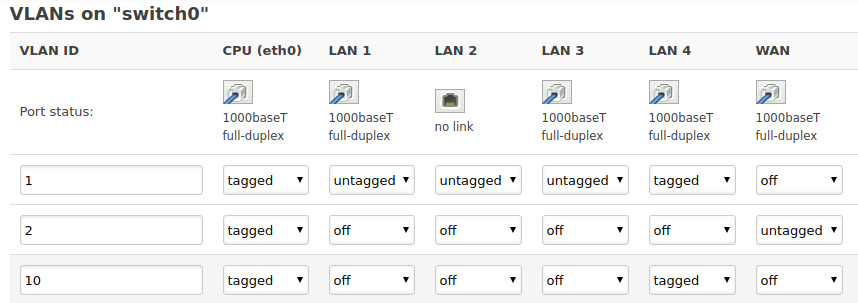
- Configure a port on the switch to receive VLANs 1 and 10 via trunking/tagging
- Connect cable to Netgear switch's trunk port (configured for VLANs 1 and 10); and to the OpenWrt's trunk port (now configured for VLANs 1 and 10 also)
- Configure access ports on switch for either VLAN 1 or 10
- Connect devices to appropriate ports
- Done!