Openwrt Tailscale

Im trying to set up tailscale but when i try to use it as exit node the client do not get any internet

Is this complete document ? I’m trying to use tailscale as exit node on client device so that i can utilize adguardhome on my router to block ads and other filters.

I do not use Tailscale but Netbird which is similar but fully opensource but I do not think you have to set it up as an exit node.
If you have connected both clients then you perhaps should be able to set the DNS server of your client to point to the Adguard home DNS server, you probably should instruct Adguard to allow DNS requests from non local subnets and it should also listen on the Netbird interface at least that is what is necessary for DNSMasq (I use DNSMasq with https-dns-proxy,)

If you are interested in Netbird maybe my notes can be helpful, but I am far from an expert (yet).
OpenWRT Netbird setup

Thanks I thought netbird is more difficult to setup ill try. Also I see magicdns missing in netbird

Ok i was able to set it up netbird but Im not sure of exact steps required for this

@egc

Ok after setting my netbird dns in nameserver it worked

1 Like

@egc Can we have updated version of netbird? I'm running with exit nodes the speeds are not crossing 30Mbps on nano Pi r6c

Great to hear it is running, can you elaborate on your solution so that I can add this?
What exactly did you place where?

About the updates
We recently had an update to 0.59.12, but I know there are very frequent upstream updates.

The maintainer agreed to do about monthly updates unless of course there is a security problem.

After the holidays I will test the then most recent version which will be probably 0.61.XXX

About the speed
Is there in indication that an update will speed things up?

Note that in case of asymmetric subscriptions e.g. docsis the speed is capped by the upload speed so even if you have 1000/30 subscription the speed will be 30.

I had to add netbird dns in web ui in nameserver.

Also I see with mobile network it’s having cgnat so it's slowing down but on pc it’s reaching 190Mbps instead of 400Mbps original speed

The cpu usage is around 30% so don’t see a hardware issue

1 Like

The underlying technology is just WireGuard and as any VPN that has a performance penalty.
My R7800 can do about 700 Mb/s but with WireGuard about 250 Mb/s and then only with irqbalance enabled.

So it can be advantageous to optimize your router, things to look at are irqbalance, offloading and packetsteering

Furthermore the connection made by Netbird (and tailscale which works the same) is dependant on the possible connections, if you are lucky it can facilitate a direct connection between the peers but if that is not possible the traffic is routed via the Netbird servers which of course is slower, see:

netbird status should show you how your peer is connected

But as said in case of asymmetric connections the speed is capped by the slowest link

With mobile its always Relay and with pc its P2P but still slow


30: wt0: <POINTOPOINT,NOARP,UP,LOWER_UP> mtu 1280 qdisc noqueue state UNKNOWN qlen 1000
link/[65534]
inet 100.68.216.8/16 brd 100.68.255.255 scope global wt0
valid_lft forever preferred_lft forever


2: eth0: <BROADCAST,MULTICAST,UP,LOWER_UP> mtu 1500 qdisc cake state UP qlen 1000
link/ether a6:b7:b8 brd ff:ff:ff:ff:ff:ff
inet6 fe80::a4b7:caff:feab:7ab8/64 scope link
valid_lft forever preferred_lft forever

If you have got a direct connection then the speed is limited by the maximum up and download speed of the ISP and your peers running WireGuard, I don not think it is related to Netbird.

One thing to look at is the MTU of the WireGuard interface (wt0), you can go as high as 1412 which might give you a small speed increase but if that is too high speed will go down.
An MTU of 1280 is chosen to be on the safe side this is the minimum for IPv6.

You can set MTU with
ip link set dev wt0 mtu 1412

MTU has to be set on all interfaces which are involved

But I would not expect miracles so probably not worth trying

DIdnt worked also on PC its going to relay again thats why slow down.

Do i need to disable something in firewall of windows to have P2P

I don't know, if relay or P2P is possible is dependant on how your equipment is connected to the internet e.g. with a public IP address or CGNAT, whether ISP is blocking things etc.
Double NAT might also play a role although my DL-WRX36 running Main build which is double NATTED with Netbird 0.59.12 is connected P2P with my Oracle VPS

root@DL-WRX36:~# netbird status --detail | grep 'Connection type:'
  Connection type: P2P

But I have full dual stack at home and my Oracle VPS also has full dual stack
(So I actually do not need Netbird to connect, but it is really convenient with the Dashboard from which I can SSH to my nodes)

firewall

config defaults
option input 'REJECT'
option output 'ACCEPT'
option forward 'REJECT'
option synflood_protect '1'

config zone
option name 'lan'
option input 'ACCEPT'
option output 'ACCEPT'
option forward 'ACCEPT'
list network 'lan'

config zone
option name 'wan'
option input 'REJECT'
option output 'ACCEPT'
option forward 'REJECT'
option masq '1'
option mtu_fix '1'
list network 'wan'

config forwarding
option src 'lan'
option dest 'wan'

config rule
option name 'Allow-DHCP-Renew'
option src 'wan'
option proto 'udp'
option dest_port '68'
option target 'ACCEPT'
option family 'ipv4'

config rule
option name 'Allow-Ping'
option src 'wan'
option proto 'icmp'
option icmp_type 'echo-request'
option family 'ipv4'
option target 'ACCEPT'

config rule
option name 'Allow-IGMP'
option src 'wan'
option proto 'igmp'
option family 'ipv4'
option target 'ACCEPT'

config rule
option name 'Allow-DHCPv6'
option src 'wan'
option proto 'udp'
option dest_port '546'
option family 'ipv6'
option target 'ACCEPT'

config rule
option name 'Allow-MLD'
option src 'wan'
option proto 'icmp'
option src_ip 'fe80::/10'
list icmp_type '130/0'
list icmp_type '131/0'
list icmp_type '132/0'
list icmp_type '143/0'
option family 'ipv6'
option target 'ACCEPT'

config rule
option name 'Allow-ICMPv6-Input'
option src 'wan'
option proto 'icmp'
list icmp_type 'echo-request'
list icmp_type 'echo-reply'
list icmp_type 'destination-unreachable'
list icmp_type 'packet-too-big'
list icmp_type 'time-exceeded'
list icmp_type 'bad-header'
list icmp_type 'unknown-header-type'
list icmp_type 'router-solicitation'
list icmp_type 'neighbour-solicitation'
list icmp_type 'router-advertisement'
list icmp_type 'neighbour-advertisement'
option limit '1000/sec'
option family 'ipv6'
option target 'ACCEPT'

config rule
option name 'Allow-ICMPv6-Forward'
option src 'wan'
option dest '*'
option proto 'icmp'
list icmp_type 'echo-request'
list icmp_type 'echo-reply'
list icmp_type 'destination-unreachable'
list icmp_type 'packet-too-big'
list icmp_type 'time-exceeded'
list icmp_type 'bad-header'
list icmp_type 'unknown-header-type'
option limit '1000/sec'
option family 'ipv6'
option target 'ACCEPT'

config rule
option name 'Allow-IPSec-ESP'
option src 'wan'
option dest 'lan'
option proto 'esp'
option target 'ACCEPT'

config rule
option name 'Allow-ISAKMP'
option src 'wan'
option dest 'lan'
option dest_port '500'
option proto 'udp'
option target 'ACCEPT'

config redirect
option target 'DNAT'
option src 'lan'
option src_dport '53'
option dest_ip '192.168.1.1'
option dest_port '53'
option name 'DNS Interception'
list proto 'tcp'
list proto 'udp'

config zone
option name 'netbird'
option input 'ACCEPT'
option output 'ACCEPT'
option forward 'ACCEPT'
option mtu_fix '1'
list network 'netbird1'
option masq '1'

config forwarding
option src 'netbird'
option dest 'lan'

config forwarding
option src 'netbird'
option dest 'wan'

config forwarding
option src 'lan'
option dest 'netbird'

config forwarding
option src 'wan'
option dest 'netbird'

config rule
option name 'Allow-NetBird-P2P'
option src 'wan'
option dest_port '51820'
option proto 'udp'
option target 'ACCEPT'
option family 'ipv4'


status


Peers detail:
<peer_1>:
NetBird IP: <NB_IP_1>
Public key: <PUBKEY_1>
Status: Connected
-- detail --
Connection type: Relayed
ICE candidate (Local/Remote): -/-
ICE candidate endpoints (Local/Remote): -/-
Relay server address: <RELAY_URL_1>
Last connection update: <TIME_1>
Last WireGuard handshake: <TIME_2>
Transfer status (received/sent) <RX_1>/<TX_1>
Quantum resistance: false
Networks: -
Latency: 0s

<peer_2>:
NetBird IP: <NB_IP_2>
Public key: <PUBKEY_2>
Status: Connected
-- detail --
Connection type: P2P
ICE candidate (Local/Remote): srflx/prflx
ICE candidate endpoints (Local/Remote): <ENDPOINT_A>/<ENDPOINT_B>
Relay server address: <RELAY_URL_2>
Last connection update: <TIME_3>
Last WireGuard handshake: <TIME_4>
Transfer status (received/sent) <RX_2>/<TX_2>
Quantum resistance: false
Networks: -
Latency: <LATENCY_1>

<peer_3>:
NetBird IP: <NB_IP_3>
Public key: <PUBKEY_3>
Status: Connected
-- detail --
Connection type: P2P
ICE candidate (Local/Remote): host/prflx
ICE candidate endpoints (Local/Remote): <ENDPOINT_C>/<ENDPOINT_D>
Relay server address: <RELAY_URL_3>
Last connection update: <TIME_5>
Last WireGuard handshake: <TIME_6>
Transfer status (received/sent) <RX_3>/<TX_3>
Quantum resistance: false
Networks: -
Latency: <LATENCY_2>

<this_device>:
NetBird IP: <NB_IP_SELF>
Public key: <PUBKEY_SELF>
Status: Connected
-- detail --
Connection type: Relayed
ICE candidate (Local/Remote): -/-
ICE candidate endpoints (Local/Remote): -/-
Relay server address: <RELAY_URL_SELF>
Last connection update: <TIME_7>
Last WireGuard handshake: -
Transfer status (received/sent) 0 B/0 B
Quantum resistance: false
Networks: -
Latency: 0s

Events:
[INFO] SYSTEM (<EVENT_ID_1>)
Message: Network map updated
Time: <EVENT_TIME_1>
[INFO] SYSTEM (<EVENT_ID_2>)
Message: Network map updated
Time: <EVENT_TIME_2>
...

OS: linux/
Daemon version: <DAEMON_VER>
CLI version: <CLI_VER>
Profile: default
Management: Connected to https://api.netbird.io:443
Signal: Connected to https://signal.netbird.io:443
Relays:
[stun:stun.netbird.io:443] is Available
[stun:stun.netbird.io:5555] is Available
[turns:turn.netbird.io:443?transport=tcp] is Available
[<RELAY_URL_POOL>] is Available
Nameservers:
FQDN: <FQDN_SELF>
NetBird IP: <NB_IP_SELF_CIDR>
Interface type: Kernel
Quantum resistance: false
Lazy connection: false
Networks: -
Forwarding rules: 0
Peers count: 4/4 Connected

Not sure whats really wrong my openwrt itself runs on relay

You firewall looks OK provided that your interface looks like this:

config interface 'netbird1'
	option proto 'none'
	option device 'wt0'

But you do not need this rule although it probably will not hurt but I would delete it anyway:

Are you sure what you label with is really your router?

For me the netbird status --detail shows all the peers and under Events is this device listed.
So I think you have 5 nodes?

Under Events you see a.o.

stun is available and that is what is used for P2P

Your router is connected P2P with peer 2, so both your router and peer2 support P2P so it seems to look OK (but I am not sure)

The p2p connection are from mini pc one Linux running and another is Windows and 2 relay is from openwrt r6c and mobile phone.

I'm not sure how can I run it in p2p to get full speed

How many connected nodes do you have in total is that 5 nodes?

Edit:
At least that is how I interpret your status.

What you showed is that this router has 4 peers (so 5 nodes including this router)

This router is connected P2P with peer2 and peer3, so this router is capable of P2P connection what you also can see at the bottom:

STUN is what makes P2P possible and this router should have this ability.

The problematic peer is what you call < this device >, that peer does not have the ability to do P2P, this is often seen with phones as not all telco's allow incoming traffic but check that device

You can research what is blocking STUN (Session Traversal Utilities for NAT) but there is no setting on Netbird which can help or on this router, the problem is on the peer labeled < this device >

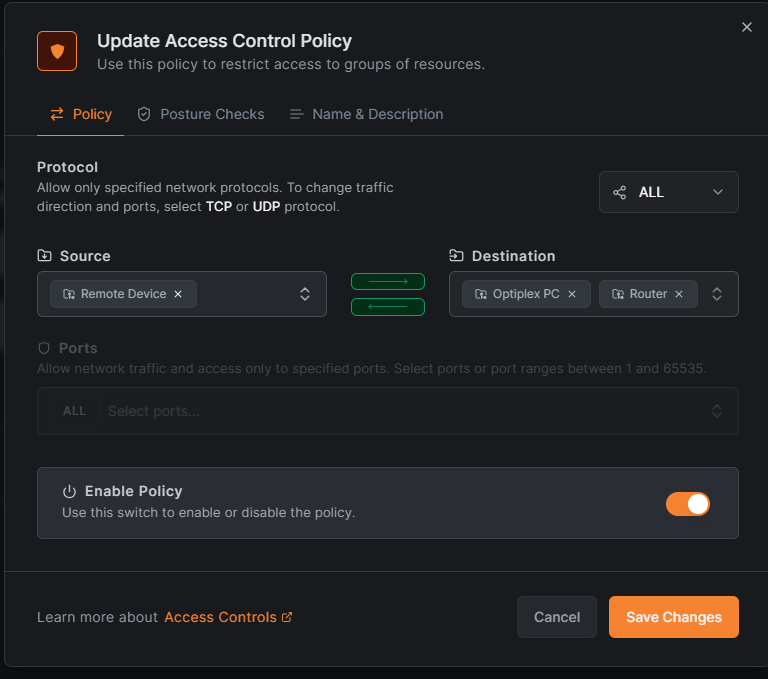
Was able to setup as adblocker as well remote access but im not sure why Lan SUbnet policy didnt worked only if i add remote device policy im able to use adguardhome

Sorry for my delayed response.

As I have just a few routers and a VPS to connect I use Network Routes which is simpler then using Networks.
Networks is new and has finer grained control but lack support for exit nodes so that has still to be done with Network Routes as outlined in my notes

For OpenWRT the networks are often simple so basically a Network has one routing peer which is the router or appliance in that network which holds the Netbird connection. This connects Netbird with the resources of the routing peer so basically the subnet or an IP address of a server which is running on this subnet. In your case you have the subnet as resource.

What I found confusing is that when making a resource you have to add the destination group but the destination is just my routing peer which is not yet in a group so I had to make a new group (just type in a name for the new group) and then under Peers add my routing peer to that new group, that seems missing in your screenshot.

For every resource you have to make an Access Policy as the Destination Group you added is not automatically added to the All group

When making an Access Policy from the resource the Destination is then automatically your new Destination group with the routing peer and as Source you add whatever needs to have access, I use just All so that everything on my network has access to it.

I will try to add it to my notes later this week

Thanks i was able to setup everything and able to achieve what i really need with netbird.

If someone has steps on how can one host the management ui on self hosted machine without opening port via cloudflare proxy would be helpful.

I was also exploring pangolin but it seems more difficult to setup and it require a VPS.

You probably have found the NetBird docs yourself but here is a link:

Would be smart to have a Linux machine with docker and I would think that you need to be able to connect to that machine from the internet so it should have a Public IP address