similar to the method of plugging a rpi4 into a managed switch and using vlan tags to direct traffic, could the same be done with an old laptop with a gig nic in it?
Isp modem - > edgerouter x, pass traffic directly to laptop, openwrt on laptop manages packages and passes traffic back to the switch where the other lans and access point would be attached
However, why not just use the ER-X as the router at this point? (possibly a rhetorical question -- if you've got lots of other packages and services you want to run, you might need the extra processing power). From an over-the-wire bandwidth standpoint, though (when assuming you're not using processor intensive features like SQM and the like), you'll be limited to 1Gbps max total throughput (up+down = 1Gbps max).
If you do opt to use the ER-X in this way, be sure you've got the latest bootloader (IIRC, it was included in the 2.0.x firmware) to ensure that the switch doesn't bridge ports while it is first coming up.
actually running openwrt on the edgerouter x, and i am primarily after the sqm shaping power the laptop could provide where the google wifi ac1304 i flashed cant quite cut it lol. its better than the edgerouter but not good enough lol. i am planning a full desktop server with a vm running openwrt and a quad intel nic, but thats all money, im working with what i have now lol.
i have a 300x10 soon to be 500x20 connection, but its spectrum so the bufferbloat is stupidly bad, i have heard rumors that they are working on a server side sqm called PIE (i used to work at spectrum as a technician, i heard things, not sure how valid they are lol)
this is super encouraging to hear, as a laptop is pretty power efficient, small form factor, with a screen built right in, now i am off to learn about virtual machines in linux / windows and see where the rabbit hole leads
You must make the laptop VLAN-aware. I've done this with systemd on a Debian system. Just use the phrase "systemd vlan" with your prefered search engine and you'll get a lot of proposals.
Currently watching a bunch of onemarcfifty vids and reading a bunch of forum posts to figure out how to get it all going
I’m going to be using port 0 as a system access port , port 1 will be the modem in, port 2 will have the laptop plugged in, port 3 will go to a home dumb switch with an access point attached, and port 4 will go to my work pc
From my understanding I tag incoming packets from port 1 and make them go to port 2, port 2 tags egress packets to go to port 1. I’m still learning lol
You'll be using a bridge-vlan configuration. for ports 1-4 (port eth0 can be removed from the bridge and placed into the 'system access' network interface).
Your WAN will use a unique VLAN ID (maybe use VLAN 2 for this), unless your modem/ISP requires a tagged VLAN.
You'll likely setup your lan on VLAN 1.
So, eth1 will be untagged
eth2 will have both VLAN 1 (can be tagged or untagged) and VLAN 2 (tagged)
I know a lot of members write to avoid those lower vlan numbers due to incompatibility or security reasons,
So I’ll be setting my vlans up with 4,8,16,32…etc
I actually can’t figure out a way to diagram how it should flow just yet so im looking for a good article about using a managed switch setup using openwrt 23.05 and configuration
The lower VLAN numbers should actually be fine, but it's certainly fine to avoid them.
It is often best to have all tagged networks on a trunk (and no untagged networks), but this is not usually a hard requirement except in some specific situations with hardware that doesn't like the mixed unagged+tagged.
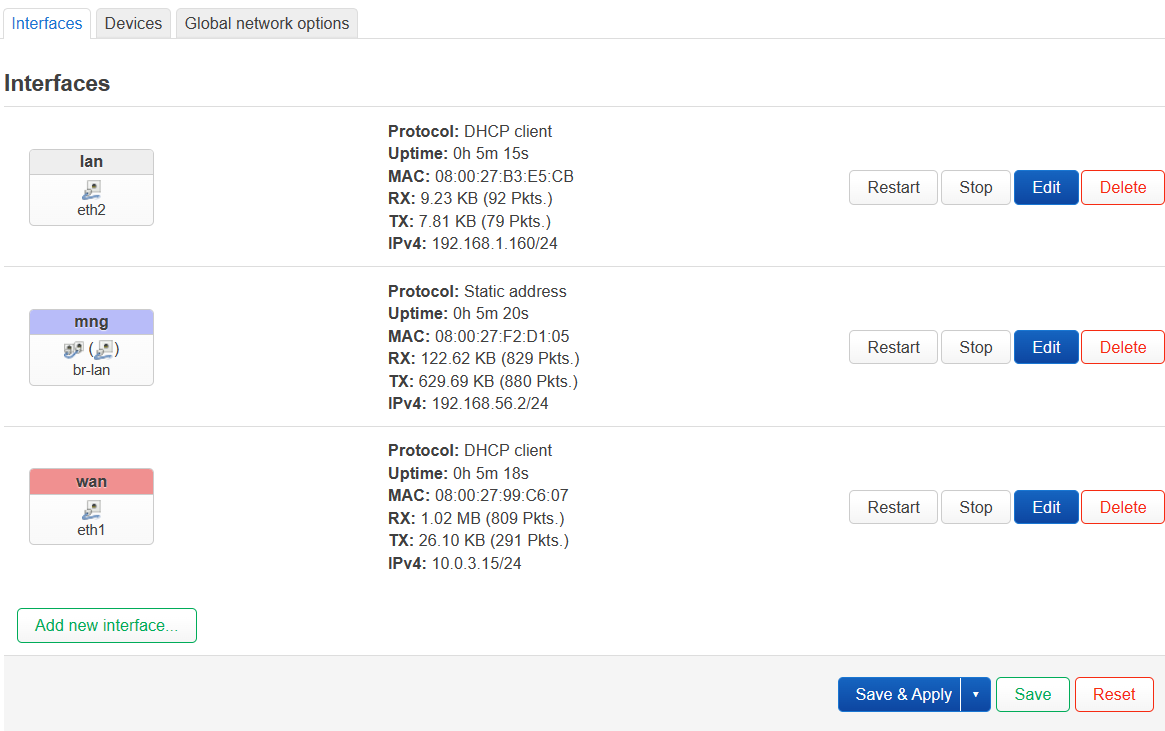
so far i have my virtual machine running connected to the internet, and luci up and running, so im ready to create the router(laptop) side of the vlan setup, with these screen shots what would be the most efficient way to set them up, i added the eth2 just in case its needed but i feel like i only need the 1 interface
On the switch it has a default config of wan on eth0, if I leave it as is and simply remove eth4 from the br-lan I should be able to set that port up with a static for management
Then setup vlan 4 and vlan 8
If I am understanding it I would create the vlans in devices, and then setup the tagging,
Assign vlan 4 to the wan port, and vlan 8 to the br-lan?
It doesn’t matter which is the wan since you won’t be using the default config at all.
Your lan is not assigned to a firewall zone - be sure to assign that network to the lan firewall zone.
From your computer, let’s see the config if that openwrt install.
Please connect to your OpenWrt device using ssh and copy the output of the following commands and post it here using the "Preformatted text </> " button:
Remember to redact passwords, MAC addresses and any public IP addresses you may have:
Thank you for the reply, I will grab that output momentarily, I did notice that it was missing a firewall zone when I was following a video guide on this, but it got a little muddy when they mentioned deleting the existing wan and I took a pause to gather and research more.
This is all being done sterile and outside of my home network, it will replace my current home network.
To clarify, the commands and output you would like are from the virtual machine, or would it be prudent to post the command results from both the VM and the switch?