I am new to the forum but have been using OpenWRT for several years now.
Just bought a GL-MT6000 router and installed OpenWRT on it for use as a dumb AP. The AP is connected to my Protectli FW4B running Pfsense. The Pfsense box serves as the main router and firewall.
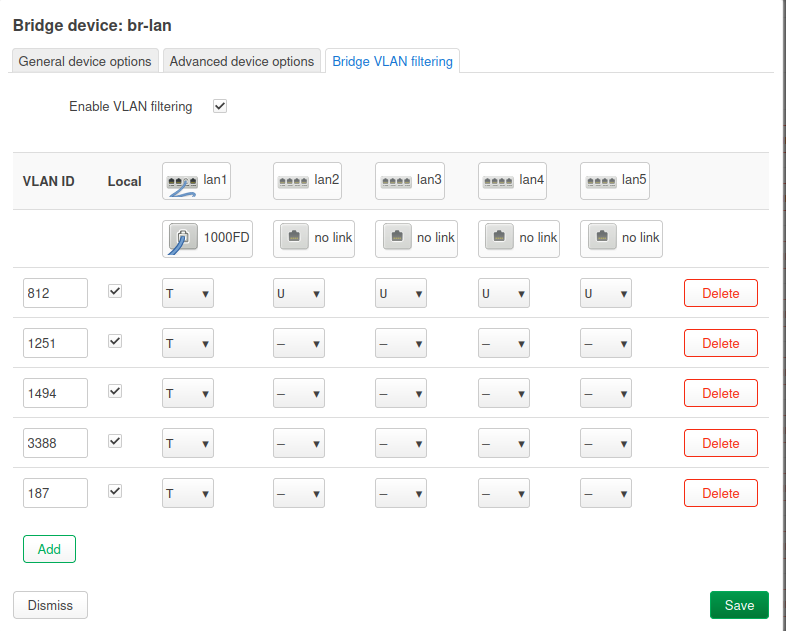
I have a physical port on the Pfsense box connected to one of the GL-MT6000 LAN ports. This port is divided into 5 different VLANs with tags synchronized between AP and router. I have 4 wireless SSIDs each using its own interface tied to one of the VLANs. The fifth VLAN serves as Ethernet connection.
My dilemma that I can't figure out is that although the wireless connections work perfectly with internet access, I can't access the internet if I connect to one of the open Ethernet ports on the GL-MT6000. There is also no DHCP IP provisioning through the AP Ethernet ports; I have to manually set a static IP on my computer.
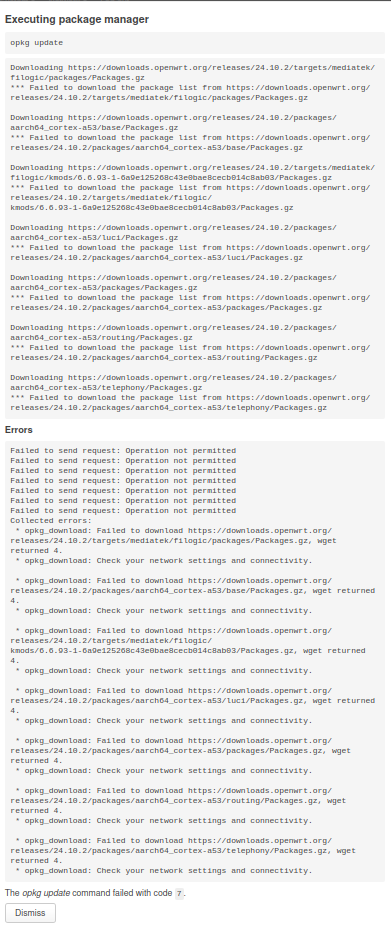
Also, although I can connect to the OpenWRT WebGUI through the firewall (computer connected to pfsense LAN port), I can't perform opkg update. The update fails with code 7. I can perform opkg update and download packages when the pfsense box is bypassed but not when I go through it.
Below is a simple diagram of my network setup.
I would like to share screenshots of my settings but am limited to one per post as a new member.
Instead of screenshots, please show the configs in their text format:
Please connect to your OpenWrt device using ssh and copy the output of the following commands and post it here using the "Preformatted text </> " button:
Remember to redact passwords, MAC addresses and any public IP addresses you may have:
Thanks for posting the config. Let's try to resolve the issue, but before we go into that, one more thing:
This typically isn't necessary for most AP configurations because it's not common to need to install non-default packages onto an AP (but yes, there are situations where that is desired). With that in mind, I want to make it clear that installing packages is fine, but don't upgrade the existing packages as that will at some point cause you major problems.
Anyway, let's clean some things up...
First, remove the last 3 lines of br-lan:
Your non-management networks should be unmanaged (there is no need for the AP to have an address on any network other than the one that is used to manage the AP itself). So, edit your networks to look like this:
config interface '24GHz_WPA3_E'
	option device 'br-lan.1251'
	option proto 'none'

config interface '5GHz_WPA3_E'
	option device 'br-lan.1494'
	option proto 'none'

config interface '5GHz_WPA2'
	option device 'br-lan.3388'
	option proto 'none'

config interface '24GHz_WPA2'
	option device 'br-lan.187'
	option proto 'none'
Since it looks like you want your lan (VLAN 812, 192.168.4.0/24) to be on present on the lan ports as untagged, make it explicit by adding :u* after each of the ports:
config bridge-vlan
	option device 'br-lan'
	option vlan '812'
	list ports 'lan1:t'
	list ports 'lan2:u*'
	list ports 'lan3:u*'
	list ports 'lan4:u*'
	list ports 'lan5:u*'
Delete this:
Remove the last line from the lan dhcp server:
Delete all of the other DHCP server stanzas (now those are all unmanaged interfaces anyway):
I made all of the instructed changes and tested. The WiFi still works as expected, however, the original two problems remain.
I do want to be able to install packages, as the next step in this process is to make the two WiFi networks listed as "_E" to be WPA3-Enterprise, using the Pfsense box as a RADIUS server. This requires some additional packages for OpenWRT.
I wasn't aware that upgrading packages could cause issues. I will heed this warning as I usually blindly install all the available updates.
Ok... let's check the lan VLAN in general. Connect a computer via Ethernet to one of the other lan ports on the OpenWrt device -- they should all connect to VLAN 812. Make sure that the computer has just that one network connection (disable wifi, unplug any other Ethernet connections). Does the computer get an IP address and normal access to the internet?
That suggests that there is a problem upstream. It could be:
the pfsense router isn't properly configured for that VLAN (network config, dhcp, firewall, or VLAN assignments at the port).
there could be a tagged/untagged mismatch between the pfsense router and the OpenWrt device. If the pfsense device is setup with that network untagged on the corresponding port, this would explain the problem -- you have port lan1 setup with VLAN 812 tagged. To fix this, change the pfsense box to tag that network on that port, or change the OpenWrt side to be untagged + PVID.
I believe the Pfsense router has the port tagged. Do you have familiarity with Pfsense? (I know this is an OpenWRT forum)
My suspicion was that it was a setting incompatibility between the OpenWRT AP and the Pfsense router, however, this doesn't explain why the WiFi networks work fine. They are setup the same on Pfsense's side.
There should be no such thing... both environments use the same standards for 802.1q VLAN tagging.
You don't have VLAN 812 (the lan network) associated with a wifi network on OpenWrt side. I expect that even if you did, you would not get proper network connectivity.
To test the Pfsense router's configuration, try unplugging the OpenWrt router and plug a computer directly into the Pfsense box (using the same port as was being used for the OpenWrt router). Does it gain connectivity at that point? If so, it means that VLAN 812 is untagged on the Pfsense side.
If it still doesn't get connectivity, it may be tagged, but something else could be wrong. You'll need to check the configuration of the Pfsense firewall, DHCP server, network interface configuration, and port assignments for that VLAN.
To test the Pfsense router's configuration, try unplugging the OpenWrt router and plug a computer directly into the Pfsense box (using the same port as was being used for the OpenWrt router). Does it gain connectivity at that point? If so, it means that VLAN 812 is untagged on the Pfsense side.
Indeed it does not get a connection from that port.
On Pfsense side, the VLAN configurations, Interface, Ports, DHCP, etc are copied identically between all 5 VLANS. I tried using the 812 VLAN for a WiFi network and indeed it failed to connect.
I suspect the issue lies in the use of both tagged and untagged ports on the OpenWRT setup for VLAN 812. This is the only unique aspect of that VLAN. This confuses me because I thought this setup was correct.
Is it possible to setup a separate untagged bridge and forward traffic to the 812 VLAN?
My apologies for the delay in this response. I accidentally locked myself out of management access on the AP while switching VLANS around for testing... I had to re-flash and reconfigure again. This time I did not update the packages.
I'm also a bit of a OpenWRT beginner , but you could try to set PVID seen as " u* " on the untagged ports in vlan 812 ?? ... (I think this (asterisk) means PVID or "native vlan" in cisco language)
With respect to the openwrt side, all VLANs are tagged on the port that connects to the pfsense box, so there is no mixing of tagged + untagged there. (Also, fwiw, this “issue” is very rare anyway). That you have the vlan untagged against the other lan ports is normal for access ports and will not break things.
How many ports do you have on your pfsense box? Try assigning this vlan as untagged to another port on that box and then connect a computer directly to it.
How many ports do you have on your pfsense box? Try assigning this vlan as untagged to another port on that box and then connect a computer directly to it.
@psherman
The Protectli FW4B - Consists of 4 x L3 Intel nics wo. any switching function.
So you can't easily "just make a copy" of vl812 packets to another pfS-IF.
I this situation that would mean to create a "software bridge" on the pfS
Well of OP knows how to do that, and this is just for debugging ....
Yup. The point is debugging. Or the vlan could be moved off the existing port and solely onto another one for the debug. We just need to establish that the vlan works at the pfsense box. We don’t care about performance (software bridge considerations) and this would only be temporary.
Didn't the OP state that Inet worked via WiFi ?
That would indicate that VL812 works on the pfSense box, and that VL812 packets can be transported on the OWRT <--> pfSnse wire
..
..
NOT related to this issue, since OP does not use untagged frames on the pfS wire
Just a FYI ..
On a pfSense , you often just make (add) vlan "logical" interfaces in the gui (IF-->Tag).
In order to receive "untagged" you have to add the "logical" IF interface too (the parent/master/owner).
Often on a pfSense trunk, the "parent" "logical" IF is omitted. Then all untagged would "just be dropped" ... Security.
Ps:
I just reread your post above, and see you had already adressed the PVID to OP.
Sorry about that.