Hey, after updating the firmware of my NanoPi R5C to version 25.12.0, I’ve experienced lower speeds and higher latency spikes than usual.
I know that I can achieve higher speeds with this hardware because it was quite stable with version 24.10.
My internet plan is 1Gb download / 50Mb upload via Docsis.
I even tried downgrading back to version 24.10 without saving the config, but it didn’t work.
And even Reinstalling 25.12 with the Firmware upgrade tool in Openwrt.
Settings like Packet Steering and Offloading have no effect on the speeds.
Sqm only limits the download and upload but increase the latency even further.
I will attach some waveform screenshots. The higher speed corresponds to my setup without the NanoPi in between.
I’m a newbie with SSH and configurations in OpenWrt, but maybe someone has an idea of what could be causing this. If you have any scripts or configs, I would appreciate some guidance.
From 24.10 to 25.12 , I dont know what it causes this but after downgrading to 24.10 the speeds are still the same like in the Waveform screenshot, without Sqm.
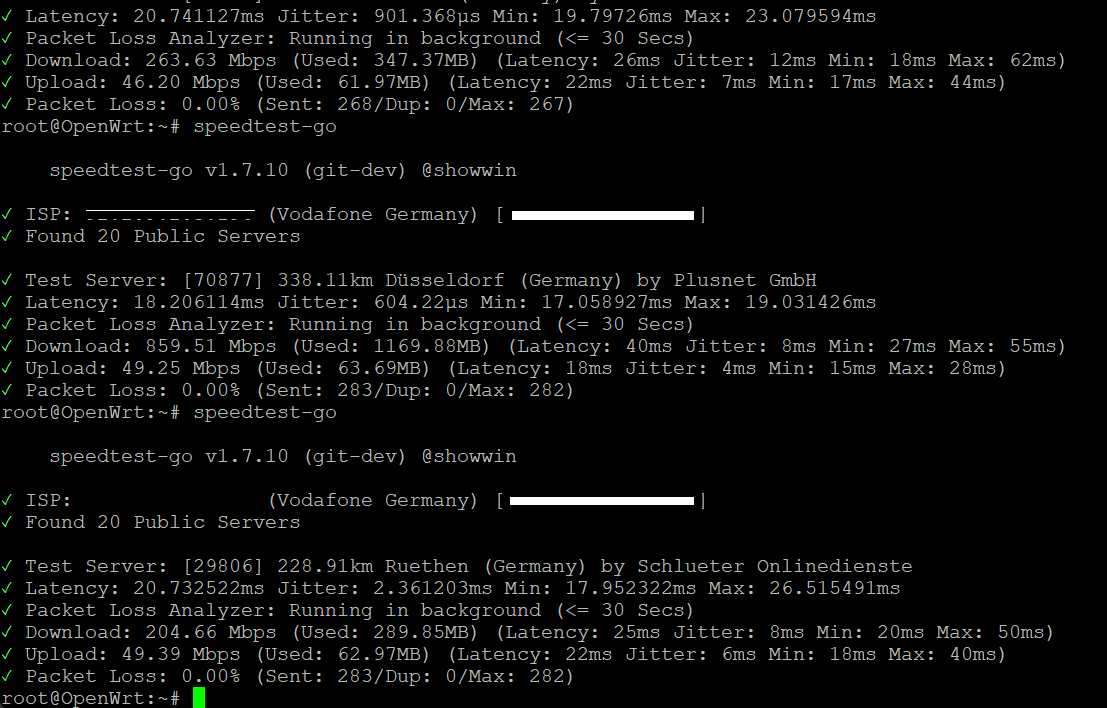
Did you confirm with another speedtest (not waveform)? I find waveform to be highly variable vs speedtest-go which you can run directly from your openwrt device.
That's not my experience on multiple OpenWrt machines at multiple locations.. speedtest-go gives is very stable results. Are you saying that under version 24 you get highly consistent results, but under 25 you get highly variable ones? Have you confirmed that with speedtes-go?
I was gotten stable results before the update 25.12 , after that something happend on the Device and now even 24.10 is not stable anymore.
Problem is that both Versions are unstable now. I dont know what happend there.
Thats the Reason why I better ask here because without transfer old configs it should be stock, right?
I suspect it's not OW but your connection. Either poor signals in your modem or ONT problems if you have fiber or download ISP stuff. Check signal levels in modem if you have one.
the weird part is my modem connection to my pc is fine. You see it in one of the Screenshots on the first post.
I even see packet loss/fail around 1-10% in Counter strike 2. OpenWrt is full stock settings.
I just clean installed friendlywrt over usb , because it was easier with my knowledge to do, erased all data and clean installed the 24.10 of it but same thing there.
I guess its a hardware defect than , the timing is to perfect to my upgrade on version 25.12. maybe someone will have a idea later, I will disconnect it for this time because my normal connection doesnt have issues.
Just contributing to the which speed test to use part of this conversation
Cloudflare - I would have suggested this previously but for the last couple of weeks it's been showing my latency massively increased (from ~17ms to ~60ms)
Waveform - still working well for me, although I'm only running on 100Mbps contract, so not the fastest
okey, after testing two days now with a new device from my isp , the packetloss and "highest" jitter are gone , still higher ping "doubled" comes from my isp, somehow.
The only Problem now that comes from time to time into play is that the nanopi doesnt get a license from my router for the internet connection.
Guess it means dhcp leasing, maybe its from the 25.12 because I never had that before.
But thanks for all the helpful answers.
Had the same with the DNS from cloudflare and switched to quad9 cause of that.
I am experiencing performance and stability issues since upgrading from OpenWrt 24.10.6 to 25.12.x.
Wi-Fi issue:
With OpenWrt 24.10.6, Wi-Fi performance is normal and responsive. However, with versions 25.12.0 and 25.12.1, I observe significant latency when loading web pages.
Speed tests (upload/download) show similar results between 24.10 and 25.12.
The issue appears during real-world usage (e.g., opening a web page).
With 24.10, pages load immediately.
With 25.12, there is a delay of several seconds before the page begins to load.
Downgrading back to 24.10.6 restores normal responsiveness.
This issue occurs on all my access points (Zyxel WSM20).
LAN issue:
There is also a LAN stability problem on 25.12.x:
After a random uptime of several days, LAN communication stops completely.
Devices on the LAN can no longer communicate.
Reverting to 24.10.6 resolves the issue and restores normal operation.
Hardware:
Zyxel WSM20 (multiple units)
Steps to reproduce:
Install OpenWrt 25.12.0 or 25.12.1
Connect via Wi-Fi
Attempt to browse websites → noticeable delay before loading starts
I just upgraded to 25.12.1 yesterday and am having almost the same issues now. Wired has been working normal and stable it is just Wi-Fi that I am having latency issues. When I ping the router on wired it is 1-2MS when I ping it on Wi-Fi it is all over the place the worst being 60-100MS+. I am using a GL-INET MT3000 with vanilla OpenWRT. As you described I also have web pages taking a long time to load.
@spade there are numerous posts about this in the 25.12.1 thread. It was an mt76 bug that was just fixed in main and 25.12 branches.
In short, downgrade to 25.12.0, 24.10.6, or upgrade to a 25.12-snapshot. At least until 25.12.2 comes out. (I’m using 25.12-snapshot now on my mt6000 it’s fixed.)
=> in normal operation we can see load harly goes above 0.25.
=> Out of topic but FYI: the big raise happen after kernel panic due to realtek driver issue:
kern.alert details
Sun May 3 22:45:59 2026 kern.alert kernel: [831333.203014] Unable to handle kernel paging request at virtual address ffff800081f10522
Sun May 3 22:45:59 2026 kern.alert kernel: [831333.203783] Mem abort info:
Sun May 3 22:45:59 2026 kern.alert kernel: [831333.204050] ESR = 0x0000000096000021
Sun May 3 22:45:59 2026 kern.alert kernel: [831333.204402] EC = 0x25: DABT (current EL), IL = 32 bits
Sun May 3 22:45:59 2026 kern.alert kernel: [831333.204890] SET = 0, FnV = 0
Sun May 3 22:45:59 2026 kern.alert kernel: [831333.205179] EA = 0, S1PTW = 0
Sun May 3 22:45:59 2026 kern.alert kernel: [831333.205476] FSC = 0x21: alignment fault
Sun May 3 22:45:59 2026 kern.alert kernel: [831333.205848] Data abort info:
Sun May 3 22:45:59 2026 kern.alert kernel: [831333.206118] ISV = 0, ISS = 0x00000021, ISS2 = 0x00000000
Sun May 3 22:45:59 2026 kern.alert kernel: [831333.206619] CM = 0, WnR = 0, TnD = 0, TagAccess = 0
Sun May 3 22:45:59 2026 kern.alert kernel: [831333.207086] GCS = 0, Overlay = 0, DirtyBit = 0, Xs = 0
Sun May 3 22:45:59 2026 kern.alert kernel: [831333.207574] swapper pgtable: 4k pages, 48-bit VAs, pgdp=0000000003d82000
Sun May 3 22:45:59 2026 kern.alert kernel: [831333.208184] [ffff800081f10522] pgd=10000001fffff003, p4d=10000001fffff003, pud=10000001ffffe003, pmd=10000001f0f7e003, pte=00680000f4200713
Sun May 3 22:45:59 2026 kern.emerg kernel: [831333.209343] Internal error: Oops: 0000000096000021 [#1] SMP
Sun May 3 22:45:59 2026 kern.warn kernel: [831333.209857] Modules linked in: xt_state xt_recent xt_helper xt_conntrack xt_connmark xt_connlimit xt_connbytes xt_CT nf_conncount xt_set ip_set_list_set ip_set_hash_netportnet ip_set_hash_netport ip_set_hash_netnet ip_set_hash_netiface ip_set_hash_net ip_set_hash_mac ip_set_hash_ipportnet ip_set_hash_ipportip ip_set_hash_ipport ip_set_hash_ipmark ip_set_hash_ipmac ip_set_hash_ip ip_set_bitmap_port ip_set_bitmap_ipmac ip_set_bitmap_ip ip_set ip6table_mangle ip6table_filter ip6_tables ip6t_REJECT rtw88_8822ce(O) rtw88_8822c(O) pppoe ppp_async option nft_fib_inet nf_flow_table_inet ipw wireguard usb_wwan rtw88_pci(O) rtw88_core(O) pppox ppp_generic nft_reject_ipv6 nft_reject_ipv4 nft_reject_inet nft_reject nft_redir nft_quota nft_numgen nft_nat nft_masq nft_log nft_limit nft_hash nft_flow_offload nft_fib_ipv6 nft_fib_ipv4 nft_fib nft_ct nft_chain_nat nf_tables nf_nat nf_flow_table nf_conntrack mac80211(O) lzo libchacha20poly1305 iptable_mangle iptable_filter ipt_REJECT ipt_ECN ip_tables huawei_cdc_ncm chacha_neon
Sun May 3 22:45:59 2026 kern.warn kernel: [831333.210495] cfg80211(O) cdc_ncm cdc_ether xt_time xt_tcpudp xt_tcpmss xt_statistic xt_multiport xt_mark xt_mac xt_limit xt_length xt_hl xt_ecn xt_dscp xt_comment xt_TCPMSS xt_LOG xt_HL xt_DSCP xt_CLASSIFY x_tables usbserial usbnet slhc sch_cake poly1305_neon nfnetlink nf_reject_ipv6 nf_reject_ipv4 nf_log_syslog nf_defrag_ipv6 nf_defrag_ipv4 lzo_rle lzo_decompress lzo_compress libcurve25519_generic libchacha crc_ccitt compat(O) cdc_wdm sch_tbf sch_ingress sch_htb sch_hfsc em_u32 cls_u32 cls_route cls_matchall cls_fw cls_flow cls_basic act_skbedit act_mirred act_gact ifb ip6_udp_tunnel udp_tunnel sha512_generic sha512_arm64 seqiv sha3_generic jitterentropy_rng drbg kpp hmac geniv rng cmac crypto_acompress r8169 fsl_mph_dr_of ehci_fsl gpio_button_hotplug(O)
Sun May 3 22:45:59 2026 kern.warn kernel: [831333.224658] CPU: 2 PID: 15710 Comm: kworker/u8:0 Tainted: G O 6.6.93 #0
Sun May 3 22:45:59 2026 kern.warn kernel: [831333.225388] Hardware name: FriendlyElec NanoPi R5C (DT)
Sun May 3 22:45:59 2026 kern.warn kernel: [831333.225870] Workqueue: phy0 0xffff8000796646bc [rtw88_core@000000000670b75c+0x1a000]
Sun May 3 22:45:59 2026 kern.warn kernel: [831333.226638] pstate: 60400009 (nZCv daif +PAN -UAO -TCO -DIT -SSBS BTYPE=--)
Sun May 3 22:45:59 2026 kern.warn kernel: [831333.227277] pc : 0xffff800079689324 [rtw88_pci@00000000a4677fd8+0x4000]
Sun May 3 22:45:59 2026 kern.warn kernel: [831333.227916] lr : 0xffff800079667bbc [rtw88_core@000000000670b75c+0x1a000]
Sun May 3 22:45:59 2026 kern.warn kernel: [831333.228567] sp : ffff800087a43cb0
Sun May 3 22:45:59 2026 kern.warn kernel: [831333.228877] x29: ffff800087a43cb0 x28: 0000000000000000 x27: 61c8864680b583eb
Sun May 3 22:45:59 2026 kern.warn kernel: [831333.229545] x26: ffff0001f0011028 x25: ffff0001f0d5b680 x24: ffff0001f61bc540
Sun May 3 22:45:59 2026 kern.warn kernel: [831333.230211] x23: ffff0001f3477238 x22: ffff0001f61bc558 x21: 0000000000000000
Sun May 3 22:45:59 2026 kern.warn kernel: [831333.230878] x20: 0000000000000001 x19: ffff0001f3472000 x18: 0000000000000000
Sun May 3 22:45:59 2026 kern.warn kernel: [831333.231543] x17: 0000000000000000 x16: 0000000000000000 x15: 0000000000000000
Sun May 3 22:45:59 2026 kern.warn kernel: [831333.232206] x14: 0000000000000000 x13: 0000000000000020 x12: 0101010101010101
Sun May 3 22:45:59 2026 kern.warn kernel: [831333.232871] x11: 7f7f7f7f7f7f7f7f x10: fefefefefefefeff x9 : 7f7f7f7f7f7f7f7f
Sun May 3 22:45:59 2026 kern.warn kernel: [831333.233536] x8 : 0000000000000005 x7 : 0000000000004c00 x6 : ffff80007970d290
Sun May 3 22:45:59 2026 kern.warn kernel: [831333.234200] x5 : 0000000000000207 x4 : 0000000000000000 x3 : ffff8000796892d8
Sun May 3 22:45:59 2026 kern.warn kernel: [831333.234863] x2 : ffff80007968931c x1 : 0000000000000522 x0 : ffff800081f10522
Sun May 3 22:45:59 2026 kern.warn kernel: [831333.235528] Call trace:
Sun May 3 22:45:59 2026 kern.warn kernel: [831333.235763] 0xffff800079689324 [rtw88_pci@00000000a4677fd8+0x4000]
Sun May 3 22:45:59 2026 kern.warn kernel: [831333.236374] 0xffff80007967a24c [rtw88_core@000000000670b75c+0x1a000]
Sun May 3 22:45:59 2026 kern.warn kernel: [831333.236994] 0xffff80007967a3fc [rtw88_core@000000000670b75c+0x1a000]
Sun May 3 22:45:59 2026 kern.warn kernel: [831333.237615] 0xffff800079664708 [rtw88_core@000000000670b75c+0x1a000]
Sun May 3 22:45:59 2026 kern.warn kernel: [831333.238231] 0xffff800080065680
Sun May 3 22:45:59 2026 kern.warn kernel: [831333.238515] 0xffff800080065ae4
Sun May 3 22:45:59 2026 kern.warn kernel: [831333.238799] 0xffff80008006d7ac
Sun May 3 22:45:59 2026 kern.warn kernel: [831333.239085] 0xffff8000800152e8
Sun May 3 22:45:59 2026 kern.emerg kernel: [831333.239372] Code: 39000022 d65f03c0 f97d3c00 8b214000 (b9400000)
Sun May 3 22:45:59 2026 kern.warn kernel: [831333.239913] ---[ end trace 0000000000000000 ]---
Due to these ramdom kernal panic I upgraded to 25.12.4 using those command lines: owut upgrade --version-to 25.12.4
Now the system load is always higher for similar internet usage: