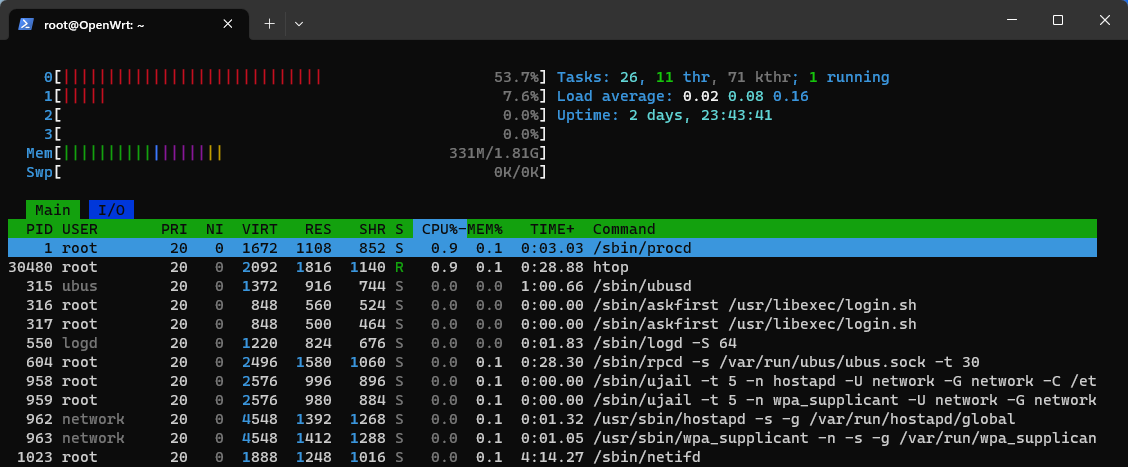
Hi, I've decided to deploy openWRT on a RPI4 with its internal ethernet 1Gbps port for LAN and an USB 3 1Gbps for WAN. I'm not using Wifi. Only wired devices.
Testing with IPerf3, the speed of all my devices between them and the RPI4 is around 900-990Mbit/s.
My ISP is fiber 1Gbps, when testing Internet speed from the RPI4 (using speedtest tool) it gets an average of 960MBit/s which is good but if I test from my PC client (same command line tool), it gets no more than 700Mbits, both for uploading and downloading.
The strange thing is that if I use my ISP own router (ZTE) I can get around 930Mbit/s as expected from my PC client. I've tested at different hours on a day and the pattern is the same.
Why my PC client is getting more than 200Mbits/s less using RPI4 as a router? I mean it's not a coincidence that with the router provided by my ISP I can use full speed. So, I'm thinking that maybe I'm missing to tweak some options or parameters in openWRT but don't know which ones.
Any help, will be really appreciated. Thanks
Please configure htop to show the detailed CPU
(start htop, press F2, select display options, then check the: [x] Detailed CPU time (System/IO-Wait/Hard-IRQ/Soft-IRQ/Steal/Guest)
field and repeat the test, look for the pink Soft-IRQ load.
Mmmh, is this during comparable condition as before? Maybe repeat this during a speedtest and then repeat after enabling packet-steering in the firewall?
So, it improved somehow (Although "Download" has gone down, I understand that this is something from my ISP that depending on the time of day varies a lot)
yes, sure! As I explained at the beginning inside my LAN, testing with IPerf3, the speed of all my devices between them and the RPI4 is around 900-990Mbit/s. So it was ok.
What I was trying to understand is why if I use my ISP own router (ZTE) I can get around 930Mbit/s for WAN connections and using OpenWRT just 700Mbits.
Enabling packet-steering in my case, did the trick.