worked. Router has been stable for the last 9 hour or so.
How is the Luci UI so colourful compared to the images from openwrt servers? do you use a custom CSS? it handles mobile rendering better which is a big plus for me.
worked. Router has been stable for the last 9 hour or so.
How is the Luci UI so colourful compared to the images from openwrt servers? do you use a custom CSS? it handles mobile rendering better which is a big plus for me.
I take you are talking about the argon theme
Yes. Maybe. I am still very new to openwrt.
I have a wax202 by Netgear as well. How do I get this theme on that device?
Looks like the log verbosity setting actually doesnt work, but I guess thats something to report in another thread?
Shame as the actual wifi is working, its just flooding the log, and I have never seen such good battery life on the phone with wifi on either.
I will probably only be using this phone for another 2-4 weeks though, and other phones dont seem to be doing it.
Finally got some free time to unbrick my router, the TFTP method doesn't work and I need the NMRP Flash to fix it.
Router: Netgear WAX206, only enables 5GHz WiFi, WAN uplink to home router with 10G internet (though only through 1G port) so there is no issue to saturate 1G if device is capable to do it.
Version: SNAPSHOT (r23411-68ef2d1856), downloaded today
Device tested: iPad Air 4 (802.11ax 80MHz compatible)
Method: Ookla speedtest
Scene 1 - Device next to router: Download 680Mbps, Upload 700Mbps
Scene 2 - Device in the next room with 1 wooden wall (direct distance to router around 5m): Download 541Mbps, Upload 620Mbps.
Scene 3 - Device in another room (direct distance to router about 8m, with 2 wooden walls between): Download 520Mbps, Upload 519Mbps.
Scene 4 - Device 1 level below (my home has 3 levels): Download 486Mbps, Upload 478Mbps
Scene 5 - Device 2 levels below (many obstacles including kitchen, even with another normal router with ext. antenna my phone not able to get signal sometimes): Download 183Mbps, Upload 120Mbps.
From my tests above, I would say the WAX206 is performing pretty good even with iPad OS.
You should be able to simply download it from my site and install it. It should be in the first packages folder under luci
in your WAX206 build, i can't check for packages. I get the below error.
wget: SSL support not available, please install one of the libustream-.*[ssl|tls] packages as well as the ca-bundle and ca-certificates packages.
The openssl version is installed. however I updated it to mbedtls or wolfssl version and I get a different error.
Failed to send request: Operation not permitted
Collected errors:
 * opkg_download: Failed to download, wget returned 4.
 * opkg_download: Check your network settings and connectivity
Which versions did you download ?? Hopefully r23300 in snapshot.
However will check the settings my end.
Update, Try now there was an IP conflict on the internal network which has been fixed
WAX206 in my updated profile now. 
Tried to tame the spam by whats in this post but it persists.
Can this be added to the wiki?
To revert to stock firmware (if you already have access, you can skip steps 2-5, adjust addresses):
WAX206_Firmware_V1.0.4.0.img
192.168.1.10 IP Address255.255.255.0 Mask192.168.1.1 Gatewayscp -O WAX206_Firmware_V1.0.4.0.img root@192.168.1.1:/tmp
ssh root@192.168.1.1
root@openwrt: cd /tmp && mtd write WAX206_Firmware_V1.0.4.0.img firmware
That seems a bit complicated compared to just using nmrpflash.
It's very clear tutorial for the mtd method. nmrpflash is another one. I don't consider one being better or longer to use than the other.
Chose the one you like/know the best as long as you are satisfied. But always remember that the other one exists, you may need it one day.
Looking at the instructions mtd method seems simpler to me.
You may consider adding the -O option to the scp command. Newer openssh implementations of scp don’t work with dropbears server without it.
I, for a newbie, didn't realize what nmrpflash actually was, that's why I share way around without other tools. I see now it may be that easier.
@Sailor thanks, added!
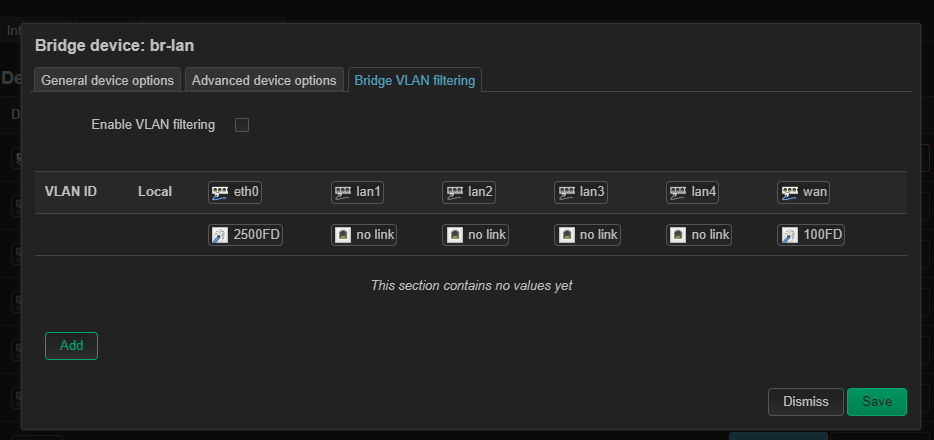
Did anyone spot this with their device, it is going down to 100MB link?
I can't yet identify what causes it, but ran few speedtests and on 2nd/3rd run I started having about 60M download.
This topic was automatically closed 10 days after the last reply. New replies are no longer allowed.