First and foremost, I am dumb and noob especially on networking things. This is my first networking diagram and I am not sure if I'm doing it correctly. Basically I have a TP-link router with openwrt installed and use it to receive internet from guest wifi and then provide lan connection for my devices. I would like to run wireguard directly on the router, however it only has 1.56MB of free space out of 55MB which is not enough to install all the needed packages for wireguard. Thus, I am setting up an openwrt VM on my proxmox host to serve as wg tunnel.
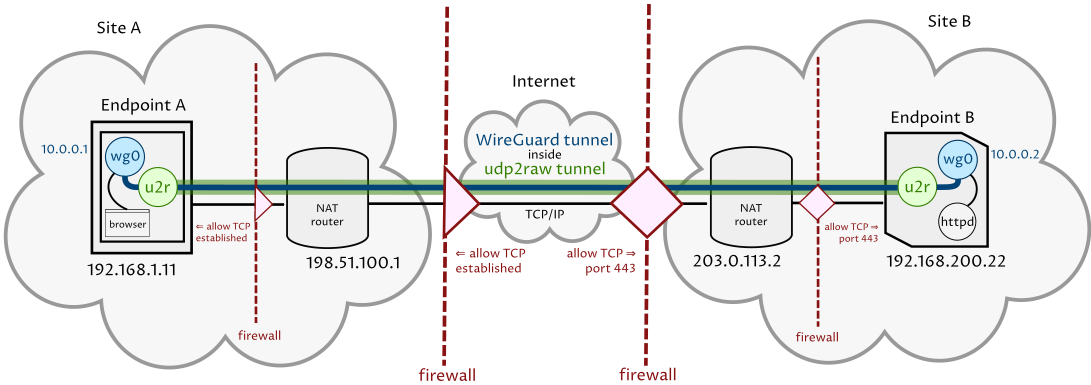
To make it more complex, I am having the wg connection through TCP port 443 using udp2raw (following this guide). It is because the guest wifi blocked all udp ports and only allow tcp 80/443. The openwrt-udp2raw-wireguard chain looks almost the same like this except the udpspeeder. I didnt use udpspeeder.
After all the hurdles, I successfully setup the network connections by self-taught up until this stage. Pheww, not easy for a noob.
My goal: I would like to have only devices connected wirelessly on wlan0 to get tunneled through wireguard.
Things I have tried (and failed): I have tried this guide but end up getting my proxmox host lost connection as well as the openwrt vm.
If your WG client routes all its traffic through the tunnel (e.g. has allowed IPs set to 0.0.0.0/0) then simply pointing your LAN clients to use your WG client as gateway might already work.
If you have a WireGuard client running in your network e.g. on a Bridged AP, or NAS or VM, then you can simply point the gateway of your LAN clients e.g. your windows PC to the ip address of the WG client.
If this works you know that the WG client is properly setup to handle traffic
I have tried to point the gateway to my wg client ip on my android phone but I got no internet connection. I also need to put the dns. Which IP should i use for dns?
After looking at all the network config of the vm, there is no problem in firewall blocking traffic whatsoever. Just problem with routing on openwrt vm. I still cant figure it out. When I point my android phone to use 192.168.1.132 as gateway, the traffic didnt go through wireguard tunnel based on tcpdump -i eth1.
On openwrt VM, I am having the wg connection through udp2raw tunnel on port 443 (following this guide). The wg tunnel inside udp2raw tunnel looks like this:
The wireguard config & udp2raw command line on openwrt VM looks like this:
# /etc/wireguard/wg0.conf

# local settings for openwrt VM
[Interface]
PrivateKey = <PRIVKEY>
Address = 10.75.7.5

# send wg through udp2raw
MTU = 1342
PreUp = udp2raw -c -l 127.0.0.1:50001 -r 100.100.100.10:443 -k "shared secret" -a >/var/log/udp2raw.log 2>&1 &
PostDown = killall udp2raw || true

# remote settings for VPS server
[Peer]
PublicKey = <PUBKEY>
Endpoint = 127.0.0.1:50001
AllowedIPs = 0.0.0.0/0
I have set a traffic rule on TP-Link router to allow from android phone 192.168.1.243 to openwrt VM 192.168.1.132. Then I tried routing same as this guide. My android phone got 192.168.1.132 as gateway but fail to get internet connection.
This is my interface & my routing config, is it correct?
You can ignore the tplink, it’s firewall and routing are irrelevant as all your devices are in the LAN zone.
Are you certain the wireguard tunnel is working at all?
If you install a wg client on the phone can it connect? That’s where I would start.
Then confirm connectivity from with the openwrt vm and only then start working on the routing within your lan
Wow, thanks. It works. I just need to use the same wg config for both openwrt & android, and now my android is connected to wg but slow connection. However, is it possible to get internet connection on android tunnelled through wg without having to turn on wg client app?