LuCI JS APP: luci-app-modemdata (Info about LTE / LTE-A / 5G connection)

Hi,

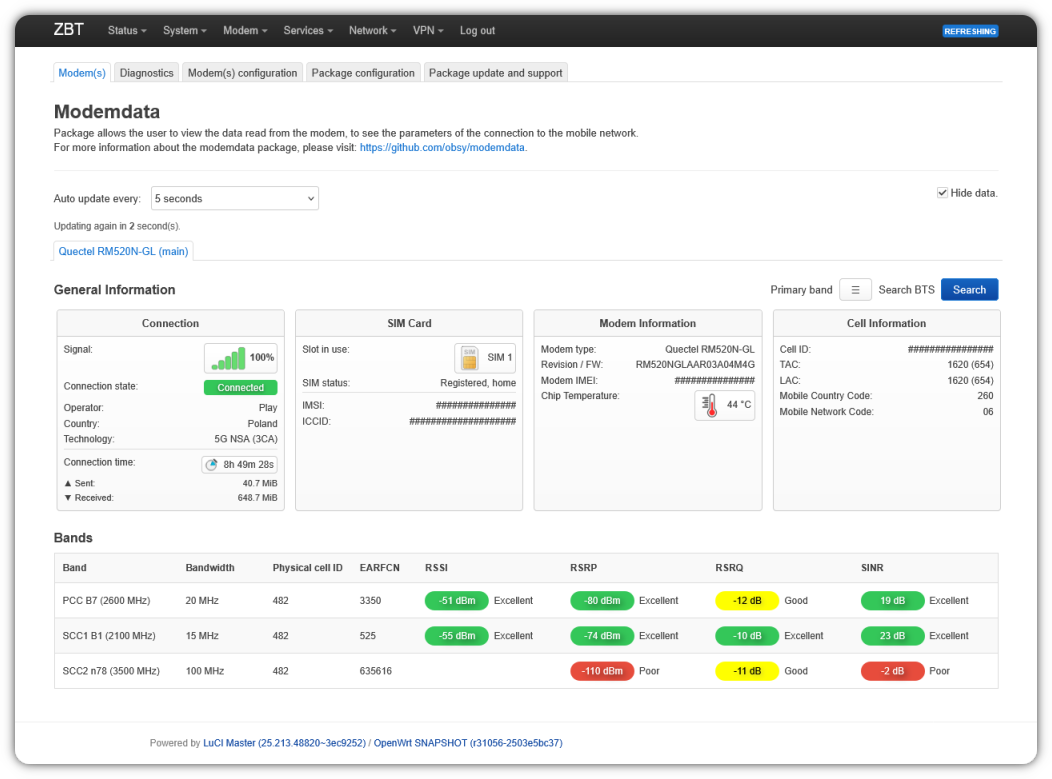
I created the LuCI JS interface for modemdata package. In the future, it will replace luci-app-3ginfo-lite.

Important
Due to the layout, the package is dedicated to the luci-theme-bootstrap.

Required Packages:
serial: sms-tool, kmod-usb-serial-option, kmod-usb-serial
QMI/MBIM protocol: kmod-usb-net-qmi-wwan / kmod-usb-net-cdc-mbim, uqmi
ModemManager protocol: modemmanager
hilink (ecm): wget-ssl

Preview
7 Likes

Great, thanks for your work.

I have a few suggestions, if you don’t mind.

“Modem IMEI” should be in Modem Information section.

“LAC” is the terminology used in GSM/UMTS while “TAC” is the terminology used in LTE. I suggest to display only one of them depending on the current RAT.

It would be good to have Cell ID presented in a way it can be used in Cellmapper, etc. - XXXXX YYY, where XXXXX is “eNB ID“ and YYY is “Sector ID”, both in decimal.

1 Like

Please, although I don't have to agree with it.
P.S.
It's nice that everyone wants to add work, but no one will make a super package by themselves :slight_smile:.

It can be changed, but I'm fine with it (3ginfo-lite residue).

It stays, too much work to hide and show data.

Here I have a problem, there are two solutions:

  1. Add a new data (only I need to know specifically what is needed and how to show it)
  2. We can try to add a Cellmapper page to search from the button.

This is what I’ve added in 3g-info into my modem file at the end:

enbh=${CID_HEX:0:-2}
sech=${CID_HEX: -2}
CID_HEX="$enbh $sech"

enb=$(printf "%d" 0x$enbh)
sec=$(printf "%d" 0x$sech)
CID_DEC="$enb/$sec"

you can probably show just one line all the time: LAC/TAC:

Also, SIM status: Registered looks slightly misleading to me. It’s a modem that is registered or unregistered to the network, but If I think about the status of a SIM card, I think of something like "READY", [un]locked, missing, etc.

I believe you have a bug, here:

The awk command will print something like KEY=xxx, VAL=yyy. Check the value of KEY:

printf '%s\n' "KEY is '$KEY'"

you will get

KEY is 'xxx,'

Clearly your code is not expecting the comma.

It works well

+ echo 'cell type: lte'
+ awk -F: '{gsub(" ", "");printf "KEY=%s, VAL=%s\n", $1, $2}'
+ eval 'KEY=celltype' ' VAL=lte'
+ KEY=celltype VAL=lte
+ MODE=lte
+ echo lte

+ + echo ' tac: E2ED'
awk -F: '{gsub(" ", "");printf "KEY=%s, VAL=%s\n", $1, $2}'
+ eval 'KEY=tac' ' VAL=E2ED'
+ KEY=tac VAL=E2ED
+ _TAC=E2ED

etc.

I tested the awk command in isolation and got the comma in $KEY. Now I see why the difference: you set IFS=, above. So yes, technically there is no bug. That said, IMO this is fragile (relying on IFS) for no good reason.

Edit: considering the IFS is comma, actually that code won't work without separating the awk output with comma. So in this context it makes sense. I don't like this sort of parsing and if this was my code, I would have implemented parsing via shell builtins. No awk, no subshells and no eval.

Edit2: tested and the code does work without the comma in awk output. The way IFS works is not always easy to predict.

@AndrewZ Fork package from my GitHub, I will remove package from my account. Fix everything and become the maintainer of the package.

It would be nice if Telit FN980 and FN990 will be added :wink:

I don't know if I should posting in this thread as a layman. I don't know anything about programming.

Powerful modems (up to 7xCA), you'll have to ask @cezary if he has time and enthusiasm to write scripts for the new modem(s).

@woziwrt We don't have such a modem, you have it. Find and test AT commands that return connection status, modem temperature, aggregation status, along with bands and bandwidths. Show the commands and their results exactly as they are displayed. You can use picocom, minicom, sms_tool or anything else that allows communication with the modem.

telit_fn980_family_at_commands_reference_guide

@woziwrt
Show results of the at commands:

AT#RFSTS
AT#CAINFO
AT#TEMPSENS
AT#TEMPSENS?
AT#TEMPSENS=?

Thank you very much for your reply. Please, if you have time and desire to do it, do not modify the FN980 which is obsolete and currently I use FN990A28 or A40.

TC_FN990_Family_AT_Commands_Reference_Guide_r4.pdf

The results of the at command you mentioned are:
AT#RFSTS
#RFSTS: "230 03",1849,-64,-31,-12,7927,255,-6,640,19,2,010BF01,"230030005363310" ,"Vodafone CZ",3,3,156030,145030,-44,0,-3,28,

no OK here?!

AT#CAINFO
+CME ERROR: 4

AT#TEMPSENS
ERROR

AT#TEMPSENS?
#TEMPSENS: 0,0
OK

AT#TEMPSENS=?
#TEMPSENS: (0-2),(1-60),(1-7),(-40-0),(0-100),(1-4,6-10)
OK

Thank you

@woziwrt Why did you write about the FN980 if you're only interested FN990? This way, we're all wasting our time unnecessarily.

AT#SERVINFO
AT#RFSTS
AT#CACTL=?
AT#CAINFO

I apologize for that, I have FN980m in some older routers, which I don't have available here now and for which such indication is not needed now

AT#SERVINFO
#SERVINFO: 1849,-31,"Vodafone CZ","23003",010BF01,7927,640,3,-64,156030,145030,0 ,-44,-3
OK

AT#RFSTS
#RFSTS: "230 03",1849,-64,-36,-8,7927,255,-4,640,19,2,010BF01,"230030005363310", "Vodafone CZ",3,3,156030,145030,-44,0,-3,28,1

AT#CACTL=?
#CACTL: (0,1)
OK

AT#CAINFO
+CME ERROR: 4

AT#CAINFO?

#CAINFO: 122,1849,5,260,-63,-35,-11,229,7927,-17,0,1,120,300,5,260,-80,-54,-6,19
5,2,0,1,0,0,0,0,0,0,0,0,0,0,0,0,0,0,0,0,0,

ENDC: 28,10,10,156030,145030,0,-44,-3,260,56,2,0,1,0
OK

What is the Vendor= ProdID= for these modems?
cat /sys/kernel/debug/usb/devices


T:  Bus=02 Lev=02 Prnt=02 Port=00 Cnt=01 Dev#=  3 Spd=5000 MxCh= 0
D:  Ver= 3.20 Cls=ef(misc ) Sub=02 Prot=01 MxPS= 9 #Cfgs=  1
P:  Vendor=1bc7 ProdID=1071 Rev= 5.04
S:  Manufacturer=Telit Wireless Solutions
S:  Product=FN990
S:  SerialNumber=9a5a5789

some mistake on my side

AT#RFSTS
#RFSTS: "230 03",1849,-63,-29,-12,7927,255,-8,640,19,2,010BF01,"230030005363310","Vodafone CZ",3,3,156030,145030,-44,0,-3,28,10,10,0
OK
AT#MONI
#MONI: Vodafone CZ RSRP:-63 RSRQ:-9 TAC:7927 Id:010BF01 EARFCN:1849 PWR:-33dbm DRX:640 NR_BAND:28 NR_BW:10 NR_ULBW:10 NR_CH:156030 NR_ULCH:145030 NR_PWR:0dbm NR_RSRP:-44 NR_RSRQ:-3 NR_PCI:260 NR_SINR:56 NR_STATE:2 NR_TXPWR:0 NR_DLMOD:0 NR_ULMOD:0
OK 
AT#TEMPSENS=2
#TEMPSENS: TSENS,57
#TEMPSENS: PA_THERM,58
OK 
AT+CESQ
+CESQ: 99,99,255,255,24,78
OK 
AT+CGMM
FN990A28
OK