I am having problems with MX4200v1. The router goes low on available memory and eventually dies. It still replies to ping and its wireguard peer's status shows active connection but nothing else seems to function.
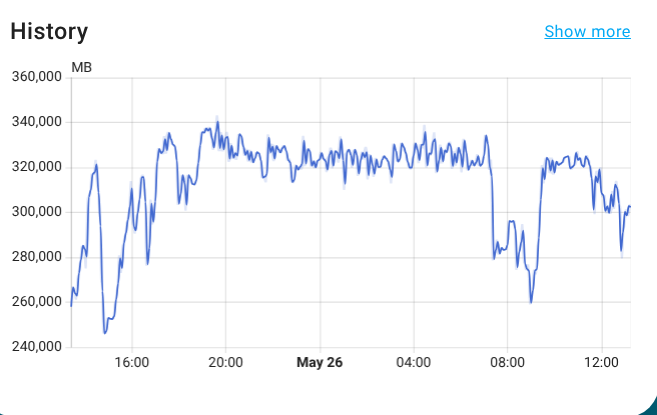
I found a workaround -- if I enable swap on a usb drive the router functions fine (though the available memory fluctuates, going pretty low at times). Interestingly, swap does not seem to be heavily used -- I saw at most 5-7MB of swap in use. I tried enabling zram-swap instead of a physical usb -- the router crashes again.
The running services are: luci, uhttpd, wireguard, and pbr. I have wifi enabled on all 3 radios and one of them also has a guest network enabled (so no clients are connected to it at the moment).
I know that the current discussion is centered on MX4300 but the thread sure has MX4200 in the subject and until some time in May it was exclusively about MX4200. If there is a better thread for MX4200, I am happy to ask there. But this seems to be the thread with participation of people who actively work on MX4200/MX4300.
I had the same issue, was never able to solve it but you could try zram see if that helps, make the zram swap more aggressive so it's using zram all the time
Thanks for the suggestion. I tried using zram with no success. I will try it again with higher swappiness value but unless someone offers a working solution, my experiments will have to wait a couple of weeks until I have that router in my physical possession. (For now I was accessing it remotely. And since it does work with the swap on an external drive I should stop breaking the Internet for the person using the router.)
What's puzzling is that swap on a physical drive fixes the problem even though it is barely used. Right now only 0.25-0.5MB of swap is used, the available memory is at 5MB (without a swap this would imply that a crash is reasonably close) but based on the past experience I'm pretty sure the router will continue running smoothly.
As I said, zram swap with the same default swappiness setting didn't help (may have brought the crash sooner).
A few more observations:
A second router that serves as a dumb AP with luci-proto-relay running but dnsmasq (and a few more services) disabled runs without hiccups.
I think another pair of routers exhibits the same behavior: the dumb AP is fine while the main router dies. That pair runs mesh 802.11s but no wireguard (which means that for now my observations on that pair are not repeatable since I have no physical access to that pair either).
(As I slowly typed this on a phone, swap use increased to 1.5MB, the available memory increased to 20MB.)
One often overlook aspect of swap is, that the kernel can use it to 'defragment' the RAM, allowing large ('bad') contiguous memory allocations to succeed. I wouldn't exactly call this a 'solution' though.
Another interesting observation is -- I reinstalled firmware, removing all extra packages except for luci, luci-app-uhttpd, wireguard and pbr. After running it for 24 hours with wireguard interface and pbr disabled I had no crashes. Moreover, I did not see available memory wildly fluctuating and going close to zero. Maybe 24 hours is not long enough...
I also enabled wireguard and pbr a couple of hours ago and no memory fluctuations so far.
So maybe the issue is that installed too many packages for this router (even though most of the additional services were disabled).
Were you able to identify specific packages that used too much memory for the MX4200 v1 to function well, and if so could you share which packages are best avoided?
No, I never found a solution. It looks like openwrt uses way too much memory with this wifi chip. MX4200v2/MX4300/MX5300 have enough memory to deal with this requirement but MX4200v1 does not.
It may also be device and/or load dependent: one of the two routers I had is on the other side of the country, so I could not yet replace it. But that one is running fine though it has a pretty light load - it is running as a dumb ap over wireless distribution bridge with 2-3 clients at most.
I should also mention that NSS version of the firmware may work better. Before getting rid of my second MX4200, I installed the NSS version. It seemed to use a bit less memory and did not have crashes for a (relatively) short period that I tested it.
I had the same problem. I'm using two of linksysmx4200 as dumb ap in batman-adv. High memory usage will usually reboot router after maybe a day. I installed on one router kmod-zram and on another I didn't.
My solution to this problem was to make new affinity settings. It was written by ai and tested by me, of course.
This is my setup. I create a file /etc/set-affinity.sh and make it exec.
Disable service smp_affinity. Enable new service and restart router.
I have uptime for more then 4 days and there is no problem with them for now. Yes there is high memory usage, but now routers do manage it more efficiently.
Also I found out that one of my wifi 5 routers is giving me a bottle neck problem in mesh. So I put this one to be client in mesh and all others have gateway mode set to off.
For now everything is working stable I have high speed over mesh nodes reaching more then 300 mbit/s on 5 Ghz ssid when there is no high demand for internet.
Current and new settings can be tested running
I had to check it. I don't have irqbalance installed. I just have smp_affinity service that i disabled.
As I know this works without irqbalance installed.
Word of caution.
I had to reboot one of my routers after nearly 6 days because it run again in memory issue.
Testing is in progress.
For now the problematic one is the node that is furthest apart from mesh gateway router.
And another observation.
I created second wifi backhaull in batman-adv on 2.4 ghz so that i can use router in my backyard as 5 ghz doesnt have enough signal strength. So I was just playing around and put 2 mx4200 routers on two wifi backhaulls, 2.4 and 5 ghz. They both started using 2.4 backhaull as default probably because it have better signal quality. But what I noticed was significant memory usage drop. Nearly instantly both of them got 100 - 150 mb of free ram.
So my conclusion is that high memory usage is somehow related to 5 ghz band because when routers use 2.4 ghz for wifi backhaull memory usage is significantly lower.
Idk, I think 5GHz in general is causing the RAM issues.
I picked up 3 of these MX4200s because they were a steal—$50 USD for all three. I’m currently working on setting up a BATMAN mesh, but before I even got that far, I noticed RAM usage was already pretty high.
One of my APs is kitted out with a bunch of packages and extras, and it hovers around 5–10% free memory most of the time. A second AP, which isn't loaded with extras but handles a similar number of clients, also sits in the 5–10% free range. Then there's the third one—completely untouched so far—and it's sitting pretty at 25–35% free. So something definitely adds up.
I’ve also seen some weird behavior where the APs lock up and won’t accept new client connections, even though they still pass traffic. I haven’t ruled out the firewall or upstream stuff yet, but it definitely seems like once 5GHz radios start working, the RAM starts tanking.
P.S. – Can someone explain why BATMAN devices can’t behave like regular DSA interfaces? It would make life so much easier. I know I might be totally ignorant here, but I’d love not having to create a bridge for every single one of my 8 VLANs just to push traffic over mesh.
That was my conclusion also. I'm using batman-adv with 5ghz wifi backhaul and those routers are just dumb ap. In my experience so far they will stay up for 7 - 8 days or maybe even more before they run out of the memory and reboot.
You can use swap with them and watchcat to reboot router if it lose connection.
Yeah I might give swap a try on these — sounds like it could be a lifesaver. I’m no stranger to OpenWRT weirdness (survived a Netgear R8000 ), so the hiccups don’t surprise me. Watchcat sounds like a solid backup plan for keeping things from going full potato.

 ), so the hiccups don’t surprise me. Watchcat sounds like a solid backup plan for keeping things from going full potato.