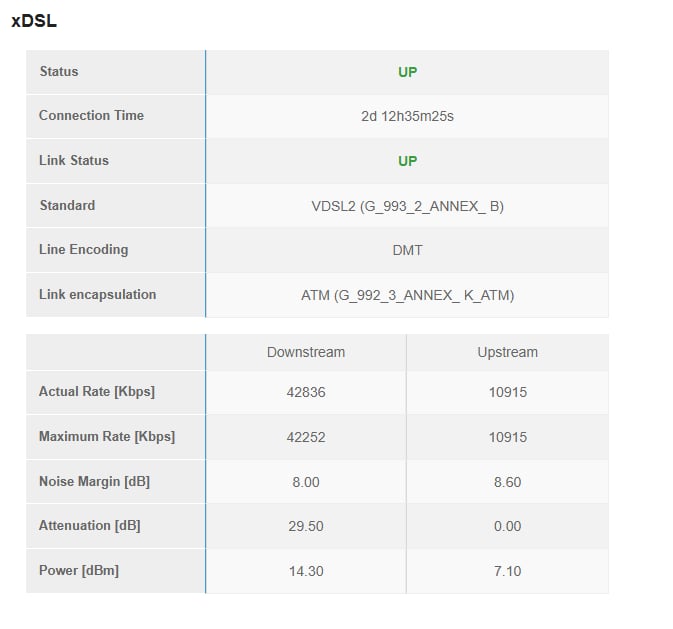
I’am looking for suggestions to improve the DSL connection for a friend, there is no possibility at the moment to get another ISP or another type of connection at the current location.
Technical facts
ISP name - Telia. ISP advertised DSL speed up to 19mbps.
To increase the connection speed up to 100mbps, ISP has deployed Huawei B525s-23a, which uses mobile sim card. It is connected to the main sagecom DSL(modem+router) unit via single ethernet cable.
There is also Arris vip1113 TV Box, which I assume uses IPTV function for television
Technical Issues
a) Attempting to download a file while someone else is gaming results into noticeble ping time increase. 16ms to 100ms during the duration of download.
b) Observed increased network jitter during gaming.
c) Observed packet loss during game. There are moments when packet loss is 0%, however most of the time it is between the range of 5-10%.
To improve the local congestion, it should be possible to place an openwrt running router(Sqm_Cake) in front of Sagemcom unit. However we are unable to find a bridge/transparent mode on the current modem.
The connection issues may also stem from the sagemcom unit being outdated, firmware etc. Would it be beneficial to also replace the modem/router unit?
How to make sure that after purchasing new equipment it will be compatible with Huawei and Arris TV box?
Please connect to your OpenWrt device using ssh and copy the output of the following commands and post it here using the "Preformatted text </> " button:
Remember to redact passwords, VPN keys, MAC addresses and any public IP addresses you may have:
Do you know how they implemented the bonding?
Where I live, a proprietary protocol is used that establishes a tunnel over DSL and 4G to achieve that, but that's on a single box (also a Huawei). This box cannot be replaced, so I could only place an OpenWrt router behind this ISP crap and I had to use double-NAT + DMZ as it's not even possible to configure a static route.
Hello. I’am planning to purchase openwrt device and before purchase, made this thread to ask whether it is even possible to place openwrt router in the current setup and if it will be viable for improving the connection even a little bit.
Currently I’am unable to find that information. Supplier doesn’t explain the technology behind bonding, just the fact, that it is DSL + 4G mobile data combined for increased speeds. Trying to access huawei internet GUI via direct ethernet cable gives a connection timeout
It appears you are using firmware that is not from the official OpenWrt project.
When using forks/offshoots/vendor-specific builds that are "based on OpenWrt", there may be many differences compared to the official versions (hosted by OpenWrt.org). Some of these customizations may fundamentally change the way that OpenWrt works. You might need help from people with specific/specialized knowledge about the firmware you are using, so it is possible that advice you get here may not be useful.
Ask for help from the maintainer(s) or user community of the specific firmware that you are using.
Provide the source code for the firmware so that users on this forum can understand how your firmware works (OpenWrt forum users are volunteers, so somebody might look at the code if they have time and are interested in your issue).
If you believe that this specific issue is common to generic/official OpenWrt and/or the maintainers of your build have indicated as such, please feel free to clarify.
Openwrt has been generaly advertised as “Install this open source firmware and run sqm cake for your family and friends to speed up the internet”.
Therefor myself being openwrt user and knowing that this project has the potential to improve the internet quality for my friend I have inquired two questions in this thread:
Is there any chance that placing openwrt router will improve the connection? (Yes/No)
Where should I install openwrt device based on the network scheme
Now from both of Your replies, It seems like you are:
Discouraging another potential user from becoming a part of this project
Encouraging first to spend money on a device without us knowing that it will have any chance of helping
My personal experience with this hybrid setup is mixed. As mentioned, I run an OpenWrt device behind a hybrid router and I have configured SQM (cake), but that's not the best configuration because cellular speed varies heavily during the day. If you search through the forum, you can find a few threads dealing with this (e.g. cake autorotate configuration).
If you already have an OpenWrt device, can't you temporarily move it to your friend's place and try it out? As an alternative, a cheap OpenWrt device with sufficient power can be found for as low as €40,- new (e.g. Cudy WR3000).
Thinking about it, I should probably invest some time into tuning this configuration!