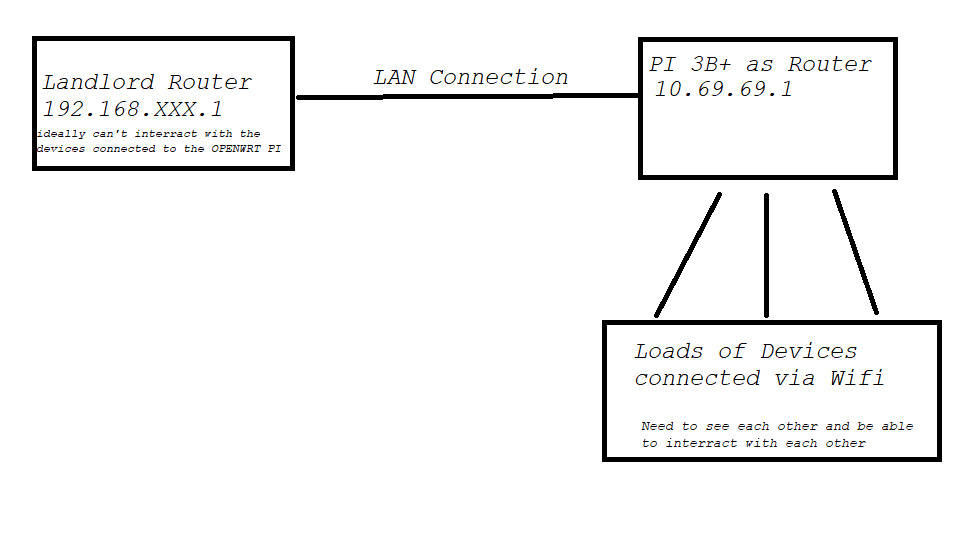
I am on the Router of my landlord, which is set up in a way that devices connected to it can't see each other (good thing, I guess) but I have some devices that need to interact witch each other.
Everything works as I wanted except for the internet speed (I've read it is because the pi's internal wifi is kinda crap) The connection between the devices is fast and stable. Because of that all I would like to change is that the pi is connected to the landlords router via LAN. When I do so I have no internet at all except if I match the Openwrts Network to the one of the landslords so to 192.168.100.X, if I do that all works fine. But I really want to keep the 10.69.69.XX network because all things I used are configured exactly to that.
and the only thing I have issues with is (I suppose atleast) the connection via lan to the landlords router.
I tried google alot (as I did for the rest of the setup) but with this issue I am to bad at describing the issue and because of that always end up reading something unrelated to my isse.
Raspberry Pi's WiFi performance as a general-use AP is garbage. Use a device designed for this task like a wireless AP or router (which can always be used as an AP). Also, the Pi 3B+'s LAN is not true gigabit, it's capped at 300 Mb/s because the NIC is connected to the CPU over a USB 2.0 link.
If you want to stick to using a Raspberry Pi as a router and not have terrible performance, you need at least Raspberry Pi 4 and a RTL8153-based USB Ethernet adapter (like TP-Link UE300). Then you attach a WiFi AP to that to get much better WiFi coverage and speeds.
If speed isn't the issue, then your previous setup should be OK. If the issue you're encountering is this:
This is expected. If you don't understand why this works and using 10.69.69.1 doesn't, you need to read up on how IPv4 subnetting works.
Basically it's because your WiFi clients get IP addresses in the 192.168.100.* subnet, which are assigned by the landlord's router. If you try to ping 10.69.69.1 from such a client, the client will send the packet to the landlord's router (not to your Pi) because it's not in the same subnet. The landlord's router is not going to have a route to 10.69.69.1 setup, so it drops it and it won't work.
But if you set the router's IP to 192.168.100.*, it will be in the same subnet, so clients can send the packet directly to the Pi and not involve the landlord's router at all.
Beyond some semantics around it, this is not really correct... the OP has almost certainly setup the Pi as a dumb AP (rather than a router). This means that the Pi is simply bridge, and is doing no routing or firewall operations. It simply passes data betweeh the ethernet and wifi interfaces transparently.
In order for the OP to use the Pi as a router, it is necessary to create a wan interface. It is not hard to do assuming somethign near defaults...
remove eth0 from br-lan
create a wan interface with eth0 that looks like this (note the lowercase 'wan' -- this is important since there is already a default wan firewall zone that contains the 'wan' network in lowercase):
config interface 'wan'
        option device 'eth0'
        option proto 'dhcp'
I do agree that the Pi's wifi is terrible and that the best option is to use a real AP for this purpose. With the built-in wifi, you'll be severely limited with resepct to general bandwidth, number of devices that can work well on the Pi's AP mode config, and of course range. To add an AP, you'll need another ethernet connection or a managed switch that you can use to connect the AP (and/or any other devices). But, once you're going that far, you might just get an all-in-one wifi router to replace the Pi -- even modest ones on the used market will perform on-par or better than the Pi3.
config device
option name 'br-lan'
option type 'bridge'
list ports 'usb0' ///// this is a pi zero connected as an usb gadget to get internet
config interface 'lan'
option device 'br-lan'
option proto 'static'
option ipaddr '10.69.69.1'
option netmask '255.255.255.0'
option ip6assign '60'
list dns '8.8.8.8'
list dns '1.1.1.1'
config interface 'wan'
option device 'eth0'
option proto 'dhcp'
with this setup it doesn't work. I have my local network but I do not have internetacces
I use a Pi3B.
The Pizero runs pihole thats why it is connected via usb to get internet acess as it doesn't have wifi.
Currently I connect to the landlord wifi via the internal Pi3B wifi interface. I also have a usb wifi dongle which is broadcasting the OpenWrt. This part is working perfectly. I am just having issues still with the connection from the 3B to the landlord router via Lan.
Please connect to your OpenWrt device using ssh and copy the output of the following commands and post it here using the "Preformatted text </> " button:
Remember to redact passwords, MAC addresses and any public IP addresses you may have:
You appear to have 2 ethernet ports on the Pi -- the built-in one and a USB adapter. Is that the case? (or is that usb0 device a wifi adapter??)
You also have a sta (client) mode configuration for the Pi's wifi, connected to network wwan but then no network interface with that name is defined (although you also have that network added to the wan firewall zone). Since that network doesn't exist, you won't get an uplink (if you're relying on wifi uplink).
Another thing... if you're using the wifi for STA mode, be aware that the Pi's wifi chipset cannot run simultaneous AP + STA mode operation, so the only physical connection you have available for your own devices would be via usb0's function.
Your firewall file looks very incomplete -- did you omit things, or is that the entirety?
the second lan is the pi zero that is used in usb gadget mode.
yes I have that wifi interface up and just delete the connection when trying with the lan cabel.
If i use that wifi (its the internal one) to connect to the landlord router I have internet access shared with the other wifi device.
enable wifi in AP mode with the wifi connected to the lan network.
connect a computer to the Pi's wifi and verify that it gets an address in the 10.69.69.0/24 network and can access the OpenWrt admin (ssh and/or LuCI web interface)
connect a cable between the Pi's built-in ethernet (eth0) and your landlord's router
The firewall wan zone only lists wwan, which does not exist. You need to add your wired wan (named wan) to the firewall wan zone. And like @psherman said, get rid of everything related to a wireless WAN.