Some news.
The card is now recognised by OpenWrt 
I can confirm the need to isolate the pins 23 to 33 (so, 6 pins, on both sides) using tape and to plug it in the "left" mPCIe port, which is labeled 0.
Regarding the taping, it's a finicky job. I covered 8 pins at first (up to pin 37, so 8 pins) and that didn't work. No real idea if covering those extra 2 GND pins made a real difference or my first taping job was not well done.
This image was possibly the most helpful:
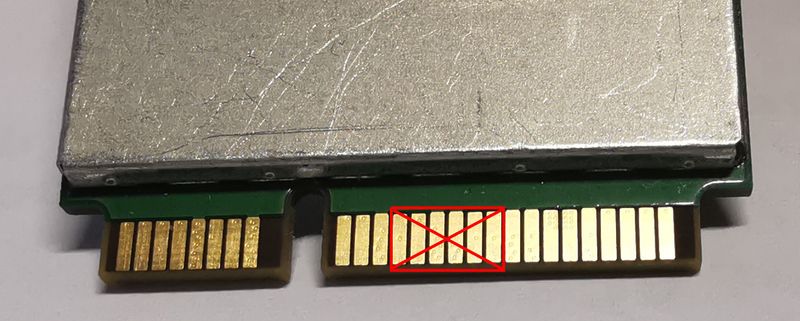
Anyway, here is the module as seen by the kernel:
# cat /sys/kernel/debug/usb/devices

T:  Bus=01 Lev=01 Prnt=01 Port=01 Cnt=01 Dev#=  2 Spd=480  MxCh= 0
D:  Ver= 2.00 Cls=ef(misc ) Sub=02 Prot=01 MxPS=64 #Cfgs=  1
P:  Vendor=2c7c ProdID=0306 Rev= 3.10
S:  Manufacturer=Quectel
S:  Product=EP06-E
S:  SerialNumber=0123456789ABCDEF
C:* #Ifs= 5 Cfg#= 1 Atr=a0 MxPwr=500mA
I:* If#= 0 Alt= 0 #EPs= 2 Cls=ff(vend.) Sub=ff Prot=ff Driver=option
E:  Ad=81(I) Atr=02(Bulk) MxPS= 512 Ivl=0ms
E:  Ad=01(O) Atr=02(Bulk) MxPS= 512 Ivl=0ms
I:* If#= 1 Alt= 0 #EPs= 3 Cls=ff(vend.) Sub=00 Prot=00 Driver=option
E:  Ad=83(I) Atr=03(Int.) MxPS=  10 Ivl=32ms
E:  Ad=82(I) Atr=02(Bulk) MxPS= 512 Ivl=0ms
E:  Ad=02(O) Atr=02(Bulk) MxPS= 512 Ivl=0ms
I:* If#= 2 Alt= 0 #EPs= 3 Cls=ff(vend.) Sub=00 Prot=00 Driver=option
E:  Ad=85(I) Atr=03(Int.) MxPS=  10 Ivl=32ms
E:  Ad=84(I) Atr=02(Bulk) MxPS= 512 Ivl=0ms
E:  Ad=03(O) Atr=02(Bulk) MxPS= 512 Ivl=0ms
I:* If#= 3 Alt= 0 #EPs= 3 Cls=ff(vend.) Sub=00 Prot=00 Driver=option
E:  Ad=87(I) Atr=03(Int.) MxPS=  10 Ivl=32ms
E:  Ad=86(I) Atr=02(Bulk) MxPS= 512 Ivl=0ms
E:  Ad=04(O) Atr=02(Bulk) MxPS= 512 Ivl=0ms
I:* If#= 4 Alt= 0 #EPs= 3 Cls=ff(vend.) Sub=ff Prot=ff Driver=qmi_wwan
E:  Ad=89(I) Atr=03(Int.) MxPS=   8 Ivl=32ms
E:  Ad=88(I) Atr=02(Bulk) MxPS= 512 Ivl=0ms
the different devices provided by the Quectel EP-06 now appear, we now have:
# ls  -l /dev/ttyUSB*

crw-rw----    1 root     dialout   188,   0 May 20 11:34 /dev/ttyUSB0
crw-rw----    1 root     dialout   188,   1 May 20 11:23 /dev/ttyUSB1
crw-rw----    1 root     dialout   188,   2 May 20 11:49 /dev/ttyUSB2
crw-rw----    1 root     dialout   188,   3 May 20 11:23 /dev/ttyUSB3
-rw-r--r--    1 root     root             3 May 20 11:23 /dev/ttyUSB4
-rw-r--r--    1 root     root             3 May 20 11:23 /dev/ttyUSB5
# ls -l /dev/cdc-wdm0

crw-------    1 root     root      180, 176 May 20 10:37 /dev/cdc-wdm0
and finally:
# uqmi -d /dev/cdc-wdm0 --get-data-status

"disconnected"
Sadly, i also get:
# uqmi -d /dev/cdc-wdm0 --get-current-settings

"Out of call"
And i think this is a very basic problem: the card is out of network, just like a phone would be if there was no signal
I am supposing this has to do with the fact there is no antenna connected to the modem, but could anyone confirm?
I'm also trying to understand if i need to issue AT commands, and if so to which ttyUSB* devices. Again, any guidance appreciated.