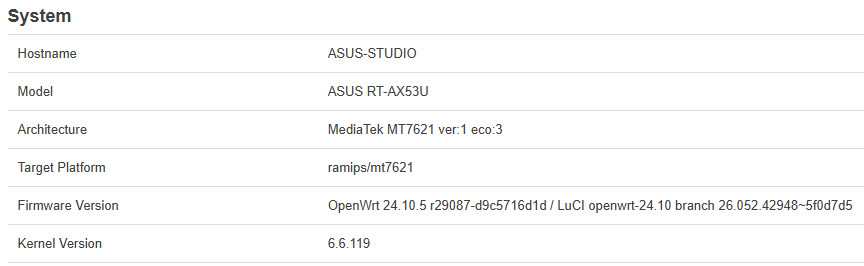
Hello team,
I need some help for the configuration of my ASUS router with 24.20.5, since my goal is to partly replace an ISP router with it, but keeping VoIP service on the ISP router (a VX830v TP-Link with proprietary firmware).
The following picture shows the topology change I'm aiming at.

ISP is using FWA access modem, which is connected to the VX830v (handling VoIP service) and then there is a cascaded ASUS (ASUS-STUDIO) with OpenWRT handling my home network.
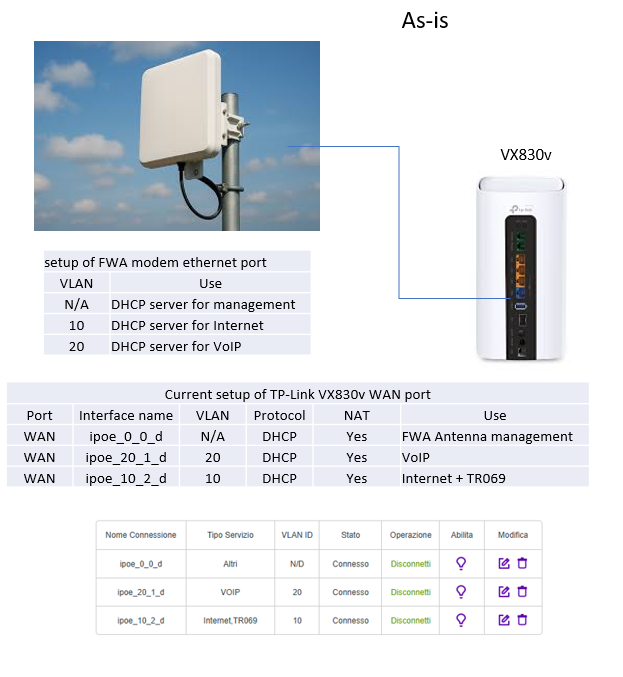
The ethernet cable bewteen modem and VX830v carries 3 services:
- modem management (no VLAN, modem is acting as DHCP server)
- Internet access with public IP (VLAN 10, modem is acting as DHCP server)
- VoIP service (VLAN 20, again modem is acting as DHCP server).
The configuration of the modem, and the VLANs, cannot be changed.
The VX830v WAN is setup accordingly, with 3 "interfaces" as shown in the picture:
- ipoe_0_0_d (no VLAN) for management
- ipoe_20_1_d (VLAN 20) for VoIP
- ipoe_10_2_d (VLAN 10) for Internet and TR069.
I need to keep the VX830v for VoIP, but I do want to use my ASUS as the front end to the modem.
I have no VLAN-capable switch to put connect to modem, so the ASUS must handle VLANs 10 and 20 towards modem and VX830v.

So the WAN port of VX830v will connect to LAN3 of the ASUS, and the WAN port of ASUS will connect to the modem. Of course ASUS port will need to carry modem management, VLAN 10 (Internet) and VLAN 20 (VoIP).
VLAN 10 will be used as Internet gateway by ASUS (no longer by VX830v, so VLAN 10 will "terminate" inside ASUS-STUDIO acting as DHCP client), while VLAN 20 must be stretched to VX830v which is the DHCP client without modification of the traffic.
Modem management (no VLAN) must as well be terminated inside ASUS-STUDIO (DHCP client).
ASUS-STUDIO is also supplying Wireguard and ADblock-lean, as well as DDNS client to DYNU.
ASUS-STUDIO is 192.168.10.1/24, and is acting as DHCP and DNS server for my home network, while VX830v is 192.168.10.2/24.
192.168.10.0/24 is the home network subnet (used as Intranet).
I also use 192.168.12.0/28 for Wireguard, and 192.168.11.0/24 as LAN subnet for VX830v (just when I connect to this box for local management).
As can be seen in this post, my attempt to configure ASUS-STUDIO did somehow reach the goal as can be seen below (192.168.192.0/24 is used for modem management)....
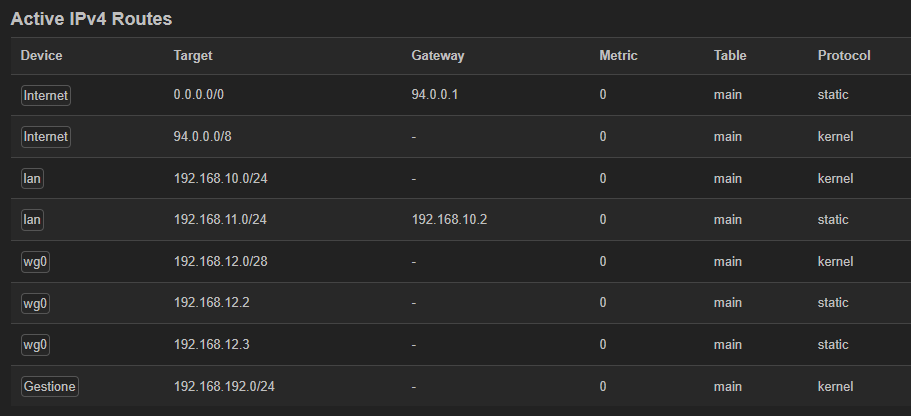
... but @psherman correctly pointed out there are many errors, especially in the VLAN configuration.
So I am asking your support to rework it out.
Here is the schematic of the solution:

This is the "interface" panel of Luci

This is the "device" panel (there is no "VLAN filtering" configuration in any of the bridges)

And here is network config of ASUS-STUDIO (client part of Wireguard removed)
config interface 'loopback'
        option device 'lo'
        option proto 'static'
        option ipaddr '127.0.0.1'
        option netmask '255.0.0.0'

config globals 'globals'
        option ula_prefix 'fdef:9f6a:ecc7::/48'
        option packet_steering '1'

config device
        option name 'br-lan'
        option type 'bridge'
        option ipv6 '0'
        option bridge_empty '1'
        option priority '1000'
        list ports 'lan1'
        list ports 'lan2'
        list ports 'lan3'
        option stp '1'

config interface 'lan'
        option device 'br-lan'
        option proto 'static'
        option ipaddr '192.168.10.1'
        option netmask '255.255.255.0'
        option ip6assign '60'
        option defaultroute '0'
        option delegate '0'
        option force_link '0'

config device
        option name 'eth0'
        option ipv6 '0'

config device
        option name 'lan1'
        option ipv6 '0'

config device
        option name 'lan2'
        option ipv6 '0'

config device
        option name 'lan3'
        option ipv6 '0'

config device
        option name 'phy0-ap0'

config device
        option name 'phy1-ap0'

config device
        option name 'wan'
        option ipv6 '0'
        option macaddr '50:EB:F6:83:1C:A7'


config device
        option type '8021q'
        option ifname 'wan'
        option vid '10'
        option name 'wan.10'
        option ipv6 '0'
        option macaddr '50:EB:F6:83:1C:A6'

config interface 'Internet'   <<<==== Internet
        option proto 'dhcp'
        option device 'wan.10'
        option hostname 'Internet'
        option peerdns '0'
        list dns '8.8.8.8'
        list dns '1.1.1.1'
        option delegate '0'

config interface 'Gestione'    <<<===== modem management
        option proto 'dhcp'
        option device 'wan'
        option hostname 'Gestione'
        option defaultroute '0'
        option peerdns '0'
        option delegate '0'

config device
        option type 'bridge'
        option name 'br-VoIP'
        option bridge_empty '1'
        option ipv6 '0'
        list ports 'lan3.20'
        list ports 'wan.20'

config device
        option type '8021q'
        option ifname 'lan3'
        option vid '20'
        option name 'lan3.20'
        option ipv6 '0'
        option isolate '1'

config device
        option type '8021q'
        option ifname 'wan'
        option vid '20'
        option name 'wan.20'
        option ipv6 '0'

config interface 'VoiPtunnel'
        option proto 'none'
        option device 'br-VoIP'
        option defaultroute '0'
        option delegate '0'

config route
        option interface 'lan'
        option target '192.168.11.0/24'    <<<==== subnet of VX830v LAN
        option gateway '192.168.10.2'
Firewall panel:

This is the part for "voIP" (nothing special indeed -- masqeradind (NAT) is performed by VX830v)

And finally the firewall config (Wireguard omitted).
config defaults
        option input 'REJECT'
        option output 'ACCEPT'
        option forward 'REJECT'
        option synflood_protect '1'
        option flow_offloading '1'
        option flow_offloading_hw '1'

config zone
        option name 'lan'
        option input 'ACCEPT'
        option output 'ACCEPT'
        option forward 'ACCEPT'
        option log '1'
        option mtu_fix '1'
        list network 'lan'
        list network 'wg0'

config zone
        option name 'wan'
        option input 'REJECT'
        option output 'ACCEPT'
        option forward 'REJECT'
        option mtu_fix '1'
        option masq '1'
        list network 'Gestione'
        list network 'Internet'

config forwarding
        option src 'lan'
        option dest 'wan'

config rule
        option name 'Allow-IGMP'
        option src 'wan'
        option proto 'igmp'
        option family 'ipv4'
        option target 'ACCEPT'

config rule
        option name 'Allow-DHCP-Renew'
        option src 'wan'
        option proto 'udp'
        option dest_port '68'
        option target 'ACCEPT'
        option family 'ipv4'
        option enabled '0'

config rule
        option name 'Allow-Ping'
        option src '*'
        option proto 'icmp'
        option family 'ipv4'
        option target 'ACCEPT'
        list icmp_type 'echo-request'
        option dest '*'
        option enabled '0'

config rule
        option name 'Allow-DHCPv6'
        option src 'wan'
        option proto 'udp'
        option dest_port '546'
        option family 'ipv6'
        option target 'ACCEPT'
        option enabled '0'

config rule
        option name 'Allow-MLD'
        option src 'wan'
        option proto 'icmp'
        option src_ip 'fe80::/10'
        list icmp_type '130/0'
        list icmp_type '131/0'
        list icmp_type '132/0'
        list icmp_type '143/0'
        option family 'ipv6'
        option target 'ACCEPT'
        option enabled '0'

config rule
        option name 'Allow-ICMPv6-Input'
        option src 'wan'
        option proto 'icmp'
        list icmp_type 'echo-request'
        list icmp_type 'echo-reply'
        list icmp_type 'destination-unreachable'
        list icmp_type 'packet-too-big'
        list icmp_type 'time-exceeded'
        list icmp_type 'bad-header'
        list icmp_type 'unknown-header-type'
        list icmp_type 'router-solicitation'
        list icmp_type 'neighbour-solicitation'
        list icmp_type 'router-advertisement'
        list icmp_type 'neighbour-advertisement'
        option limit '1000/sec'
        option family 'ipv6'
        option target 'ACCEPT'
        option enabled '0'

config rule
        option name 'Allow-ICMPv6-Forward'
        option src 'wan'
        option dest '*'
        option proto 'icmp'
        list icmp_type 'echo-request'
        list icmp_type 'echo-reply'
        list icmp_type 'destination-unreachable'
        list icmp_type 'packet-too-big'
        list icmp_type 'time-exceeded'
        list icmp_type 'bad-header'
        list icmp_type 'unknown-header-type'
        option limit '1000/sec'
        option family 'ipv6'
        option target 'ACCEPT'
        option enabled '0'

config rule
        option name 'Allow-IPSec-ESP'
        option src 'wan'
        option dest 'lan'
        option proto 'esp'
        option target 'ACCEPT'
        option enabled '0'

config rule
        option name 'Allow-ISAKMP'
        option src 'wan'
        option dest 'lan'
        option dest_port '500'
        option proto 'udp'
        option target 'ACCEPT'
        option enabled '0'

config zone
        option name 'VoIP'
        option input 'REJECT'
        option output 'ACCEPT'
        option forward 'REJECT'
        option log '1'
        option family 'ipv4'
        list network 'VoiPtunnel'
Note: log is showing the following warning, but the VoIP service is correctly working and the VLAN 20 interface of VX830v is ok 
Sat Feb 28 20:05:18 2026 kern.warn kernel: [48435.042238] reject VoIP in: IN=br-VoIP OUT= MAC=ff:ff:ff:ff:ff:ff:ee:fa:c4:fe:2b:40:08:00 SRC=0.0.0.0 DST=255.255.255.255 LEN=576 TOS=0x00 PREC=0x00 TTL=64 ID=62124 PROTO=UDP SPT=68 DPT=67 LEN=556
Thanks in advance for any help, appreciated