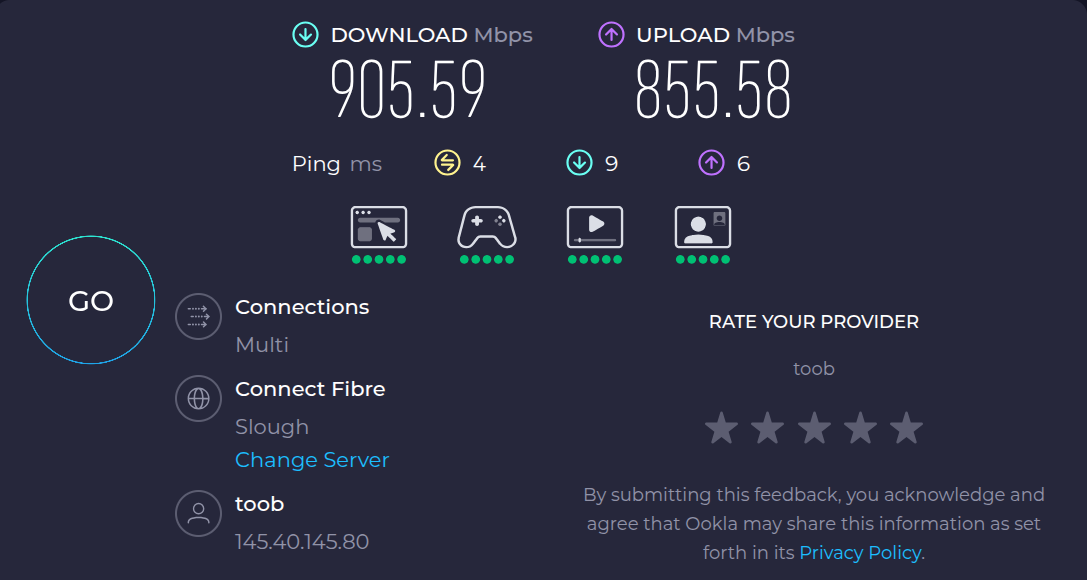
GL-iNet MT6000 throughput when using PBR

I’m running a MT6000 as my main router. Its connected between my ONT and my managed switch, and uses 802.1Q VLANs to segment my network into two subnets. Each subnet has its own ISP. One accesses the internet via the base network provided by the ONT, the other accesses the internet via a L2TP link running over the base network. I also have a Wireguard site to site VPN running over the L2TP tunnel to connect to a second location. The MT6000 ties that all together, using a custom nftable that runs ahead of fw4 to mark and route packets properly.

I have packet steering enabled, along with irqbalance, and I can see all cores being used. Because of the dependency on nftables and packet marking, hardware flow offload (HFO) is disabled.

My problem is that I’m now seeing a maximum LAN-WAN speed of about 300Mbps (very variable, and often much less) on a symmetric 1Gbps FTTP link. I was expecting better, given this is powered by a MediaTek MT7986AV (4xA53 arm cores clocked @2.0Ghz).

But there’s more … I also see horrible jitter, even on any packets that travel via the router within my own network (from fractions of a mSec up to several hundred mSec) while packets between other devices on the same segment (ie, that don’t interact with the router) are consistently sub-mSec

I don’t think I’m CPU-bound because my idle load is usually 2.75-3.5 and I don’t see significant rises in CPU usage even when running a speedtest, either on the LUCI live graphs, or when running htop in an SSH session.

Something must be causing a bottleneck, but I’m at a bit of a loss, and would really appreciate any suggestions on what to investigate next - thanks.

Edit: Posted to wrong section of site

l2p is like vpn or like to connect to provider?
out
of steering and irqbalance you have to choose one.
steering posts network packets to all cpus while irqbalance spreads interrupts between all cpus, ie combination pointlessly re-schedules packets from already different cpus to all others.

Please connect to your OpenWrt device using ssh and copy the output of the following commands and post it here using the "Preformatted text </> " button (red circle; this works best in the 'Markdown' composer view in the blue oval):

Screenshot 2025-10-20 at 8.14.14 PM

Remember to redact passwords, VPN keys, MAC addresses and any public IP addresses you may have:

ubus call system board
cat /etc/config/network
cat /etc/config/wireless
cat /etc/config/dhcp
cat /etc/config/firewall
cat /etc/config/pbr
1 Like

ubus call system board

{
    "kernel": "6.6.110",
    "hostname": "router.xxxxxxx.lan",
    "system": "ARMv8 Processor rev 4",
    "model": "GL.iNet GL-MT6000",
    "board_name": "glinet,gl-mt6000",
    "rootfs_type": "squashfs",
    "release": {
        "distribution": "OpenWrt",
        "version": "24.10.4",
        "revision": "r28959-29397011cc",
        "target": "mediatek/filogic",
        "description": "OpenWrt 24.10.4 r28959-29397011cc",
        "builddate": "1760891865"
    }
}

cat /etc/config/network

config interface 'loopback'
    option device 'lo'
    option proto 'static'
    option ipaddr '127.0.0.1'
    option netmask '255.0.0.0'

config globals 'globals'
    option ula_prefix 'fdb4::/48'
    option packet_steering '2'

config device
    option name 'br-lan'
    option type 'bridge'
    list ports 'lan1'
    list ports 'lan2'
    list ports 'lan3'
    list ports 'lan4'
    list ports 'lan5'

config device
    option name 'lan1'
    option macaddr '94:83:c4:a2:e8:df'

config device
    option name 'lan2'
    option macaddr '94:83:c4:a2:e8:df'

config device
    option name 'lan3'
    option macaddr '94:83:c4:a2:e8:df'

config device
    option name 'lan4'
    option macaddr '94:83:c4:a2:e8:df'

config device
    option name 'lan5'
    option macaddr '94:83:c4:a2:e8:df'

config bridge-vlan
    option device 'br-lan'
    option vlan '1'
    list ports 'lan2:t'
    list ports 'lan3:u*'

config bridge-vlan
    option device 'br-lan'
    option vlan '10'
    list ports 'lan2:t'
    list ports 'lan4:u*'

config interface 'lan_server'
    option macaddr '02:11:22:33:44:0A'
    option proto 'static'
    option device 'br-lan.10'
    list ipaddr '192.168.251.1/24'
    list ip6class 'local'
    list ip6class 'aaisp6'
    list dns_search 'xxxxxxx.lan'
    list dns_search 'yyyyyyy.lan'
    option ip6assign '64'
    option delegate '0'
    option ip6hint '1'
    option ip6ifaceid '::1'

config interface 'lan'
    option macaddr '02:11:22:33:44:01'
    option proto 'static'
    option device 'br-lan.1'
    option ipaddr '192.168.252.1/22'
    list ip6class 'local'
    list ip6class 'wan6'
    list dns_search 'xxxxxxx.lan'
    list dns_search 'yyyyyyy.lan'
    option ip6assign '64'
    option delegate '0'
    option ip6hint '0'
    option ip6ifaceid '::1'

config device
    option name 'eth1'
    option macaddr '94:83:c4:a2:e8:dd'

config interface 'wan'
    option device 'eth1'
    option proto 'dhcp'
    option defaultroute '1'
    option ipv6 '1'
    option peerdns '0'
    option metric '300'
    list dns '9.9.9.9'
    list dns '149.112.112.112'
    list dns '2620:fe::fe'
    list dns '2620:fe::9'
    list dns_search 'xxxxxxx.lan'
    list dns_search 'yyyyyyy.lan'

config interface 'wan6'
    option proto 'dhcpv6'
    option device '@wan'
    option reqaddress 'try'
    option reqprefix 'auto'
    option sourcefilter '0'
    option defaultroute '1'
    option ip6ifaceid '::1'
    option peerdns '1'
    option metric '300'
    option ip6class 'wan6'
    option norelease '0'

config interface 'aaisp'
    option proto 'l2tp'
    option server 'l2tp.aa.net.uk'
    option username 'redacted'
    option password 'redacted'
    option peerdns '0'
    option metric '200'
    option checkup_interval '10'
    option defaultroute '1'
    option ipv6 '1'
    option delegate '0'

config interface 'aaisp6'
    option proto 'dhcpv6'
    option device '@aaisp'
    option reqaddress 'try'
    option reqprefix 'auto'
    option sourcefilter '0'
    option defaultroute '1'
    option ip6ifaceid '::1'
    option peerdns '1'
    option metric '200'
    option ip6class 'aaisp6'
    option norelease '0'

config interface 'site2site'
    option proto 'wireguard'
    option private_key 'redacted'
    option listen_port '51820'
    list addresses '192.168.100.1/29'
    option mtu '1360'
    option auto '0'

config wireguard_site2site 'wgclient1'
    option persistent_keepalive '20'
    option public_key 'redacted'
    option description 'yyyyyyy1'
    option route_allowed_ips '1'
    list allowed_ips '192.168.100.2/32'
    list allowed_ips '192.168.43.0/24'
    list allowed_ips '192.168.1.1/32'

config interface 'mobiles'
    option proto 'wireguard'
    option private_key 'redacted'
    option listen_port '51821'
    list addresses '192.168.101.1/24'
    option mtu '1360'
    option auto '0'

config wireguard_mobiles
    option description 'MyPhone'
    option public_key 'redacted'
    option private_key 'redacted'
    option preshared_key 'redacted'
    option persistent_keepalive '20'
    list allowed_ips '192.168.101.2/32'

config wireguard_mobiles
    option description 'MyiPad'
    option public_key 'redacted'
    option private_key 'redacted'
    option preshared_key 'redacted'
    option persistent_keepalive '20'
    list allowed_ips '192.168.101.3/32'

cat /etc/config/wireless

config wifi-device 'radio0'
    option type 'mac80211'
    option path 'platform/soc/18000000.wifi'
    option channel '1'
    option band '2g'
    option htmode 'HE20'
    option country 'GB'
    option cell_density '0'

config wifi-iface 'default_radio0'
    option device 'radio0'
    option network 'lan'
    option mode 'ap'
    option ssid 'SSID1'
    option encryption 'psk2'
    option key 'redacted'

config wifi-device 'radio1'
    option type 'mac80211'
    option path 'platform/soc/18000000.wifi+1'
    option channel '36'
    option band '5g'
    option htmode 'HE80'
    option country 'GB'
    option cell_density '0'

config wifi-iface 'default_radio1'
    option device 'radio1'
    option network 'lan'
    option mode 'ap'
    option ssid 'SSID1'
    option encryption 'psk2'
    option key 'redacted'

cat /etc/config/dhcp

config dnsmasq
    option domainneeded '1'
    option localise_queries '1'
    option rebind_protection '1'
    option rebind_localhost '1'
    option local '/xxxxxxx.lan/'
    option domain 'xxxxxxx.lan'
    option expandhosts '1'
    option cachesize '1000'
    option authoritative '1'
    option readethers '1'
    option leasefile '/tmp/dhcp.leases'
    option resolvfile '/tmp/resolv.conf.d/resolv.conf.auto'
    option localservice '0'
    list rebind_domain 'xxxxxxx.lan'
    list rebind_domain 'yyyyyyy.lan'
    list rebind_domain 'zzzzzzz.home'
    option dnssec '1'
    option ednspacket_max '1232'
    list server '/*.yyyyyyy.lan/192.168.43.1'
    list address '/zzzzzzz.home/192.168.1.1'

config dhcp 'lan'
    option interface 'lan'
    option start '100'
    option limit '150'
    option leasetime '5m'
    option dhcpv4 'server'
    option dhcpv6 'server'
    option ra 'server'
    list ra_flags 'managed-config'
    list ra_flags 'other-config'
    option prefix_filter '2001:470:6ba2::/64'
    option preferred_lifetime '5m'
    list domain 'xxxxxxx.lan'
    list domain 'yyyyyyy.lan'
    list ntp 'uk.pool.ntp.org'

config dhcp 'lan_server'
    option interface 'lan_server'
    option start '100'
    option limit '150'
    option leasetime '5m'
    option dhcpv4 'server'
    option dhcpv6 'server'
    option ra 'server'
    list ra_flags 'managed-config'
    list ra_flags 'other-config'
    option prefix_filter '2001:8b0:a4ee:4d01::/64'
    option preferred_lifetime '5m'
    list domain 'xxxxxxx.lan'
    list domain 'yyyyyyy.lan'
    list ntp 'uk.pool.ntp.org'

config dhcp 'wan'
    option interface 'wan'
    option ignore '1'

config odhcpd 'odhcpd'
    option maindhcp '0'
    option leasefile '/tmp/hosts/odhcpd'
    option leasetrigger '/usr/sbin/odhcpd-update'
    option loglevel '4'

# config domain and config host entries removed for brevity

cat /etc/config/firewall

config defaults
    option input 'REJECT'
    option output 'ACCEPT'
    option forward 'REJECT'
    option synflood_protect '1'

#
# ZONES
#

config zone
    option name 'lan'
    option input 'ACCEPT'
    option output 'ACCEPT'
    option forward 'ACCEPT'
    list network 'lan'
    list network 'lan_server'
    list network 'site2site'
    list network 'mobiles'

config zone
    option name 'wan'
    option input 'REJECT'
    option output 'ACCEPT'
    option forward 'REJECT'
    option masq '1'
    option mtu_fix '1'
    list network 'wan'
    list network 'wan6'

config zone
    option name 'overlay'
    option input 'REJECT'
    option output 'ACCEPT'
    option forward 'REJECT'
    option masq '1'
    list network 'aaisp'
    list network 'aaisp6'

#
# FORWARDING
#

config forwarding
    option src 'lan'
    option dest 'overlay'

config forwarding
    option src 'lan'
    option dest 'wan'

############################################################################
# Include firewall snippet to mark packets for overlay operation
#
# In the form of another nftable (overlay) containing a single rule, in a 
# single chain, hooked to the prerouting hook, executed just prior to the
# rules in the fw4 nftable.
# Included here so OpenWRT's fw4 manages the load/reload/flushing reliably.
config include
    option	type 'nftables'
    option	path '/etc/firewall-overlay-marking.nft'
    option	position 'ruleset-pre'

############################################################################
# Allow-DHCP-Renew
# Needed only if the ISP on that interface uses DHCPv4.
# Mine does.
config rule
    option name 'Allow-DHCP-Renew'
    option src 'wan'
    option proto 'udp'
    option dest_port '68'
    option target 'ACCEPT'
    option family 'ipv4'

config rule
    option name 'Allow-DHCP-Renew'
    option src 'overlay'
    option proto 'udp'
    option dest_port '68'
    option target 'ACCEPT'
    option family 'ipv4'

############################################################################
# Allow-Ping (ICMP Echo Request)
# Used for diagnostics — not strictly required.
# Requirement for the HE tunnel broker, should I ever need to restore it
config rule
    option name 'Allow-Ping'
    option src 'wan'
    option proto 'icmp'
    option icmp_type 'echo-request'
    option family 'ipv4'
    option target 'ACCEPT'

config rule
    option name 'Allow-Ping'
    option src 'overlay'
    option proto 'icmp'
    option family 'ipv4'
    option target 'ACCEPT'
    list icmp_type 'echo-request'

############################################################################
# Allow-IGMP
# Needed only if you're using IPv4 multicast (e.g., IPTV over WAN).
# Recommendation: Only allow on LAN, unless your WAN explicitly needs it.
config rule
    option name 'Allow-IGMP'
    option src 'wan'
    option proto 'igmp'
    option family 'ipv4'
    option target 'ACCEPT'

config rule
    option name 'Allow-IGMP'
    option src 'overlay'
    option proto 'igmp'
    option family 'ipv4'
    option target 'ACCEPT'

############################################################################
# Allow-DHCPv6
# Needed if your ISP assigns IPv6 using DHCPv6 (e.g., for prefix delegation).
# Needed for AAISP. Not needed for Plusnet or Hurricane Electric.
# Will be needed for Toob
config rule
    option name 'Allow-DHCPv6'
    option src 'wan'
    option proto 'udp'
    option dest_port '546'
    option family 'ipv6'
    option target 'ACCEPT'

config rule
    option name 'Allow-DHCPv6'
    option src 'overlay'
    option proto 'udp'
    option dest_port '546'
    option family 'ipv6'
    option target 'ACCEPT'

############################################################################
# Allow-MLD
# MLD is the IPv6 equivalent of IGMP, managing multicast group membership.
# Rarely needed on WAN unless using IPv6 multicast IPTV or similar.
config rule
    option name 'Allow-MLD'
    option src 'wan'
    option proto 'icmp'
    option src_ip 'fe80::/10'
    list icmp_type '130/0'
    list icmp_type '131/0'
    list icmp_type '132/0'
    list icmp_type '143/0'
    option family 'ipv6'
    option target 'ACCEPT'

config rule
    option name 'Allow-MLD'
    option src 'overlay'
    option proto 'icmp'
    list src_ip 'fe80::/10'
    list icmp_type '130/0'
    list icmp_type '131/0'
    list icmp_type '132/0'
    list icmp_type '143/0'
    option family 'ipv6'
    option target 'ACCEPT'

############################################################################
# Allow-ICMPv6-Input
# Crucial for IPv6 operation: allows things like:
# Router Advertisements (RA)
# Neighbor Discovery (ND)
# Path MTU Discovery
# If you have public IPv6 on a WAN, this must be allowed.
# Enable on WANs with native/public IPv6 (e.g., both my wans)
config rule
    option name 'Allow-ICMPv6-Input'
    option src 'wan'
    option proto 'icmp'
    list icmp_type 'echo-request'
    list icmp_type 'echo-reply'
    list icmp_type 'destination-unreachable'
    list icmp_type 'packet-too-big'
    list icmp_type 'time-exceeded'
    list icmp_type 'bad-header'
    list icmp_type 'unknown-header-type'
    list icmp_type 'router-solicitation'
    list icmp_type 'neighbour-solicitation'
    list icmp_type 'router-advertisement'
    list icmp_type 'neighbour-advertisement'
    option limit '1000/sec'
    option family 'ipv6'
    option target 'ACCEPT'

config rule
    option name 'Allow-ICMPv6-Input'
    option src 'overlay'
    option proto 'icmp'
    option limit '1000/sec'
    option family 'ipv6'
    option target 'ACCEPT'
    list icmp_type 'bad-header'
    list icmp_type 'destination-unreachable'
    list icmp_type 'echo-reply'
    list icmp_type 'echo-request'
    list icmp_type 'neighbour-advertisement'
    list icmp_type 'neighbour-solicitation'
    list icmp_type 'packet-too-big'
    list icmp_type 'router-advertisement'
    list icmp_type 'router-solicitation'
    list icmp_type 'time-exceeded'
    list icmp_type 'unknown-header-type'

############################################################################
# Allow-ICMPv6-Forward
# Rarely required unless you’re forwarding IPv6 traffic between interfaces.
# Typically applies to multi-router networks or IPv6 relay scenarios.
# Recommendation: Disable unless you know you need it.
config rule
    option name 'Allow-ICMPv6-Forward'
    option src 'wan'
    option dest '*'
    option proto 'icmp'
    option limit '1000/sec'
    option family 'ipv6'
    option target 'ACCEPT'
    list icmp_type 'echo-request'
    list icmp_type 'echo-reply'
    list icmp_type 'destination-unreachable'
    list icmp_type 'packet-too-big'
    list icmp_type 'time-exceeded'
    list icmp_type 'bad-header'
    list icmp_type 'unknown-header-type'

config rule
    option name 'Allow-ICMPv6-Forward'
    option src 'overlay'
    option dest '*'
    option proto 'icmp'
    option limit '1000/sec'
    option family 'ipv6'
    option target 'ACCEPT'
    list icmp_type 'bad-header'
    list icmp_type 'destination-unreachable'
    list icmp_type 'echo-reply'
    list icmp_type 'echo-request'
    list icmp_type 'packet-too-big'
    list icmp_type 'time-exceeded'
    list icmp_type 'unknown-header-type'

############################################################################
# WebServer 
############################################################################
# IPv4 inbound HTTP to Overlay
config redirect
    option dest 'lan'
    option target 'DNAT'
    option name 'HTTP'
    list proto 'tcp'
    option src 'overlay'
    option src_dport '80'
    option dest_ip '192.168.251.20'
    option dest_port '80'

# IPv4 inbound HTTPS to Overlay
config redirect
    option dest 'lan'
    option target 'DNAT'
    list proto 'tcp'
    option src 'overlay'
    option src_dport '443'
    option dest_ip '192.168.251.20'
    option dest_port '443'
    option name 'HTTPS'

# IPv6 inbound HTTP to Overlay
config rule
    option name 'HTTP-6'
    option family 'ipv6'
    list proto 'tcp'
    option src 'overlay'
    option dest 'lan'
    option dest_port '80'
    option target 'ACCEPT'
    list dest_ip '2001:8b0:a4ee:4d01::redacted'

# IPv6 inbound HTTPS to Overlay
config rule
        option name 'HTTPS-6'
        option family 'ipv6'
        list proto 'tcp'
        option src 'overlay'
        option dest 'lan'
        option dest_port '443'
        option target 'ACCEPT'
        list dest_ip '2001:8b0:a4ee:4d01::redacted'

############################################################################
# Mailserver, IPv4 first...
############################################################################
# IPv4 SMTPD - Inbound connections from MTAs (other mailservers)
config redirect
    option dest 'lan'
    option target 'DNAT'
    option name 'SMTPD'
    list proto 'tcp'
    option src 'overlay'
    option src_dport '25'
    option dest_ip '192.168.251.20'
    option dest_port '25'

# IPv4 SUBMISSION - Preferred way for a mail client to input a new email
config redirect
    option dest 'lan'
    option target 'DNAT'
    option name 'SUBMISSION'
    list proto 'tcp'
    option src 'overlay'
    option src_dport '587'
    option dest_ip '192.168.251.20'
    option dest_port '587'

# IPv4 IMAP(STARTTLS) - Less preferred IMAP access for mail clients
config redirect
    option dest 'lan'
    option target 'DNAT'
    option name 'IMAP(STARTTLS)'
    list proto 'tcp'
    option src 'overlay'
    option src_dport '143'
    option dest_ip '192.168.251.20'
    option dest_port '143'

# IPv4 IMAPS - Preferred way for mail client to use IMAP to read email
config redirect
    option dest 'lan'
    option target 'DNAT'
    option name 'IMAPS'
    list proto 'tcp'
    option src 'overlay'
    option src_dport '993'
    option dest_ip '192.168.251.20'
    option dest_port '993'

############################################################################
# Mailserver, now IPv6 ... 
############################################################################
# IPv6 SMTPD - Inbound connections from MTAs (other mailservers)
config rule
    option name 'SMTPD-6'
    option family 'ipv6'
    list proto 'tcp'
    option src 'overlay'
    option dest 'lan'
    list dest_ip '2001:8b0:a4ee:4d01::redacted'
    option dest_port '25'
    option target 'ACCEPT'

# IPv6 SUBMISSION - Preferred way for a mail client to input a new email
config rule
    option name 'SUBMISSION-6'
    option family 'ipv6'
    list proto 'tcp'
    option src 'overlay'
    option dest 'lan'
    list dest_ip '2001:8b0:a4ee:4d01::redacted'
    option dest_port '587'
    option target 'ACCEPT'

# IPv6 IMAP(STARTTLS) - Less preferred IMAP access for mail clients
config rule
    option name 'IMAP(STARTTLS)-6'
    option family 'ipv6'
    list proto 'tcp'
    option src 'overlay'
    option dest 'lan'
    list dest_ip '2001:8b0:a4ee:4d01::redacted'
    option dest_port '143'
    option target 'ACCEPT'

# IPv6 IMAPS - Preferred way for mail client to use IMAP to read email
config rule
    option name 'IMAPS-6'
    option family 'ipv6'
    list proto 'tcp'
    option src 'overlay'
    option dest 'lan'
    list dest_ip '2001:8b0:a4ee:4d01::redacted'
    option dest_port '993'
    option target 'ACCEPT'

############################################################################
# Wireguard servers
############################################################################
config rule
    option name 'Wireguard-site2site'
    list proto 'udp'
    option dest_port '51820'
    option target 'ACCEPT'
    option src 'overlay'
    option enabled '1'

config rule
    option name 'Wireguard-mobiles'
    list proto 'udp'
    option src 'overlay'
    option dest_port '51821'
    option target 'ACCEPT'
    option enabled '1'

############################################################################
# VoIP phones
# AAISP services related to VoIP are in the following blocks:
# 81.187.30.110/31, 81.187.30.112/29, 90.155.3.0/24 and 90.155.103.0/24
#
# voip.xxxxxxx.lan accepts UDP traffic on 15020-15038 inclusive
# voip.yyyyyyy.lan accepts UDP traffic on 15000-15018 inclusive
#
# Both phones are IPv4 only, and route their traffic through the overlay.
# voip.xxxxxxx.lan is on 192.168.252.10
# voip.yyyyyyy.lan is on 192.168.43.10 (far end of the site to site WG tunnel)
############################################################################
config ipset
        option	name	'AAISP_VOIP'
        option	family	'ipv4'
        option	match	'src_net'
        list	entry	'81.187.30.110/31'
        list	entry	'81.187.30.112/29'
        list	entry	'90.155.3.0/24'
        list	entry	'90.155.103.0/24'

config redirect
    option  name            'Inbound VoIP for voip.xxxxxxx.lan'
    option  src             'overlay'
    option	src_dport       '15020-15038'
    option  ipset		    'AAISP_VOIP'
    option  dest            'lan'
    option  dest_ip         '192.168.252.10'
    option  proto           'udp'
    option  target          'DNAT'
    option	enabled		    '0'

config redirect
    option	name            'Inbound VoIP for voip.yyyyyyy.lan'
    option	src             'overlay'
    option  src_dport       '15000-15018'
    option	ipset	    	'AAISP_VOIP'
    option	dest            'lan'
    option	dest_ip         '192.168.43.10'
    option	proto           'udp'
    option	target          'DNAT'
    option	enabled		    '0'

cat /etc/config/pbr
cat: can't open '/etc/config/pbr': No such file or directory

This is because I am using my own nftables, not the PBR package. See next post...

cat /etc/hotplug.d/iface/99-overlay-mods

#!/bin/sh

#
# Hotplug script for OpenWRT, sits in /etc/hotplug.d/iface/99-overlay-mods
#
# Processes: wan/ifup/ifupdate/reload and wan/ifdown
# 	     aaisp/ifup/ifupdate/reload and aaisp/ifdown
# 	     wan6/ifup/ifupdate/reload and wan6/ifdown
# 	     aaisp6/ifup/ifupdate/reload and aaisp6/ifdown
#
# In ifup/wan:
# - Set up specific routes for the L2TP tunnel server over the wan interface
# - Start aaisp interfaces, which will start an L2TP tunnel over the routes we just created, with a higher 
#   default (IPv4) priority (ie, lower metric) than the wan interfaces
#
# In ifup/aaisp:
# - Create a default route to the underlay interface (wan) in the (pre-existing) underlay custom routing table
# - Create a rule that directs IPv4 packets marked with 0x10000000 to use the underlay custom routing table
# - Start the Wireguard interfaces, now that the default routing via aaisp is now in place
#
# In ifup/wan6 & aaisp6:
# - Create a default route to the underlay6 interface (wan6) in the (pre-existing) underlay6 custom routing table
# - Create a default route to the overlay6 interface (aaisp6) in the (pre-existing) overlay6 custom routing table
# - Create a rule that directs IPv6 packets marked with 0x10000000 to use the underlay custom routing table
# - Create a rule that directs IPv6 packets marked with 0x20000000 to use the overlay custom routing table
#
# The nftables element of this is injected by fw4 into a custom inet nftable via an include in /etc/config/firewall
# It marks Internet-bound IPv4 packets that need to be directed to the underlay; all the rest go via the default route, which is
# set to the overlay ISP.
# It also marks all Internet-bound IPv6 traffic (as IPv6 is not masqueraded) to direct it via one or the other of the
# underlay or overlay ISPs.
#
# All traffic marked with 0x10000000 will route to the underlay ISP (IPv4 and IPv6)
# All traffic marked with 0x20000000 will route to the overlay ISP (IPv6)
#
# Deliberately set up this way as Wireguard cannot be bound to a specific interface, and always uses the default 
# gateway, so that default needs to be set to suit the desired functionality. In this case the wireguard tunnels
# must run over the overlay as its the only one that is externally resolveable, because the underlay is behind CGNAT
#

[ "$INTERFACE" = "aaisp" ] || [ "$INTERFACE" = "wan" ] || [ "$INTERFACE" = "wan6" ] || [ "$INTERFACE" = "aaisp6" ] || exit 0
[ "$ACTION" = "ifup" ] || [ "$ACTION" = "ifupdate" ] || [ "$ACTION" = "reload" ] || [ "$ACTION" = "ifdown" ] || exit 0

UNDERLAY_TABLE="underlay"
UNDERLAY6_TABLE="underlay6"
OVERLAY6_TABLE="overlay6"
UNDERLAY_IF="eth1"
OVERLAY_IF="l2tp-aaisp"
L2TP_HOST="l2tp.aa.net.uk"
SCRIPT="99-overlay-mods"


case "$INTERFACE" in
    wan)
        # Want to set up the routes to the AAISP L2TP tunnel server as part of the wan interface ifup so there is no 
        # chance that the L2TP tunnel is brought up over the wrong interface because of metric settings
 
        case "$ACTION" in
            ifup | ifupdate | reload)
                logger -t hotplug "Setting up routes to $L2TP_HOST in $INTERFACE ifup hotplug script $SCRIPT"	

                # Add routes so L2TP tunnel continues to use wan interface
                # Use nslookup to resolve IPv4 address(es) of L2TP endpoint in AAISP network (skip header and extract IPs only)
                L2TP_IPS=$(nslookup "$L2TP_HOST" 127.0.0.1 | awk '/^Address: / {print $2}' | grep -E '^[0-9]+\.[0-9]+\.[0-9]+\.[0-9]+')

                logger -t hotplug "Resolved $L2TP_HOST to: $L2TP_IPS"

                for ip in $L2TP_IPS; do
                    ip route replace "$ip" dev "$UNDERLAY_IF" table main
                    logger -t hotplug "Added route to $ip via $UNDERLAY_IF in main routing table"
                done
                # Cache IP addresses for teardown
                TMPFILE="/tmp/l2tp_routes.txt"
                echo "$L2TP_IPS" > "$TMPFILE"

                # WAN is now up, L2TP routes are in place, so bring up the L2TP tunnel to AAISP
                # If by any chance they are already up, this will actually take them down before bringing them back up
                /sbin/ifup aaisp
                /sbin/ifup aaisp6                
                ;;

            ifdown)
                logger -t hotplug "Removing routes to $L2TP_HOST in $INTERFACE ifup hotplug script $SCRIPT"				
                if [ -f /tmp/l2tp_routes.txt ]; then
                    for ip in $(cat /tmp/l2tp_routes.txt); do
                        ip route delete "$ip" dev "$UNDERLAY_IF" table main 2>/dev/null
                        logger -t hotplug "Removed route to $ip via $UNDERLAY_IF in main table"
                        done
                    rm -f /tmp/l2tp_routes.txt
                    fi
                ;;
            esac
        ;;
        
    aaisp)
        case "$ACTION" in
            ifup | ifupdate | reload)
                logger -t hotplug "Setting up $UNDERLAY_TABLE routing table in $INTERFACE ifup hotplug script $SCRIPT"
                
                # Get WAN gateway IP dynamically (as it seems to vary a little)
                for i in 1 2 3 4 5; do
                    WAN_GATEWAY_IP=$(ubus call network.interface.wan status | jsonfilter -e "@['route'][*]['nexthop']")
                    # WAN_GATEWAY_IP=$(ifstatus wan | grep nexthop | awk -F\" '{print $4}')
                    [ -n "$WAN_GATEWAY_IP" ] && break
                    sleep 1
                done

                if [ -z "$WAN_GATEWAY_IP" ]; then
                    logger -t hotplug "ERROR: Could not determine WAN gateway for $UNDERLAY_IF"
                else
                    # Create default route in underlay table to Internet via WAN
                    ip route replace default via "$WAN_GATEWAY_IP" dev "$UNDERLAY_IF" table "$UNDERLAY_TABLE"
                    logger -t hotplug "Added default route via $WAN_GATEWAY_IP dev $UNDERLAY_IF table $UNDERLAY_TABLE"

                    # Tie fwmark to routing table with iproute2 rule
                    ip rule add fwmark 0x10000000/0x30000000 table "$UNDERLAY_TABLE" priority 20100 2>/dev/null 
                logger -t hotplug "Added ip rule so traffic fwmarked wih 0x10000000/0x30000000 uses custom routing table $UNDERLAY_TABLE"
                fi

                # At this point our environment is set up, so start the WG tunnels, which will establish on the overlay
                # If by any chance they are already up, this will actually take them down before bringing them up, so its safe as it stands
                /sbin/ifup site2site
                /sbin/ifup mobiles

                logger -t hotplug "$UNDERLAY_TABLE routing setup complete and all network interfaces started"
                ;;

            ifdown)
                logger -t hotplug "Tearing down $UNDERLAY_TABLE routing in $INTERFACE ifdown hotplug script $SCRIPT"

                logger -t hotplug "Removing $UNDERLAY_TABLE routing table rules"
                # Remove the rule that directs marked traffic to the underlay table
                ip rule delete from all fwmark 0x10000000/0x30000000 lookup "$UNDERLAY_TABLE" 2>/dev/null
                # Remove the default route in the underlay table
                ip route delete default table "$UNDERLAY_TABLE" 2>/dev/null

                logger -t hotplug "Teardown of $UNDERLAY_TABLE routing in $INTERFACE ifdown hotplug script $SCRIPT complete"
                ;;
        esac
    ;;

        wan6)                                                                                                                                         
                case "$ACTION" in                                                                                                                      
                        ifup | ifupdate | reload)                                                                                                      
                                logger -t hotplug "Setting up $UNDERLAY6_TABLE routing table in $INTERFACE ifup hotplug script $SCRIPT"                 
                                                                                                                                                       
                                # Get WAN6 nexthop 
                                for i in 1 2 3 4 5; do                                                                                                 
                                        WAN_GATEWAY_IP=$(ubus call "network.interface.$INTERFACE" status | jsonfilter -e "@['route'][*]['nexthop']")            
                                        sleep 1                                                                                                        
                                done                                                                                                                   
                                                                                                                                                       
                                if [ -z "$WAN_GATEWAY_IP" ]; then                                                                                      
                                        logger -t hotplug "ERROR: Could not determine $INTERFACE gateway for $UNDERLAY_IF"                                    
                                else                                                                                                                   
                                        # Create default route in underlay6 table to Internet via WAN6                                                   
                                        ip -6 route replace default via "$WAN_GATEWAY_IP" dev "$UNDERLAY_IF" table "$UNDERLAY6_TABLE"                      
                                        logger -t hotplug "Added default route via $WAN_GATEWAY_IP dev $UNDERLAY_IF table $UNDERLAY6_TABLE"             
                                                                                                                                                       
                                        # Tie fwmark to routing table with iproute2 rule                                                               
                                        ip -6 rule add fwmark 0x10000000/0x30000000 table "$UNDERLAY6_TABLE" priority 20099 2>/dev/null                    
                                    logger -t hotplug "Added ip rule so traffic fwmarked wih 0x10000000/0x30000000 uses custom routing table $UNDERLAY6_TABLE"
                                fi                                                                                                                       
                                                                                                                                                         
                                logger -t hotplug "$UNDERLAY6_TABLE routing setup complete"                              
                                ;;                                                                                                                         
                                                                                                                                                           
                        ifdown)                                                                                                                            
                                logger -t hotplug "Tearing down $UNDERLAY6_TABLE routing in $INTERFACE ifdown hotplug script $SCRIPT"                       
                                                                                                                                                           
                                logger -t hotplug "Removing $UNDERLAY6_TABLE routing table rules"                                                           
                                # Remove the rule that directs marked traffic to the underlay table                                                        
                                ip -6 rule delete from all fwmark 0x10000000/0x30000000 lookup "$UNDERLAY6_TABLE" 2>/dev/null                                  
                                # Remove the default route in the underlay table                                                                           
                                ip -6 route delete default table "$UNDERLAY6_TABLE" 2>/dev/null                                                                
                                                                                                                                                           
                                logger -t hotplug "Teardown of $UNDERLAY6_TABLE routing in $INTERFACE ifdown hotplug script $SCRIPT complete"               
                                ;;                                                                                                                         
                esac                                                                                                                                       
        ;;

        aaisp6)                                                                                                                                              
                case "$ACTION" in                                                                                                                          
                        ifup | ifupdate | reload)                                                                                                          
                                logger -t hotplug "Setting up $OVERLAY6_TABLE routing table in $INTERFACE ifup hotplug script $SCRIPT"                    
                                                                                                                                                           
                                # Get AAISP6 nexthop                                                                                                         
                                for i in 1 2 3 4 5; do                                                                                                     
                                        WAN_GATEWAY_IP=$(ubus call "network.interface.$INTERFACE" status | jsonfilter -e "@['route'][*]['nexthop']")       
                                        sleep 1                                                                                                            
                                done                                                                                                                       
                                                                                                                                                           
                                if [ -z "$WAN_GATEWAY_IP" ]; then                                                                                          
                                        logger -t hotplug "ERROR: Could not determine $INTERFACE gateway for $OVERLAY_IF"
                                else                                                                                                                       
                                        # Create default route in overlay6 table to Internet via aaisp6                                                     
                                        ip -6 route replace default via "$WAN_GATEWAY_IP" dev "$OVERLAY_IF" table "$OVERLAY6_TABLE"                         
                                        logger -t hotplug "Added default route via $WAN_GATEWAY_IP dev $OVERLAY_IF table $OVERLAY6_TABLE"                
                                                                                                                                                           
                                        # Tie fwmark to routing table with iproute2 rule                                                                   
                                        ip -6 rule add fwmark 0x20000000/0x30000000 table "$OVERLAY6_TABLE" priority 20098 2>/dev/null                       
                                logger -t hotplug "Added ip rule so traffic fwmarked wih 0x20000000/0x30000000 uses custom routing table $OVERLAY6_TABLE" 
                                fi                                                                                                                         
                                                                                                                                                           
                                logger -t hotplug "$OVERLAY6_TABLE routing setup complete"                                                                
                                ;;                                                                                                                         
                                                                                                                                                           
                        ifdown)                                                                                                                            
                                logger -t hotplug "Tearing down $OVERLAY6_TABLE routing in $INTERFACE ifdown hotplug script $SCRIPT"                      
                                                                                                                                                           
                                logger -t hotplug "Removing $OVERLAY6_TABLE routing table rules"                                                          
                                # Remove the rule that directs marked traffic to the overlay table                                                        
                                ip -6 rule delete from all fwmark 0x20000000/0x30000000 lookup "$OVERLAY6_TABLE" 2>/dev/null                                 
                                # Remove the default route in the overlay table                                                                           
                                ip -6 route delete default table "$OVERLAY6_TABLE" 2>/dev/null                                                               
                                                                                                                                                           
                                logger -t hotplug "Teardown of $OVERLAY6_TABLE routing in $INTERFACE ifdown hotplug script $SCRIPT complete"              
                                ;;                                                                                                                         
                esac                                                                                                                                       
        ;;
esac

cat /etc/init.d/create_overlay_nftable

#!/bin/sh /etc/rc.common

# The nftable snippet that OpenWRT fw4 includes has to execute cleanly. But it also
# has to flush the table or delete it during reload or restart operations. 
# Unfortunately these both create errors during startup when no table exists, and
# stops execution of the snippet, which prevents the marking rule being created, and
# prevents the startup of the OpenWRT firewall, which would be a disaster.
#
# The answer to that is to create the table on startup, before OpenWRTs firewall
# manager (fw4) starts, so the snippet always encounters an existing table, and 
# can contain a flush command and not fail. This init.d script does that nftables 
# table create.
#
# This script goes in /etc/init.d/create_overlay_nftable
#
# It includes some helper functions and the standard initd framework from /etc/rc.common
# (see top of this file). Customisation is all below, but we need to hook this into the
# init.d startup/shutdown process. This is done by calling the "enable" function that
# is included into this script, which causes links to be make to this script from 
# /etc/rc.d/ that determine the timing of its execution during startup and shutdown,
# though for this script, shutdown is a NOP. 
#
# To do that run the command "/etc/init.d/create_overlay_nftable enable" to link 
# it into the startup process.
#
# For these changes to survive an attended sysupgrade, we need to put that command into the
# script that runs once, at the end of a sysupgrade.
#
START=15  # Must be before fw4 (which defaults to START=19)

USE_PROCD=1

start_service() {
    logger -t overlay "Checking whether to create nftable 'overlay' during startup"
    if nft list table inet overlay >/dev/null 2>&1; then
        logger -t overlay "... nftable 'overlay' already exists, doing nothing."
    else
        nft 'add table inet overlay'
        logger -t overlay "... nftable 'overlay' added, so fw4 can flush it during its startup"
    fi
}

cat /etc/firewall-overlay-marking.nft

# There cannot be any errors returned from the execution of this snippet as it 
# is included into the startup of OpenWRT by its firewall manager, fw4.
#
# The flush command is absolutely required to ensure there is no buildup of rules 
# over time & repeated reload / restart operations of the network and firewall. 
# However, on first boot there will be no nftables, and the flush (or a delete)
# of a non-existant table will fail with an error, causing the creation of the rest 
# of the table/chain/rules to fail, breaking my overlay networking setup.
# 
# To resolve this, there is a small script in /etc/init.d that creates the nftable 
# just before fw4 starts up, so this snippet will always see an existing table.
# See /etc/init.d/create_overlay_nftable for more information on how that is created.

flush table inet overlay

table inet overlay {
    set aaisp_voip4 {
        type ipv4_addr;
        flags interval;
        elements = {
            81.187.30.110/31,
            81.187.30.112/29,
            90.155.3.0/24,
            90.155.103.0/24
        }
    }

    set local4 {
        type ipv4_addr;
        flags interval;
        elements = {
            192.168.1.0/24,
            192.168.43.0/24,
            192.168.100.0/29,
            192.168.101.0/24,
            192.168.155.0/24,
            192.168.252.0/22
        }
    }

    set internal4 {
        type ipv4_addr;
        flags interval;
        elements = { 192.168.0.0/16 }
    }

    set local6_lan {
        type ipv6_addr;
        flags interval;
        elements = { 2a0e:cb01:17b:c900::/64 }
    }

    set local6_server {
        type ipv6_addr;
        flags interval;
        elements = { 2001:8b0:a4ee:4d01::/64 }
    }

    set internal6 {
        type ipv6_addr;
        flags interval;
        elements = {
            2a0e:cb01:17b:c900::/64,
            fdb4::/64,
            2001:8b0:a4ee:4d01::/64,
            fdb4:0:0:1::/64
        }
    }

    chain marking {
        type filter hook prerouting priority -300;
        policy accept;

        meta nfproto ipv4 goto ipv4_marking
        meta nfproto ipv6 goto ipv6_marking
    }

    chain ipv4_marking {
        ip daddr @internal4 return
        ip daddr @aaisp_voip4 return
        ip saddr @local4 ip daddr != @internal4 meta mark set meta mark | 0x10000000
    }

    chain ipv6_marking {
        ip6 daddr @internal6 return
        ip6 saddr @local6_lan ip6 daddr != @internal6 meta mark set meta mark | 0x10000000
        ip6 saddr @local6_server ip6 daddr != @internal6 meta mark set meta mark | 0x20000000
    }
}

cat /etc/iproute2/rt_tables

#
# reserved values
#
128	prelocal
255	local
254	main
253	default
0	unspec
#
# local
#
#1	inr.ruhep
#
# Custom Routing tables
# 
146	underlay6
148	overlay6
150	underlay

The route to the L2TP tunnel server at my "overlay" ISP
ip route list match 194.4.172.12 table main

default via 81.187.81.187 dev l2tp-aaisp proto static metric 200 
default via 100.68.0.1 dev eth1 proto static src 100.69.136.20 metric 300 
194.4.172.12 dev eth1 scope link 
194.4.172.12 via 100.68.0.1 dev eth1 proto static metric 300 

ip -4 rule show

0:	from all lookup local
20100:	from all fwmark 0x10000000/0x30000000 lookup underlay
32766:	from all lookup main
32767:	from all lookup default

ip -6 rule show

0:	from all lookup local
20098:	from all fwmark 0x20000000/0x30000000 lookup overlay6
20099:	from all fwmark 0x10000000/0x30000000 lookup underlay6
32766:	from all lookup main
4200000000:	from 2a0e:cb01:17b:c900::1/64 iif br-lan.1 unreachable
4200000000:	from 2001:8b0:a4ee:4d01::1/64 iif br-lan.10 unreachable

main table for IPv4:
ip -4 route show table main

default via 81.187.81.187 dev l2tp-aaisp proto static metric 200 
default via 100.68.0.1 dev eth1 proto static src 100.69.136.20 metric 300 
81.187.81.187 dev l2tp-aaisp proto kernel scope link src 81.187.73.113 
100.68.0.0/15 dev eth1 proto static scope link metric 300 
192.168.1.1 dev site2site proto static scope link 
192.168.43.0/24 dev site2site proto static scope link 
192.168.100.0/29 dev site2site proto kernel scope link src 192.168.100.1 
192.168.100.2 dev site2site proto static scope link 
192.168.101.0/24 dev mobiles proto kernel scope link src 192.168.101.1 
192.168.251.0/24 dev br-lan.10 proto kernel scope link src 192.168.251.1 
192.168.252.0/22 dev br-lan.1 proto kernel scope link src 192.168.252.1 
194.4.172.12 dev eth1 scope link 
194.4.172.12 via 100.68.0.1 dev eth1 proto static metric 300 

IPv4 underlay table:
ip -4 route show table underlay

default via 100.68.0.1 dev eth1 

IPv6 main table:
ip -6 route show table main

2001:8b0:a4ee:4d01::/64 dev br-lan.10 proto static metric 1024 pref medium
unreachable 2001:8b0:a4ee:4d00::/60 dev lo proto static metric 2147483647 pref medium
2a0e:cb01:17b:c900::/64 dev br-lan.1 proto static metric 1024 pref medium
unreachable 2a0e:cb01:17b:c900::/56 dev lo proto static metric 2147483647 pref medium
fdb4::/64 dev br-lan.1 proto static metric 1024 pref medium
fdb4:0:0:1::/64 dev br-lan.10 proto static metric 1024 pref medium
unreachable fdb4::/48 dev lo proto static metric 2147483647 pref medium
fe80::29d9:88b8:cd10:6f81 dev l2tp-aaisp proto kernel metric 256 pref medium
fe80::9e89:1eff:fe3f:0 dev l2tp-aaisp proto kernel metric 256 pref medium
fe80::/64 dev eth0 proto kernel metric 256 pref medium
fe80::/64 dev br-lan proto kernel metric 256 pref medium
fe80::/64 dev br-lan.1 proto kernel metric 256 pref medium
fe80::/64 dev br-lan.10 proto kernel metric 256 pref medium
fe80::/64 dev eth1 proto kernel metric 256 pref medium
default via fe80::9e89:1eff:fe3f:0 dev l2tp-aaisp proto static metric 512 pref medium

IPv6 underlay table:
ip -6 route show table underlay6

default via fe80::429e:a4ff:fe3b:d62b dev eth1 metric 1024 pref medium

IPv6 overlay table:
ip -6 route show table overlay6

default via fe80::9e89:1eff:fe3f:0 dev l2tp-aaisp metric 1024 pref medium

NFT overlay marking rules:
nft list chain inet overlay marking

table inet overlay {
	chain marking { # handle 1
		type filter hook prerouting priority raw; policy accept;
		meta nfproto ipv4 goto ipv4_marking # handle 90
		meta nfproto ipv6 goto ipv6_marking # handle 91
	}
}

nft list chain inet overlay ipv4_marking

table inet overlay {
	chain ipv4_marking {
		ip daddr @internal4 return
		ip daddr @aaisp_voip4 return
		ip saddr @local4 ip daddr != @internal4 meta mark set meta mark | 0x10000000
	}
}

nft list chain inet overlay ipv6_marking

table inet overlay {
	chain ipv6_marking {
		ip6 daddr @internal6 return
		ip6 saddr @local6_lan ip6 daddr != @internal6 meta mark set meta mark | 0x10000000
		ip6 saddr @local6_server ip6 daddr != @internal6 meta mark set meta mark | 0x20000000
	}
}

That is a lot to ingest
What are MTU values in ip link ?
(just summary where not 1500, no need for full ouput with MAC addresses)
ie
wan - 1500
l2tp - -38
wg - -80

I realise it looks pretty horrific, but actually its fairly simple; I have a standard FTTP connection which is behind CGNAT, so IPv4 and IPv6 that are potentially only valid for a day or so. However I need static IP for some internet addressable services, including my own mailserver that also requires reverse DNS. My ISP could provide (an expensive) static IP address, but not the rDNS. They are the only ISP in my area able to provide a symmetric FTTP connection, so swapping provider was not ideal. So this is my solution; to have a second ISP for my services that need to be Internet addressable. That ISP is accessed via the L2TP tunnel, and they provide me with static IPv4 and IPv6, rDNS, my VoIP service, etc.

My "server" stuff sits on one VLAN and everything else on another. The router makes sure that each subnet gets IP addresses from the relevant ISP and routes "internet" traffic to the correct ISP (easy for IPv4, a bit more tricky for IPv6).

The nftable sets up marking rules, which standard routing rules then dispatch. There are a few quirks - wireguard will only establish itself on the default interface, so I have to make the interface where I want my wireguard endpoints (ie, the static IP from the L2TP tunnel) be my default IPv4 interface. This determines the entire marking strategy (which would look odd if you didn't know that).

Functionally everything works - IPv4 and v6 get handed out correctly, and routed to the right ISP. Traffic flows as you'd expect. The WG tunnels establish on the static IPv4 address supplied by my overlay ISP, and flow traffic into my network as expected. The only problems are the performance, which is less than I was expecting, and the amount of jitter. I strongly suspect the two are related, especially as I don't seem to be CPU bound.

Anyway, MTU's - I think they’re OK; I did check them all in the past, but extra eyes is always good :slight_smile:

eth1 (wan) - 1500
br-lan, br-lan.1, br-lan.10 (the bridge & the VLANs) - 1500
lan1-lan5 (the physical ports) - 1500
phy0.ap0, phy1.ap0 (wifi radios) - 1500
l2tp-aaisp (l2tp) - 1460
site2site (wireguard vpn) - 1360
mobiles (wireguard vpn) - 1360

Note the wireguard vpns are lower than normal (default is 1420) because they have to run through the l2tp tunnel, which itself runs over the fttp link.

1 Like

Enable mss fixup for overlay net and test again.

2 Likes

Brilliant! Thank you very much.

Jitter has completely gone.

Performance now exactly where I expected it to be:

Could you explain what that setting actually did, because it hasn't changed any of my MTU values?

1 Like
1 Like

Perfect, thanks. So my MTU values were right, but without setting MSS clamping the responses across those links with sub-1500 MTUs were generating lots of round trip response traffic until the destination eventually fragmented the response down to a size that fitted back across the link.

So for the future, any outgoing link with an MTU less than 1500 needs MSS clamping set.

2 Likes

You understood it right.

More or less all packets were split in half unless endpoints (sockets) did pmtu discovery and reduced mss to fit whatever bytes wg interface has.

if going further < 1280 you lose ip6 and <536 many sites would block you ip4

1 Like

That's good to know, but I'd hope this is as far as I need to go. Running tunnels within tunnels isn't ideal, but it does give me the connectivity I need, and the speed boost of being on FTTP more than mitigates the overheads.

Thanks again for your help. Much appreciated :+1:

1 Like
nft -c -o -f  /etc/firewall-overlay-marking.nft

You are welcome....

This topic was automatically closed 10 days after the last reply. New replies are no longer allowed.