I get the same result when I run your logread command.
Does this indicate an issue that should be reported to devs?
No errors when I run that command on my GL-MT6000 running 24.10.5.
I get the same result when I run your logread command.
Does this indicate an issue that should be reported to devs?
No errors when I run that command on my GL-MT6000 running 24.10.5.
Does WED still turn on as before?
options mt7915e wed_enable=Y
/etc/modules.conf
Or, in new versions it needs to be enabled like this:
options mt76 wed_enable=y
I mentioned the warnings back in December 2023, and @mindwolf eventually replied with instructions that should clear it up. However, I’ve personally taken the “if it ain’t broke, don’t fix it” approach, so I just ignore the warnings.
https://forum.openwrt.org/t/gl-inet-flint-2-gl-mt6000-discussions/173524/2737
Which build are you currently running?
I’m currently using snapshot r32935.
I usually use the firmware selector every month or so to create a new snapshot with the packages I need.
Is that 24.10 or 25.12 based?
Have you benchmarked this? GL-MT6000 has a much faster CPU than most plastic routers.
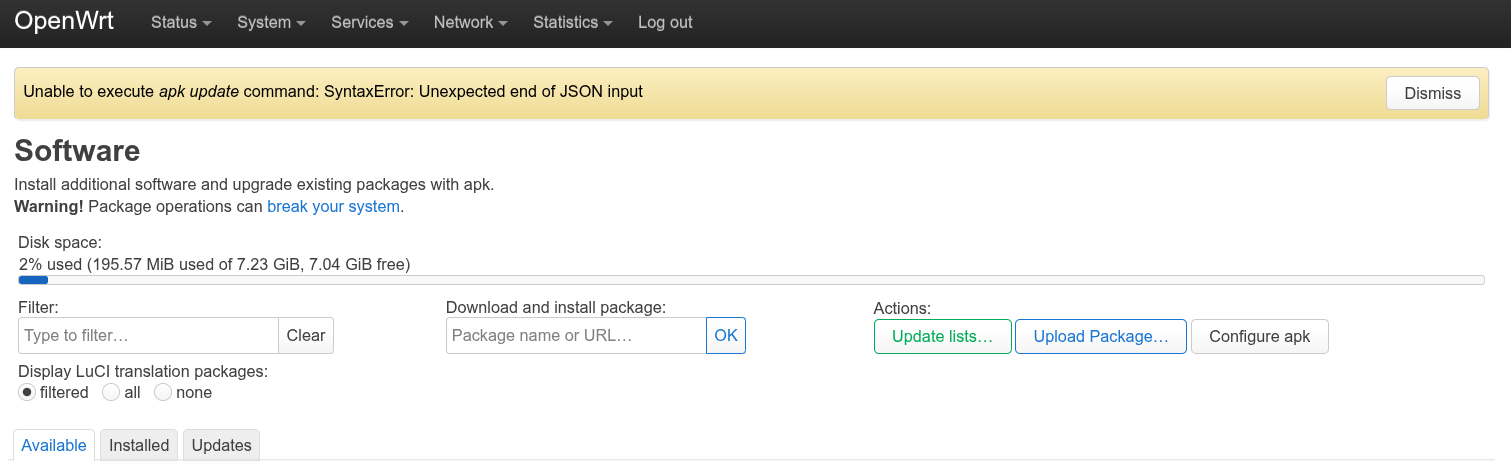
I’m on 25.12.0-rc4 and I get this error when updating apk lists from luci:
Unable to execute apk update command: SyntaxError: Unexpected end of JSON input
Please provide the specific steps you used when getting this error. I don’t see “apk update” in Luci.
I’ll see if I get the same results.
Works fine for me. No errors, just the normal list of URLs for downloads.
Can you run /usr/libexec/package-manager-call update
root@OpenWrt:~# /usr/libexec/package-manager-call update
{ "code": 6, "pkmcmd": "apk update ", "stdout": " [https://downloads.openwrt.org/releases/25.12.0-rc4/targets/mediatek/filogic/packages/packages.adb\]\n [https://downloads.openwrt.org/releases/25.12.0-rc4/targets/mediatek/filogic/kmods/6.12.66-1-60d938adcb727697d3015e4285d4c290/packages.adb\]\n [https://downloads.openwrt.org/releases/25.12.0-rc4/packages/aarch64_cortex-a53/packages/packages.adb\]\n [https://downloads.openwrt.org/releases/25.12.0-rc4/packages/aarch64_cortex-a53/telephony/packages.adb\]\n [https://downloads.openwrt.org/releases/25.12.0-rc4/packages/aarch64_cortex-a53/video/packages.adb\]\n3 unavailable, 3 stale; 6822 distinct packages available", "stderr": "wgetSSL error: SSL - The connection indicated an EOF\nERROR: wget: exited with error 5\nWARNING: updating https://downloads.openwrt.org/releases/25.12.0-rc4/targets/mediatek/filogic/packages/packages.adb: unexpected end of file\nwgetSSL error: SSL - The connection indicated an EOF\nERROR: wget: exited with error 5\nWARNING: updating and opening https://downloads.openwrt.org/releases/25.12.0-rc4/packages/aarch64_cortex-a53/base/packages.adb: unexpected end of file\nwgetSSL error: SSL - The connection indicated an EOF\nERROR: wget: exited with error 5\nWARNING: updating and opening https://downloads.openwrt.org/releases/25.12.0-rc4/packages/aarch64_cortex-a53/luci/packages.adb: unexpected end of file\nwgetSSL error: SSL - The connection indicated an EOF\nERROR: wget: exited with error 5\nWARNING: updating https://downloads.openwrt.org/releases/25.12.0-rc4/packages/aarch64_cortex-a53/packages/packages.adb: unexpected end of file\nwgetSSL error: SSL - The connection indicated an EOF\nERROR: wget: exited with error 5\nWARNING: updating and opening https://downloads.openwrt.org/releases/25.12.0-rc4/packages/aarch64_cortex-a53/routing/packages.adb: unexpected end of file\nwgetSSL error: SSL - The connection indicated an EOF\nERROR: wget: exited with error 5\nWARNING: updating https://downloads.openwrt.org/releases/25.12.0-rc4/packages/aarch64_cortex-a53/telephony/packages.adb: unexpected end of file" }
I understand there are pending fixes to apk for the next RC. Hang tight, or use owut to create another rc4 image with updated packages.
There is no proper network connectivity from the router itself.
Wget error 5 can also mean that there is trouble with SSL. E.g. date is so wrong that certificates are not valid.
Check that the router has DNS and gateway defined, if it is secondary router with fixed IP.
Someone added this as an open issue: https://github.com/openwrt/openwrt/issues/21876
If it is a versioned message then I think it's a bug to report.
EDIT see above
Has anyone run into the upstream eth1 port (connected to ISP's modem that is in bridge mode), maxing out at 1Gbps instead of the 2.5 Gbps it's supposed to be running at? I'm using OpenWRT v24.10.5.
Has anyone run into the upstream eth1 port (connected to ISP's modem that is in bridge mode), maxing out at 1Gbps instead of the 2.5 Gbps it's supposed to be running at? I'm using OpenWRT v24.10.5.
Are you saying you are not getting a link at 2.5Gbps and instead it’s negotiating a 1Gbps link?
Or you’re not seeing the throughput you’d expect with a 2.5Gbps link?
I get a 2.5GB link with my modem. I don’t think I pay for that high of speed. What is usable? Isn’t it 60 percent of the stated link speed due to Ethernet overhead? I think that’s about right.
Just upgraded to 1.5GB with ISP, but with the modem in bridge mode the router's 2.5GB port (the yellow WAN one) gets ~930Mbps according to iperfs on the openwrt cli.
And ethtool eth1 reports "Speed: 1000Mb/s" for that port. Shouldn't it be 2500Mb/s?