Hello guys,hope you are going well.
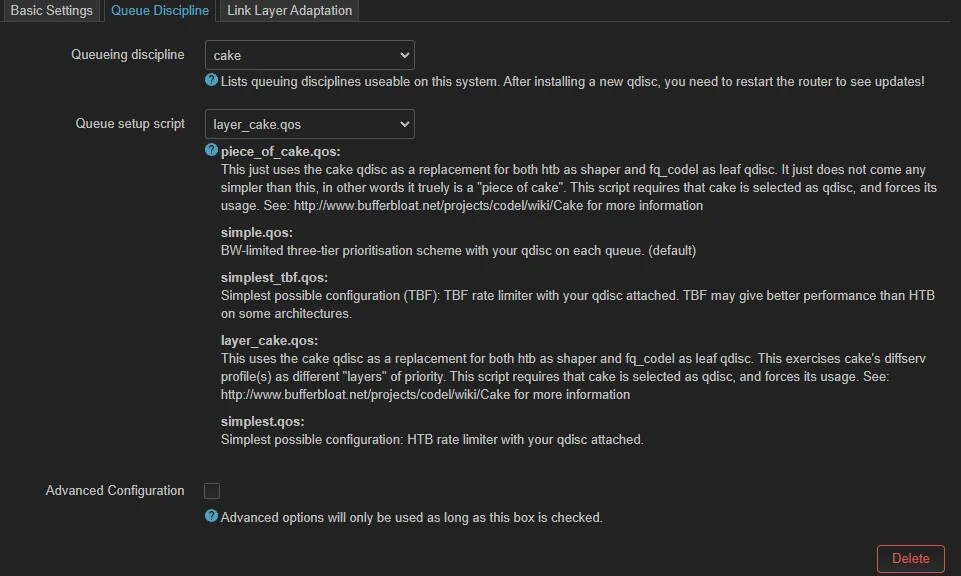
I need help when it comes to setting the upload and download values correctly.
Here is what im running with atm:
- D-Link DSL-2750U rev C1 (Router)
-ADSL connection with my ISP capping it at 10mbps download and 1mbps upload (Sometimes download goes up to 12mbps but the upload is hard capped and wont go past 1mbps)
The issue im dealing with is that there is +8-13ms latency when upload starts and i cant seem to figure out how to deal with it no matter the value i set.
Is there anything i am missing? Help.

Please post the output of:
a) ifstatus wan | grep device
b) cat /etc/config/sqm
c) tc -s qdisc
Just make sure you "sandwich" your text between two rows of backtick characters ` (which themselves will be invisible in the preview) looking in something like this in the editor:
```
Your Pasted Text as preformatted text with fixed width font
   1
1111 (note with fixed-width fonts the numbers are right-aligned)
```
but looking like this in the rendered forum:
Your Pasted Text as preformatted text with fixed width font
1
1111 (note with fixed-width fonts the numbers are right-aligned)
Or:
Please use the "Preformatted text </>" button for logs, scripts, configs and general console output.

Please edit your post accordingly. Thank you! 
A quick sanity check transferring a full MTU sized packet (~1650 bytes with ATM/AAL5) at 1 Mbps takes:
1000 * (1650 * 8) / (1 * 1000^2) = 13.2 ms
So on a loaded link there is on average at least one packet already ion the queue and anywhere from 0 to 100% transmitted, so on average you can expect a delay of 7-8 ms... so it might be that all is as good as you can expect with such slow a link....
Sure thing. Here is everything you requested:
Answer for B
config queue 'eth1'
        option debug_logging '0'
        option enabled '1'
        option interface 'eth0.2'
        option verbosity '0'
        option download '10000'
        option upload '650'
        option qdisc 'cake'
        option linklayer 'atm'
        option overhead '44'
        option script 'piece_of_cake.qos'

config queue
        option interface 'wlan0'
        option debug_logging '0'
        option enabled '1'
        option verbosity '0'
        option qdisc 'cake'
        option linklayer 'atm'
        option overhead '44'
        option script 'piece_of_cake.qos'
        option download '300'
        option upload '3000'
Answer for C:
qdisc noqueue 0: dev lo root refcnt 2
 Sent 0 bytes 0 pkt (dropped 0, overlimits 0 requeues 0)
 backlog 0b 0p requeues 0
qdisc fq_codel 0: dev eth0 root refcnt 2 limit 10240p flows 1024 quantum 1514 target 5ms interval 100ms memory_limit 4Mb ecn drop_batch 64
 Sent 1201856817 bytes 1521857 pkt (dropped 0, overlimits 0 requeues 34)
 backlog 0b 0p requeues 34
  maxpacket 1466 drop_overlimit 0 new_flow_count 69 ecn_mark 0
  new_flows_len 0 old_flows_len 0
qdisc noqueue 0: dev eth0.1 root refcnt 2
 Sent 0 bytes 0 pkt (dropped 0, overlimits 0 requeues 0)
 backlog 0b 0p requeues 0
qdisc cake 8009: dev eth0.2 root refcnt 2 bandwidth 650Kbit besteffort triple-isolate nonat nowash no-ack-filter split-gso rtt 100ms atm overhead 44
 Sent 83335564 bytes 582549 pkt (dropped 13185, overlimits 505675 requeues 0)
 backlog 366b 3p requeues 0
 memory used: 920128b of 4Mb
 capacity estimate: 650Kbit
 min/max network layer size:           28 /    1452
 min/max overhead-adjusted size:      106 /    1696
 average network hdr offset:           14

                  Tin 0
  thresh        650Kbit
  target         27.9ms
  interval        123ms
  pk_delay       46.9ms
  av_delay       2.73ms
  sp_delay       1.53ms
  backlog          366b
  pkts           595737
  bytes        88459307
  way_inds         6906
  way_miss         7226
  way_cols            0
  drops           13185
  marks               0
  ack_drop            0
  sp_flows            3
  bk_flows            1
  un_flows            0
  max_len          1466
  quantum           300

qdisc ingress ffff: dev eth0.2 parent ffff:fff1 ----------------
 Sent 1778968289 bytes 1541154 pkt (dropped 0, overlimits 0 requeues 0)
 backlog 0b 0p requeues 0
qdisc cake 800d: dev wlan0 root refcnt 5 bandwidth 3Mbit besteffort triple-isolate nonat nowash no-ack-filter split-gso rtt 100ms atm overhead 44
 Sent 492829431 bytes 450439 pkt (dropped 108367, overlimits 1262713 requeues 224)
 backlog 0b 0p requeues 224
 memory used: 418Kb of 4Mb
 capacity estimate: 3Mbit
 min/max network layer size:           28 /    1491
 min/max overhead-adjusted size:      106 /    1696
 average network hdr offset:           14

                  Tin 0
  thresh          3Mbit
  target         6.05ms
  interval        101ms
  pk_delay        247ms
  av_delay        135ms
  sp_delay       4.51ms
  backlog            0b
  pkts           558806
  bytes       625799952
  way_inds         1467
  way_miss         4298
  way_cols            0
  drops          108367
  marks               1
  ack_drop            0
  sp_flows            2
  bk_flows            1
  un_flows            0
  max_len          1505
  quantum           300

qdisc ingress ffff: dev wlan0 parent ffff:fff1 ----------------
 Sent 45202134 bytes 241108 pkt (dropped 0, overlimits 0 requeues 0)
 backlog 0b 0p requeues 0
qdisc cake 800a: dev ifb4eth0.2 root refcnt 2 bandwidth 10Mbit besteffort triple-isolate nonat wash no-ack-filter split-gso rtt 100ms atm overhead 44
 Sent 1744614851 bytes 1497913 pkt (dropped 43241, overlimits 2559950 requeues 0)
 backlog 0b 0p requeues 0
 memory used: 587136b of 4Mb
 capacity estimate: 10Mbit
 min/max network layer size:           46 /    1491
 min/max overhead-adjusted size:      106 /    1696
 average network hdr offset:           14

                  Tin 0
  thresh         10Mbit
  target            5ms
  interval        100ms
  pk_delay       36.7ms
  av_delay       9.79ms
  sp_delay         97us
  backlog            0b
  pkts          1541154
  bytes      1800544445
  way_inds         9201
  way_miss         6991
  way_cols            0
  drops           43241
  marks               0
  ack_drop            0
  sp_flows            3
  bk_flows            1
  un_flows            0
  max_len          1505
  quantum           305

qdisc cake 800e: dev ifb4wlan0 root refcnt 2 bandwidth 300Kbit besteffort triple-isolate nonat wash no-ack-filter split-gso rtt 100ms atm overhead 44
 Sent 43223940 bytes 232416 pkt (dropped 8689, overlimits 350321 requeues 0)
 backlog 831b 3p requeues 0
 memory used: 552Kb of 4Mb
 capacity estimate: 300Kbit
 min/max network layer size:            6 /    1452
 min/max overhead-adjusted size:      106 /    1696
 average network hdr offset:           14

                  Tin 0
  thresh        300Kbit
  target         60.6ms
  interval        156ms
  pk_delay        172ms
  av_delay       56.7ms
  sp_delay       4.46ms
  backlog          831b
  pkts           241108
  bytes        48577646
  way_inds          505
  way_miss         4375
  way_cols            0
  drops            8689
  marks               0
  ack_drop            0
  sp_flows            2
  bk_flows            1
  un_flows            0
  max_len          1466
  quantum           300
For the first command (ifstatus wan | grep device) nothing happens. Any idea?
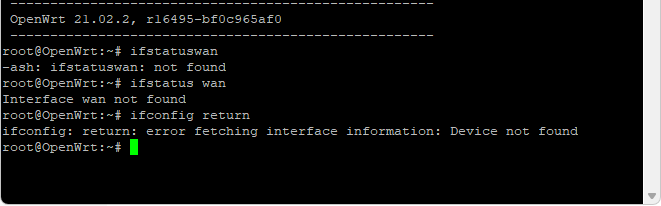
That is odd, what does ifstatus wan return? and what does ifconfig return?
See the latency targets for your upload shapers:
eth0.2:
qdisc cake 8009: dev eth0.2 root refcnt 2 bandwidth 650Kbit besteffort triple-isolate nonat nowash no-ack-filter split-gso rtt 100ms atm overhead 44
[...]
  target         27.9ms
  interval        123ms
and
ifb4wlan0:
qdisc cake 800e: dev ifb4wlan0 root refcnt 2 bandwidth 300Kbit besteffort triple-isolate nonat wash no-ack-filter split-gso rtt 100ms atm overhead 44
[...]

  target         60.6ms
  interval        156ms
Under load you have to expect that the standing queue in cake approaches (or even exceeds) the configured latency target, so your reported +8 to +13 milliseconds is to be expected.
And the reason why these target values are above the 5 ms default vale is because your uplink is really slow and so cake adjust these values as it otherwise would cause too many drops on your uplink...
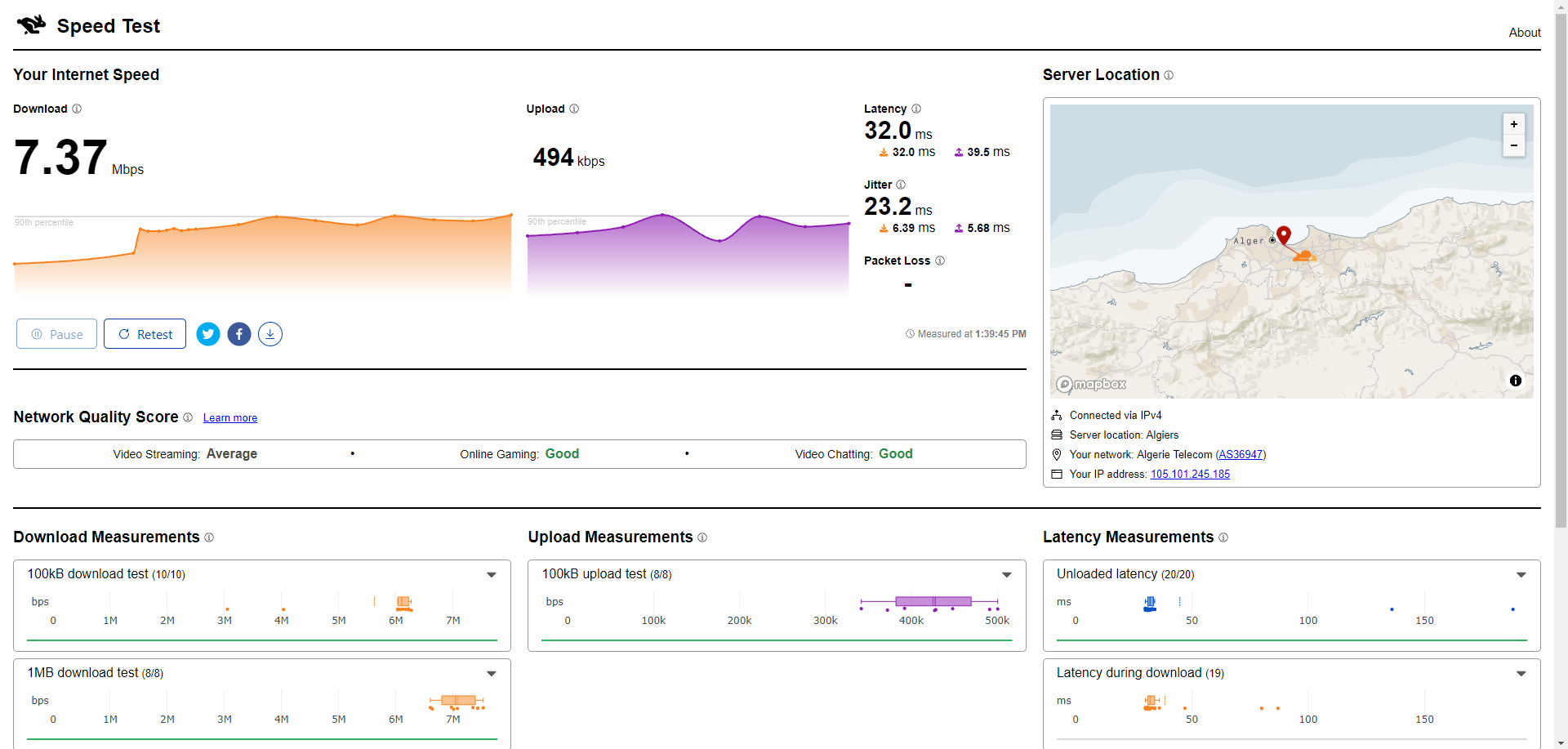
But for curiosity, could you please post screen shots of the full data of:
(I want to see the individual plots as well, not just the summary evaluation report).
We can also quickly run the numbers for the DSL side of things:
at max IP size of 1452 and overhead 44, at 650 Kbps a single full sized packet will block the link for:
1000 * (ceil((1452 + 44) / 48) * 53 * 8) / (650 * 1000^1) = 20.8738461538 -> ~21ms
And on average under saturating load there will be half a packet in front so from this serialisation delay alone you need to expect ~10ms delay, which falls well within your reported range.
Ah I see, I had accidentally included the word return in my instructions, sorry.
Please try:
ifstatus wan
ifconfig
Let's quickly run the numbers for what rates to expect for IPv4:
Download: 10 * ((1491 - 20 - 20) / (ceil((1491+44) / 48) * 53)) = 8.555 Mbps
Upload: 0.65 * ((1491 - 20 - 20) / (ceil((1491+44) / 48) * 53)) = 0.556 Mbps
So your speed test fall a bit short but not catastrophically, and latency under load seems also OKish, given your slow uplink.
eth0      Link encap:Ethernet  HWaddr 78:54:2E:79:27:B1
          inet6 addr: fe80::7a54:2eff:fe79:27b1/64 Scope:Link
          UP BROADCAST RUNNING MULTICAST  MTU:1500  Metric:1
          RX packets:8150336 errors:0 dropped:0 overruns:0 frame:0
          TX packets:5633676 errors:0 dropped:0 overruns:0 carrier:0
          collisions:0 txqueuelen:1000
          RX bytes:3951371638 (3.6 GiB)  TX bytes:2089615824 (1.9 GiB)

eth0.1    Link encap:Ethernet  HWaddr 78:54:2E:79:27:B1
          inet addr:192.168.10.1  Bcast:192.168.10.255  Mask:255.255.255.0
          UP BROADCAST RUNNING MULTICAST  MTU:1492  Metric:1
          RX packets:829794 errors:0 dropped:0 overruns:0 frame:0
          TX packets:1580038 errors:0 dropped:0 overruns:0 carrier:0
          collisions:0 txqueuelen:1000
          RX bytes:107205463 (102.2 MiB)  TX bytes:1604176029 (1.4 GiB)

eth0.2    Link encap:Ethernet  HWaddr 78:54:2E:79:27:B1
          inet addr:192.168.1.24  Bcast:192.168.1.255  Mask:255.255.255.0
          UP BROADCAST RUNNING MULTICAST  MTU:1492  Metric:1
          RX packets:7320382 errors:0 dropped:0 overruns:0 frame:0
          TX packets:4053630 errors:0 dropped:0 overruns:0 carrier:0
          collisions:0 txqueuelen:1000
          RX bytes:7992404387 (7.4 GiB)  TX bytes:460099719 (438.7 MiB)

ifb4eth0.2 Link encap:Ethernet  HWaddr DA:2E:D7:4E:B3:DB
          inet6 addr: fe80::d82e:d7ff:fe4e:b3db/64 Scope:Link
          UP BROADCAST RUNNING NOARP  MTU:1500  Metric:1
          RX packets:4764106 errors:0 dropped:0 overruns:0 frame:0
          TX packets:4764106 errors:0 dropped:0 overruns:0 carrier:0
          collisions:0 txqueuelen:32
          RX bytes:5083545683 (4.7 GiB)  TX bytes:5083545683 (4.7 GiB)

lo        Link encap:Local Loopback
          inet addr:127.0.0.1  Mask:255.0.0.0
          inet6 addr: ::1/128 Scope:Host
          UP LOOPBACK RUNNING  MTU:65536  Metric:1
          RX packets:881 errors:0 dropped:0 overruns:0 frame:0
          TX packets:881 errors:0 dropped:0 overruns:0 carrier:0
          collisions:0 txqueuelen:1000
          RX bytes:78802 (76.9 KiB)  TX bytes:78802 (76.9 KiB)

wlan0     Link encap:Ethernet  HWaddr 78:54:2E:79:27:B2
          inet addr:192.168.8.1  Bcast:192.168.8.255  Mask:255.255.255.0
          inet6 addr: fe80::7a54:2eff:fe79:27b2/64 Scope:Link
          UP BROADCAST RUNNING MULTICAST  MTU:1500  Metric:1
          RX packets:3348090 errors:0 dropped:0 overruns:0 frame:0
          TX packets:5322327 errors:0 dropped:0 overruns:0 carrier:0
          collisions:0 txqueuelen:1000
          RX bytes:368447015 (351.3 MiB)  TX bytes:6091033520 (5.6 GiB)
1 Like
ifstatus wan shows nothing.
Do you think that sqm autorate would help in this situation?
cake-autorate can help if the achievable throughput varies a lot over the day. But if you can get these 7/0.5 Mbps all day round then I am not sure what autorate would bring to the table...
Makes sense, no need for autorate then.