Dnscrypt proxy - clients having trouble accessing internet

I upgraded to the latest divested build and also reinstalled dnscrypt proxy2.

My router can do nslookup successfully but my clients are all offline from the internet.

I’ve tried to disable in dhcp conf by # lines I know is used by dnscryptproxy 2. But still no go..

Hard to paste config , typing from my phone. Help needed

well, you will have to do the hard thing ...

If I’m to disable all config related to dnscrypt proxy would that be the service and a few lines in dhcp?

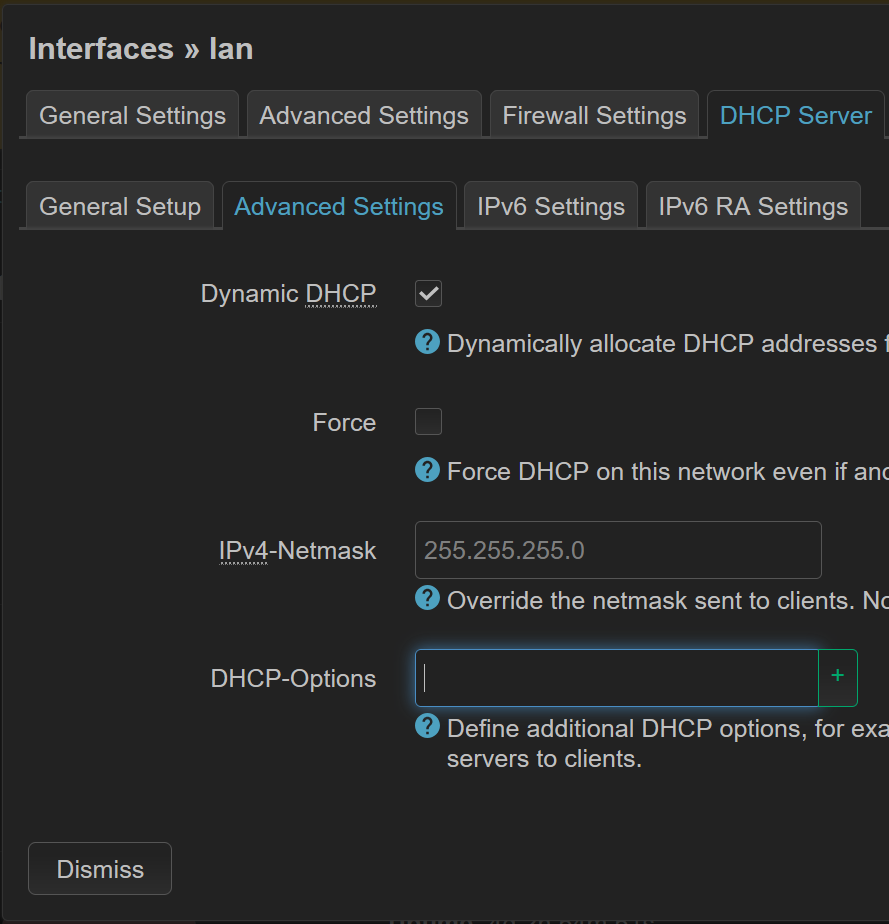
if you haven't implemented DNS hijacking, use 6,1.1.1.1 in the last field on the screenshot to temp bypass your DNScrypt proxy.
it should restore DNS for the clients.
the clients will need to make a new DHCP request to get this DNS IP.
you need to force them to disconnect from your LAN.

Thank you, I will try.

I didn’t try your solution unfortunately, I downgraded from the latest divested build to the build I had. It came up straigt away and my clients are online again..

However, when I look at service it seems firewall and others are stopped. Never run this command before so can’t say if it’s normal or not?

/etc/init.d/adblock                enabled         stopped
/etc/init.d/banip                 disabled         stopped
/etc/init.d/boot                   enabled         stopped
/etc/init.d/bootcount              enabled         stopped
/etc/init.d/cron                   enabled         stopped
/etc/init.d/ddns                   enabled         stopped
/etc/init.d/divblock              disabled         stopped
/etc/init.d/dnscrypt-proxy         enabled         running
/etc/init.d/dnsmasq                enabled         running
/etc/init.d/done                   enabled         stopped
/etc/init.d/dropbear               enabled         running
/etc/init.d/firewall               enabled         stopped
/etc/init.d/gpio_switch            enabled         stopped
/etc/init.d/irqbalance             enabled         stopped
/etc/init.d/led                    enabled         stopped
/etc/init.d/log                    enabled         running
/etc/init.d/miniupnpd              enabled         stopped
/etc/init.d/network                enabled         running
/etc/init.d/odhcpd                 enabled         running
/etc/init.d/openssl                enabled         stopped
/etc/init.d/packet_steering        enabled         stopped
/etc/init.d/radius                 enabled         stopped
/etc/init.d/rpcd                   enabled         running
/etc/init.d/sqm                    enabled         stopped
/etc/init.d/sysctl                 enabled         stopped
/etc/init.d/sysfixtime             enabled         stopped
/etc/init.d/sysntpd                enabled         running
/etc/init.d/system                 enabled         stopped
/etc/init.d/ubihealthd             enabled         running
/etc/init.d/ucitrack               enabled         stopped
/etc/init.d/uhttpd                 enabled         running
/etc/init.d/umount                 enabled         stopped
/etc/init.d/urandom_seed           enabled         stopped
/etc/init.d/urngd                  enabled         running
/etc/init.d/wpad                   enabled         running

 service firewall start
The fw4 firewall appears to be already loaded.

you'll probably have to ask divested, it's a fork, AFAIK.

Thanks will do so. Some desperate hours troubleshooting.. Next time I’ll revert sooner.

Have a nice one!

No. Pure OpenWrt SNAPSHOT Community build.

Did you also update your /etc/dnscrypt-proxy2.tomlfor listen_addresses = ['127.0.0.53:53'] to match your /etc/config/dhcp?

Yes I kept my config when upgrading.. no idea why it was not working this time.

My router could do nslookup and found both ipv4/6, even tho I tried to disable ipv6 for some time ago.

Not sure when I’ll try again but I assume it was some issue on my end.

Tried again today, same result (no itnernet access from my devices).

Nslookup works from the router as you can see below. So it’s kind of strange that it doesn’t work on my devices.

Reverted to divested:

divested-wrt-snapshot-r30008+8-82d20a0fbd-mvebu-cortexa9-linksys_wrt1900acs-squashfs-sysupgrade (downloaded june 11th)

Run this:

uci set dhcp.@dnsmasq[0].noresolv="0"
uci commit dhcp
/etc/init.d/dnsmasq restart
/etc/init.d/divblock disable
apk update
apk add dnscrypt-proxy2
apk add luci-app-ddns
uci set dhcp.@dnsmasq[0].noresolv="1"
uci commit dhcp
/etc/init.d/dnsmasq restart
apk add adblock
apk add luci-app-adblock
apk add ddns-scripts-cloudflare

And I’m back.

Copied some config from the latest running build when I couldnt access the internet from my devices:

dhcp config

config dnsmasq
        option domainneeded '1'
        option localise_queries '1'
        option rebind_protection '1'
        option rebind_localhost '1'
        option local '/lan/'
        option domain 'lan'
        option expandhosts '1'
        option cachesize '0'
        option authoritative '1'
        option readethers '1'
        option leasefile '/tmp/dhcp.leases'
        option ednspacket_max '1232'
        option confdir '/tmp/dnsmasq.d'
        option localservice '1'
        option noresolv '1'
        option localuse '1'
        list server '127.0.0.53'

Tried noresolv to 0 and dnsmasq and proxy restart.. No go. 


dnscrypt-proxy2.toml

## Remove the leading # first to enable this; lines starting with # are ignored.

server_names = ['google', 'cloudflare']


## List of local addresses and ports to listen to. Can be IPv4 and/or IPv6.
## Example with both IPv4 and IPv6:
## listen_addresses = ['127.0.0.1:53', '[::1]:53']
##
## To listen to all IPv4 addresses, use `listen_addresses = ['0.0.0.0:53']`
## To listen to all IPv4+IPv6 addresses, use `listen_addresses = ['[::]:53']`

listen_addresses = ['127.0.0.53:53']


## Maximum number of simultaneous client connections to accept

max_clients = 250


dnscrypt-proxy -resolve google.com
Resolving [google.com] using 127.0.0.53 port 53

Resolver      : 162.158.221.89

Canonical name: google.com.

IPv4 addresses: 142.250.74.142
IPv6 addresses: 2a00:1450:400f:803::200e

Name servers  : ns2.google.com., ns3.google.com., ns1.google.com., ns4.google.com.
DNSSEC signed : no
Mail servers  : 1 mail servers found

HTTPS alias   : -
HTTPS info    : [alpn]=[h2,h3]

Host info     : -
TXT records   : globalsign-smime-dv=CDYX+XFHUw2wml6/Gb8+59BsH31KzUr6c1l2BPvqKX8=, MS=E4A68B9AB2BB9670BCE15412F62916164C0B20BB, google-site-verification=TV9-DBe4R80X4v0M4U_bd_J9cpOJM0nikft0jAgjmsQ, cisco-ci-domain-verification=47c38bc8c4b74b7233e9053220c1bbe76bcc1cd33c7acf7acd36cd6a5332004b, google-site-verification=wD8N7i1JTNTkezJ49swvWW48f8_9xveREV4oB-0Hf5o, apple-domain-verification=30afIBcvSuDV2PLX, onetrust-domain-verification=de01ed21f2fa4d8781cbc3ffb89cf4ef, docusign=1b0a6754-49b1-4db5-8540-d2c12664b289, facebook-domain-verification=22rm551cu4k0ab0bxsw536tlds4h95, v=spf1 include:_spf.google.com ~all, docusign=05958488-4752-4ef2-95eb-aa7ba8a3bd0e, google-site-verification=4ibFUgB-wXLQ_S7vsXVomSTVamuOXBiVAzpR5IZ87D0


nslookup google.com localhost
Server:         localhost
Address:        [::1]:53

Non-authoritative answer:
Name:   google.com
Address: 142.250.74.142

Non-authoritative answer:
Name:   google.com
Address: 2a00:1450:400f:803::200e

this is probably very incorrect, but yet it seems to work :slight_smile:

It’s what I’m running at the moment, it works…

To correct it what would you insert? Remove the port?

the syntax is in the example:

Ah, so instead of localhost I’ve used.. soemthing else

Ok I’ve update dhcp and proxy.toml to 127.0.0.1:53 and did a reboot of the router. I can access this forum for instance. And a local newspaper. But many/most others are not displaying at all. Google works.. googling dnsleaktest works. Opening one of the test sites, doesn’t work..

run a nslookup on your client using a the FQDN of a site that doesn't work.

Dns request timed out my windows pc says

DNS request timed out.
    timeout was 2 seconds.
Server:  UnKnown
Address:  192.168.1.1

DNS request timed out.

192.168.1.1 being my openwrt router

Tried a ipconfig/flushdns as well…

I can’t ping the websites that works in my browser

the interesting part is where it sends the DNS query ... ?
feel free to post the whole thing, there's nothing secret in it, use the </> button to sandwitch the text.