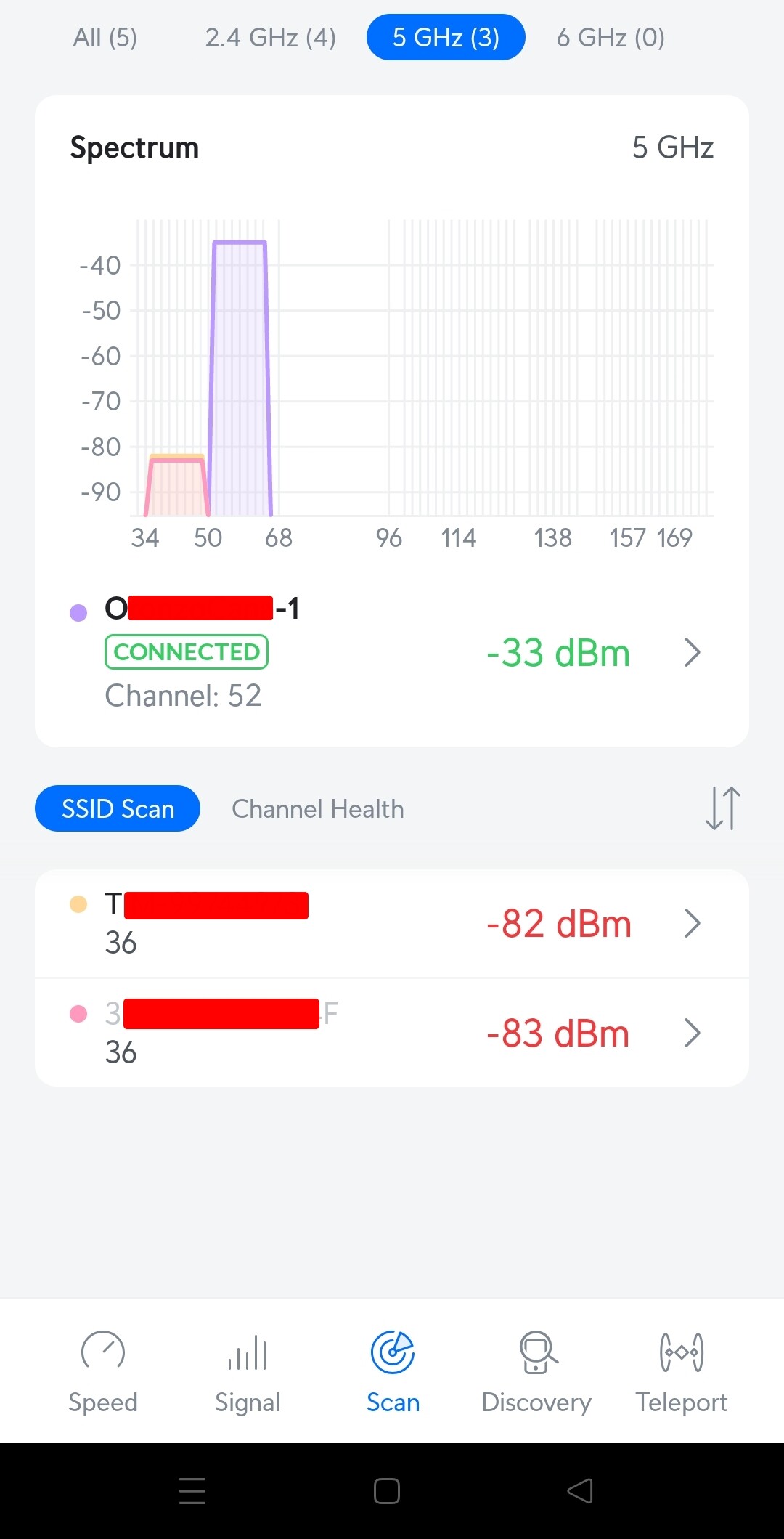
Hello everyone!
First of all, I would like to thank you for your support and suggestions.
Before making any attempts (e.g. swapping routers between floors -1 and +1), I think it is a good think to start with my 3 routers configurations.
Main Router 10.212.79.1 (floor 0)
root@OpenWrt1:~# ubus call system board
{
        "kernel": "6.6.73",
        "hostname": "OpenWrt1",
        "system": "ARMv8 Processor rev 4",
        "model": "Xiaomi Mi Router AX3000T (OpenWrt U-Boot layout)",
        "board_name": "xiaomi,mi-router-ax3000t-ubootmod",
        "rootfs_type": "squashfs",
        "release": {
                "distribution": "OpenWrt",
                "version": "24.10.0",
                "revision": "r28427-6df0e3d02a",
                "target": "mediatek/filogic",
                "description": "OpenWrt 24.10.0 r28427-6df0e3d02a",
                "builddate": "1738624177"
        }
}
root@OpenWrt1:~# cat /etc/config/network

config interface 'loopback'
        option device 'lo'
        option proto 'static'
        option ipaddr '127.0.0.1'
        option netmask '255.0.0.0'

config globals 'globals'
        option ula_prefix 'fd74:8a14:1f36::/48'

config device
        option name 'br-lan'
        option type 'bridge'
        list ports 'lan2'
        list ports 'lan3'
        list ports 'lan4'

config interface 'lan'
        option device 'br-lan'
        option proto 'static'
        option netmask '255.255.255.0'
        option ip6assign '60'
        option ipaddr '10.212.79.1'
        list dns '1.1.1.1'
        list dns '1.0.0.1'

config device
        option name 'wan'
        option macaddr 'XXX'

config interface 'wan'
        option proto 'pppoe'
        option username 'XXX'
        option password 'XXX'
        option ipv6 'auto'
        option device 'wan.835'
        option peerdns '0'

config interface 'wan6'
        option device 'wan'
        option proto 'dhcpv6'
        option reqaddress 'try'
        option reqprefix 'auto'
        option peerdns '0'

config interface 'WG_0'
        option proto 'wireguard'
        option private_key 'XXX'
        option listen_port '51820'
        list addresses '10.58.45.1/24'

config wireguard_WG_0
        option description 'XXX'
        option public_key 'XXX'
        list allowed_ips '10.58.45.2/32'
        option route_allowed_ips '1'

config wireguard_WG_0
        option description 'XXX'
        option public_key 'XXX'
        list allowed_ips '10.58.45.3/32'
        option route_allowed_ips '1'

config wireguard_WG_0
        option description 'XXX'
        option public_key 'XXX'
        list allowed_ips '10.58.45.4/32'
        option route_allowed_ips '1'
        option disabled '1'

root@OpenWrt1:~# cat /etc/config/wireless

config wifi-device 'radio0'
        option type 'mac80211'
        option path 'platform/soc/18000000.wifi'
        option channel '6'
        option band '2g'
        option htmode 'HE20'
        option cell_density '0'
        option country 'IT'

config wifi-device 'radio1'
        option type 'mac80211'
        option path 'platform/soc/18000000.wifi+1'
        option channel '161'
        option band '5g'
        option htmode 'HE80'
        option cell_density '0'
        option country 'IT'

config wifi-iface 'default_radio1'
        option device 'radio1'
        option network 'lan'
        option mode 'ap'
        option ssid 'XXX'
        option encryption 'psk2'
        option key 'XXX'

config wifi-iface 'wifinet1'
        option device 'radio0'
        option mode 'ap'
        option ssid 'XXX'
        option encryption 'psk2'
        option key 'XXX'
        option network 'lan'

root@OpenWrt1:~# cat /etc/config/dhcp

config dnsmasq
        option domainneeded '1'
        option localise_queries '1'
        option rebind_protection '1'
        option rebind_localhost '1'
        option local '/lan/'
        option domain 'lan'
        option expandhosts '1'
        option cachesize '1000'
        option authoritative '1'
        option readethers '1'
        option leasefile '/tmp/dhcp.leases'
        option resolvfile '/tmp/resolv.conf.d/resolv.conf.auto'
        option localservice '1'
        option ednspacket_max '1232'

config dhcp 'lan'
        option interface 'lan'
        option start '101'
        option limit '254'
        option leasetime '12h'
        option dhcpv4 'server'
        option dhcpv6 'server'
        option ra 'server'
        list ra_flags 'managed-config'
        list ra_flags 'other-config'

config dhcp 'wan'
        option interface 'wan'
        option ignore '1'

config odhcpd 'odhcpd'
        option maindhcp '0'
        option leasefile '/tmp/hosts/odhcpd'
        option leasetrigger '/usr/sbin/odhcpd-update'
        option loglevel '4'

config host
        option ip '10.212.79.101'
        list mac 'XXX'
        option name 'XXX'

config host
        option name 'XXX'
        list mac 'XXX'
        option ip '10.212.79.200'

config host
        option name 'XXX'
        option ip '10.212.79.201'
        list mac 'XXX'
        list mac 'XXX'

config host
        option name 'XXX'
        list mac 'XXX'
        list mac 'XXX'
        option ip '10.212.79.199'

config host
        option name 'XXX'
        list mac 'XXX'
        option ip '10.212.79.202'

config host
        option name 'XXX'
        list mac 'XXX'
        option ip '10.212.79.102'

root@OpenWrt1:~# cat /etc/config/firewall

config defaults
        option syn_flood '1'
        option input 'REJECT'
        option output 'ACCEPT'
        option forward 'REJECT'

config zone 'lan'
        option name 'lan'
        option input 'ACCEPT'
        option output 'ACCEPT'
        option forward 'ACCEPT'
        list network 'lan'
        list network 'WG_0'

config zone 'wan'
        option name 'wan'
        option input 'REJECT'
        option output 'ACCEPT'
        option forward 'REJECT'
        option masq '1'
        option mtu_fix '1'
        list network 'wan'
        list network 'wan6'

config forwarding
        option src 'lan'
        option dest 'wan'

config rule
        option name 'Allow-DHCP-Renew'
        option src 'wan'
        option proto 'udp'
        option dest_port '68'
        option target 'ACCEPT'
        option family 'ipv4'

config rule
        option name 'Allow-Ping'
        option src 'wan'
        option proto 'icmp'
        option icmp_type 'echo-request'
        option family 'ipv4'
        option target 'ACCEPT'

config rule
        option name 'Allow-IGMP'
        option src 'wan'
        option proto 'igmp'
        option family 'ipv4'
        option target 'ACCEPT'

config rule
        option name 'Allow-DHCPv6'
        option src 'wan'
        option proto 'udp'
        option dest_port '546'
        option family 'ipv6'
        option target 'ACCEPT'

config rule
        option name 'Allow-MLD'
        option src 'wan'
        option proto 'icmp'
        option src_ip 'fe80::/10'
        list icmp_type '130/0'
        list icmp_type '131/0'
        list icmp_type '132/0'
        list icmp_type '143/0'
        option family 'ipv6'
        option target 'ACCEPT'

config rule
        option name 'Allow-ICMPv6-Input'
        option src 'wan'
        option proto 'icmp'
        list icmp_type 'echo-request'
        list icmp_type 'echo-reply'
        list icmp_type 'destination-unreachable'
        list icmp_type 'packet-too-big'
        list icmp_type 'time-exceeded'
        list icmp_type 'bad-header'
        list icmp_type 'unknown-header-type'
        list icmp_type 'router-solicitation'
        list icmp_type 'neighbour-solicitation'
        list icmp_type 'router-advertisement'
        list icmp_type 'neighbour-advertisement'
        option limit '1000/sec'
        option family 'ipv6'
        option target 'ACCEPT'

config rule
        option name 'Allow-ICMPv6-Forward'
        option src 'wan'
        option dest '*'
        option proto 'icmp'
        list icmp_type 'echo-request'
        list icmp_type 'echo-reply'
        list icmp_type 'destination-unreachable'
        list icmp_type 'packet-too-big'
        list icmp_type 'time-exceeded'
        list icmp_type 'bad-header'
        list icmp_type 'unknown-header-type'
        option limit '1000/sec'
        option family 'ipv6'
        option target 'ACCEPT'

config rule
        option name 'Allow-IPSec-ESP'
        option src 'wan'
        option dest 'lan'
        option proto 'esp'
        option target 'ACCEPT'

config rule
        option name 'Allow-ISAKMP'
        option src 'wan'
        option dest 'lan'
        option dest_port '500'
        option proto 'udp'
        option target 'ACCEPT'

config rule 'wg'
        option name 'Allow-WireGuard'
        option src 'wan'
        option proto 'udp'
        option target 'ACCEPT'
        option dest_port '51820'

config redirect
        option dest 'lan'
        option target 'DNAT'
        option name 'Wireguard'
        list proto 'udp'
        option src 'wan'
        option src_dport '51820'
        option dest_ip '10.212.79.1'
        option dest_port '51820'

config redirect
        option dest 'lan'
        option target 'DNAT'
        option name 'XXX'
        list proto 'tcp'
        option src 'wan'
        option src_dport '10001'
        option dest_ip '10.212.79.200'
        option dest_port '10001'
Router 10.212.79.2 (floor -1)
root@OpenWrt2:~# ubus call system board
{
        "kernel": "6.6.104",
        "hostname": "OpenWrt2",
        "system": "ARMv8 Processor rev 4",
        "model": "Xiaomi Mi Router AX3000T (OpenWrt U-Boot layout)",
        "board_name": "xiaomi,mi-router-ax3000t-ubootmod",
        "rootfs_type": "squashfs",
        "release": {
                "distribution": "OpenWrt",
                "version": "24.10.3",
                "revision": "r28872-daca7c049b",
                "target": "mediatek/filogic",
                "description": "OpenWrt 24.10.3 r28872-daca7c049b",
                "builddate": "1758316778"
        }
}
root@OpenWrt2:~# cat /etc/config/network

config interface 'loopback'
        option device 'lo'
        option proto 'static'
        option ipaddr '127.0.0.1'
        option netmask '255.0.0.0'

config globals 'globals'
        option ula_prefix 'fdb0:bcf3:ca2f::/48'

config device
        option name 'br-lan'
        option type 'bridge'
        list ports 'lan2'
        list ports 'lan3'
        list ports 'lan4'

config interface 'lan'
        option device 'br-lan'
        option proto 'static'
        option ipaddr '10.212.79.2'
        option netmask '255.255.255.0'
        option ip6assign '60'
        option gateway '10.212.79.1'
        option dns '1.1.1.1 1.0.0.1'

config device
        option name 'wan'
        option macaddr 'XXX'

root@OpenWrt2:~# cat /etc/config/wireless

config wifi-device 'radio0'
        option type 'mac80211'
        option path 'platform/soc/18000000.wifi'
        option band '2g'
        option channel 'auto'
        option htmode 'HE20'
        option country 'IT'
        option cell_density '0'

config wifi-iface 'default_radio0'
        option device 'radio0'
        option network 'lan'
        option mode 'ap'
        option ssid 'XXX'
        option encryption 'psk2'
        option key 'XXX'

config wifi-device 'radio1'
        option type 'mac80211'
        option path 'platform/soc/18000000.wifi+1'
        option band '5g'
        option channel 'auto'
        option htmode 'HE80'
        option country 'IT'
        option cell_density '0'

config wifi-iface 'default_radio1'
        option device 'radio1'
        option network 'lan'
        option mode 'ap'
        option ssid 'XXX'
        option encryption 'psk2'
        option key 'XXX'

root@OpenWrt2:~# cat /etc/config/dhcp

config dnsmasq
        option domainneeded '1'
        option boguspriv '1'
        option filterwin2k '0'
        option localise_queries '1'
        option rebind_protection '1'
        option rebind_localhost '1'
        option local '/lan/'
        option domain 'lan'
        option expandhosts '1'
        option nonegcache '0'
        option cachesize '1000'
        option authoritative '1'
        option readethers '1'
        option leasefile '/tmp/dhcp.leases'
        option resolvfile '/tmp/resolv.conf.d/resolv.conf.auto'
        option nonwildcard '1'
        option localservice '1'
        option ednspacket_max '1232'
        option filter_aaaa '0'
        option filter_a '0'

config dhcp 'lan'
        option interface 'lan'
        option start '100'
        option limit '150'
        option leasetime '12h'
        option dhcpv4 'server'
        option dhcpv6 'server'
        option ra 'server'
        option ra_slaac '1'
        list ra_flags 'managed-config'
        list ra_flags 'other-config'
        option ignore '1'

config dhcp 'wan'
        option interface 'wan'
        option ignore '1'

config odhcpd 'odhcpd'
        option maindhcp '0'
        option leasefile '/tmp/hosts/odhcpd'
        option leasetrigger '/usr/sbin/odhcpd-update'
        option loglevel '4'

root@OpenWrt2:~# cat /etc/config/firewall
config defaults
        option syn_flood        1
        option input            REJECT
        option output           ACCEPT
        option forward          REJECT
# Uncomment this line to disable ipv6 rules
#       option disable_ipv6     1

config zone
        option name             lan
        list   network          'lan'
        option input            ACCEPT
        option output           ACCEPT
        option forward          ACCEPT

config zone
        option name             wan
        list   network          'wan'
        list   network          'wan6'
        option input            REJECT
        option output           ACCEPT
        option forward          REJECT
        option masq             1
        option mtu_fix          1

config forwarding
        option src              lan
        option dest             wan

# We need to accept udp packets on port 68,
# see https://dev.openwrt.org/ticket/4108
config rule
        option name             Allow-DHCP-Renew
        option src              wan
        option proto            udp
        option dest_port        68
        option target           ACCEPT
        option family           ipv4

# Allow IPv4 ping
config rule
        option name             Allow-Ping
        option src              wan
        option proto            icmp
        option icmp_type        echo-request
        option family           ipv4
        option target           ACCEPT

config rule
        option name             Allow-IGMP
        option src              wan
        option proto            igmp
        option family           ipv4
        option target           ACCEPT

# Allow DHCPv6 replies
# see https://github.com/openwrt/openwrt/issues/5066
config rule
        option name             Allow-DHCPv6
        option src              wan
        option proto            udp
        option dest_port        546
        option family           ipv6
        option target           ACCEPT

config rule
        option name             Allow-MLD
        option src              wan
        option proto            icmp
        option src_ip           fe80::/10
        list icmp_type          '130/0'
        list icmp_type          '131/0'
        list icmp_type          '132/0'
        list icmp_type          '143/0'
        option family           ipv6
        option target           ACCEPT

# Allow essential incoming IPv6 ICMP traffic
config rule
        option name             Allow-ICMPv6-Input
        option src              wan
        option proto    icmp
        list icmp_type          echo-request
        list icmp_type          echo-reply
        list icmp_type          destination-unreachable
        list icmp_type          packet-too-big
        list icmp_type          time-exceeded
        list icmp_type          bad-header
        list icmp_type          unknown-header-type
        list icmp_type          router-solicitation
        list icmp_type          neighbour-solicitation
        list icmp_type          router-advertisement
        list icmp_type          neighbour-advertisement
        option limit            1000/sec
        option family           ipv6
        option target           ACCEPT

# Allow essential forwarded IPv6 ICMP traffic
config rule
        option name             Allow-ICMPv6-Forward
        option src              wan
        option dest             *
        option proto            icmp
        list icmp_type          echo-request
        list icmp_type          echo-reply
        list icmp_type          destination-unreachable
        list icmp_type          packet-too-big
        list icmp_type          time-exceeded
        list icmp_type          bad-header
        list icmp_type          unknown-header-type
        option limit            1000/sec
        option family           ipv6
        option target           ACCEPT

config rule
        option name             Allow-IPSec-ESP
        option src              wan
        option dest             lan
        option proto            esp
        option target           ACCEPT

config rule
        option name             Allow-ISAKMP
        option src              wan
        option dest             lan
        option dest_port        500
        option proto            udp
        option target           ACCEPT


### EXAMPLE CONFIG SECTIONS
# do not allow a specific ip to access wan
#config rule
#       option src              lan
#       option src_ip   192.168.45.2
#       option dest             wan
#       option proto    tcp
#       option target   REJECT

# block a specific mac on wan
#config rule
#       option dest             wan
#       option src_mac  00:11:22:33:44:66
#       option target   REJECT

# block incoming ICMP traffic on a zone
#config rule
#       option src              lan
#       option proto    ICMP
#       option target   DROP

# port redirect port coming in on wan to lan
#config redirect
#       option src                      wan
#       option src_dport        80
#       option dest                     lan
#       option dest_ip          192.168.16.235
#       option dest_port        80
#       option proto            tcp

# port redirect of remapped ssh port (22001) on wan
#config redirect
#       option src              wan
#       option src_dport        22001
#       option dest             lan
#       option dest_port        22
#       option proto            tcp

### FULL CONFIG SECTIONS
#config rule
#       option src              lan
#       option src_ip   192.168.45.2
#       option src_mac  00:11:22:33:44:55
#       option src_port 80
#       option dest             wan
#       option dest_ip  194.25.2.129
#       option dest_port        120
#       option proto    tcp
#       option target   REJECT

#config redirect
#       option src              lan
#       option src_ip   192.168.45.2
#       option src_mac  00:11:22:33:44:55
#       option src_port         1024
#       option src_dport        80
#       option dest_ip  194.25.2.129
#       option dest_port        120
#       option proto    tcp
Router 10.212.79.3 (floor +1)
root@OpenWrt3:~# ubus call system board
{
        "kernel": "6.6.73",
        "hostname": "OpenWrt3",
        "system": "ARMv8 Processor rev 4",
        "model": "Xiaomi Mi Router AX3000T (OpenWrt U-Boot layout)",
        "board_name": "xiaomi,mi-router-ax3000t-ubootmod",
        "rootfs_type": "squashfs",
        "release": {
                "distribution": "OpenWrt",
                "version": "24.10.0",
                "revision": "r28427-6df0e3d02a",
                "target": "mediatek/filogic",
                "description": "OpenWrt 24.10.0 r28427-6df0e3d02a",
                "builddate": "1738624177"
        }
}
root@OpenWrt3:~# cat /etc/config/network

config interface 'loopback'
        option device 'lo'
        option proto 'static'
        option ipaddr '127.0.0.1'
        option netmask '255.0.0.0'

config globals 'globals'
        option ula_prefix 'fd34:fd16:5749::/48'

config device
        option name 'br-lan'
        option type 'bridge'
        list ports 'lan2'
        list ports 'lan3'
        list ports 'lan4'

config interface 'lan'
        option device 'br-lan'
        option proto 'static'
        option ipaddr '10.212.79.3'
        option netmask '255.255.255.0'
        option ip6assign '60'
        option gateway '10.212.79.1'
        option dns '1.1.1.1 1.0.0.1'

config device
        option name 'wan'
        option macaddr 'XXX'

root@OpenWrt3:~# cat /etc/config/wireless

config wifi-device 'radio0'
        option type 'mac80211'
        option path 'platform/soc/18000000.wifi'
        option band '2g'
        option channel 'auto'
        option htmode 'HE20'
        option disabled '0'
        option country 'IT'
        option cell_density '0'

config wifi-iface 'default_radio0'
        option device 'radio0'
        option network 'lan'
        option mode 'ap'
        option ssid 'XXX'
        option encryption 'psk2'
        option key 'XXX'
        option disabled '0'

config wifi-device 'radio1'
        option type 'mac80211'
        option path 'platform/soc/18000000.wifi+1'
        option band '5g'
        option channel 'auto'
        option htmode 'HE80'
        option disabled '0'
        option country 'IT'
        option cell_density '0'

config wifi-iface 'default_radio1'
        option device 'radio1'
        option network 'lan'
        option mode 'ap'
        option ssid 'XXX'
        option encryption 'psk2'
        option key 'XXX'
        option disabled '0'

root@OpenWrt3:~# cat /etc/config/dhcp

config dnsmasq
        option domainneeded '1'
        option boguspriv '1'
        option filterwin2k '0'
        option localise_queries '1'
        option rebind_protection '1'
        option rebind_localhost '1'
        option local '/lan/'
        option domain 'lan'
        option expandhosts '1'
        option nonegcache '0'
        option cachesize '1000'
        option authoritative '1'
        option readethers '1'
        option leasefile '/tmp/dhcp.leases'
        option resolvfile '/tmp/resolv.conf.d/resolv.conf.auto'
        option nonwildcard '1'
        option localservice '1'
        option ednspacket_max '1232'
        option filter_aaaa '0'
        option filter_a '0'

config dhcp 'lan'
        option interface 'lan'
        option start '100'
        option limit '150'
        option leasetime '12h'
        option dhcpv4 'server'
        option dhcpv6 'server'
        option ra 'server'
        option ra_slaac '1'
        list ra_flags 'managed-config'
        list ra_flags 'other-config'
        option ignore '1'

config dhcp 'wan'
        option interface 'wan'
        option ignore '1'

config odhcpd 'odhcpd'
        option maindhcp '0'
        option leasefile '/tmp/hosts/odhcpd'
        option leasetrigger '/usr/sbin/odhcpd-update'
        option loglevel '4'

root@OpenWrt3:~# cat /etc/config/firewall
config defaults
        option syn_flood        1
        option input            REJECT
        option output           ACCEPT
        option forward          REJECT
# Uncomment this line to disable ipv6 rules
#       option disable_ipv6     1

config zone
        option name             lan
        list   network          'lan'
        option input            ACCEPT
        option output           ACCEPT
        option forward          ACCEPT

config zone
        option name             wan
        list   network          'wan'
        list   network          'wan6'
        option input            REJECT
        option output           ACCEPT
        option forward          REJECT
        option masq             1
        option mtu_fix          1

config forwarding
        option src              lan
        option dest             wan

# We need to accept udp packets on port 68,
# see https://dev.openwrt.org/ticket/4108
config rule
        option name             Allow-DHCP-Renew
        option src              wan
        option proto            udp
        option dest_port        68
        option target           ACCEPT
        option family           ipv4

# Allow IPv4 ping
config rule
        option name             Allow-Ping
        option src              wan
        option proto            icmp
        option icmp_type        echo-request
        option family           ipv4
        option target           ACCEPT

config rule
        option name             Allow-IGMP
        option src              wan
        option proto            igmp
        option family           ipv4
        option target           ACCEPT

# Allow DHCPv6 replies
# see https://github.com/openwrt/openwrt/issues/5066
config rule
        option name             Allow-DHCPv6
        option src              wan
        option proto            udp
        option dest_port        546
        option family           ipv6
        option target           ACCEPT

config rule
        option name             Allow-MLD
        option src              wan
        option proto            icmp
        option src_ip           fe80::/10
        list icmp_type          '130/0'
        list icmp_type          '131/0'
        list icmp_type          '132/0'
        list icmp_type          '143/0'
        option family           ipv6
        option target           ACCEPT

# Allow essential incoming IPv6 ICMP traffic
config rule
        option name             Allow-ICMPv6-Input
        option src              wan
        option proto    icmp
        list icmp_type          echo-request
        list icmp_type          echo-reply
        list icmp_type          destination-unreachable
        list icmp_type          packet-too-big
        list icmp_type          time-exceeded
        list icmp_type          bad-header
        list icmp_type          unknown-header-type
        list icmp_type          router-solicitation
        list icmp_type          neighbour-solicitation
        list icmp_type          router-advertisement
        list icmp_type          neighbour-advertisement
        option limit            1000/sec
        option family           ipv6
        option target           ACCEPT

# Allow essential forwarded IPv6 ICMP traffic
config rule
        option name             Allow-ICMPv6-Forward
        option src              wan
        option dest             *
        option proto            icmp
        list icmp_type          echo-request
        list icmp_type          echo-reply
        list icmp_type          destination-unreachable
        list icmp_type          packet-too-big
        list icmp_type          time-exceeded
        list icmp_type          bad-header
        list icmp_type          unknown-header-type
        option limit            1000/sec
        option family           ipv6
        option target           ACCEPT

config rule
        option name             Allow-IPSec-ESP
        option src              wan
        option dest             lan
        option proto            esp
        option target           ACCEPT

config rule
        option name             Allow-ISAKMP
        option src              wan
        option dest             lan
        option dest_port        500
        option proto            udp
        option target           ACCEPT


### EXAMPLE CONFIG SECTIONS
# do not allow a specific ip to access wan
#config rule
#       option src              lan
#       option src_ip   192.168.45.2
#       option dest             wan
#       option proto    tcp
#       option target   REJECT

# block a specific mac on wan
#config rule
#       option dest             wan
#       option src_mac  00:11:22:33:44:66
#       option target   REJECT

# block incoming ICMP traffic on a zone
#config rule
#       option src              lan
#       option proto    ICMP
#       option target   DROP

# port redirect port coming in on wan to lan
#config redirect
#       option src                      wan
#       option src_dport        80
#       option dest                     lan
#       option dest_ip          192.168.16.235
#       option dest_port        80
#       option proto            tcp

# port redirect of remapped ssh port (22001) on wan
#config redirect
#       option src              wan
#       option src_dport        22001
#       option dest             lan
#       option dest_port        22
#       option proto            tcp

### FULL CONFIG SECTIONS
#config rule
#       option src              lan
#       option src_ip   192.168.45.2
#       option src_mac  00:11:22:33:44:55
#       option src_port 80
#       option dest             wan
#       option dest_ip  194.25.2.129
#       option dest_port        120
#       option proto    tcp
#       option target   REJECT

#config redirect
#       option src              lan
#       option src_ip   192.168.45.2
#       option src_mac  00:11:22:33:44:55
#       option src_port         1024
#       option src_dport        80
#       option dest_ip  194.25.2.129
#       option dest_port        120
#       option proto    tcp
The first thing I notice from these configurations is that on router 10.212.79.1 the wireless channels are fixed, while on routers 10.212.79.2 and 10.212.79.3 they are set to auto.
So, i suppose the first thing to do is to set fixed channels also on routers .2 and .3, right?
The question is: which strategy should I follow in choosing the best channels? For example, on floor -1 I receive wifi signals not only from my routers at floor 0 and +1 but also from neighbours' router. Should I avoid overlapping with the strongest signal I receive, regardless of whether this signal comes from my routers or neighbour's routers?
Any other suggestions to improve my configurations?
Thanks a lot again.