Batman-adv & vlan filtering

Hello fellow forum people!

I have discovered OpenWRT searching for a way to reuse old hardware, and fell in love with the amounth of settings and tweekings possible!

Unfortunatly i was a little too motivated and i think i skipped some essential steps (one little after another... ;)) Well now i am stuck with my (selfmade) problem, and i would love a little help from you guys! Thanks in advance!

Here is what i am trying to achieve with batman-adv over Wifi-Mesh:

Router (with no Wifi) serves DHCP and Firewall over two VLANs in a Wifi-Mesh:
3: IOT
4: GUEST
The each of the three Ethernet Ports on the dump AP should be assigned to one VLAN.

Just like the tutorial of onemarcfifty:

I got the Wifi Mesh working, but i am not sure if i configured the wired part of the network correctly.
Also, i struggle to understand how the VLAN filtering works on DSA and swconfig devices.

I just don't get how the traffic should be tagged or untagged to be visible to batman...
I read that VLAN 1 & 2 are sometimes used by the cpu, how do i handle these two?

My Hardware is as follows:
Router: Ubiquiti Edgerouter Er8-pro
Dump APs: Netgear R6120, SRR60, RBR40

Here are the /etc/config/network of all devices:
Router:


config interface 'loopback'
        option device 'lo'
        option proto 'static'
        option ipaddr '127.0.0.1'
        option netmask '255.0.0.0'

config globals 'globals'
        option ula_prefix 'fd00:3f14:febd::/48'
        option packet_steering '1'

config device
        option name 'br-lan'
        option type 'bridge'
        list ports 'bat0'
        list ports 'eth0'
        list ports 'eth2'

config interface 'lan'
        option device 'br-lan'
        option proto 'static'
        option ipaddr '192.168.1.1'
        option netmask '255.255.255.0'
        option ip6assign '64'
        option defaultroute '0'

config interface 'wan'
        option device 'eth1'
        option proto 'dhcp'

config interface 'wan6'
        option device '@wan'
        option proto 'dhcpv6'
        option reqaddress 'try'
        option reqprefix 'auto'
        option norelease '1'

config interface 'GUEST'
        option proto 'static'
        option ipaddr '192.168.10.1'
        option netmask '255.255.255.0'
        option device 'br-guest'
        option defaultroute '0'

config interface 'IOT'
        option proto 'static'
        option ipaddr '10.0.0.1'
        option netmask '255.255.255.0'
        option device 'br-iot'
        option defaultroute '0'

config interface 'bat0'
        option proto 'batadv'
        option routing_algo 'BATMAN_IV'
        option bridge_loop_avoidance '1'
        option gw_mode 'server'
        option hop_penalty '30'

config interface 'batwire'
        option proto 'batadv_hardif'
        option master 'bat0'
        option device 'br-lan'

config device
        option type 'bridge'
        option name 'br-iot'
        list ports 'bat0.3'
        list ports 'eth3'

config device
        option type 'bridge'
        option name 'br-guest'
        list ports 'bat0.4'
        list ports 'eth4'

Dump AP: NETGEAR SRR60

config interface 'loopback'
        option device 'lo'
        option proto 'static'
        option ipaddr '127.0.0.1'
        option netmask '255.0.0.0'

config globals 'globals'
        option ula_prefix 'fd17:b412:ddda::/48'
        option packet_steering '1'

config device
        option name 'br-lan'
        option type 'bridge'
        list ports 'bat0'
        list ports 'lan1'

config interface 'lan'
        option device 'br-lan'
	option proto 'static'
        option ipaddr '192.168.1.3'
        option netmask '255.255.255.0'

config device
        option name 'wan'
        option macaddr '38:94:ed:ca:e6:b1'

config interface 'IOT'
        option proto 'dhcp'
        option defaultroute '0'
        option device 'br-iot'
        option hostname '3iot'

config interface 'GUEST'
        option proto 'dhcp'
        option defaultroute '0'
        option device 'br-guest'
        option hostname '3guest'

config interface 'bat0'
        option proto 'batadv'
        option routing_algo 'BATMAN_IV'
        option bridge_loop_avoidance '1'
        option gw_mode 'client'
        option hop_penalty '30'

config device
        option type 'bridge'
        option name 'br-iot'
        list ports 'bat0.3'
        list ports 'lan2'

config device
        option type 'bridge'
        option name 'br-guest'
        list ports 'bat0.4'
        list ports 'lan3'

config interface 'batmesh'
        option proto 'batadv_hardif'
        option master 'bat0'
        option defaultroute '0'
        option mtu '1532'

config interface 'batwire'
        option proto 'batadv_hardif'
        option device 'eth0'
        option master 'bat0'

Dump AP NETGEAR R6120

config interface 'loopback'
        option device 'lo'
        option proto 'static'
        option ipaddr '127.0.0.1'
        option netmask '255.0.0.0'

config globals 'globals'
        option ula_prefix 'fd61:eeb8:c095::/48'
        option packet_steering '1'

config device
        option name 'br-lan'
        option type 'bridge'
        list ports 'bat0'
        list ports 'eth0.1'

config interface 'lan'
        option device 'br-lan'
        option proto 'static'
        option ipaddr '192.168.1.2'
        option netmask '255.255.255.0'
        option ip6assign '60'
        option force_link '0'
        option defaultroute '0'

config device
        option name 'eth0.2'
        option macaddr '94:a6:7e:b5:93:41'

config switch
        option name 'switch0'
        option reset '1'
        option enable_vlan '1'

config switch_vlan
        option device 'switch0'
        option vlan '1'
        option ports '6t 3 2'

config switch_vlan
        option device 'switch0'
        option vlan '2'
        option ports '6t 4'

config interface 'bat0'
        option proto 'batadv'
        option routing_algo 'BATMAN_IV'
        option bridge_loop_avoidance '1'
        option gw_mode 'off'
        option hop_penalty '30'

config interface 'batmesh'
        option proto 'batadv_hardif'
        option master 'bat0'

config device
        option type 'bridge'
        option name 'br-guest'
        list ports 'eth0.4'
        list ports 'bat0.4'

config device
        option type 'bridge'
        option name 'br-iot'
        list ports 'eth0.3'
        list ports 'bat0.3'

config switch_vlan
        option device 'switch0'
        option vlan '3'
        option ports '6t 1'

config switch_vlan
        option device 'switch0'
        option ports '6t 0'
        option vlan '4'

config bridge-vlan
        option device 'br-iot'
        option vlan '3'
        list ports 'bat0.3:t'
        list ports 'eth0.3'

config bridge-vlan
        option device 'br-guest'
        option vlan '4'
        list ports 'bat0.4:t'
        list ports 'eth0.4'

config interface 'IOT'
        option proto 'dhcp'
        option device 'br-iot'
        option hostname '2iot'

config interface 'GUEST'
        option proto 'dhcp'
        option device 'br-guest'
        option hostname '2guest'

I searched the forum and read all the posts about VLAN filtering and batman-adv wiki.
Maybe i just need a little hint to get it working....

Thank you !

Can you clarify... when you say dumb APs -- are these all wired via ethernet to the main router (or a switch, or each other), or are they actually using wireless backhaul? Obviously at least one of them has to be ethernet connected to the main router (since that doesn't have wifi), but what about the others?

hello @psherman thank you for your quick answer!
you guessed right!
The SRS60 is wired on port lan1 to the eth0 port of the edgerouter.
The connectivity to the other aps are over a dedicated 5ghz radio.
Dump AP are APs stripped of firewall and dhcp server.

Ok... thanks for the clarification -- it's important to ensure that the right context is specified. That said, I'm not an expert on BATMAN, so I'll leave it to others to help here.

I only find a few smaller things....

Do you really need hop penalty? Check defaults.

Loop avoiding is enable per default, so no need.

Vlan tags with :t on dsa and on swcomfig with eth.n and bat0.n is correct syntax.

Did you set the mtu on wireless?
I'm missing mtu settings for Ethernet on your router and AP.

hello @_bernd . I didnt touch the hop penalty, 30 is the default what was configured...

The MTU was mentioned in the system log of the wireless aps:
batman_adv: bat0: The MTU of interface 3mesh is too small (1500) to handle the transport of batman-adv packets. Packets going over this interface will be fragmented on layer2 which could impact the performance. Setting the MTU to 1532 would solve the problem.

So i changed it on all batman interfaces, but it kinda broke the mesh...

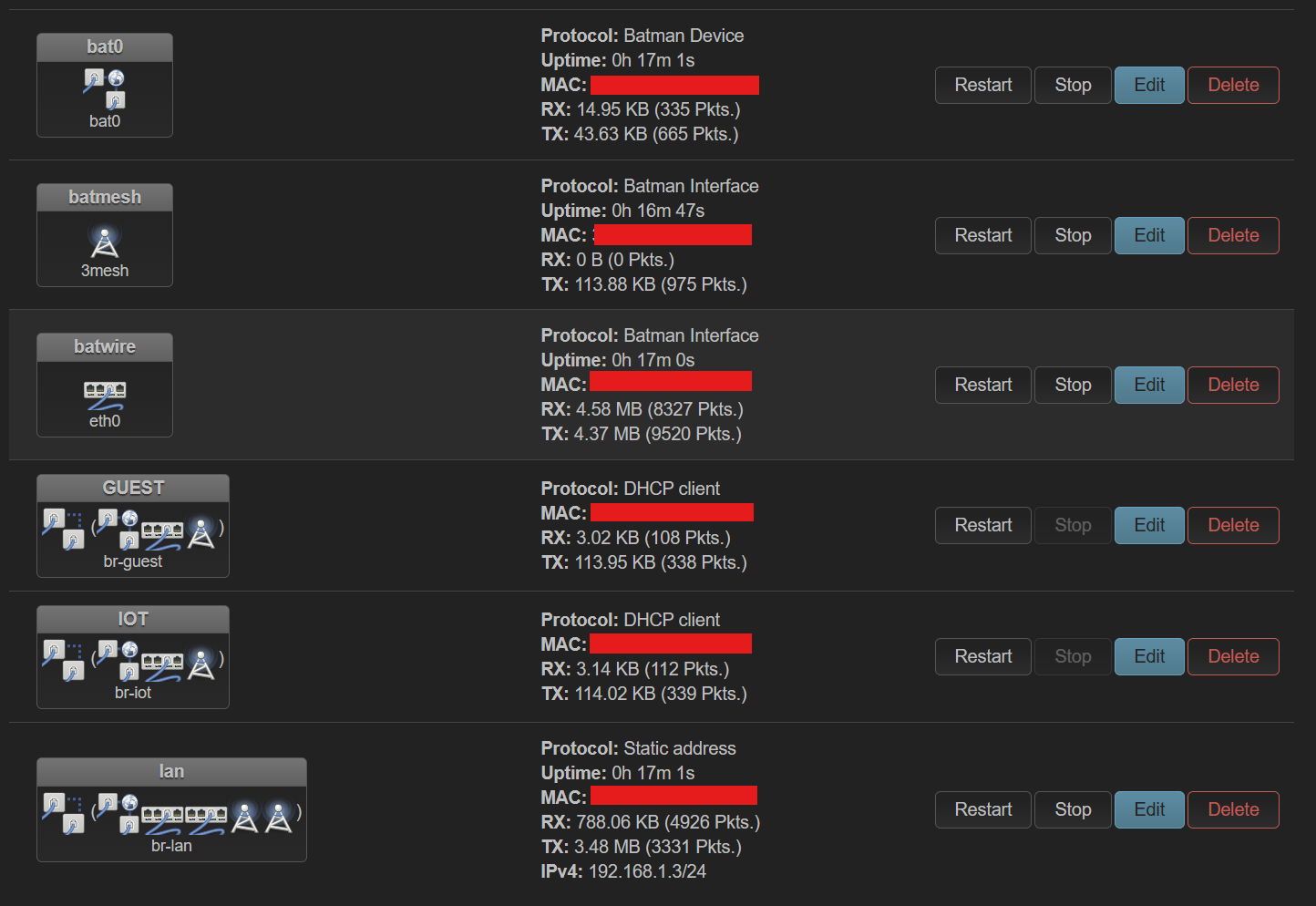
I find weird that the bat0 device on the Router has no throughput, only the batwire:

in comparison a screenshot of the AP connected via Ethernet Wire. On onemarcfifty`s tutorial, he suggested to create another batman interface for "off mesh" traffic..

Maybe i misconfigured something in the whole process.

Please share your network and wireless config in text form. As preformated text.

I’ve been playing around with BATMAN and a running wired only setup. Far from being an expert or understanding everthing. My first guess for your primary router would be that you have to assign the batman interface to the lanport connecting to the AP.

try changing:
config interface 'batwire'
option proto 'batadv_hardif'
option master 'bat0'
option device 'br-lan'

to

config interface 'batwire_lan4'
option proto 'batadv_hardif'
option master 'bat0'
option device 'eth(port connecting to wired AP)'

BATMAN is not necessary in a wired only setup unless you have redundant wiring (i.e. loops, multiple possible paths to the same destination) in the topology. Then BATMAN will work to find the best path and re-route if the best path becomes broken.

If the wiring is simple star or bus connections, ordinary Ethernet VLANs will work.

Even without STP. (When sticking to star or bus, or any other single wired path setup)

I will send you my config of batman over wifi and cable. it is easier just with wifi because cable and wifi can create loops.

Server node, router A, just cable, network:

config device
	option name 'br-lan'
	option type 'bridge'
	list ports 'bat0'
	list ports 'lan1'
	list ports 'lan2'
	list ports 'lan3'
	list ports 'lan5'
	option mtu '1460'
	option priority '4096'

config interface 'bat0'
	option proto 'batadv'
	option mtu '1460'
	option routing_algo 'BATMAN_V'
	option gw_mode 'server'
	option hop_penalty '5'
	option aggregated_ogMS '1'
	option bridge_loop_avoidance '1'

config interface 'bat0_hardif'
	option proto 'batadv_hardif'
	option master 'bat0'
	option device 'eth1'
	option mtu '1460'

config interface 'GUEST'
	option proto 'none'
	option device 'br-guest'

config device
	option type 'bridge'
	option name 'br-guest'
	option bridge_empty '1'
	list ports 'bat0.30'
	list ports 'lan4.30'
	option mtu '1460'

On other router, router B, connected with cable that have wifi mesh for other nodes I have this:

config device
	option name 'br-lan'
	option type 'bridge'
	list ports 'bat0'
	list ports 'lan1'
	list ports 'lan2'
	list ports 'lan3'
	option mtu '1460'

config interface 'bat0'
	option proto 'batadv'
	option mtu '1460'
	option routing_algo 'BATMAN_V'
	option gw_mode 'off'
	option hop_penalty '10'
	option bridge_loop_avoidance '1'

config interface 'batmesh0'
	option proto 'batadv_hardif'
	option master 'bat0'
	option mtu '1460'

config interface 'GUEST'
	option proto 'none'
	option device 'br-guest'

config device
	option type 'bridge'
	option name 'br-guest'
	list ports 'bat0.30'
	option bridge_empty '1'
	option mtu '1460'

config interface 'bat0_hardif'
	option proto 'batadv_hardif'
	option master 'bat0'
	option device 'wan'
	option mtu '1460'

Router A is connected to opensense as gateway, firewall, dhcp. All openwrt router have firewall and dhcp disabled.

Now, the problem that I faced is that second router will route packages in a loop. I had errors on second router like this

received packet on bat0 with own address as source address

The solution to this problem, no matter what ai sadi, in my case was to configure first router as server node in batman and second that have wire and wireless connection to gateway off in batman. That stopped loop immediately.

The only thing I don’t quite get is why I have low iperf3 speed with high retransimission between those two routers. They are connected with cable and it should flow but it doesnt.

I get far better speed with iperf3 between wifi mesh routers with retransmision 0 then on cable. I’m using moca adapters to connect those two routers.

You need to increase the mtu of Ethernet and wifi and not lower that of the bat device.

Sometimes these detecting packet with own Mac is because Mac address are not uniw to each interface, did you checked that?

i tried this solution and now the bat0 interface on my router is showing some traffic..
But i don't know if this did the trick.
Syslog now gives the same error that i should increase the MTU to 1532, bur this made my network unreachable the last time i tried...

Its just recommendation. Run

batctl n

to see neighbors and

batctl o

for originators. If you can ping routers from each other then it is working. Attach some wifi ssid to lan and see if you can browse net or just run speedtest from dumb ap. If it is working then your mesh is working. Just need some wifi ssid, firewall rules and such,

I don’t know..

When I’m running iperf3 using linksys mx4300 ( wifi and cable ) as server from my linksys mx4200 it give me great results.

iperf3 -c 192.168.8.10
Connecting to host 192.168.8.10, port 5201
[  5] local 192.168.8.4 port 46284 connected to 192.168.8.10 port 5201
[ ID] Interval           Transfer     Bitrate         Retr  Cwnd
[  5]   0.00-1.00   sec  38.5 MBytes   322 Mbits/sec    0   1.49 MBytes       
[  5]   1.00-2.00   sec  47.5 MBytes   398 Mbits/sec    0   1.96 MBytes       
[  5]   2.00-3.00   sec  47.8 MBytes   401 Mbits/sec    0   1.96 MBytes       
[  5]   3.00-4.00   sec  47.1 MBytes   395 Mbits/sec    0   1.96 MBytes       
[  5]   4.00-5.00   sec  47.8 MBytes   401 Mbits/sec    0   1.96 MBytes       
[  5]   5.00-6.00   sec  47.6 MBytes   400 Mbits/sec    0   1.96 MBytes       
[  5]   6.00-7.00   sec  48.4 MBytes   406 Mbits/sec    0   1.96 MBytes       
[  5]   7.00-8.00   sec  48.9 MBytes   410 Mbits/sec    0   1.96 MBytes       
[  5]   8.00-9.00   sec  44.8 MBytes   375 Mbits/sec    0   1.96 MBytes       
[  5]   9.00-10.00  sec  47.0 MBytes   393 Mbits/sec    0   1.96 MBytes       
- - - - - - - - - - - - - - - - - - - - - - - - -
[ ID] Interval           Transfer     Bitrate         Retr
[  5]   0.00-10.00  sec   468 MBytes   393 Mbits/sec    0             sender
[  5]   0.00-10.01  sec   468 MBytes   392 Mbits/sec                  receiver

iperf Done.

But when i do the same from mx4300 to flint 2 ( moca connected only ) I get this

iperf3 -c  192.168.8.2
Connecting to host 192.168.8.2, port 5201
[  5] local 192.168.8.10 port 44066 connected to 192.168.8.2 port 5201
[ ID] Interval           Transfer     Bitrate         Retr  Cwnd
[  5]   0.00-1.00   sec  23.0 MBytes   193 Mbits/sec   65   67.4 KBytes       
[  5]   1.00-2.00   sec  17.2 MBytes   145 Mbits/sec   24   64.6 KBytes       
[  5]   2.00-3.00   sec  15.8 MBytes   132 Mbits/sec   20   90.8 KBytes       
[  5]   3.00-4.00   sec  18.5 MBytes   155 Mbits/sec   20    102 KBytes       
[  5]   4.00-5.00   sec  21.5 MBytes   180 Mbits/sec   20    126 KBytes       
[  5]   5.00-6.00   sec  21.9 MBytes   184 Mbits/sec   20   99.0 KBytes       
[  5]   6.00-7.00   sec  19.2 MBytes   161 Mbits/sec   24   86.6 KBytes       
[  5]   7.00-8.00   sec  18.6 MBytes   156 Mbits/sec   17    109 KBytes       
[  5]   8.00-9.00   sec  19.2 MBytes   161 Mbits/sec   22   88.0 KBytes       
[  5]   9.00-10.00  sec  16.8 MBytes   140 Mbits/sec   25   70.1 KBytes       
- - - - - - - - - - - - - - - - - - - - - - - - -
[ ID] Interval           Transfer     Bitrate         Retr
[  5]   0.00-10.00  sec   192 MBytes   161 Mbits/sec  257            sender
[  5]   0.00-10.01  sec   190 MBytes   160 Mbits/sec                  receiver

iperf Done.

I mean maybe it is the problem that i have moca 2.5 with flint having 2.5 gb port and linksys mx4300 1 gb.. I don’t know. Was playing with mtu a lot, but I think I have a great results over wifi and I don’t want to break something up again. internet speed is fine everything is working fine except this. I don’t say I mind but.. you know.. just curiosity.

i just ran iperf3 and my results are half as fast as yours..
My Bitrate is around 74 Mbits/sec.
My wireless backhaul is a 5ghz Radio and the SSID i am connection to is 2.4Ghz.

Well, I’m using wifi 6 routers with 3 band. One radio is dedicated to mesh wifi only.

If you have wifi 5 routers don’t expect much of them as they don’t have enough cpu power for this.

I also noticed that different wifi drivers will not work that great and that is why I went for a wire. Fast speed over the wifi I posted is between linksys mx4300 and mx4200, ath11 to ath11. But when you put mediatek in this, speed ten to drop especially with flint 2.

And there is a ton of other reason why, like ch, width, interference, signal strenght etc etc