Same here. I was running multi-pro.plus but had a couple of issues with it, so I switched to just multi-pro. It’s been working great. hagezi multi-pro has replaced OISD for me. Oh, and I am also running threat-intelligence.
1 Like
Please show the content of your local block- and allowlist. Also the banIP log output after a restart and the status after that restart plus your current config. Thanks!
Please check private message. Thanks.
2 Likes
Thanks now see you are right!!!
Was mostly focusing energy reading/learning how to block “wildcards” like *.website.com and similar that the install seemed “trivial” since it’s via LuCI thought it’s just click and go.. maybe the banip page where u enable, can have a link to the System/startup, or when it says “error” next to it a notice “be sure to enable at startup” to raise awareness beyond readme…
Maybe a specific example will help, at first had in DNS this rule:
/firmware.nettvservices.com/#
which translates it to 127.0.0.1, but other nodes on LAN may get the IP via other dns, so added banip, with that domain name:
firmware.nettvservices.com
however, it is still possible to ping that IP, even from the router directly.. banip reports shows zero but it’s actively running.. the block list also says “domain names”.. Tried reload/restart and after several attempts found in the block list banip expanded to about 12 lines of individual IPs with remark:
# 'firmware.nettvservices.com' added on 2025-08-07
yet, even after all these IPs are hardcoded, restarted the service, still can ping that domain name.
Aren’t ICMP also supposed to be blocked? how to validate the banip is working correctly ?
Note: setup uses MultiWAN with 2 different networks, in balanced manner.
Well, first of all: banIP never blocks router initiated communication. It can block in WAN-Input- and WAN-/LAN-Forward chains, never in Output chains.
I’ve added your mentioned domain and did a quick test:
-
add the domain to local blocklist and hit save (see the hint in blue => reload!)
-
reload and check the debug logs (1 domain parsed and 12 IPs resolved in this run/reload)

-
check the local blocklist afterwards
-
try a ping to the mentioned domain from a connected client


…everything works as expected.
Regarding DNS I prefer adblock - but I’m a little bit biased … 
3 Likes
THANKS for the “hand holding” - much appreciate it! Hopefully others reading can learn too.. was not aware that router initiated is excluded from banip  Saw similar effect that IPs were added , yet pinging kept taking place, b/c the DNS kept on “generating” new IPs for that same domain..
After going through few rounds manually added 3.161.82.75 and several others, and it got more, until it started blocking, but, then, pinging started working again – did a reload and restart, sometimes blocked, sometimes working pinging on the same IP (started testing by exact IP)..
Maybe the mwan3 setup is causing banip to sometimes work on one interface or the other?
Startup trigger interface is listed as LAN, which is what the mwan3 works on..
ping definitely works:
$ ping 3.161.82.75

Pinging 3.161.82.75 with 32 bytes of data:
Reply from 3.161.82.75: bytes=32 time=78ms TTL=239
Reply from 3.161.82.75: bytes=32 time=109ms TTL=239
and that IP is definitely in the block list verified by grep:
root@:/etc/banip# grep 3.161.82.75 *block*
3.161.82.75
that might be mwan3 related?
pause…
Wow now i see the complexity behind such blocking.. not trivial as it would seem..
Almost feels like TWO lists need to be maintained, the “user-friendly” i.e. what users type , edit, the TOP main domains, and the “internally, expanded , generated list”, that can get “refreshed” periodically, or for “power users” can edit directly.. that might be easier to manage, longer term, if only one domain name already generated 20+ IPs, what happens with 20+ domains
Well, consult the readme again. If you’re using complex network setups, disable the autodetection and configure esp. the interfaces manually.
ok, thanks!! when selecting “devices” should it be like that u think?

OR more towards like this:

on the IPv4 net interfaces selected:

now it acts much better, but still, some clients are ALLOWED , why others are blocked, re-trying tracert/ping, shows clearly that blocked are blocked, but on another client, using same router as DG (no wifi, etc.) ping is ALLOWED, but then after a few minutes, it gets blocked
then a new IP comes along, manually added 6 more… save/ reload.. and it’s better.
I guess there probably is some timeouts or caches, after ~3min all got blocked, but then, another IP came, and more how funny…
Thanks for support!!
Is there a tool/solution that can further automate the ban/ip based on domain NAME alone (without having to exactly maintain/list all IPs?),
specifically interested to block such addresses *.website.com, but cannot use the DNS since clients may be able to use their own DNS or cached DNS.. so looking for a filter/block type solution.. maybe “adblock” is the tool?
maybe “ip sets”? saw that term mentioned.. and when searching on them, not seeing wildcards, they appear to be able to hold only specific IPs, so not sure would help much..
I guess this is a very common question here.
I recall my first post was about this too.
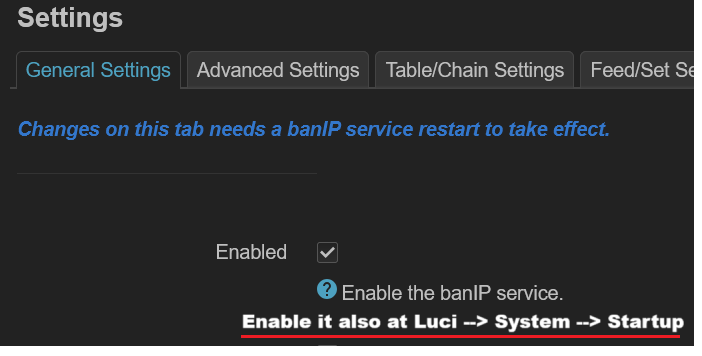
When the user see an option saying “Enable”, they don’t expect to Enable it again in another settings.
By the way, why is there two “Enable”?
Maybe a message like this could help?
Hi dibdot, could you please share whether it is possible to set ban_allowflag to allow a combination of different TCP and UDP ports? For example TCP ports 80 and 443, as well as UDP ports 1194 and 1195.
Thank you.
Nope, that’s currently not supported.
1 Like
Just put all domains in your local block-/allowlist and schedule a banip reload every 4 hours or similar.

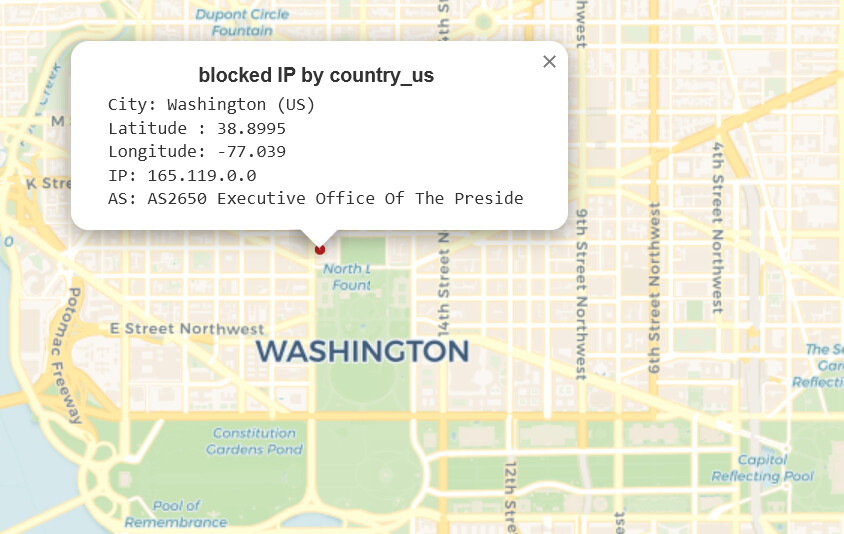
Some would be more interested in what did president do to you so you banned him and his whole country 
1 Like
Now he is offended and will raise tariffs on your country …
3 Likes

I’m already at 50% 
How dare you! Unban him! Probably he is offering you a discount.
1 Like
https://ip.bieringer.net/ - geoloc. data in some databases is very wrong. Last two columns place me on a wrong continent.
