Oh !!
Thanks 
Is this new list will be used with my settings?
No, I run on full OpenWRT. Look at the right-bottom of my first screenshot.
Oh !!
Thanks
Is this new list will be used with my settings?
No, I run on full OpenWRT. Look at the right-bottom of my first screenshot.
Hello,
I was experiencing a problem of periodic timeout on my network.
Every severals minutes (changing from time to time) I loose connectivity to internet and to some of my servers (maybe because of lack of the dhcp server).
It took me some times to diagnose and solve (I hope) this problem .
The faulty one was the router… I’ve been experiencing those timeout since I flashed GL.iNet 4.7.4-OP24 firmware, and again with full OpenWrt 24.
And I see in the logs on the Flibt2 many many lines from banip.
I remember I activate some logs options and I thought : what if all the logs induced by banip was causing my problems…
So I deactivated those options:
And from this moment to now, I think I don’t have anymore some timeout.

Not really relevant for my problem, but do you know why it would not work? As it seems most tools accept this notation, I'm curious which ones don't. I was not familiar with this notation before myself, but since I've discovered it I have found that it is correctly interpreted by all tools I tried it with.
Right now if your ISP uses NAT64, any blocking that does not consider this will be ineffective as the application ends up finding the IPv6 variant over DNS64 and using that. Especially mobile ISPs seem to be using NAT64 with DNS64. The original IPv4 addresses might not need to be blocklisted if there is no IPv4 connectivity at all. (Another way to avoid the block would simply be to use any set of DNS servers from https://nat64.net/ so for a total block maybe one wants to block those networks too, but those could be blocked as a whole alternatively.)
So for banip users behind ISPs with NAT64 it will be helpful.
Yes, that's a good idea, I'll look into that.
Can banip be the reason for this crash?
I got a crash and router reboot after banip save&reload.
Thanks, fixed in latest banIP update.
Thanks, fixed in latest banIP update.
Of course, the log shows …
nft with 173 MB RAM
jsonfilter with 143 MB RAM
…bottomline refine/reduce your setup.
Nope, it doesn’t … and IP based that makes no sense - just use the right tool for outbound blocking and use an adblocker. Or block the complete/used NAT64-prefix.
That’s the default anyway.
Thanks for responding! I guess I’m not fully understanding how the ASN based blocking works. My understanding was that that each ASN essentially refers to a large collection of subnets as to allow blocking them all-together easily. I will investigate how this works exactly first then.
Hi @dibdot
Is the automatic suspicious IP banning based on Log Terms working for you?
It used to work for me in the past, but it seems to have stopped working in the later releases.
Is there a way to enable debug for this functionality? Thanks.
config banip 'global'
	option ban_enabled '1'
	option ban_debug '1'
	option ban_autodetect '1'
	option ban_fetchretry '5'
	option ban_nicelimit '0'
	option ban_filelimit '4096'
	option ban_cores '4'
	option ban_splitsize '16384'
	option ban_deduplicate '1'
	option ban_nftpriority '-100'
	option ban_synlimit '10'
	option ban_udplimit '100'
	option ban_nftpolicy 'memory'
	option ban_nftloglevel 'warn'
	option ban_logprerouting '0'
	option ban_loglimit '250'
	option ban_autoallowlist '1'
	option ban_autoallowuplink 'subnet'
	option ban_autoblocklist '1'
	option ban_autoblocksubnet '1'
	option ban_allowlistonly '0'
	option ban_fetchcmd 'curl'
	option ban_protov4 '1'
	list ban_ifv4 'wan'
	option ban_protov6 '1'
	list ban_ifv6 'wan6'
	list ban_feed 'bruteforceblock'
	list ban_feed 'country'
	list ban_feed 'drop'
	list ban_feed 'dshield'
	list ban_feed 'firehol1'
	list ban_feed 'firehol2'
	list ban_feed 'firehol3'
	list ban_feed 'firehol4'
	option ban_logcount '2'
	option ban_nftretry '5'
	option ban_blockpolicy 'drop'
	option ban_loginbound '0'
	option ban_logoutbound '0'
	option ban_icmplimit '25'
	list ban_dev 'wan'
	list ban_asn '14061'
	list ban_asn '46652'
	list ban_asn '16509'
	list ban_asn '45102'
	list ban_asn '24429'
	list ban_asn '134963'
	list ban_feedinout 'allowlist'
	list ban_feedinout 'blocklist'
	list ban_feedinout 'asn'
	list ban_feedinout 'bruteforceblock'
	list ban_feedinout 'country'
	list ban_feedinout 'drop'
	list ban_feedinout 'dshield'
	list ban_feedinout 'etcompromised'
	list ban_feedinout 'firehol1'
	list ban_feedinout 'firehol2'
	list ban_feedinout 'firehol3'
	list ban_feedinout 'greensnow'
	list ban_feedinout 'uceprotect1'
	list ban_feedinout 'uceprotect2'
	list ban_country 'cn'
	list ban_country 'ir'
	list ban_country 'kp'
	list ban_country 'ro'
	list ban_country 'ru'
	list ban_country 'uy'
	list ban_country 've'
	list ban_trigger 'wan'
	list ban_logterm 'Exit before auth from'
	list ban_logterm 'luci: failed login'
	list ban_logterm 'error: maximum authentication attempts exceeded'
	list ban_logterm 'sshd.*Connection closed by.*\[preauth\]'
	list ban_logterm 'received a suspicious remote IP '\''.*'\'''
	list ban_logterm 'Bad encapsulated packet length from peer'
	list ban_logterm 'TLS handshake error from'
	list ban_logterm 'invalid notify data length'
# logread -f
Mon Aug  4 21:03:33 2025 authpriv.warn dispatcher.uc: luci: failed login on / for root from 192.168.43.100
Mon Aug  4 21:03:37 2025 authpriv.warn dispatcher.uc: luci: failed login on / for root from 192.168.43.100
Mon Aug  4 21:03:41 2025 authpriv.warn dispatcher.uc: luci: failed login on / for root from 192.168.43.100
Mon Aug  4 21:03:51 2025 authpriv.warn dispatcher.uc: luci: failed login on / for root from 192.168.43.100
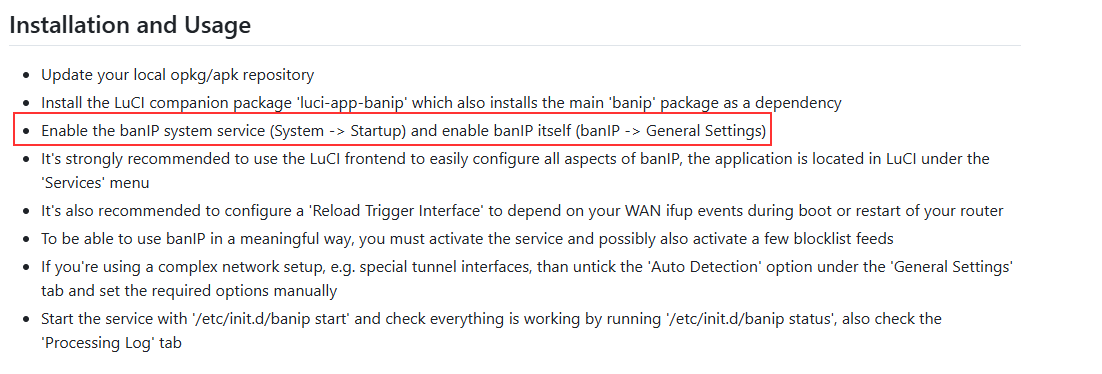
Tried to set up BanIP from LUCI interface, clicked on enable, yet despite all attempts, it kept saying disabled, OR “error”, in logfile these appeared:
user.err banIP-1.5.6-r6[12406]: banIP service autostart is disabled
going into command line noticed error comes from /etc/init.d/banip:
46-start_service() {
47-     if "${ban_init}" enabled; then
48-             f_rmpid
49-             procd_open_instance "banip-service"
50-             procd_set_param command "${ban_service}" "${@:-"${action}"}"
51-             procd_set_param pidfile "${ban_pidfile}"
52-             procd_set_param nice "$(uci_get banip global ban_nicelimit "0")"
53-             procd_set_param limits nofile="$(uci_get banip global ban_filelimit "1024")"
54-             procd_set_param stdout 0
55-             procd_set_param stderr 1
56-             procd_close_instance
57-     else
58:             f_log "err" "banIP service autostart is disabled"
59-             rm -rf "${ban_lock}"
60-     fi
61-}
so, ran from cmd line /etc/init.d/banip enable, followed by ‘start’ and instantly LUCI showed service is running.
question is this expected? shouldn’t the luci / web interface allow such enable/start directly from UI?
Thanks!
remove that and restart banIP.
I even removed all existing ban_logterm and added only 'Login attempt for nonexistent user', but the automatic banning still did not take effect. This is very weird.
list ban_logterm 'Login attempt for nonexistent user'


Tue Aug  5 07:52:20 2025 authpriv.info dropbear[31588]: Child connection from 192.168.1.100:52742
Tue Aug  5 07:52:20 2025 authpriv.warn dropbear[31588]: Login attempt for nonexistent user from 192.168.1.100:52742
Tue Aug  5 07:52:24 2025 authpriv.info dropbear[31588]: Exit before auth from <192.168.1.100:52742>: Max auth tries reached - user 'is invalid'
Tue Aug  5 07:52:25 2025 authpriv.info dropbear[31598]: Child connection from 192.168.1.100:52746
Tue Aug  5 07:52:25 2025 authpriv.warn dropbear[31598]: Login attempt for nonexistent user from 192.168.1.100:52746
Tue Aug  5 07:52:27 2025 authpriv.info dropbear[31598]: Exit before auth from <192.168.1.100:52746>: Max auth tries reached - user 'is invalid'
Tue Aug  5 07:52:28 2025 authpriv.info dropbear[31604]: Child connection from 192.168.1.100:52747
Tue Aug  5 07:52:28 2025 authpriv.warn dropbear[31604]: Login attempt for nonexistent user from 192.168.1.100:52747
Tue Aug  5 07:52:30 2025 authpriv.info dropbear[31604]: Exit before auth from <192.168.1.100:52747>: Max auth tries reached - user 'is invalid'
Tue Aug  5 07:52:31 2025 authpriv.info dropbear[31605]: Child connection from 192.168.1.100:52749
Tue Aug  5 07:52:31 2025 authpriv.warn dropbear[31605]: Login attempt for nonexistent user from 192.168.1.100:52749
Tue Aug  5 07:52:34 2025 authpriv.info dropbear[31605]: Exit before auth from <192.168.1.100:52749>: Max auth tries reached - user 'is invalid'
you’ve asked the very same question 6months ago…. …
…
First of all - very good memory @dibdot. I didn’t intend to test it, sorry but so many things in my head so this one obviously got wiped .
Anyone here using hagezi feed on a router?
Yes, the multi pro flavor.