2025: current recommendations for bufferbloat testing

Note this is work in progress, and will see some more edits....

Tuning one's own internet access for low latency under load (aka bufferbloat) can be quite satisfying and the end result is a generally better internet experience. To make the tuning fun and efficient it can be quite helpful to know which tools are available to assess the current latency-under-load behaviour. In my experience there are several levels of tooling available, all with different pros and cons. Here I try to give the main categories I see, with examples and a quick evaluation.

The browser-based tests

These tend to be the most convenient, as "everybody (and almost every device) has a browser". That is generally true, and modern browsers are marvels of utility, yet, they are not perfect for high fidelity, high-quality measurements (see below). Still for quick tests or for getting started these are invaluable.

1) Waveform's bufferbloat test (https://www.waveform.com/tools/bufferbloat)

Pros:

  • Measures latency (and throughput) during idle, download, and upload epochs.
  • High number of latency samples
  • Shows latency distributions (and summary statistics) for the three epochs separately
  • Allows exporting data as .csv file (contains all latency samples, but only aggregate summaries for the throughput)
  • Operated from cloudflare CDNs so typically will find a reasonably close by server location.

Cons:

  • Tests are relative short (common for on-line tests, someone needs to pay for the server capacity)
  • No bidirectionally saturating measurement phase

2) Cloudflare's Speedtest (https://speed.cloudflare.com)

Pros:

  • Measures latency (and throughput) during idle, download, and upload epochs.
  • Measures throughput for differently sized objects
  • Also includes a packet loss test
  • Shows latency distributions (and summary statistics) for the three epochs separately
  • Allows exporting data as .csv file (contains only aggregate summaries for throughput and latency), latency numbers can be manually scraped from the web page...
  • Operated from cloudflare CDNs so typically will find a reasonably close by server location.

Cons:

  • Tests are relative short (common for on-line tests, someone needs to pay for the server capacity)
  • No bidirectionally saturating measurement phase
  • Relative low number of latency samples

NOTE: the results page contains the local IP address as well as maps of the server location and the estimated client location. If you consider these sensitive, redact them before sharing. In my case the geoIP is just really far off (100s of kilometers) and my IPv6 prefix changes every day, so I am not concerned sharing these, but be aware...

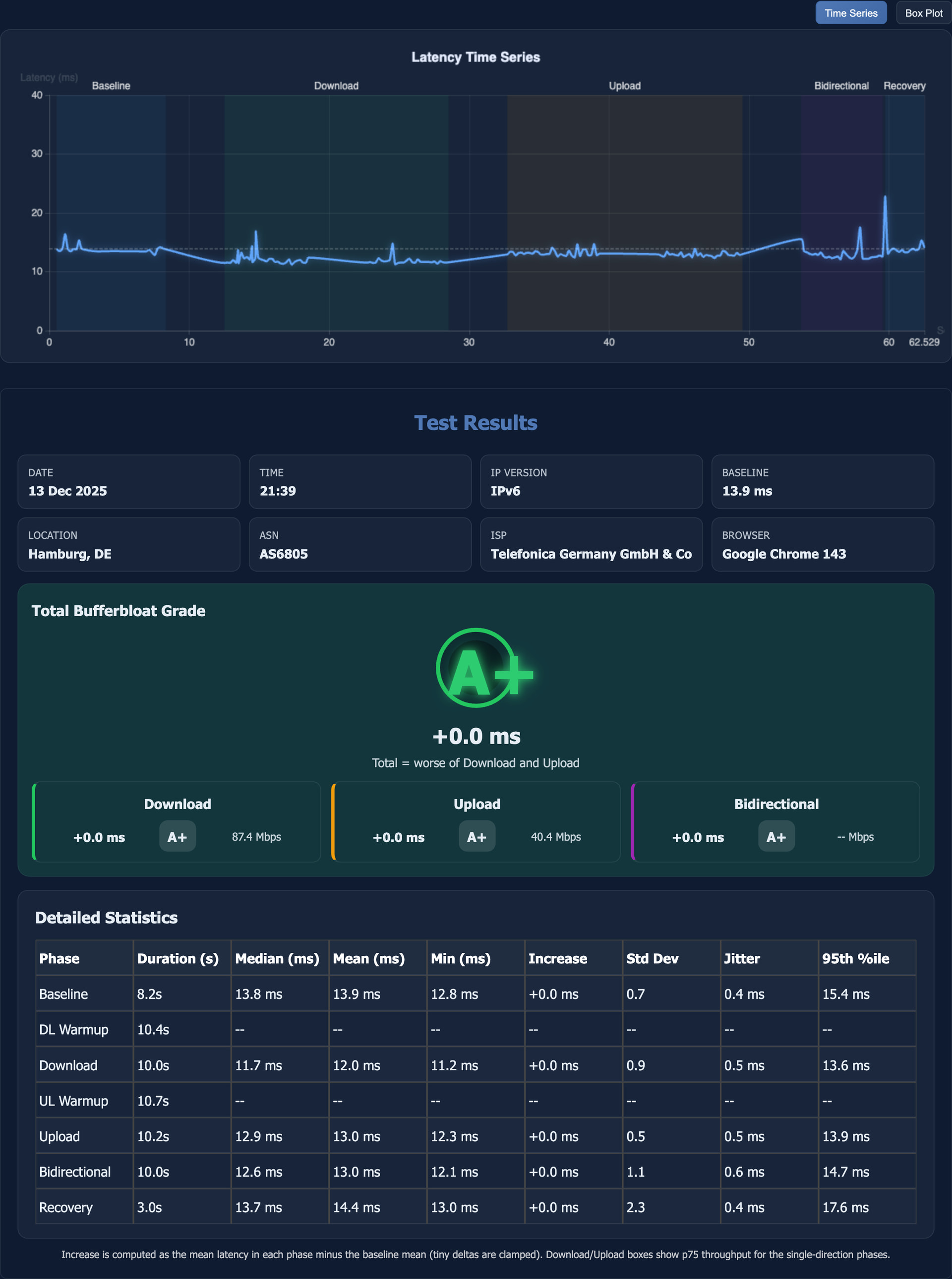
3) the new kid on the block: the LibreQoS Test (https://bufferbloat.libreqos.com)

Pros:

  • Measures latency (and throughput) during idle, download, upload, as well as concurrent down- and upload epochs.
  • Shows latency distributions (and summary statistics) for all epochs separately
  • Offers both time series and box plots for the latency results
  • Allows exporting the full result page as .png image.
    EDIT: the png now exports the relevant part of the results only which helps making the png smaller and easier to past and view in fora like this.
  • Operated from cloudflare CDNs so typically will find a reasonably close by server location.
  • Virtual household test, in which 4 different usage profiles (games, video call, video streaming, background update) are tested concurrently, this test shows how well different uses are separated (see post 18 for current screenshots from both libreqos tests)

Cons:

  • No digital data export yet
  • No option for longer measurement durations (same as the other on-line tests)

NOTE: As of 2025 12 14 you need to click on the advanced details "header" to see and export the "Detailed Statistics" table, I typically always want that table. Also note that this table contains noticeable fewer columns in smartphone mode, so set your mobile browser to "Desktop site" (chrome, firefox, no idea how mobile safari and other browsers handle that), before you start a test as switching post-test will not reveal the "missing" columns.

These are the main browser tests useful for debloating a link, but there are two additional capacity tests that can be useful

4) Ookla's Speetest (https://www.speedtest.net)

Pros:

  • Large network on servers, typically it will find servers close by
  • Measures throughput and latency under load

Cons:

  • Latency per epoch only reported as summary statistics (aggregate, Low, and High, and sometimes Jitter). NOTE you need to select the Results history and click the test session of interest to see the latency statistics.

5) Netflix fast.com (https://fast.com)

Pros:

  • Uses Netflix' own large content delivery network, typically it will find servers close by
  • Measures throughput and latency under load
  • Allows to configure number of flows as well as test duration

Cons:

  • Loaded latency results a only reported as single aggregate number (not even split for down- and upload)

IMHO the first three are decent tools in their own right, with the newcomer 3) currently my favourite. The last two are less than ideal, but better than nothing :wink:

The public command line interface (CLI) tests:

These are command line utilities that talk to public servers and hence are easy to use, but are more limited than tests where one controls both sides

1) networkQuality (either Apple's own implementation included in Apple OSs or the great go-responsiveness (https://github.com/network-quality/goresponsiveness))

Pros:

  • Use servers from apple's CDN so should be able to find close by servers
  • Throughput and concurrent latency measurements
  • Summary reporting of latency and throughput statistics
  • Allow saving latency sample data to file
  • Allow to configure either sequential tests of both directions or a concurrent test with bidirectional saturation.

Cons:

  • the two implementations have similar capabilities but are not identical, only a con if one wants to mix data from both
  • Tests are currently aiming for short run times, and offer no (apple) or little configurability of run time (goresponsiveness)

2) Oookla's speedtest app

Pros:

  • similar to 4. above

Cons:

  • similar to 4. above

The private command line interface (CLI) tests:

netserver/flent (https://flent.org)

This IMHO is the GOAT for self testing, but requires to set up a remote netserver on the other side.

iperf2 (https://sourceforge.net/projects/iperf2/)

In spite of still being on sourceforge (I think it moved to sourceforge when SF was the new hotness :wink: ) iperf2 is under active development and has bunch of latency related features. Like flent/netserver it also requires to set up remote a server on the far side.

iperf3 (https://iperf.fr)

Quite popular, and NOT in any way shape of form the successor of iperf2 (rather both develop in parallel), there are some remote servers publicly available. Popular, I believe but lacks the depth of iperf2 regarding latency tests.

networkQuality/goresponsiveness

These can be run against one's own servers (these servers are essentially just web servers). Apple's networkQuality binary can also be started in local server mode and used for local tests.

crusader (https://github.com/Zoxc/crusader)

Great tool for local testing. Simple to use, offers both server and client, and has a great default test set: Download, Upload, Concurrent Down- and Upload, interspersed with small recovery periods for queues to dissolve. Creates nice graphical output. Will require to set up one's own server if to be used over the internet.

Notes on browser measurements

As I said above, modern browsers are marvels of utility, but getting high precision temporal network measurements out of them is a challenge. For the same tests different browsers can behave differently and return different results, so with browser tests always keep in mind that you are testing the browser itself just as much as the network, ideally repeat tests with different browsers (ideally different lineages, like safari, mozilla, chrome/chromium). See the Safari example in the next post and compare with the firefox measurement under otherwise very similar conditions, clearly some latency samples reliably and repeatably came from Safari and did not reflect the network itself.

13 Likes

Here are some results from the recommended tests with and without SQM enabled:

1) Waveform (firefox):

no SQM

SQM

1) Waveform (safari):

SQM

Note that probably due to Safari internal processes like garbage collection or similar, there are latency samples in all three measurements in the range around 200ms, that where not caused by the network...

2) Cloudflare (chrome):

no SQM

SQM

3) LibreQoS (chrome):

no SQM

SQM

7 Likes

One more slot for updates/examples

1 Like

I played with the LibreQoS tool back when it was first announced on the bufferbloat mail list and haven't tried it again since. So, thanks for reminding me, I need to try it out some more.

I do wish they had some permalink to a database of results (like waveform/ookla does it) instead of their png screenshot, but that of course means storing data on their end and I can see why they want to avoid it.

2 Likes

Yeah, well - we would like to add more features for sure…but it’s just 3 of us :frowning: after Dave’ passed away. But keep feature requests coming, anyone. Don’t hesitate to tag me, so I can bring to our internal discussion. Or if you want to discuss it more in-depth, join LibreQoS support channel: https://chat.libreqos.io/

7 Likes

https://devina.io/speed-test - works well also

3 Likes

Thanks, it looks like the davina.io test is really just the waveform test repackaged (it even states powered by Waveform). Looks slick, and can display the latency samples as (too small) time-series. Decent test, would I personally use this for a debloating attempt? Likely not.

1 Like

This thread piqued my interest as I have not enabled any SQM or even software or hardware offloading up to now. Recently I have noticed (or maybe imagined) more latency so started to read the wikis on SQM. In those doc it talks about getting baseline numbers. So using some of the sites you mention above my question is what numbers do I take if I want to do anything other than the defaults as they vary so much -

Ookla 899 up 503 down, Libre 439 up 280 down A+, Waveform 781 up 698 down A,

Then a bit later (like less than 20 minutes)

Cloudflare 571 up 400 down, Ookla 889 up 506 down, Fast 940 up, test my Net to Singapore (from Thailand) 631 then 635 up and 8.9 and 11.2 down, then some weird Waveform tests -

663 up 1141 down…..A

751 up 524 down B

776 up 1026 down….B

Latency is all over the place with some tests maximum over 300ms. My ISP is supplying 1Gb/500 so the later waveform tests are strange (to me). Unfortunately my better half decided to get up so I couldn’t carry on and actually test adding sqm.

All tested using a usb c connected ethernet cable into a MT6000 on 24.10.3

So how should I decide what numbers to use? :thinking:

PS - apologies if my question is off topic a bit.

A few comments,

  • All browser-based tests are prune to external non-related disturbances, especially with gigabit speeds. There may always be some garbage collection, background task in PC etc. distorting the timings.
  • There may always be outliers in the latency, so pay more attention to the median, mean, and maybe 25%-75% interval latency, so that most packets are with reasonable latency, than to the maximum pings.
  • Based on those results and ISP promised speed, I would maybe start with 500/400 limits, and then test impact from changing 100 Mbit to up or down. Note that half gigabit per second is pretty surely plenty for any normal use.
  • (With that high speeds I prefer SQM simple.qos with fq_codel qdisc. Your problem is not really tweaking the diverse flows like cake does, but to mange the general latency.)
3 Likes

Yes I appreciate that and since the speed increases have pretty much come at no increased cost over the last 10 years or so I am certainly not complaining.

Thank you for your answer and I will try as you suggest when it is convenient. :+1:

Well, there are two relevant sets of numbers:
a) the actually achievable throughput to the speedtest sites, which gives an estimate about the net capacity of a link, often that is close to the contracted rates, but not always so we want to know the true values (if only because part of the easy recipe for setting up sqm is to set the shaper to 50% of the achievable rate).
b) an estimate how bad the link is bufferbloated to beginn with, a convenient number to use here the difference between the idle and loaded latency statistics, I tend to look at median, mean and 75%. Ideally 95% or maximum, but as @hnyman elaborated browsers can never be trusted 100%.

That can be an issue, not all USB ethernet dongles are equally well, and not all drivers are equally efficient (e.g. on my macbook, some realtek 1 Gbps dongles use the slower com.apple.driver.usb.cdc.ecm, some use the more modern com.apple.driver.usb.cdc.ncm).

Trial and error :wink:

It’s been awhile since i looked at my own numbers again. At the intro of the libra qos there is a delta from the bufferbloat com site.

Perfect: https://www.waveform.com/tools/bufferbloat?test-id=e8815d25-0347-49b5-abce-95c74ca02c8b

less then perfect:

So now its making me want to tune again to make the libraqos an A+. Has anyone else seen similar results?

1 Like

So I believe the difference is how these two calculate the relevant latency under load number:
waveform IIRC takes the difference in the means, while LibeQoS uses the difference between the 95% latency percentile for the load epochs and subtracts the median of the idle latency. This is considerably more sensitiver then the difference of means approach.
I actually argued for taking the minimum of the idle latency which would make these differences a bit larger.
In addition the LibreQoS test also adds the bidirectionally saturating load condition....

You could try, but it might simply be that even a decently debloated link does not easily achieve +0 LULI in the libreqos test. Which is actually what I expect, e.g. cake and fq_codel default to allowing 5ms of standing queue so any test with saturating loads running long enough should actually show these 5 ms... (and transiently even more, as the control law of codel allows by defaults for the standing queue to exceed the target interval of 5ms for a duration of 100ms).

On the subject of SQM, in a scenario of one device running a torrent max speed while watching a Twitch stream on same device that the Twitch stream buffers every 3-4 seconds. Is that expected? No other devices require bandwidth at the time. Latencies seem fine when running ping tests while doing it.

Yes that is expected... in that case the "pain" is restricted to the torrenting machine and we simply expect the admin to reign in the torrents if they get out of hand (I think at least transmission had some toggles to control the number of parallel transfers and maybe even a capacity limit)*. The goal here is simply to make sure other machines on the network are not negatively affected.

The way this works is that cake/fq_codel try to serve all active flows equally, but torrenting will open a shipload of parallel flows that all get an equitable share of the capacity and if say torrenting uses 99 parallel flows and your twitch stream just one, twitch will only get 1/100 of the capacity, which might be too little...
Now torrent protocols like µtp try to get out of the way if they detect other traffic using the capacity, but alas that does not work as well as one would like.

*) This might sound harsh, but that is how this works by default, you could use qosmate and have it down prioritise presumable torrent flows automatically

Yeah makes sense. I saw these options in qBittorrent would probably fix it.

Need some math to try and find a good balance. So if you had 135 Mbps (150 gross) and come up with that a Twitch stream requires about 7-8 Mbps, let’s just say 10 max. Each connection must allow about that much. I tried 12 (135/12). Gives enough headroom and incase another device is on YouTube it should be ok. The problem is I think the torrent program (or me) is kinda stupid because it’s now just a lottery if those 12 seeds it picks have fast upload or not (it has over 300 seeders). Setting to 12 was not maxing out my download and even 16 really wasn’t since some seeds just send nothing half the time:

16

16 didn’t cause buffering but it also wasn’t constantly maxxing out the download speed so don’t know if it did anything. I’d need to do alot of experimenting to find the golden value but it can’t be much more than 16 I guess.

Waveform's
the LibreQoS Test
devina

All of these appear to be cloudflare. Because I block tons of things, cloudflare deems me a "robot / ai scrapper bot" for a lot of sites. I assume that is why none of these will complete until I run the official cloudflare speedtest directly first. Even after I occasionally get a few hangs producing false positives in results from those three sites. F12 -> network -> reload page and then start test. I am sure others may be getting hit by this and attempting to use SQM to fix it without success.

Here are examples of the current libreqos test reports, for both the "single" and the "household" tests:
single:


(this is not my home link and without SQM, not terrible by virtue of being high capacity, but not great either)
virtual household:

Also not great, but not totally terrible either...

5 Likes

Since I am at it here is a test from my home link with SQM (via ethernet):

and here without SQM, noticeably worse, but by no means terrible:

4 Likes