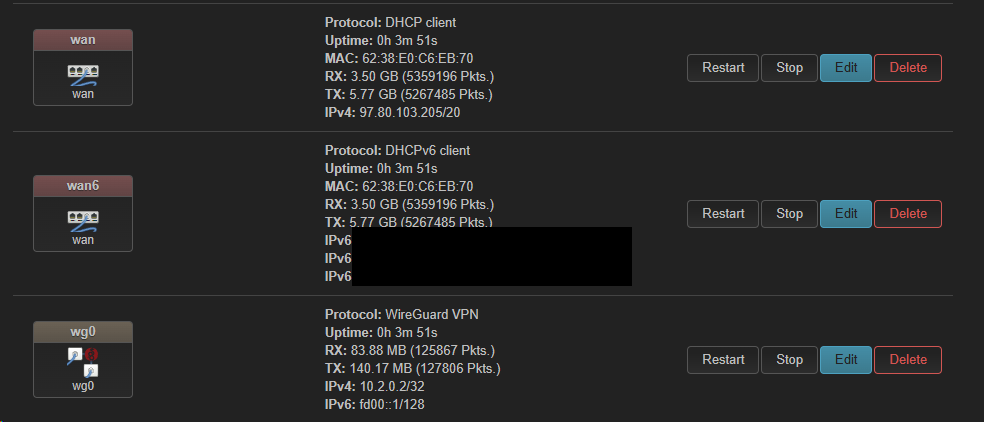
So now with all the scripts dead, I sat and watched my wg0 interface go down, both the wan and wan6 interfaces being rebooted in real-time and everything coming back up again.
So reverting back to 24.10.0 didn’t fix the issue at all. I’m still having the same problem with the WG interface starting itself back up again and the WAN/WAN6 interfaces rebooting. I double-checked the script and it seems fine. The only other thing I can think of at this point is the packages I installed after the firmware upgrade (I installed the same packages when I downgraded.) Here is the raw list of packages I installed post-upgrade for both instances:
root@PyrosRouter:/etc/backup# cat installed_packages.txt
base-files      rom
busybox rom
ca-bundle       rom
cgi-io  rom
dnsmasq rom
dropbear        rom
firewall4       rom
fstools rom
fwtool  rom
getrandom       rom
hostapd-common  rom
iw      rom
iwinfo  rom
jansson4        rom
jshn    rom
jsonfilter      rom
kernel  rom
kmod-bluetooth  rom
kmod-btmrvl     rom
kmod-cfg80211   rom
kmod-crypto-acompress   rom
kmod-crypto-aead        rom
kmod-crypto-ccm rom
kmod-crypto-cmac        rom
kmod-crypto-crc32c      rom
kmod-crypto-ctr rom
kmod-crypto-ecb rom
kmod-crypto-ecdh        rom
kmod-crypto-gcm rom
kmod-crypto-geniv       rom
kmod-crypto-gf128       rom
kmod-crypto-ghash       rom
kmod-crypto-hash        rom
kmod-crypto-hmac        rom
kmod-crypto-kpp rom
kmod-crypto-manager     rom
kmod-crypto-null        rom
kmod-crypto-rng rom
kmod-crypto-seqiv       rom
kmod-crypto-sha3        rom
kmod-crypto-sha512      rom
kmod-gpio-button-hotplug        rom
kmod-hid        rom
kmod-input-core rom
kmod-input-evdev        rom
kmod-lib-crc-ccitt      rom
kmod-lib-crc16  rom
kmod-lib-crc32c rom
kmod-lib-lzo    rom
kmod-mac80211   rom
kmod-mmc        rom
kmod-mwifiex-sdio       rom
kmod-mwlwifi    rom
kmod-nf-conntrack       rom
kmod-nf-conntrack6      rom
kmod-nf-flow    rom
kmod-nf-log     rom
kmod-nf-log6    rom
kmod-nf-nat     rom
kmod-nf-reject  rom
kmod-nf-reject6 rom
kmod-nfnetlink  rom
kmod-nft-core   rom
kmod-nft-fib    rom
kmod-nft-nat    rom
kmod-nft-offload        rom
kmod-nls-base   rom
kmod-ppp        rom
kmod-pppoe      rom
kmod-pppox      rom
kmod-regmap-core        rom
kmod-slhc       rom
kmod-usb-core   rom
libblobmsg-json20240329 rom
libc    rom
libgcc1 rom
libiwinfo-data  rom
libiwinfo20230701       rom
libjson-c5      rom
libjson-script20240329  rom
liblucihttp-ucode       rom
liblucihttp0    rom
libmbedtls21    rom
libmnl0 rom
libnftnl11      rom
libnl-tiny1     rom
libpthread      rom
libubox20240329 rom
libubus20250102 rom
libuci20250120  rom
libuclient20201210      rom
libucode20230711        rom
libudebug       rom
libustream-mbedtls20201210      rom
logd    rom
luci-app-firewall       rom
luci-app-package-manager        rom
luci-base       rom
luci-light      rom
luci-mod-admin-full     rom
luci-mod-network        rom
luci-mod-status rom
luci-mod-system rom
luci-proto-ipv6 rom
luci-proto-ppp  rom
luci-ssl        rom
luci-theme-bootstrap    rom
luci    rom
mtd     rom
mwifiex-sdio-firmware   rom
mwlwifi-firmware-88w8964        rom
netifd  rom
nftables-json   rom
odhcp6c rom
odhcpd-ipv6only rom
openwrt-keyring rom
opkg    rom
ppp-mod-pppoe   rom
ppp     rom
procd-seccomp   rom
procd-ujail     rom
procd   rom
px5g-mbedtls    rom
rpcd-mod-file   rom
rpcd-mod-iwinfo rom
rpcd-mod-luci   rom
rpcd-mod-rrdns  rom
rpcd-mod-ucode  rom
rpcd    rom
ubi-utils       rom
uboot-envtools  rom
ubox    rom
ubus    rom
ubusd   rom
uci     rom
uclient-fetch   rom
ucode-mod-fs    rom
ucode-mod-html  rom
ucode-mod-math  rom
ucode-mod-nl80211       rom
ucode-mod-rtnl  rom
ucode-mod-ubus  rom
ucode-mod-uci   rom
ucode-mod-uloop rom
ucode   rom
uhttpd-mod-ubus rom
uhttpd  rom
urandom-seed    rom
urngd   rom
usign   rom
wifi-scripts    rom
wireless-regdb  rom
wpad-basic-mbedtls      rom
kmod-nf-conntrack-netlink       overlay
ip-full overlay
tailscale       overlay
resolveip       overlay
luci-proto-wireguard    overlay
kmod-crypto-lib-curve25519      overlay
luci-lib-uqr    overlay
libpcap1        overlay
libnetfilter-conntrack3 overlay
kmod-udptunnel6 overlay
luci-app-nlbwmon        overlay
ip-tiny overlay
nlbwmon overlay
kmod-crypto-lib-chacha20poly1305        overlay
libnetfilter-cthelper0  overlay
luci-lib-ip     overlay
libbpf1 overlay
zlib    overlay
kmod-tun        overlay
luci-lua-runtime        overlay
luci-app-openvpn        overlay
ucode-mod-lua   overlay
liblua5.1.5     overlay
libelf1 overlay
lua     overlay
pbr     overlay
kmod-crypto-lib-chacha20        overlay
liblz4-1        overlay
luci-lib-base   overlay
kmod-wireguard  overlay
tcpdump overlay
wireguard-tools overlay
luci-compat     overlay
liblucihttp-lua overlay
liblzo2 overlay
openvpn-openssl overlay
luci-app-pbr    overlay
libgmp10        overlay
kmod-udptunnel4 overlay
libnettle8      overlay
libnfnetlink0   overlay
libnetfilter-cttimeout1 overlay
luci-lib-nixio  overlay
libubus-lua     overlay
libopenssl3     overlay
libatomic1      overlay
luci-lib-jsonc  overlay
kmod-crypto-lib-poly1305        overlay
luci-lib-chartjs        overlay
libnetfilter-queue1     overlay
conntrack       overlay
libcap-ng       overlay
root@PyrosRouter:/etc/backup#
Since this was a lot to parse through, I threw this list in ChatGPT and this is what it gave me:
Perfect — thanks for posting the full list.
Here’s the key thing:
Everything marked rom comes built into the OpenWrt image — you do not need to reinstall those.
Everything marked overlay was manually installed by you (or dependencies of those packages) and is what you’ll need to put back after the upgrade.
Core user-installed packages from your list
Here’s the cleaned-up list of packages you should explicitly reinstall. Dependencies (libs, crypto modules, etc.) will be pulled in automatically by opkg:
VPN / tunneling
luci-app-openvpn
openvpn-openssl
luci-proto-wireguard
wireguard-tools
kmod-wireguard
Tailscale
tailscale
Policy-based routing
pbr
luci-app-pbr
Bandwidth monitoring
nlbwmon
luci-app-nlbwmon
Diagnostics / networking tools
tcpdump
conntrack
The actual command I put into the CLI was the following:
The script can restart the whole network as option.
You do not need that so you should comment out the rule with RESTARTNETWORK= so it should look like:
#RESTARTNETWORK=  # uncomment/comment to enable/disable restarting the whole network instead of only bringing up the WireGuard interface
#RESTARTPBR=  # uncomment/comment to enable/disable to restart Policy Based Routing might be necessary if you are using it
That way the script only enable/disable a WireGuard interface and brings it up without restarting Network or PBR (which also restarts a lot of things)
If the WAN still goes up and down something else is watching.
About WireGuard, installing luci-proto-wireguard is enough as it installs wireguard-tools and the kernel module but also installing it should not matter.
I do not know about tailscale (well I know what it does, but not what it installs, I use Netbird ).
Thank you for the update. I have both of them commented out and the interfaces are still restarting on their own with the WAN. I don't think it's your script at all at this point because with it running, sometimes it flips to another interfaces (as I expect it to) but other times, it stays on one and restarts the WAN so I agree something else is watching. The big question I have is what is it and how do I stop it? I'm not sure what it could be at this point since reverting back to 24.10.0 didn't fix this problem so I'm at a complete loss. Where do I begin to troubleshoot this issue?
So I found the issue. Apparently it was the 20-firewall script that lives here: /etc/hotplug.d/iface
It was taking the WAN/WAN6 interfaces down every time the VPN would flap. I had ChatGPT re-write this script so that it wouldn’t touch the WAN when the VPN interface switches:
#!/bin/sh

has_zone() {
        fw4 -q network "$INTERFACE" >/dev/null && return 0
        eval $(ubus call "network.interface.$INTERFACE" status | jsonfilter -e 'ZONE=@.data.zone')
        fw4 -q zone "$ZONE" >/dev/null
}

# Only act on interface UP/UPDATE events
[ "$ACTION" = ifup -o "$ACTION" = ifupdate ] || exit 0
[ "$ACTION" = ifupdate -a -z "$IFUPDATE_ADDRESSES" -a -z "$IFUPDATE_DATA" ] && exit 0

# Skip wan and wan6 entirely
[ "$INTERFACE" = "wan" ] && exit 0
[ "$INTERFACE" = "wan6" ] && exit 0

/etc/init.d/firewall enabled || exit 0
has_zone || exit 0

logger -t firewall "Reloading firewall due to $ACTION of $INTERFACE ($DEVICE)"
fw4 -q reload
It has been almost a full 24 hours that the WAN interfaces have not been reset so I think this fixed the problem? I won’t call it completely resolved until it’s been solid for at least 72 hours.
Again, I need to take my previous comment about this issue being resolved. Apparently when my router got rebooted, everything went right back to the way it was before, WAN/WAN6 restarting and my WireGuard interface just restarting the one it's on. I feel like I've run into a wall and could really use the help of someone that knows networking better than me.
Wed Sep 10 14:51:47 2025 daemon.notice netifd: Network device 'wg5' link is down
Wed Sep 10 14:51:48 2025 daemon.notice netifd: Interface 'wg5' is now down
Wed Sep 10 14:51:48 2025 daemon.notice netifd: Interface 'wg5' is setting up now
Wed Sep 10 14:51:48 2025 daemon.notice netifd: Interface 'wg5' is now up
Wed Sep 10 14:51:48 2025 daemon.notice netifd: Network device 'wg5' link is up
Wed Sep 10 14:51:48 2025 daemon.err tailscaled[3438]: 2025/09/10 18:51:48 LinkChange: major, rebinding. New state: interfaces.State{defaultRoute=wan ifs={br-lan:[192.168.2.1/24 2600:6c64:497f:b6e5::1/64 fd6f:b40c:82e5::1/60 llu6] tailscale0:[IPv4/32 IPv6/128 llu6] wan:[IPv4/20 IPv6/128 IPv6/64 llu6] wg5:[10.2.0.2/32 fd00::1/128]} v4=true v6=true}
Wed Sep 10 14:51:48 2025 daemon.err tailscaled[3438]: 2025/09/10 18:51:48 Rebind; defIf="wan", ips=[IPv4/20 IPv6/128 IPv6/64 fe80::6038:e0ff:fec6:eb70/64]
Wed Sep 10 14:51:49 2025 user.notice wireguard-watchdog.sh[4107]: WireGuard watchdog: started, pinging every 10 seconds to 8.8.8.8 on tunnel wg5 with endpoint 143.244.44.186
Wed Sep 10 14:51:57 2025 user.notice wireguard-watchdog.sh[13437]: WireGuard watchdog: started, pinging every 10 seconds to 8.8.8.8 on tunnel wg5 with endpoint 143.244.44.186
Wed Sep 10 15:00:27 2025 user.notice wan-guard: Ignoring ifupdate on wan6 (wan)
Wed Sep 10 15:00:32 2025 user.notice wan-guard: Ignoring ifupdate on wan6 (wan)
Wed Sep 10 15:05:56 2025 user.notice wan-guard: Ignoring ifupdate on wan6 (wan)
Wed Sep 10 15:05:59 2025 user.notice wan-guard: Ignoring ifupdate on wan6 (wan)
Wed Sep 10 15:11:51 2025 user.notice wireguard-watchdog.sh[13437]: WireGuard watchdog: still running, pinging every 10 seconds to 8.8.8.8 on tunnel wg5 with endpoint 143.244.44.186
I learned that the reason the wireguard.watchdog.sh script appears to hung while the user.notice wan-guard: Ignoring ifupdate on wan6 message is shown is multiple things are attempting to touch these interfaces: wan-guard (my script I created for testing) the watchdog script itself, and netifd or the network interface manager. Is it safe to disable the network interface manager and let your script handle the switching of interfaces or am I looking at this the complete wrong way?
Honestly, this sounds like a decent idea, but it will take me all day to do it. Do you think it’s sufficient enough to reflash the firmware and only install WireGuard and your script to see if it works?
On a whim, I turned everything off and just watched my WAN/WAN6 interfaces and low and behold, they are dropping and connecting all on their own! It’s something on the physical layer, nothing to do with your script or any software on the router. I just have to figure out if it’s on my end or the ISP. I’ll be replacing the CAT6 cord first and I’ll go from there. Thank you for your help!
Use a dump desktop switch with 5 ports. And put it between the wan port and the ISP line.
Why? The dump switch prevents your wan port from flapping on physical glitches but if your pppoe session drops that's an other story. I did not saw your network config on this thread?
Thanks for the update. I never thought of putting a switch between the two. I’m going to call my ISP today to make sure it’s something on their end and not my hard ware. My network config is in the 4th post in the thread, but I will post it again for you:
root@PyrosRouter:/usr/share# ubus call system board
{
        "kernel": "6.6.93",
        "hostname": "PyrosRouter",
        "system": "ARMv7 Processor rev 1 (v7l)",
        "model": "Linksys WRT3200ACM",
        "board_name": "linksys,wrt3200acm",
        "rootfs_type": "squashfs",
        "release": {
                "distribution": "OpenWrt",
                "version": "24.10.2",
                "revision": "r28739-d9340319c6",
                "target": "mvebu/cortexa9",
                "description": "OpenWrt 24.10.2 r28739-d9340319c6",
                "builddate": "1750711236"
        }
}
root@PyrosRouter:/usr/share# cat /etc/config/network

config interface 'loopback'
        option device 'lo'
        option proto 'static'
        option ipaddr '127.0.0.1'
        option netmask '255.0.0.0'

config globals 'globals'
        option ula_prefix 'fd6f:b40c:82e5::/48'
        option packet_steering '1'

config device
        option name 'br-lan'
        option type 'bridge'
        list ports 'lan1'
        list ports 'lan2'
        list ports 'lan3'
        list ports 'lan4'

config interface 'lan'
        option device 'br-lan'
        option proto 'static'
        option ipaddr '192.168.2.1'
        option netmask '255.255.255.0'
        option ip6assign '60'
        list dns '192.168.2.148'
        list dns '192.168.2.149'

config device
        option name 'wan'
        option macaddr '[MAC]'

config interface 'wan'
        option device 'wan'
        option proto 'dhcp'
        option peerdns '0'
        list dns '10.2.0.1'

config interface 'wan6'
        option device 'wan'
        option proto 'dhcpv6'
        option reqaddress 'try'
        option reqprefix 'auto'
        option norelease '1'
        option ip6assign '64'

config interface 'tun0'
        option proto 'none'
        option device 'tun0'
        option auto '0'

config interface 'wg0'
        option proto 'wireguard'
        option private_key '[KEY]'
        option mtu '1412'
        list dns '10.2.0.1'
        list dns 'fd00::1'
        list addresses '10.2.0.2/32'
        list addresses 'fd00::1/128'
        option disabled '1'

config wireguard_wg0
        option description 'wg-US-NY-198.conf'
        option public_key '[KEY]'
        option persistent_keepalive '25'
        option endpoint_host '[IP]'
        option endpoint_port '51820'
        option route_allowed_ips '1'
        list allowed_ips '0.0.0.0/0'
        list allowed_ips '::0/0'

config interface 'wg1'
        option proto 'wireguard'
        option private_key '[KEY]'
        option mtu '1412'
        list dns '10.2.0.1'
        list dns 'fd00::1'
        list addresses '10.2.0.2/32'
        list addresses 'fd00::1/128'
        option disabled '1'

config interface 'wg2'
        option proto 'wireguard'
        option private_key '[KEY]'
        option mtu '1412'
        list addresses '10.2.0.2/32'
        list addresses 'fd00::1/128'
        list addresses '10.2.0.2/32'
        list dns '10.2.0.1'
        list dns 'fd00::1'
        option disabled '1'

config wireguard_wg2
        option description 'wg-US-NY-477.conf'
        option public_key '[KEY]'
        option persistent_keepalive '25'
        option endpoint_host '[IP]'
        option endpoint_port '51820'
        option route_allowed_ips '1'
        list allowed_ips '0.0.0.0/0'
        list allowed_ips '::0/0'

config interface 'wg3'
        option proto 'wireguard'
        option private_key '[KEY]'
        option mtu '1412'
        list addresses '10.2.0.2/32'
        list addresses 'fd00::1/128'
        list addresses '10.2.0.2/32'
        list dns '10.2.0.1'
        list dns 'fd00::1'
        option disabled '1'

config interface 'wg4'
        option proto 'wireguard'
        option private_key '[KEY]'
        option mtu '1412'
        list dns '10.2.0.1'
        list dns 'fd00::1'
        list addresses '10.2.0.2/32'
        list addresses 'fd00::1/128'
        option disabled '1'

config interface 'wg5'
        option proto 'wireguard'
        option private_key '[KEY]'
        option mtu '1412'
        list dns '10.2.0.1'
        list dns 'fd00::1'
        option disabled '1'
        list addresses '10.2.0.2/32'
        list addresses 'fd00::1/128'

config interface 'wg6'
        option proto 'wireguard'
        option private_key '[KEY]'
        option mtu '1412'
        list dns '10.2.0.1'
        list dns 'fd00::1'
        list addresses '10.2.0.2/32'
        list addresses 'fd00::1/128'
        option disabled '1'

config interface 'wg7'
        option proto 'wireguard'
        option private_key '[KEY]'
        option mtu '1412'
        list addresses '10.2.0.2/32'
        list addresses 'fd00::1/128'
        list addresses '10.2.0.2/32'
        list dns '10.2.0.1'
        list dns 'fd00::1'

config wireguard_wg7
        option description 'wg-US-IL-592.conf'
        option public_key '[KEY]'
        option persistent_keepalive '25'
        option endpoint_host '[IP]'
        option endpoint_port '51820'
        option route_allowed_ips '1'
        list allowed_ips '0.0.0.0/0'
        list allowed_ips '::0/0'

config wireguard_wg1
        option description 'wg-US-NY-606.conf'
        option public_key '[KEY]'
        option persistent_keepalive '25'
        option endpoint_host '[IP]'
        option endpoint_port '51820'
        list allowed_ips '0.0.0.0/0'
        list allowed_ips '::0/0'
        option route_allowed_ips '1'

config wireguard_wg3
        option description 'wg-US-NY-593.conf'
        option public_key '[KEY]'
        option persistent_keepalive '25'
        option endpoint_host '[IP]'
        option endpoint_port '51820'
        list allowed_ips '0.0.0.0/0'
        list allowed_ips '::0/0'
        option route_allowed_ips '1'

config wireguard_wg4
        option description 'wg-US-NY-494.conf'
        option public_key '[KEY]'
        option persistent_keepalive '25'
        option endpoint_host '[IP]'
        option endpoint_port '51820'
        list allowed_ips '0.0.0.0/0'
        list allowed_ips '::0/0'
        option route_allowed_ips '1'

config wireguard_wg5
        option description 'wg-US-NY-428.conf'
        option public_key '[KEY]'
        option persistent_keepalive '25'
        option endpoint_host '[IP]'
        option endpoint_port '51820'
        list allowed_ips '0.0.0.0/0'
        list allowed_ips '::0/0'
        option route_allowed_ips '1'

config wireguard_wg6
        option description 'wg-US-IL-269.conf'
        option public_key '[KEY]'
        option persistent_keepalive '25'
        option endpoint_host '[IP]'
        option endpoint_port '51820'
        list allowed_ips '0.0.0.0/0'
        list allowed_ips '::0/0'
        option route_allowed_ips '1'

root@PyrosRouter:/usr/share# cat /etc/config/firewall

config defaults
        option input 'REJECT'
        option output 'ACCEPT'
        option forward 'REJECT'
        option synflood_protect '1'

config zone
        option name 'lan'
        option input 'ACCEPT'
        option output 'ACCEPT'
        option forward 'ACCEPT'
        option mtu_fix '1'
        list network 'lan'
        list network 'tun0'

config zone
        option name 'wan'
        option input 'REJECT'
        option output 'ACCEPT'
        option forward 'REJECT'
        option masq '1'
        option mtu_fix '1'
        list device 'tun0'
        list network 'wan'
        list network 'wan6'

config rule
        option name 'Allow-DHCP-Renew'
        option src 'wan'
        option proto 'udp'
        option dest_port '68'
        option target 'ACCEPT'
        option family 'ipv4'

config rule
        option name 'Allow-Ping'
        option src 'wan'
        option proto 'icmp'
        option icmp_type 'echo-request'
        option family 'ipv4'
        option target 'ACCEPT'

config rule
        option name 'Allow-IGMP'
        option src 'wan'
        option proto 'igmp'
        option family 'ipv4'
        option target 'ACCEPT'

config rule
        option name 'Allow-DHCPv6'
        option src 'wan'
        option proto 'udp'
        option dest_port '546'
        option family 'ipv6'
        option target 'ACCEPT'

config rule
        option name 'Allow-MLD'
        option src 'wan'
        option proto 'icmp'
        option src_ip 'fe80::/10'
        list icmp_type '130/0'
        list icmp_type '131/0'
        list icmp_type '132/0'
        list icmp_type '143/0'
        option family 'ipv6'
        option target 'ACCEPT'

config rule
        option name 'Allow-ICMPv6-Input'
        option src 'wan'
        option proto 'icmp'
        list icmp_type 'echo-request'
        list icmp_type 'echo-reply'
        list icmp_type 'destination-unreachable'
        list icmp_type 'packet-too-big'
        list icmp_type 'time-exceeded'
        list icmp_type 'bad-header'
        list icmp_type 'unknown-header-type'
        list icmp_type 'router-solicitation'
        list icmp_type 'neighbour-solicitation'
        list icmp_type 'router-advertisement'
        list icmp_type 'neighbour-advertisement'
        option limit '1000/sec'
        option family 'ipv6'
        option target 'ACCEPT'

config rule
        option name 'Allow-ICMPv6-Forward'
        option src 'wan'
        option dest '*'
        option proto 'icmp'
        list icmp_type 'echo-request'
        list icmp_type 'echo-reply'
        list icmp_type 'destination-unreachable'
        list icmp_type 'packet-too-big'
        list icmp_type 'time-exceeded'
        list icmp_type 'bad-header'
        list icmp_type 'unknown-header-type'
        option limit '1000/sec'
        option family 'ipv6'
        option target 'ACCEPT'

config rule
        option name 'Allow-IPSec-ESP'
        option src 'wan'
        option dest 'lan'
        option proto 'esp'
        option target 'ACCEPT'

config rule
        option name 'Allow-ISAKMP'
        option src 'wan'
        option dest 'lan'
        option dest_port '500'
        option proto 'udp'
        option target 'ACCEPT'

config zone
        option name 'vpn'
        option input 'REJECT'
        option output 'ACCEPT'
        option forward 'REJECT'
        option masq '1'
        list network 'wg0'
        list network 'wg1'
        list network 'wg2'
        list network 'wg3'
        list network 'wg4'
        list network 'wg5'
        list network 'wg6'
        list network 'wg7'
        option mtu_fix '1'
        option masq6 '1'

config forwarding
        option src 'lan'
        option dest 'wan'

config forwarding
        option src 'lan'
        option dest 'vpn'

config zone 'tailscale'
        option name 'tailscale'
        option input 'ACCEPT'
        option output 'ACCEPT'
        option forward 'ACCEPT'
        list device 'tailscale0'

config forwarding
        option src 'tailscale'
        option dest 'lan'

config redirect
        option dest 'lan'
        option target 'DNAT'
        option name 'Plex'
        list proto 'tcp'
        option src 'wan'
        option src_dport '32400'
        option dest_ip '192.168.2.200'
        option dest_port '32400'

config include 'pbr'
        option fw4_compatible '1'
        option type 'script'
        option path '/usr/share/pbr/firewall.include'

root@PyrosRouter:/usr/share# wg show
interface: wg7
  public key: [KEY]
  private key: (hidden)
  listening port: 38205

peer: [KEY]
  endpoint: [IP]:51820
  allowed ips: 0.0.0.0/0, ::/0
  latest handshake: 7 seconds ago
  transfer: 35.38 MiB received, 203.84 MiB sent
  persistent keepalive: every 25 seconds
root@PyrosRouter:/usr/share#
If you have your ISP on the line, ask them if your lease is static, or if you can reuse your lease aka if you can use "no release". Then the dumb-switch can help in case of flapping link state...
I also had a flapping WAN connection after updating to 24.10 but this was only in periods of slow traffic. For me it was due to EEE settings, but this does not seem to apply to your problem.
Confirmed with Spectrum, they do not offer static IPs to home accounts, it’s a business option only. (And an extra $20 a month) would the “norelease” option still work for me or is this for static public addresses only? Also, as far as the switch goes, any 1Gbps dump switch will work, correct? (I have a handful of Cisco/Dell/Netgear 5-port switches I can use.) Also, Spectrum confirms that their connection to the modem has been stable for the last 30 days, no packet loss at all on their end. ISsue must be coming from behind the cable box.
Sounds like the same issue I’m experiencing. I know that this might not seem to apply to my current situation, but what did you change your EEE settings to fix this problem?
 Core user-installed packages from your list
 ).
).

