I have tried to config-preserving upgrade of a working TP Link c7-v5 from rc1 to rc2, using sysupgrade -c -u -k -v. The general upgrade works, but I am not then able to install wireguard-tools.
Used the firmware selector for a Netgear R7450. Flashed from 24.10.5 using sysupgrade image, saved settings, working fine with Xfinity cable. Thank you!
These time zones are hard coded into /usr/share/zoneinfo with underscores as spaces. Most Linux/BSD implementations soft link /etc/localtime to the appropriate file. Just checked my OpenWRT install and /etc/localtime is also symlinked.
The timezone implementation you describe sounds like it breaks with standard practice and if the project insists on implementing it, they ideally would have to edit “/usr/share/zoneinfo” and maintain their own version as it tends to change frequently. It seems to me that Command Line or UCI editing should incorporate the undersore and any attempt to make it human readeable be confined to how it is displayed in luci.
This change warrants some review and in the interim I would symlink either America/Vancouver or US/Pacific.
That's what was fixed. The non-standard inclusion of a space in OpenWrt's zonename varied from the Linux standard use of underscore. Now we use the underscore, so should be good going forward.
$ ls /usr/share/zoneinfo/America/Lo*
/usr/share/zoneinfo/America/Los_Angeles
/usr/share/zoneinfo/America/Louisville
/usr/share/zoneinfo/America/Lower_Princes
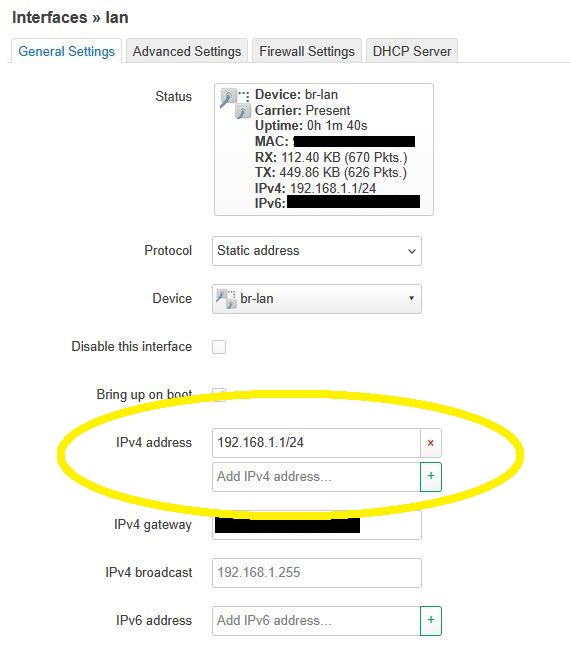
In testing, twice now I’ve been unable to change the IP address on the LAN interface.
If I delete the first line and add a new IP, (192.168.1.4) I never get the usual “Connectivity screen” alert. Instead, it rolls back to 192.168.1.1
I can’t seem to recreate this. I have rolled back to 24.10.5 and use Attended Sysupdate to to get to rc2. Sometimes I get this multi line IP address, but on the last update, it is working fine.
Before I update to rc2, on the 24.10.5 image I run this
I read through the issue comments, and that looks like something driver-related. While the issue I addressed is more of a logic mistake. I don't want to muddy that thread with unrelated comments asking for feedback as people seem quite upset already.
No, the driver works ok (even though it is a regression coming from 23.xx that you cannot define anymore per card your frequency 5GHz or 6 GHz but only per completely environment - but that only bothers people who installed 2 or more MT7916 cards in their environment), but the frontend doesn't.
Roughly summarising the situation:
Set global parameter for 6GHz frequency via SSH, no GUI available (or don't do anything for 5GHz)
if chosen frequency=5GHz, Wifi config can be done via luci
If chosen frequency=6GHz, Wifi config has to be done via SSH
Details have been stated in the bug report's comments.
That allow section in your chrony uci config doesn't seem correct. There should be an interface specified. I'm not sure why it works in the older version. The only supposed change around allow was handling multiple interfaces specified as a list.
I am experiencing similar struggles with my BPIR4 that I upgraded (using OWUT) from 24.10.5.
The unit often becomes unreachable at all via ethernet (gui or cli) and I have to resort to the serial console to reset it using firstboot && reboot.
The behaviour of LuCi has changed recently in that when I attempt to change the lan IPv4 address, it does the 90second countdown, waits ~5second, only then does it give the option to make the change without verification and does another 90s countdown -- and mostly fails.
I had been lucky enough to get it to change once, and I made a backup of that configuration, which will load and work after a reset.
Upgraded my Xiaomi AX3000t from 24.10.5 to 25.12.0-rc2 my tasmota clients are unable to connect.
log says hostapd: handle_probe_req: send failed
When I send a HUP to the hostapd process my clients connect.
Same game after a reboot.
No problems with 24.10.5
Thank you very much @mlichvar . I remember that I tried to hack sth. like allow all into that config, but that was stupid. Also I forgot about this. Despite this, it worked... for some time. I should have done that in /etc/chrony/chrony.conf, but the uci system is cleaner I guess. I reconfigured that section and see no more problems.
At the end I can say, 25.12.0-rc2 is working good for me on my test device, even on a 16/64 MB device. Yet another year of great support!
So far I’ve upgraded the following machines to 25.12-SNAPSHOT (I always like to run snapshots and upgrade between point releases as updates get merged) without any real issues (ok, one small owut issue that’s since been fixed):
All nodes were upgraded from various, but faily recent, 24.10-SNAPSHOT builds, and are all dumb, VLAN’ed APs. I have not upgraded my primary (x86_64) router.
Noted a couple of small gotchas:
Cron was logging a DEBUG level and needed to be set to NORMALso as not to spam the logs.
Timezones may not have persisted? All my AP’s ended up in UTC timezone though I could have sworn that I had the previously configured to America/New_York.
The best news is that the MX-4300v2 (LN-1301) now works with VLANs bridged to Wifi directly thanks to @es86de /@robimarko’s fixes to the qca-nss-dp driver which propagate FDB flushes across all kinds of bridge hierarchies. So I’ve now got ac and ax nodes (as well as the b/g/n) in one big happy roaming setup, and everything is working peachy keen! Super exciting to be able to turn the MX-4300v2 into a useful member of my home Wifi instead of just a test thing!
[EDIT: Credit where credit is due, thanks for that fix @es86de!]
Clean Flash - cleared Settings and manually set up
Flashed Partition 1, partition 2 still has “old” snapshot
successful flash, set up external unbound pihole - on a raspberri pi
coming from 24.10.5 (on my gl.inet gl mt6000)
what threw me off was the new menu in Network DHCP with separate tab for dnsmasq, but not hard to figure out
under the menu for Port Forward > Nat Rules under ip address (in green box) - no port to add in (my case port 53 for unbound pihole). it works - unbound pihole receiving traffic…, I guess his gets picked up from network>firewall>port forwards then?
Obviously the AX1800 with Qualcomm chipset is WAY slower since NSS is not activly being worked on for the 6x chipsets (at least at this time)
Otherwise it works and will let this run for a few days.
Thanks for the clarifications. My point still stands that it's unrelated, and I don't have the aforementioned gear or, in fact, any 6GHz gear to test or fix it. If it's indeed a purely UI issue, surely some volunteers can pick this up
Thanks, @efahl, I think this is the same space-in-timezone-name thing – I just hadn’t been paying attention to OpenWRT for a while and so didn’t catch up to that in the release thread until after I posted.