when you connect to the device via ssh, you literally just type that text
good evening everybody my last result with this script
error rtnetlink fq codel
i' post the result
This script prioritizes the UDP packets from / to a set of gaming
machines into a real-time HFSC queue with guaranteed total bandwidth

Based on your settings:

Game upload guarantee = 800 kbps
Game download guarantee = 1600 kbps

Download direction only works if you install this on a *wired* router
and there is a separate AP wired into your network, because otherwise
there are multiple parallel queues for traffic to leave your router
heading to the LAN.

Based on your link total bandwidth, the **minimum** amount of jitter
you should expect in your network is about:

UP = 2 ms

DOWN = 0 ms

In order to get lower minimum jitter you must upgrade the speed of
your link, no queuing system can help.

Please note for your display rate that:

at 30Hz, one on screen frame lasts:   33.3 ms
at 60Hz, one on screen frame lasts:   16.6 ms
at 144Hz, one on screen frame lasts:   6.9 ms

This means the typical gamer is sensitive to as little as on the order
of 5ms of jitter. To get 5ms minimum jitter you should have bandwidth
in each direction of at least:

7200 kbps

The queue system can ONLY control bandwidth and jitter in the link
between your router and the VERY FIRST device in the ISP
network. Typically you will have 5 to 10 devices between your router
and your gaming server, any of those can have variable delay and ruin
your gaming, and there is NOTHING that your router can do about it.

adding fq_codel qdisc for non-game traffic due to fast link
adding fq_codel qdisc for non-game traffic due to fast link

We are going to add classification rules via iptables to the
POSTROUTING chain. You should actually read and ensure that these
rules make sense in your firewall before running this script.

Continue? (type y or n and then RETURN/ENTER)
y
DONE!
qdisc noqueue 0: dev lo root refcnt 2
 Sent 0 bytes 0 pkt (dropped 0, overlimits 0 requeues 0)
 backlog 0b 0p requeues 0
qdisc fq_codel 0: dev eth0 root refcnt 2 limit 10240p flows 1024 quantum 1514 target 5.0ms interval 100.0ms memory_limit 4Mb ecn
 Sent 9330831 bytes 22660 pkt (dropped 0, overlimits 0 requeues 12)
 backlog 0b 0p requeues 12
  maxpacket 3008 drop_overlimit 0 new_flow_count 29 ecn_mark 0
  new_flows_len 0 old_flows_len 0
qdisc noqueue 0: dev br-lan root refcnt 2
 Sent 0 bytes 0 pkt (dropped 0, overlimits 0 requeues 0)
 backlog 0b 0p requeues 0
qdisc hfsc 1: dev eth0.1 root refcnt 2 default 3
 Sent 340044 bytes 770 pkt (dropped 0, overlimits 183 requeues 0)
 backlog 0b 0p requeues 0
Segmentation fault
root@OpenWrt:~#
This is working... the error is just when tc tries to print out info about the qdiscs... but it does in fact all work.
How is the performance, can you give us a dslreports speed test, and do some game testing?
1 Like
root@OpenWrt:~# tc -s qdisc
qdisc noqueue 0: dev lo root refcnt 2
 Sent 0 bytes 0 pkt (dropped 0, overlimits 0 requeues 0)
 backlog 0b 0p requeues 0
qdisc fq_codel 0: dev eth0 root refcnt 2 limit 10240p flows 1024 quantum 1514 target 5.0ms interval 100.0ms memory_limit 4Mb ecn
 Sent 185843867 bytes 324087 pkt (dropped 0, overlimits 0 requeues 47)
 backlog 0b 0p requeues 47
  maxpacket 4542 drop_overlimit 0 new_flow_count 1353 ecn_mark 0
  new_flows_len 0 old_flows_len 0
qdisc noqueue 0: dev br-lan root refcnt 2
 Sent 0 bytes 0 pkt (dropped 0, overlimits 0 requeues 0)
 backlog 0b 0p requeues 0
qdisc hfsc 1: dev eth0.1 root refcnt 2 default 3
 Sent 143279991 bytes 216809 pkt (dropped 204, overlimits 87207 requeues 0)
 backlog 0b 0p requeues 0
Segmentation fault
root@OpenWrt:~#
 or paste code here


http://www.dslreports.com/speedtest/66515984i have placed your files in /etc at this time  (winscp)
Ok, it should be just the one file now, so delete any old ones, and you should have the commands in your /etc/rc.local if you want it to start up automatically at boot (see a few messages above for example commands).
Uploading: Capture d’écran 2020-12-05 à 00.43.38.png...


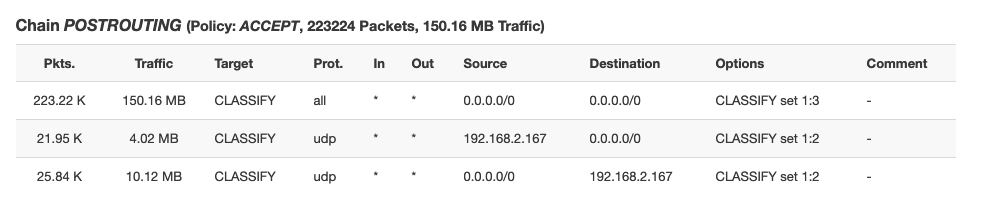
i have reboot the router and classify appair 
my name of script is qosdaniel bit in game i have a many little saccade  not stability
Free four saccades like this vidéo
It's hard to know what is you getting warped around vs what you are doing on purpose but I think I saw where you suddenly twitch to the side a few times.
Unfortunately because tc is broken and doesn't print the qdisc stats it's a little harder to debug. Because you have high overall bandwidth, can you set
GAMEUP=1200
GAMEDOWN=3000
and try again?
1 Like
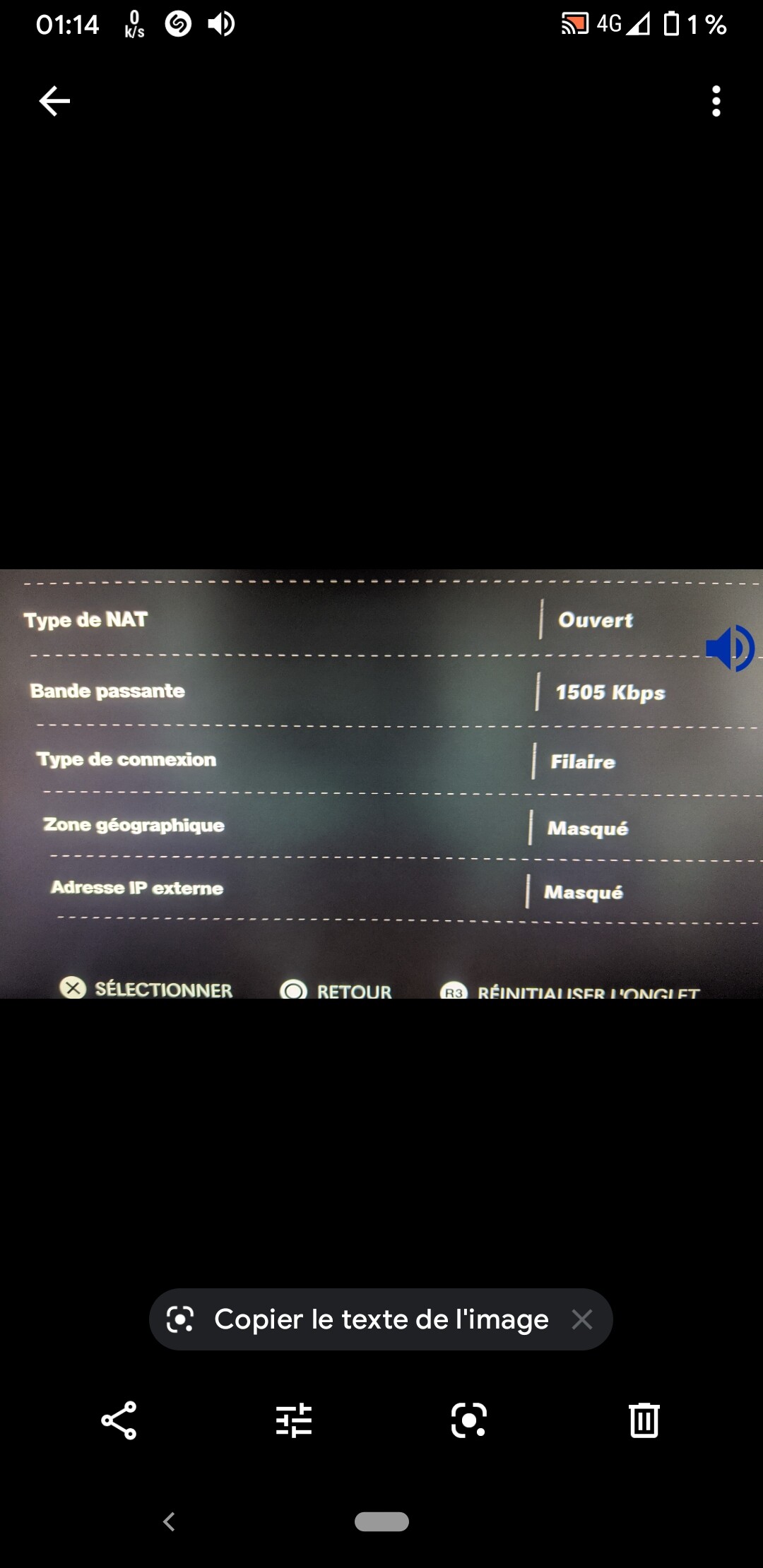
i have a simple question I know that call of duty use at most 4250 kbps when I am at max should I not put 4250 up you think ?
It's hard to know what is the best choice for any given game without doing the packet capture. Above we had evidence of about 100kbps up and 300kps down
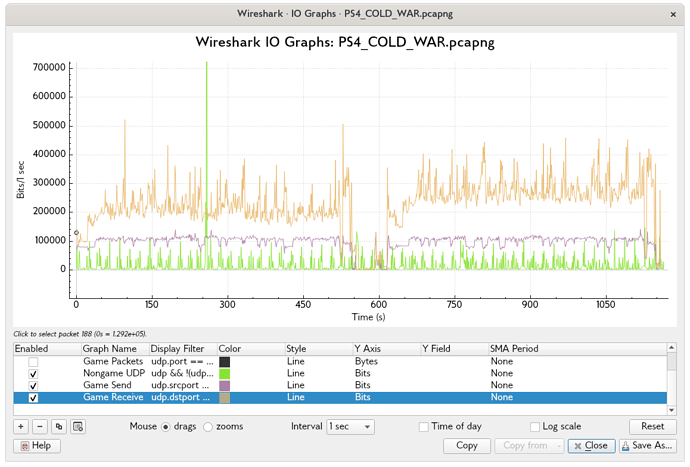
But maybe this is only PS4 and you play on windows machine, or maybe when more is available, it uses more... or whatever.
It is fine for you to scale up GAMEUP and GAMEDOWN to higher levels. Ideally it would be at least say 200 and 500 for ColdWar, but if you have more bandwidth it is good to allocate maybe 10 to 20% of your bandwidth. So if you have 50Mbps you could easily do 5000 or even maybe 10000.
In general things work better if real-time doesn't take up more than 10-20% of bandwidth, but of course when people have very low speeds, like 500kbps upload, then we are forced to do something non-optimal.
I suggest yes try 5000 each way.
Another option is to do:
if [ $UPRATE -gt 10000 ]; then
   GAMEUP=$((600+UPRATE*15/100))
fi
if [ $DOWNRATE -gt 10000 ]; then
  GAMEDOWN=$((1200+DOWNRATE*15/100))
fi
This works well for the larger bandwidths.
1 Like
atm i have this writen in the code
WAN=eth0.2 # change this to your WAN device name
UPRATE=18000 #change this to your kbps upload speed
LAN=eth0.1
DOWNRATE=65000 #change this to about 80% of your download speed (in kbps)
but my actual wan and lan are
wan is br lan and wan is br wan
i read you gys saying not to use br wn or br lan but i dont know why
herere a text that might help
oot@OpenWrt:~# tc -s qdisc
qdisc noqueue 0: dev lo root refcnt 2
Sent 0 bytes 0 pkt (dropped 0, overlimits 0 requeues 0)
backlog 0b 0p requeues 0
qdisc fq_codel 0: dev eth0 root refcnt 2 limit 10240p flows 1024 quantum 1514 target 5.0ms interval 100.0ms memory_limit 4Mb ecn
Sent 540022 bytes 1389 pkt (dropped 0, overlimits 0 requeues 1)
backlog 0b 0p requeues 1
maxpacket 0 drop_overlimit 0 new_flow_count 0 ecn_mark 0
new_flows_len 0 old_flows_len 0
qdisc noqueue 0: dev br-lan root refcnt 2
Sent 0 bytes 0 pkt (dropped 0, overlimits 0 requeues 0)
backlog 0b 0p requeues 0
qdisc noqueue 0: dev eth0.1 root refcnt 2
Sent 0 bytes 0 pkt (dropped 0, overlimits 0 requeues 0)
backlog 0b 0p requeues 0
qdisc noqueue 0: dev br-wan root refcnt 2
Sent 0 bytes 0 pkt (dropped 0, overlimits 0 requeues 0)
backlog 0b 0p requeues 0
qdisc noqueue 0: dev eth0.2 root refcnt 2
Sent 0 bytes 0 pkt (dropped 0, overlimits 0 requeues 0)
backlog 0b 0p requeues 0
root@OpenWrt:~#
i forgot to as is this ok how it written
echo y | /etc/qosscript.sh
exit 0
or this way
echo y | /etc/qosscript.sh
exit 0
This script is set up for people who have wired-only routers. The bridges have weird queue behavior, it's better to control each port in the bridge (in this case the vlan devices).
Your output of tc -s qdisc shows that you have not run the script yet.
empty lines in a shell script are not meaningful, they don't matter, you can leave them or delete.
I just ran the script about 2 mins ago
Then i did a test tc -d qdisk
Its now partially working
so im delighted so far
It was i changed the wan to eth0 from etho.2 that made the scripst run
Now it shows hfsc is running on eth0
But nothing else is running
Ile copy text tmaz as its a bite late and im knackered from doing this all today
Thank you all for your great help
Im just gonna play two games of coldwar with my new partial settings to try it then bed time
Cheers all
i even tried 5 Down and 2.5 Up, which is 20x less of 100 Down speed
root@OpenWrt:~# tc -s qdisc
qdisc noqueue 0: dev lo root refcnt 2
 Sent 0 bytes 0 pkt (dropped 0, overlimits 0 requeues 0)
 backlog 0b 0p requeues 0
qdisc mq 0: dev eth1 root
 Sent 22634620 bytes 59710 pkt (dropped 0, overlimits 0 requeues 2)
 backlog 0b 0p requeues 2
qdisc fq_codel 0: dev eth1 parent :8 limit 10240p flows 1024 quantum 1514 target 5.0ms interval 100.0ms memory_limit 4Mb ecn
 Sent 0 bytes 0 pkt (dropped 0, overlimits 0 requeues 0)
 backlog 0b 0p requeues 0
  maxpacket 0 drop_overlimit 0 new_flow_count 0 ecn_mark 0
  new_flows_len 0 old_flows_len 0
qdisc fq_codel 0: dev eth1 parent :7 limit 10240p flows 1024 quantum 1514 target 5.0ms interval 100.0ms memory_limit 4Mb ecn
 Sent 0 bytes 0 pkt (dropped 0, overlimits 0 requeues 0)
 backlog 0b 0p requeues 0
  maxpacket 0 drop_overlimit 0 new_flow_count 0 ecn_mark 0
  new_flows_len 0 old_flows_len 0
qdisc fq_codel 0: dev eth1 parent :6 limit 10240p flows 1024 quantum 1514 target 5.0ms interval 100.0ms memory_limit 4Mb ecn
 Sent 0 bytes 0 pkt (dropped 0, overlimits 0 requeues 0)
 backlog 0b 0p requeues 0
  maxpacket 0 drop_overlimit 0 new_flow_count 0 ecn_mark 0
  new_flows_len 0 old_flows_len 0
qdisc fq_codel 0: dev eth1 parent :5 limit 10240p flows 1024 quantum 1514 target 5.0ms interval 100.0ms memory_limit 4Mb ecn
 Sent 0 bytes 0 pkt (dropped 0, overlimits 0 requeues 0)
 backlog 0b 0p requeues 0
  maxpacket 0 drop_overlimit 0 new_flow_count 0 ecn_mark 0
  new_flows_len 0 old_flows_len 0
qdisc fq_codel 0: dev eth1 parent :4 limit 10240p flows 1024 quantum 1514 target 5.0ms interval 100.0ms memory_limit 4Mb ecn
 Sent 0 bytes 0 pkt (dropped 0, overlimits 0 requeues 0)
 backlog 0b 0p requeues 0
  maxpacket 0 drop_overlimit 0 new_flow_count 0 ecn_mark 0
  new_flows_len 0 old_flows_len 0
qdisc fq_codel 0: dev eth1 parent :3 limit 10240p flows 1024 quantum 1514 target 5.0ms interval 100.0ms memory_limit 4Mb ecn
 Sent 0 bytes 0 pkt (dropped 0, overlimits 0 requeues 0)
 backlog 0b 0p requeues 0
  maxpacket 0 drop_overlimit 0 new_flow_count 0 ecn_mark 0
  new_flows_len 0 old_flows_len 0
qdisc fq_codel 0: dev eth1 parent :2 limit 10240p flows 1024 quantum 1514 target 5.0ms interval 100.0ms memory_limit 4Mb ecn
 Sent 0 bytes 0 pkt (dropped 0, overlimits 0 requeues 0)
 backlog 0b 0p requeues 0
  maxpacket 0 drop_overlimit 0 new_flow_count 0 ecn_mark 0
  new_flows_len 0 old_flows_len 0
qdisc fq_codel 0: dev eth1 parent :1 limit 10240p flows 1024 quantum 1514 target 5.0ms interval 100.0ms memory_limit 4Mb ecn
 Sent 22634620 bytes 59710 pkt (dropped 0, overlimits 0 requeues 2)
 backlog 0b 0p requeues 2
  maxpacket 1514 drop_overlimit 0 new_flow_count 7 ecn_mark 0
  new_flows_len 0 old_flows_len 0
qdisc mq 0: dev eth0 root
 Sent 22725034 bytes 27068 pkt (dropped 0, overlimits 0 requeues 0)
 backlog 0b 0p requeues 0
qdisc fq_codel 0: dev eth0 parent :8 limit 10240p flows 1024 quantum 1514 target 5.0ms interval 100.0ms memory_limit 4Mb ecn
 Sent 0 bytes 0 pkt (dropped 0, overlimits 0 requeues 0)
 backlog 0b 0p requeues 0
  maxpacket 0 drop_overlimit 0 new_flow_count 0 ecn_mark 0
  new_flows_len 0 old_flows_len 0
qdisc fq_codel 0: dev eth0 parent :7 limit 10240p flows 1024 quantum 1514 target 5.0ms interval 100.0ms memory_limit 4Mb ecn
 Sent 0 bytes 0 pkt (dropped 0, overlimits 0 requeues 0)
 backlog 0b 0p requeues 0
  maxpacket 0 drop_overlimit 0 new_flow_count 0 ecn_mark 0
  new_flows_len 0 old_flows_len 0
qdisc fq_codel 0: dev eth0 parent :6 limit 10240p flows 1024 quantum 1514 target 5.0ms interval 100.0ms memory_limit 4Mb ecn
 Sent 0 bytes 0 pkt (dropped 0, overlimits 0 requeues 0)
 backlog 0b 0p requeues 0
  maxpacket 0 drop_overlimit 0 new_flow_count 0 ecn_mark 0
  new_flows_len 0 old_flows_len 0
qdisc fq_codel 0: dev eth0 parent :5 limit 10240p flows 1024 quantum 1514 target 5.0ms interval 100.0ms memory_limit 4Mb ecn
 Sent 0 bytes 0 pkt (dropped 0, overlimits 0 requeues 0)
 backlog 0b 0p requeues 0
  maxpacket 0 drop_overlimit 0 new_flow_count 0 ecn_mark 0
  new_flows_len 0 old_flows_len 0
qdisc fq_codel 0: dev eth0 parent :4 limit 10240p flows 1024 quantum 1514 target 5.0ms interval 100.0ms memory_limit 4Mb ecn
 Sent 0 bytes 0 pkt (dropped 0, overlimits 0 requeues 0)
 backlog 0b 0p requeues 0
  maxpacket 0 drop_overlimit 0 new_flow_count 0 ecn_mark 0
  new_flows_len 0 old_flows_len 0
qdisc fq_codel 0: dev eth0 parent :3 limit 10240p flows 1024 quantum 1514 target 5.0ms interval 100.0ms memory_limit 4Mb ecn
 Sent 0 bytes 0 pkt (dropped 0, overlimits 0 requeues 0)
 backlog 0b 0p requeues 0
  maxpacket 0 drop_overlimit 0 new_flow_count 0 ecn_mark 0
  new_flows_len 0 old_flows_len 0
qdisc fq_codel 0: dev eth0 parent :2 limit 10240p flows 1024 quantum 1514 target 5.0ms interval 100.0ms memory_limit 4Mb ecn
 Sent 0 bytes 0 pkt (dropped 0, overlimits 0 requeues 0)
 backlog 0b 0p requeues 0
  maxpacket 0 drop_overlimit 0 new_flow_count 0 ecn_mark 0
  new_flows_len 0 old_flows_len 0
qdisc fq_codel 0: dev eth0 parent :1 limit 10240p flows 1024 quantum 1514 target 5.0ms interval 100.0ms memory_limit 4Mb ecn
 Sent 22725034 bytes 27068 pkt (dropped 0, overlimits 0 requeues 0)
 backlog 0b 0p requeues 0
  maxpacket 0 drop_overlimit 0 new_flow_count 0 ecn_mark 0
  new_flows_len 0 old_flows_len 0
qdisc noqueue 0: dev br-lan root refcnt 2
 Sent 0 bytes 0 pkt (dropped 0, overlimits 0 requeues 0)
 backlog 0b 0p requeues 0
qdisc hfsc 1: dev eth0.1 root refcnt 2 default 3
 Sent 23247496 bytes 26876 pkt (dropped 3289, overlimits 37534 requeues 0)
 backlog 0b 0p requeues 0
Segmentation fault
also got this "Segmentation fault" error, never seen this before
Silly thought from looking at the plots, average receive rate stays below 300 Kbps but instantaneous rates go up to 400 or even 500 Kbps, so it might make sense to give the game a bit more bandwidth than its sustained use to allow for some burstyness (unless the qdisc/shaper in use is configured to handle bursts of that magnitude already, which knowing @dlakelan's attention to detail, probably is already taken care of).
I would definitely say you should increase the game reserve well above the minimum if you have the bandwidth. A good quantity is maybe 2-4x the minimum if that is still less than say 20% of your total bandwidth. But, if you don't, then those bursts should get smoothed a bit by the HFSC burst
In this case the burst rate is to send at the ${highrate} for at least 80ms, which is 90% of upload bandwidth in this script. So it depends on what highrate is as to whether it will power through those hiccups... If we imagine that suddenly something happens and the game sendings 4 packets in the clock tick where it normally sends 1, as long as 90% of your bandwidth is still less than 4x your game's normal rate, you're probably ok. So If the game's normal rate is say 300kbps, as long as you have above a 1200kbps line it should be ok... which brings up the point that I want to link to the new thread where I explain why gaming on less than 3Mbps is going to always hurt a bit, and less than 1500Mbps is really going to be noticeable.
Why you need at least 3Mbps upload to get good game performance: Doing the math
So for those having trouble, if you have less than 3Mbps it's normal for you to have trouble if you're sharing your line, and if you have less than 1500kbps it's almost guaranteed. If you have 750kbps anyone doing anything at all will be as good as a packet drop.
1 Like
Ah, as I thought, already ahead of me  it is fun doing these drive by comments and still being able to learn something
Hi All... In working with @knomax and thinking about the issues in this thread: Why you need at least 3Mbps upload to get good game performance: Doing the math
We came up with the following adjustments to this public script which do two important things:
-
For connections less than 3Mbps it changes the OpenWrt firewall to use MSS clamping to 540 byte packets each direction. This causes TCP streams to be much less efficient, but the packets being sent take about 1/3 of the time, thereby limiting jitter, which we assume is more important to the audience reading this thread
-
When the connection is asymmetric, so that upload/download > 5 it uses a rate-limiter on sending small ACKs on the WAN, it allows 100 acks/second with a 100 packet burst, and drops 90% of acks over that randomly. This seems to make a HUGE difference with asymmetry... cake does something probably smarter than this, but this should work well.
New script:
#!/bin/sh

## "atm" for old-school DSL or change to "DOCSIS" for cable modem, or "other" for everything else

LINKTYPE="ethernet"

WAN=veth0 # change this to your WAN device name
UPRATE=18000 #change this to your kbps upload speed
LAN=veth1
DOWNRATE=65000 #change this to about 80% of your download speed (in kbps)

## how many kbps of UDP upload and download do you need for your games
## across all gaming machines?

GAMEUP=800
GAMEDOWN=1600

## set this to "red" or if you want to differentiate between game
## packets into 3 different classes you can use either "drr" or "qfq"
## be aware not all machines will have drr or qfq available
## also qfq or drr require setting up tc filters!

gameqdisc="red"

GAMINGIP="192.168.1.111" ## change this


cat <<EOF

This script prioritizes the UDP packets from / to a set of gaming
machines into a real-time HFSC queue with guaranteed total bandwidth

Based on your settings:

Game upload guarantee = $GAMEUP kbps
Game download guarantee = $GAMEDOWN kbps

Download direction only works if you install this on a *wired* router
and there is a separate AP wired into your network, because otherwise
there are multiple parallel queues for traffic to leave your router
heading to the LAN.

Based on your link total bandwidth, the **minimum** amount of jitter
you should expect in your network is about:

UP = $(((1500*8)*3/UPRATE)) ms

DOWN = $(((1500*8)*3/DOWNRATE)) ms

In order to get lower minimum jitter you must upgrade the speed of
your link, no queuing system can help.

Please note for your display rate that:

at 30Hz, one on screen frame lasts:   33.3 ms
at 60Hz, one on screen frame lasts:   16.6 ms
at 144Hz, one on screen frame lasts:   6.9 ms

This means the typical gamer is sensitive to as little as on the order
of 5ms of jitter. To get 5ms minimum jitter you should have bandwidth
in each direction of at least:

$((1500*8*3/5)) kbps

The queue system can ONLY control bandwidth and jitter in the link
between your router and the VERY FIRST device in the ISP
network. Typically you will have 5 to 10 devices between your router
and your gaming server, any of those can have variable delay and ruin
your gaming, and there is NOTHING that your router can do about it.

EOF


setqdisc () {
DEV=$1
RATE=$2
OH=37
MTU=1500
highrate=$((RATE*90/100))
lowrate=$((RATE*10/100))
gamerate=$3
useqdisc=$4


tc qdisc del dev "$DEV" root

case $LINKTYPE in
    "atm")
	tc qdisc replace dev "$DEV" handle 1: root stab mtu 2047 tsize 512 mpu 68 overhead ${OH} linklayer atm hfsc default 3
	;;
    "DOCSIS")
	tc qdisc replace dev $DEV stab overhead 25 linklayer ethernet handle 1: root hfsc default 3
	;;
    *)
	tc qdisc replace dev $DEV stab overhead 40 linklayer ethernet handle 1: root hfsc default 3
	;;
esac


#limit the link overall:
tc class add dev "$DEV" parent 1: classid 1:1 hfsc ls m2 "${RATE}kbit" ul m2 "${RATE}kbit"

# high prio realtime class
tc class add dev "$DEV" parent 1:1 classid 1:2 hfsc rt m1 "${highrate}kbit" d 80ms m2 "${gamerate}kbit"


# other prio class
tc class add dev "$DEV" parent 1:1 classid 1:3 hfsc ls m1 "${lowrate}kbit" d 80ms m2 "${highrate}kbit"


## set this to "drr" or "qfq" to differentiate between different game
## packets, or use "pfifo" to treat all game packets equally

REDMIN=$((gamerate*30/8)) #30 ms of data

if [ $REDMIN -lt 3000 ]; then
    REDMIN=3000
fi
REDMAX=$((REDMIN * 4)) #200ms of data


case $useqdisc in
    "drr")
	tc qdisc add dev "$DEV" parent 1:2 handle 2:0 drr
	tc class add dev "$DEV" parent 2:0 classid 2:1 drr quantum 8000
	tc qdisc add dev "$DEV" parent 2:1 handle 10: red limit 150000 min $REDMIN max $REDMAX avpkt 500 bandwidth ${RATE}kbit probability 1.0
	tc class add dev "$DEV" parent 2:0 classid 2:2 drr quantum 4000
	tc qdisc add dev "$DEV" parent 2:2 handle 20: red limit 150000 min $REDMIN max $REDMAX avpkt 500 bandwidth ${RATE}kbit probability 1.0
	tc class add dev "$DEV" parent 2:0 classid 2:3 drr quantum 1000
	tc qdisc add dev "$DEV" parent 2:3 handle 30: red limit 150000  min $REDMIN max $REDMAX avpkt 500 bandwidth ${RATE}kbit probability 1.0
	## with this send high priority game packets to 10:, medium to 20:, normal to 30:
	## games will not starve but be given relative importance based on the quantum parameter
    ;;

    "qfq")
	tc qdisc add dev "$DEV" parent 1:2 handle 2:0 qfq
	tc class add dev "$DEV" parent 2:0 classid 2:1 qfq weight 8000
	tc qdisc add dev "$DEV" parent 2:1 handle 10: red limit 150000  min $REDMIN max $REDMAX avpkt 500 bandwidth ${RATE}kbit probability 1.0
	tc class add dev "$DEV" parent 2:0 classid 2:2 qfq weight 4000
	tc qdisc add dev "$DEV" parent 2:2 handle 20: red limit 150000 min $REDMIN max $REDMAX avpkt 500 bandwidth ${RATE}kbit probability 1.0
	tc class add dev "$DEV" parent 2:0 classid 2:3 qfq weight 1000
	tc qdisc add dev "$DEV" parent 2:3 handle 30: red limit 150000  min $REDMIN max $REDMAX avpkt 500 bandwidth ${RATE}kbit probability 1.0
	## with this send high priority game packets to 10:, medium to 20:, normal to 30:
	## games will not starve but be given relative importance based on the weight parameter

    ;;

    *)

	tc qdisc add dev "$DEV" parent 1:2 handle 10: red limit 150000 min $REDMIN max $REDMAX avpkt 500 bandwidth ${RATE}kbit  probability 1.0
	## send game packets to 10:, they're all treated the same

    ;;
esac

if [ $((MTU * 8 * 10 / RATE > 50)) -eq 1 ]; then ## if one MTU packet takes more than 5ms
    echo "adding PIE qdisc for non-game traffic due to slow link"
    tc qdisc add dev "$DEV" parent 1:3 handle 3: pie limit  $((RATE * 200 / (MTU * 8))) target 80ms ecn tupdate 40ms bytemode
else ## we can have queues with multiple packets without major delays, fair queuing is more meaningful
    echo "adding fq_codel qdisc for non-game traffic due to fast link"
    tc qdisc add dev "$DEV" parent 1:3 handle 3: fq_codel limit $((RATE * 200 / (MTU * 8))) quantum $((MTU * 2))
fi

}


setqdisc $WAN $UPRATE $GAMEUP $gameqdisc

## uncomment this to do the download direction via output of LAN
setqdisc $LAN $DOWNRATE $GAMEDOWN $gameqdisc

## we want to classify packets, so use these rules

cat <<EOF

We are going to add classification rules via iptables to the
POSTROUTING chain. You should actually read and ensure that these
rules make sense in your firewall before running this script.

Continue? (type y or n and then RETURN/ENTER)
EOF

read -r cont

if [ "$cont" = "y" ]; then

    iptables -t mangle -F POSTROUTING
    iptables -t mangle -A POSTROUTING -j CLASSIFY --set-class 1:3 # default everything to 1:3,  the "non-game" qdisc
    if [ "$gameqdisc" = "red" ]; then
	iptables -t mangle -A POSTROUTING -p udp -s ${GAMINGIP} -j CLASSIFY --set-class 1:2
	iptables -t mangle -A POSTROUTING -p udp -d ${GAMINGIP} -j CLASSIFY --set-class 1:2
    else
	echo "YOU MUST PLACE CLASSIFIERS FOR YOUR GAME TRAFFIC HERE"
	echo "SEND TRAFFIC TO 2:1 (high) or 2:2 (medium) or 3:3 (normal)"
    fi

    if [ $((UPRATE/DOWNRATE > 5)) -eq 1 ]; then
	## we need to trim acks in the upstream direction, we let 100/second through, and then drop 90% of the rest
	iptables -A forwarding_rule -p tcp -m tcp --tcp-flags ACK ACK -o $WAN -m length --length 0:100 -m limit --limit 100/second --limit-burst 100
	iptables -A forwarding_rule -p tcp -m tcp --tcp-flags ACK ACK -o $WAN  -m length --length 0:100 -m statistic --mode random --probability .90 -j DROP
    fi
    if [$UPRATE -lt 3000 -o $DOWNRATE -lt 3000 ]; then
	## need to clamp MSS to 540 bytes in both directions to reduce
	## the latency increase caused by 1 packet ahead of us in the
	## queue since rates are too low to send 1500 byte packets at acceptable delay
	iptables -t mangle -F FORWARD # to flush the openwrt default MSS clamping rule
	iptables -t mangle -A FORWARD -p tcp --tcp-flags SYN,RST SYN -o $WAN -j TCPMSS --set-mss 540
	iptables -t mangle -A FORWARD -p tcp --tcp-flags SYN,RST SYN -o $LAN -j TCPMSS --set-mss 540
    fi


else
    cat <<EOF
Check the rules and come back when you're ready.
EOF
fi

echo "DONE!"

if [ $qdisc = "red" ]; then
   echo "Can not output tc -s qdisc because it crashes on OpenWrt when using RED qdisc, but things are working!"
else
   tc -s qdisc
fi
hi dlakelan i'm here tonight i will test now  thanks
vdsl2 overhead 37 ? so this script is for adsl and vdsl ?
root@OpenWrt:~# ls
qos3.sh
root@OpenWrt:~# sh qos3.sh

This script prioritizes the UDP packets from / to a set of gaming
machines into a real-time HFSC queue with guaranteed total bandwidth

Based on your settings:

Game upload guarantee = 800 kbps
Game download guarantee = 1600 kbps

Download direction only works if you install this on a *wired* router
and there is a separate AP wired into your network, because otherwise
there are multiple parallel queues for traffic to leave your router
heading to the LAN.

Based on your link total bandwidth, the **minimum** amount of jitter
you should expect in your network is about:

UP = 2 ms

DOWN = 0 ms

In order to get lower minimum jitter you must upgrade the speed of
your link, no queuing system can help.

Please note for your display rate that:

at 30Hz, one on screen frame lasts:   33.3 ms
at 60Hz, one on screen frame lasts:   16.6 ms
at 144Hz, one on screen frame lasts:   6.9 ms

This means the typical gamer is sensitive to as little as on the order
of 5ms of jitter. To get 5ms minimum jitter you should have bandwidth
in each direction of at least:

7200 kbps

The queue system can ONLY control bandwidth and jitter in the link
between your router and the VERY FIRST device in the ISP
network. Typically you will have 5 to 10 devices between your router
and your gaming server, any of those can have variable delay and ruin
your gaming, and there is NOTHING that your router can do about it.

RTNETLINK answers: No such file or directory
adding fq_codel qdisc for non-game traffic due to fast link
RTNETLINK answers: No such file or directory
adding fq_codel qdisc for non-game traffic due to fast link

We are going to add classification rules via iptables to the
POSTROUTING chain. You should actually read and ensure that these
rules make sense in your firewall before running this script.

Continue? (type y or n and then RETURN/ENTER)
y
qos3.sh: line 207: [18000: not found
DONE!
sh: red: unknown operand
qdisc noqueue 0: dev lo root refcnt 2
 Sent 0 bytes 0 pkt (dropped 0, overlimits 0 requeues 0)
 backlog 0b 0p requeues 0
qdisc fq_codel 0: dev eth0 root refcnt 2 limit 10240p flows 1024 quantum 1514 target 5.0ms interval 100.0ms memory_limit 4Mb ecn
 Sent 625579160 bytes 1920762 pkt (dropped 0, overlimits 0 requeues 33)
 backlog 0b 0p requeues 33
  maxpacket 1514 drop_overlimit 0 new_flow_count 1110 ecn_mark 0
  new_flows_len 0 old_flows_len 0
qdisc noqueue 0: dev br-lan root refcnt 2
 Sent 0 bytes 0 pkt (dropped 0, overlimits 0 requeues 0)
 backlog 0b 0p requeues 0
qdisc hfsc 1: dev eth0.1 root refcnt 2 default 3
 Sent 87269 bytes 226 pkt (dropped 0, overlimits 1 requeues 0)
 backlog 0b 0p requeues 0
Segmentation fault
root@OpenWrt:~#