my DNS interface with all the IPs has its device set to br-lan, if I set it to anything else device do not have DNS resolution
but lan seems to loose its DNS resolution by doing this
is that a problem, I don’t need to install anymore software
my DNS interface with all the IPs has its device set to br-lan, if I set it to anything else device do not have DNS resolution
but lan seems to loose its DNS resolution by doing this
is that a problem, I don’t need to install anymore software
one last thing, is there any way to speed up DHCP
my iPhone is taking up to a minute to get an IP address
I thought you said the Roku TV wasn't configured yet - I guess I misunderstood your issue again.
I misunderstand your goal, then.
Fix the interface DNS setting.
 Excellent!
A dumb AP only has one interface (LAN). You assured us that your device was configured correctly. So, it's not clear how you can set "it" to "anything else" (also, it's not clear what "it" you're referring to).
Very odd - that's not normal.
It was getting its DHCP from openwrt but not tagged
there will not be any unconfigured devices, i meant so new devices can have a connection before being tagged
I had to add this interface because the other IP address’ were causing problems
The DNS interface I had to create contains all the IP address’ used for HDP, as with them on lan dnsmasq was listening on them all, I added an exclude for DNS interface to fix this
I seem to have created another problem, DHCP is not renewing for anything
is there another way to exclude the 192.168.10.X ip range, because that DNS interface I think is causing the DHCP issues
We discussed adding other IPs to the single LAN interface. Now it seems you added a second interface to a Dumb AP and are experiencing issues.
Perhaps you should explain why you created a second interface. Maybe we can assist after understanding.
Exclude from what???
You mentioned that you used 192.168.0.0/16 as your subnet. I'm not sure why, and you never elaborated. Despite our discussion, you also insisted on using IPs in the 192.168.10.X range. Since it's not clear why, you'll need to elaborate now that you're experiencing issues.
and dnsmasq took all of them, so HDP could not bind
that was my original plan
dnsmasq binded to all the 192.168.10.X address I added to lan, HDP would not start
exclude from dnsmasq
just a random subnet number
the address’ the clients use for the DNS
If I have the DNS address’ on lan dnsmasq binds them all, if I have them on the DNS interface, it seems to block DHCP
We discussed fixing dnsmasq, instead you created a second interface and are asking a different series of questions about a config you just surprisingly made?
Since that's not how a Dumb AP is configured (which we discussed) and I'm not sure how you expect another interface to serve DHCP on LAN (and I'm not going to guess how you expect it to, or why you think it should work), I'll just let someone else try to follow this setup.
I'll Private Message you off-thread.
I must have missed that, sorry can you please quote it or say it again
when dnsmasq is fixed, this interface is gone
Lan is still serving DHCP, the other interface is just for the IP address’
all I need is dnsmasq not to bind to the address’ that are use with HDP
the main instance and only instance of dnsmasq is listening on every IP created on lan, thats what my problem was and why I create the other interface
I will removed the other interface when dnsmasq is fixed
Per our discussion in PM, I hope this helps:
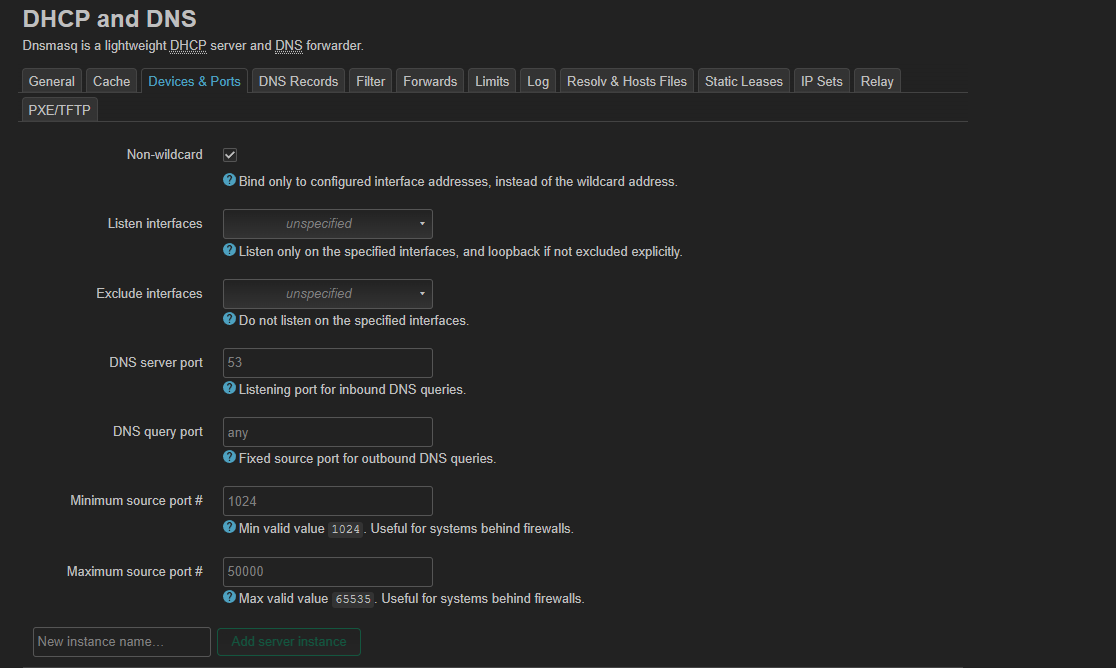
This is a screenshot of the 25.12.2 web GUI. Feel free to ask [detailed questions] if you need further assistance. I don't want to elaborate in case you already have the knowledge or if you've already made a drastic configuration change that makes this discussion/post irrelevant.
thats what I have, I ran lsof -i :53 and dnsmasq is useing all the address’
And you configured it how?
(I hope it's obvious that my screenshot just shows the default, as I don't have a Dumb AP that I'm attempting to setup multiple IPs on LAN for DoH proxies. You do.)
Can you show the screenshot?
where is listen address, its not there for me
Is that a feature of openwrt 25?
Then, as we discussed a few times before:
Is what a feature of OpenWrt 25?
(I think I'll PM you again, as the conversation seems to have taken another twist.)
you shown in the screenshot you sent
I do not have that option
Then yes, it must be a feature of version 25. So now, I assume you're running an old version of OpenWrt.
I am running 24.10.2
so do I sysupgrade? does that reset to factory defaults?
I never thought, this device has been sitting in a drawer for almost a year