FYI, in master and 25.12 branch is a new banIP maintainance update:
Have fun!
Dirk
FYI, in master and 25.12 branch is a new banIP maintainance update:
Have fun!
Dirk
Hi Everyone,
Need help, not much in logs.
I installed BanIP, selected one feed to test, restarted, but the information says this. What did I miss?
Status
error: nft: ✘, monitor: ✘ (frontend: 1.8.8-r2 / backend: 1.8.8-r2)
Element Count
0 (chains: 0, sets: 0, rules: 0)
Active Feeds
-
Active Devices
wan-dev: - / wan-if: -, - / vlan-allow: - / vlan-block: -
Active Uplink
-
NFT Information
ver: 1.1.6-r1, priority: -100, policy: memory, loglevel: warn, expiry: -, limit (icmp/syn/udp): 25/10/100, loglimit (rate/burst): 10/5
Run Information
base: /tmp, backup: /tmp/banIP-backup, report: /tmp/banIP-report, error: /tmp/banIP-error
Run Flags
auto: ✔, proto (4/6): ✘/✘, bcp38: ✘, log (pre/in/out): ✘/✘/✘, count: ✔, dedup: ✔, split: ✘, custom feed: ✘, allowed only: ✘, debug: ✘
Last Run
-
System Info
cores: 1, log: logread, fetch: , QEMU Standard PC (i440FX + PIIX, 1996), x86/64, OpenWrt 25.12.2 (r32802-f505120278)
Hostname	OpenWrt
Model	QEMU Standard PC (i440FX + PIIX, 1996)
Architecture	Intel(R) Xeon(R) CPU E5-2690 v4 @ 2.60GHz
Target Platform	x86/64
Firmware Version	OpenWrt 25.12.2 r32802-f505120278 / LuCI (HEAD detached at 067535e) branch 26.082.75780~067535e
Kernel Version	6.12.74
Local Time	May 7, 2026, 5:27:31 PM PDT
Uptime	1d 1h 21m 12s
Load Average	0.10, 0.14, 0.09
Try turning off auto-detection for devices / Interfaces. One of the more common causes of issue with new installs.

Below that setting, manually set device / interface for WAN.
Do a reload of BanIP and see if there is anything that stands out in the "Processing Log" tab.
deleted by the author
EDIT: This resolved after some time, and a restart. Not sure what the issue was.
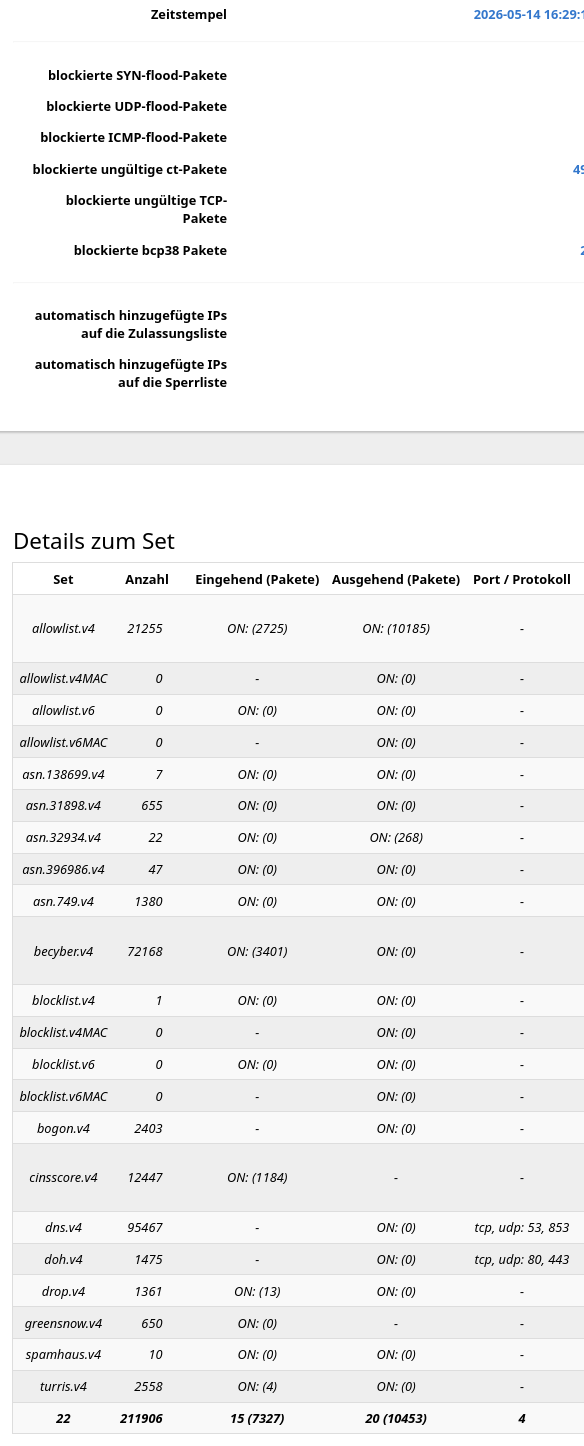
With version 1.8.8-r2, is anyone noticing that Set Reporting is not populating counters for in / out?
I understand there will be dashes for in or out when the traffic direction is not set for a feed, but the entirety of the lists have dashes in both directions.
(This is in a fresh install on a test device. The issue did not occur with previous versions.)
The Firewall Log is showing block activity, but there are no counters in Set Reporting for any of them. Example:


The system logs in version 24.12.6 indicate which IP address is attempting to log in; however, this information is not displayed in the logs for version 25.12.3. Which configuration setting needs to be modified to enable this?
The IP monitor has been reworked since this release:
The logging in the "hot path" during attacks is no longer needed, for debugging you can enable the debug flag to receive such messages.
After update the performance is very bad and I had to restart MT6000 and start/stopp service several times.
I can't support with any reports because there are no issues...
Less than 10 seconds - just as it was before.
P.S. Show your config if you wish to get help. Long processing time? Probably you don't have gawk installed.
Where is the recommendation to install gawk in the new version?
Not reproducible ... without any details no help ... provide at least your config and the debug output of a banIP reload.
BTW, gawk is (still) a package requirement.
Hello im new to banip. How to ban or block a specific country like india? I've tried all instructions i could find but it doesn't work.
root@OpenWrt:~# uci show | grep banip
banip.global=banip
banip.global.ban_enabled='1'
banip.global.ban_debug='0'
banip.global.ban_autodetect='0'
banip.global.ban_logterm='Exit before auth from' 'luci: failed login'
banip.global.ban_fetchretry='5'
banip.global.ban_nicelimit='0'
banip.global.ban_filelimit='1024'
banip.global.ban_deduplicate='1'
banip.global.ban_nftpriority='-100'
banip.global.ban_icmplimit='25'
banip.global.ban_synlimit='10'
banip.global.ban_udplimit='100'
banip.global.ban_nftpolicy='performance'
banip.global.ban_nftretry='3'
banip.global.ban_nftloglevel='warn'
banip.global.ban_logprerouting='0'
banip.global.ban_loginbound='0'
banip.global.ban_logoutbound='0'
banip.global.ban_loglimit='100'
banip.global.ban_logratelimit='10'
banip.global.ban_logburstlimit='5'
banip.global.ban_autoallowlist='1'
banip.global.ban_autoblocklist='1'
banip.global.ban_allowlistonly='0'
banip.global.ban_fetchcmd='curl'
banip.global.ban_protov4='1'
banip.global.ban_ifv4='wan'
banip.global.ban_dev='wan'
banip.global.ban_trigger='wan'
banip.global.ban_autoblocksubnet='1'
banip.global.ban_feed='bogon' 'country' 'firehol1' 'greensnow' 'proxy' 'threat' 'tor'
banip.global.ban_autoallowuplink='subnet'
banip.global.ban_blockpolicy='reject'
banip.global.ban_bcp38='1'
banip.global.ban_country='in'
banip.global.ban_ifv6='wan'
banip.global.ban_nftexpiry='2w'
root@OpenWrt:~#'
More context please. What did you try to achieve, what does not work?
I just wanted to block websites coming from india. I chose the country list and still can access like "indiatoday.in"
Is hosted on IP addresses which belong to Akamai Technologies, Inc. and accessed through addresses local to you including which register they are registered with.
To block accessing websites by domain (including top level domains like in) you can use another OpenWrt package: adblock (see: Adblock support thread - Community Builds, Projects & Packages - OpenWrt Forum) and put in in the block list. Have to make sure DNS lookups go through the router and any client cache is cleared to see such domains stop resolving after blocking them.