I’m back with another inexpensive outdoor AP candidate. The O-90 was originally manufactured by LITEON and sold under the AirTight/Mojo/Arista badges from 2015-2019. This model is very similar to the indoor C-75. The housing is impressive, but the internal PCB antennas look pretty cheap.
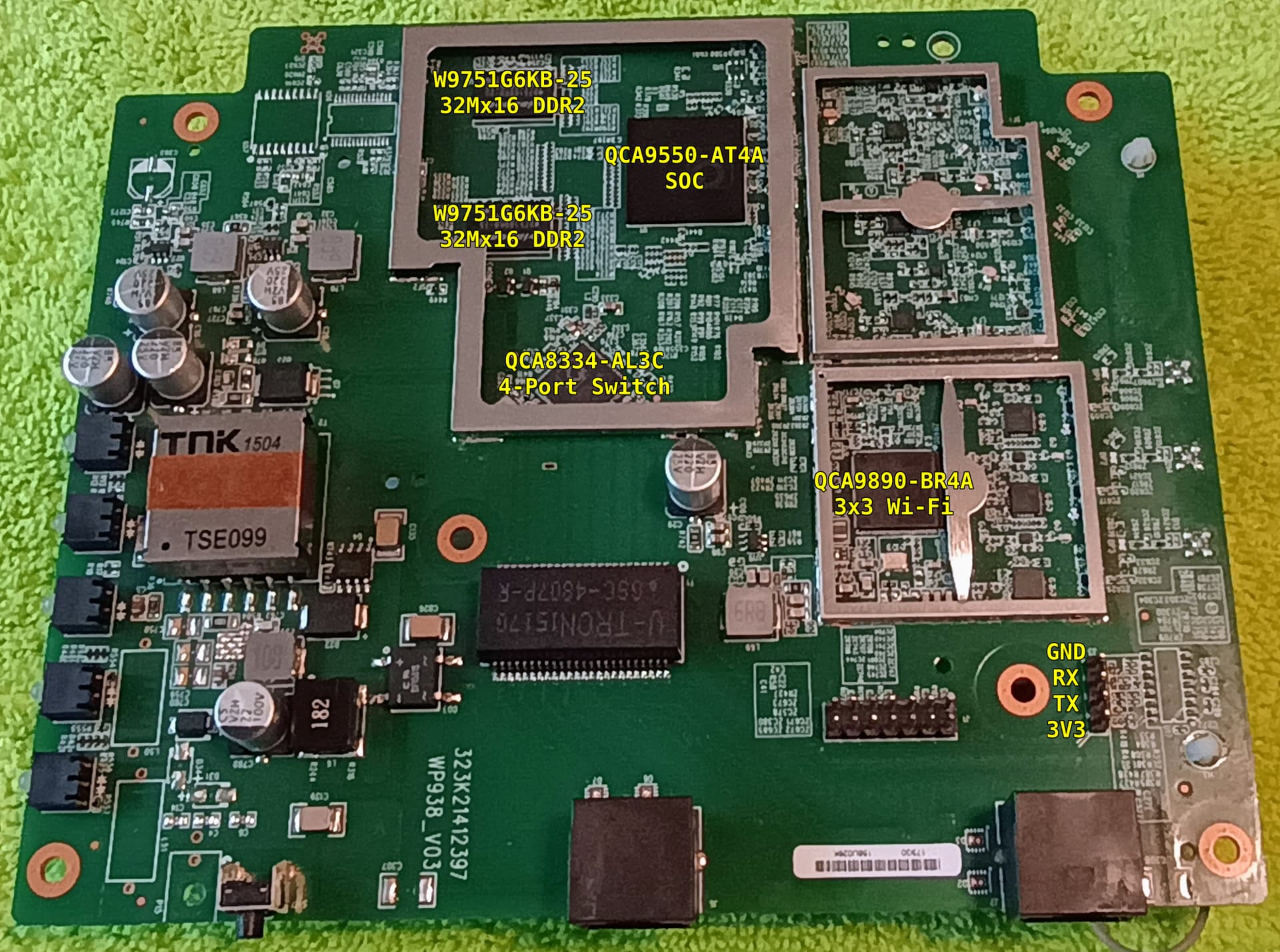


Not taking any chances. I got creative with SMD proto boards. It’s a little sloppy, but it works. I also tried swapping with FLASH I purchased on AliExpress including larger 256Mb.

I’ve gathered the following technical specs:
- QCA9550-AT4A SoC
- 32MB NOR FLASH: MX25L12835FMI-10G x2
- 128MB DDR2 RAM: W9751G6KB-25 x2
- QCA8334-AL3C 4-port switch
- QCA9890-BR4A radio
- FCC report
Unlike the C-75, there’s no external console port. There’s a 4-pin header inside with 3.3V serial (115200 8N1):
J3  4   3   2   1
   GND  RX  TX 3V3
Here’s the boot activity:
U-Boot 1.0.0 (Nov 14 2014 - 14:32:46)

WP938-AT - Scorpion 1.0DRAM:
sri
Scorpion 1.0
ath_ddr_initial_config(200): (32bit) ddr2 init
tap = 0x00000003
Tap (low, high) = (0x4, 0x1d)
Tap values = (0x10, 0x10, 0x10, 0x10)
128 MB
Top of RAM usable for U-Boot at: 88000000
Reserving 208k for U-Boot at: 87fc8000
Reserving 192k for malloc() at: 87f98000
Reserving 44 Bytes for Board Info at: 87f97fd4
Reserving 36 Bytes for Global Data at: 87f97fb0
Reserving 128k for boot params() at: 87f77fb0
Stack Pointer at: 87f77f98
Now running in RAM - U-Boot at: 87fc8000
Flash Manuf Id 0xc2, DeviceId0 0x20, DeviceId1 0x18
flash size 16MB, sector count = 256
flash size 16MB, sector count = 256
Flash: 32 MB
*** Warning *** : PCIe WLAN Module not found !!!
In:    serial
Out:   serial
Err:   serial
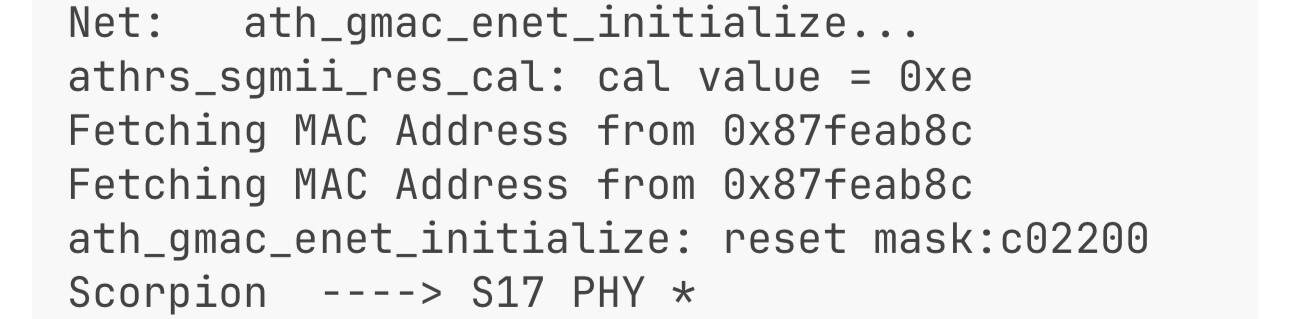
Net:   ath_gmac_enet_initialize...
athrs_sgmii_res_cal: cal value = 0xe
Fetching MAC Address from 0x87feab8c
Fetching MAC Address from 0x87feab8c
ath_gmac_enet_initialize: reset mask:c02200
Scorpion  ----> S17 PHY *
Vlan config...
s17 phy0 register value 0x00004140
TEST: FINAL REG VAL after TX Calibration - 0x4a000000
TEST: FINAL XMII VAL after RX Calibration - 0x5a000000
TEST: FINAL ETH_CFG VAL after RX Calibration - 0x00000001
athrs17_reg_init: complete
: cfg1 0x80000000 cfg2 0x7335
eth0: 00:11:74:f8:4d:5f
eth0 up
athrs17_reg_init_wan done
SGMII in forced mode
athr_gmac_sgmii_setup SGMII done
: cfg1 0x800c0000 cfg2 0x7214
eth1: 00:11:74:f8:4d:5e
eth1 up
eth0, eth1
Setting 0x18116290 to 0x50a0214f
Hit any key to stop autoboot:  0
## Booting image at 9f060000 ...
   Image Name:   Linux Kernel Image
   Created:      2015-05-18  16:41:26 UTC
   Image Type:   MIPS Linux Kernel Image (lzma compressed)
   Data Size:    1092493 Bytes =  1 MB
   Load Address: 80002000
   Entry Point:  80249fd0
   Verifying Checksum at 0x9f060040 ...OK
   Uncompressing Kernel Image ... OK
No initrd
## Transferring control to Linux (at address 80249fd0) ...
## Giving linux memsize in bytes, 134217728

Starting kernel ...

Booting QCA955x
Linux version 2.6.31-dirty (root@productbuilder-2) (gcc version 4.3.3 (GCC) ) #1 Mon May 18 22:11:10 IST 2015
flash_size passed from bootloader = 32
arg 1: console=ttyS0,115200
arg 2: root=31:03
arg 3: rootfstype=jffs2
arg 4: init=/sbin/init
arg 5: mtdparts=ath-nor0:256k(u-boot),128k(uboot-env),2048k(kernel),13888k(rootfs),64k(ART);ath-nor1:16M(opt)
arg 6: mem=128M
CPU revision is: 00019750 (MIPS 74Kc)
cpu apb ddr apb ath_sys_frequency: cpu 720 ddr 600 ahb 200
Determined physical RAM map:
 memory: 02000000 @ 00000000 (usable)
User-defined physical RAM map:
 memory: 08000000 @ 00000000 (usable)
Initrd not found or empty - disabling initrd
Zone PFN ranges:
  Normal   0x00000000 -> 0x00008000
Movable zone start PFN for each node
early_node_map[1] active PFN ranges
    0: 0x00000000 -> 0x00008000
Built 1 zonelists in Zone order, mobility grouping on.  Total pages: 32512
Kernel command line: console=ttyS0,115200 root=31:03 rootfstype=jffs2 init=/sbin/init mtdparts=ath-nor0:256k(u-boot),128k(uboot-env),2048k(kernel),13888k(rootfs),64k(ART);ath-nor1:16M(opt) mem=128M
PID hash table entries: 512 (order: 9, 2048 bytes)
Dentry cache hash table entries: 16384 (order: 4, 65536 bytes)
Inode-cache hash table entries: 8192 (order: 3, 32768 bytes)
Primary instruction cache 64kB, VIPT, 4-way, linesize 32 bytes.
Primary data cache 32kB, 4-way, VIPT, cache aliases, linesize 32 bytes
Writing ErrCtl register=00000000
Readback ErrCtl register=00000000
Memory: 112228k/131072k available (2354k kernel code, 18672k reserved, 571k data, 164k init, 0k highmem)
NR_IRQS:128
plat_time_init: plat time init done
Console: colour dummy device 80x25
Calibrating delay loop... 359.42 BogoMIPS (lpj=718848)
Mount-cache hash table entries: 512

****************ALLOC***********************
 Packet mem: 80319e40 (0xe00000 bytes)
********************************************

NET: Registered protocol family 16
ath_pcibios_init: bus 0
ath_pcibios_init(250): PCI 0 CMD write: 0x356
registering PCI controller with io_map_base unset
ath_pcibios_init: bus 1
***** Warning PCIe 1 H/W not found !!!
registering PCI controller with io_map_base unset
bio: create slab <bio-0> at 0
SCSI subsystem initialized
usbcore: registered new interface driver usbfs
usbcore: registered new interface driver hub
usbcore: registered new device driver usb
pcibios_map_irq: IRQ 75 for bus 0
NET: Registered protocol family 2
IP route cache hash table entries: 1024 (order: 0, 4096 bytes)
TCP established hash table entries: 4096 (order: 3, 32768 bytes)
TCP bind hash table entries: 4096 (order: 2, 16384 bytes)
TCP: Hash tables configured (established 4096 bind 4096)
TCP reno registered
NET: Registered protocol family 1
ATH GPIOC major 0
JFFS2 version 2.2 (NAND) (ZLIB) (RTIME) (c) 2001-2006 Red Hat, Inc.
fuse init (API version 7.12)
msgmni has been set to 219
io scheduler noop registered
io scheduler deadline registered (default)
Serial: 8250/16550 driver, 1 ports, IRQ sharing disabled
serial8250.0: ttyS0 at MMIO 0xb8020000 (irq = 19) is a 16550A
console [ttyS0] enabled
brd: module loaded
5 cmdlinepart partitions found on MTD device ath-nor0
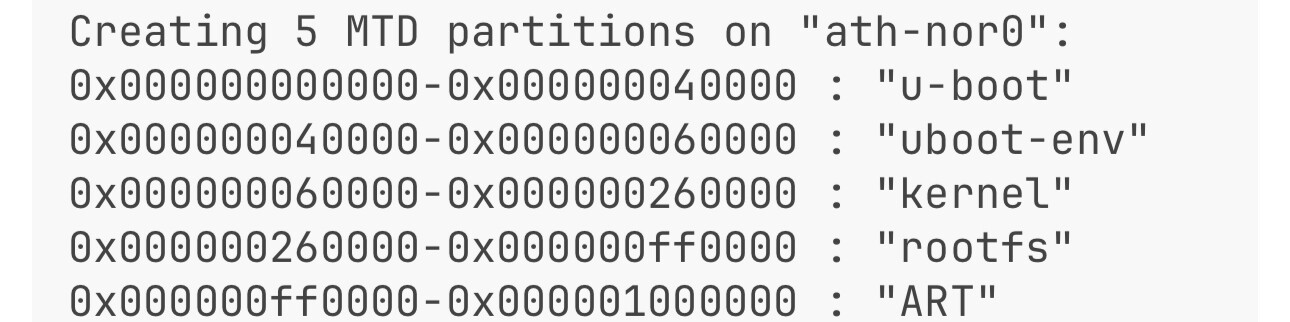
Creating 5 MTD partitions on "ath-nor0":
0x000000000000-0x000000040000 : "u-boot"
0x000000040000-0x000000060000 : "uboot-env"
0x000000060000-0x000000260000 : "kernel"
0x000000260000-0x000000ff0000 : "rootfs"
0x000000ff0000-0x000001000000 : "ART"
1 cmdlinepart partitions found on MTD device ath-nor1
Creating 1 MTD partitions on "ath-nor1":
0x000001000000-0x000002000000 : "opt"
usbmon: debugfs is not available
ehci_hcd: USB 2.0 'Enhanced' Host Controller (EHCI) Driver
Port Status 1c000004
ath-ehci ath-ehci.0: ATH EHCI
ath-ehci ath-ehci.0: new USB bus registered, assigned bus number 1
ehci_reset Intialize USB CONTROLLER in host mode: 13
ehci_reset Port Status 1c000000
ath-ehci ath-ehci.0: irq 3, io mem 0x1b000000
ehci_reset Intialize USB CONTROLLER in host mode: 13
ehci_reset Port Status 1c000000
ath-ehci ath-ehci.0: USB 2.0 started, EHCI 1.00
usb usb1: New USB device found, idVendor=1d6b, idProduct=0002
usb usb1: New USB device strings: Mfr=3, Product=2, SerialNumber=1
usb usb1: Product: ATH EHCI
usb usb1: Manufacturer: Linux 2.6.31-dirty ehci_hcd
usb usb1: SerialNumber: platform
usb usb1: configuration #1 chosen from 1 choice
hub 1-0:1.0: USB hub found
hub 1-0:1.0: 1 port detected
Port Status 1c000000
ath-ehci1 ath-ehci1.1: ATH EHCI
ath-ehci1 ath-ehci1.1: new USB bus registered, assigned bus number 2
ehci_reset Intialize USB CONTROLLER in host mode: 13
ehci_reset Port Status 1c000000
ath-ehci1 ath-ehci1.1: irq 3, io mem 0x1b400000
ehci_reset Intialize USB CONTROLLER in host mode: 13
ehci_reset Port Status 1c000000
ath-ehci1 ath-ehci1.1: USB 2.0 started, EHCI 1.00
usb usb2: New USB device found, idVendor=1d6b, idProduct=0002
usb usb2: New USB device strings: Mfr=3, Product=2, SerialNumber=1
usb usb2: Product: ATH EHCI
usb usb2: Manufacturer: Linux 2.6.31-dirty ehci_hcd
usb usb2: SerialNumber: platform
usb usb2: configuration #1 chosen from 1 choice
hub 2-0:1.0: USB hub found
hub 2-0:1.0: 1 port detected
ohci_hcd: USB 1.1 'Open' Host Controller (OHCI) Driver
uhci_hcd: USB Universal Host Controller Interface driver
Initializing USB Mass Storage driver...
usbcore: registered new interface driver usb-storage
USB Mass Storage support registered.
dummy_hcd dummy_hcd: USB Host+Gadget Emulator, driver 02 May 2005
dummy_hcd dummy_hcd: Dummy host controller
dummy_hcd dummy_hcd: new USB bus registered, assigned bus number 3
usb usb3: New USB device found, idVendor=1d6b, idProduct=0002
usb usb3: New USB device strings: Mfr=3, Product=2, SerialNumber=1
usb usb3: Product: Dummy host controller
usb usb3: Manufacturer: Linux 2.6.31-dirty dummy_hcd
usb usb3: SerialNumber: dummy_hcd
usb usb3: configuration #1 chosen from 1 choice
hub 3-0:1.0: USB hub found
hub 3-0:1.0: 1 port detected
usbcore: registered new interface driver hiddev
usbcore: registered new interface driver usbhid
usbhid: v2.6:USB HID core driver
TCP cubic registered
NET: Registered protocol family 17
Bridge firewalling registered
802.1Q VLAN Support v1.8 Ben Greear <greearb@candelatech.com>
All bugs added by David S. Miller <davem@redhat.com>
arch/mips/atheros/gpio.c (ath_simple_config_init) JUMPSTART_GPIO: 0
ath_simple_config_invoke_cb: sc 1, irq 0, ignorepb 1, jiffies 4294892531
enable watchdog
athwdt_init: Registering WDT success
ath_otp_init: Registering OTP success
VFS: Mounted root (jffs2 filesystem) readonly on device 31:3.
Freeing unused kernel memory: 164k freed
Warning: unable to open an initial console.
qca955x_GMAC: Length per segment 1536
955x_GMAC: qca955x_gmac_attach
955x_GMAC: qca955x_set_gmac_caps
Currently in polling mode unit0
mac:0 Registering S17....
qca955x_GMAC: RX TASKLET - Pkts per Intr:160
qca955x_GMAC: Mac address for unit 0:bfff0000
qca955x_GMAC: 00:11:74:f8:4d:5f
qca955x_GMAC: Max segments per packet :   1
qca955x_GMAC: Max tx descriptor count :   128
qca955x_GMAC: Max rx descriptor count :   224
qca955x_GMAC: Mac capability flags    :   10002A00
955x_GMAC: qca955x_gmac_attach
955x_GMAC: qca955x_set_gmac_caps
Currently in polling mode unit1
mac:1 Registering S17....
qca955x_GMAC: RX TASKLET - Pkts per Intr:160
qca955x_GMAC: Mac address for unit 1:bfff0006
qca955x_GMAC: 00:11:74:f8:4d:5e
qca955x_GMAC: Max segments per packet :   1
qca955x_GMAC: Max tx descriptor count :   128
qca955x_GMAC: Max rx descriptor count :   224
qca955x_GMAC: Mac capability flags    :   12002200
955x_GMAC: Serdes PLL is locked value 0x1f038116
To set s17 LOOKUP_CTRL_REG registers, flag 0
athr_gmac_ring_alloc Allocated 2048 at 0x87998800
sram_desc_cnt 1536,mac Unit 0,Tx r->ring_desc 0xbd000000
athr_gmac_ring_alloc Allocated 3584 at 0x87978000
sram_desc_cnt 4224,mac Unit 0,Rx r->ring_desc 0xbd000600
955x_GMAC: eth0 in RGMII MODE
Scorpion -----> S17 PHY
MC0 as SGMII
athrs17_reg_init:done
Setting Drop CRC Errors, Pause Frames and Length Error frames
Setting PHY...
Phy setup Complete
To set s17 LOOKUP_CTRL_REG registers, flag 1
To set s17 LOOKUP_CTRL_REG registers, flag 0
athr_gmac_ring_alloc Allocated 2048 at 0x87998000
sram_desc_cnt 5760,mac Unit 1,Tx r->ring_desc 0xbd001080
athr_gmac_ring_alloc Allocated 3584 at 0x879cb000
sram_desc_cnt 8448,mac Unit 1,Rx r->ring_desc 0xbd001680
955x_GMAC: eth1 in SGMII MODE
Scorpion -----> S17 PHY
MAC6 as RGMII
athrs17_reg_init_wan done
955x_SGMII::athr_gmac_sgmii_setup  Done

rewrite SGMII_SERDES_ADDRESS register
Setting Drop CRC Errors, Pause Frames and Length Error frames
Setting PHY...
Phy setup Complete
To set s17 LOOKUP_CTRL_REG registers, flag 1
NET: Registered protocol family 10
ADDRCONF(NETDEV_UP): eth0: link is not ready
ADDRCONF(NETDEV_UP): eth1: link is not ready
LED driver initializing
apmode is 0
Initialising Reset Sensor module
Sensor Integrity Check: [PASSED]
FIPS mode:  [OFF]

 (none) mips #1 Mon May 18 22:11:10 IST 2015 (none)
(none) login:
U-Boot commands:
ath> help
?       - alias for 'help'
autoscr - run script from memory
base    - print or set address offset
bdinfo  - print Board Info structure
boot    - boot default, i.e., run 'bootcmd'
bootd   - boot default, i.e., run 'bootcmd'
bootelf - Boot from an ELF image in memory
bootm   - boot application image from memory
bootp   - boot image via network using BootP/TFTP protocol
bootvx  - Boot vxWorks from an ELF image
cmp     - memory compare
coninfo - print console devices and information
cp      - memory copy
crc32   - checksum calculation
dhcp    - invoke DHCP client to obtain IP/boot params
echo    - echo args to console
erase   - erase FLASH memory
ethreg  - Switch/PHY Reg rd/wr  utility
exit    - exit script
flinfo  - print FLASH memory information
go      - start application at address 'addr'
help    - print online help
iminfo  - print header information for application image
itest   - return true/false on integer compare
loop    - infinite loop on address range
md      - memory display
mii     - MII utility commands
mm      - memory modify (auto-incrementing)
mtest   - simple RAM test
mw      - memory write (fill)
nfs     - boot image via network using NFS protocol
nm      - memory modify (constant address)
pci     - list and access PCI Configuration Space
ping    - send ICMP ECHO_REQUEST to network host
pll cpu-pll dither ddr-pll dither - Set to change CPU & DDR speed
pll erase
pll get
printenv- print environment variables
progmac - Set ethernet MAC addresses
progmac2 - Set ethernet MAC addresses
protect - enable or disable FLASH write protection
rarpboot- boot image via network using RARP/TFTP protocol
reset   - Perform RESET of the CPU
run     - run commands in an environment variable
saveenv - save environment variables to persistent storage
setenv  - set environment variables
sleep   - delay execution for some time
test    - minimal test like /bin/sh
tftpboot- boot image via network using TFTP protocol
version - print monitor version
Like the C-75, you can log into the ‘sensor shell’ with config/config. Commands:
[config]$ help
-----------------------------------------
Help for Sensor Config Shell Commands
-----------------------------------------
Get Commands:
get mode                             : Displays the mode in which the device is currently configured
get ip config                        : Displays IP information
get serial num                       : Displays Board Number
get version                          : Displays Version and Build information of all components
get presence notification parameters : Displays presence notification feature parameters
get interface                        : Displays Network Interface speed and mode
get ap                               : Displays all currently visible APs
get log                              : Displays log information as it is created
get rf                               : Displays if RF monitoring for Sensor is ON or OFF
get status                           : Displays current running status of all components
get server discovery                 : Displays Server discovery/setting information
get vlan config                      : Displays vlan information (set info and dynamic info)
get vlan id                          : Displays vlan IDs seen by ND
get vlan status                      : Displays vlan status information
get network status                   : Displays running status of network profiles
get network vlan status              : Displays IP setting of vlans on remote end point
get vlan connectivity                : Performs ping on particular vlan other than communication vlan
get client logs                      : Get client connections logs as it happens
get log config                       : Displays the configuration of the logger
get model                            : Displays model of the Sensor
get antenna                          : Displays antenna configuration (Internal/ External)
get wired trace                      : Performs packet capture on ethernet interface (eth0) upto file size 5MB
get route                            : Displays IP routing table entries
get registration key                 : Displays device's registration information
-----------------------------------------

Set Commands:
set erase                            : Sets the erase character to ^H
set interface                        : Sets Network Interface speed and mode.
set ip config                        : Runs through the current VLAN and IP config wizard
set vlan config                      : Sets multiple VLAN monitoring to ON or OFF
set server discovery                 : Sets Server discovery information
set mode                             : Sets the mode to Sensor,Network Detector or Sentry
set ipv6 config                      : Sets IPv6 network settings.
set communication passphrase         : Sets the passphrase used by the sensor to authenticate and communicate with the server
set communication key                : Sets the key used by the sensor to authenticate and communicate with the server
set communication key default        : Sets the communication key to its default value
set presence notification parameters : Sets the rssi threshold and time interval and server ip address
-----------------------------------------

Other Commands:
exit                                 : Exits the Sensor config shell session
help                                 : Displays help for all commands
help set                             : Displays help for 'set' commands
help get                             : Displays help for 'get' commands
help other                           : Displays help for 'other' commands
passwd                               : Changes the config shell password
ping6                                : Ping a IPv6 host Usage: ping6 <ipv6_address/host_name>
ping                                 : Ping a host. Usage: ping <ip_address/host_name> e.g. ping 192.168.1.246
reboot                               : Reboots the Sensor
restart                              : Restarts the Sensor application
reset factory                        : Resets Sensor to 'out of the box' status
upgrade                              : Upgrades the Sensor manually from a given IP address
Standalone-Mode enable               : Sets the device in Standalone mode
Standalone-Mode disable              : Sets the device in Remote Management mode
presence notification enable         : Enable the presence notification feature
presence notification disable        : Disable the presence notification feature
-----------------------------------------
ath> bdinfo
boot_params = 0x87F77FB0
memstart    = 0x80000000
memsize     = 0x08000000
flashstart  = 0x9F000000
flashsize   = 0x02000000
flashoffset = 0x0002A980
ethaddr     = 00:AA:BB:CC:DD:EE
ip_addr     = 192.168.9.218
baudrate    = 115200 bps

ath> printenv
bootdelay=2
baudrate=115200
ethaddr=0x00:0xaa:0xbb:0xcc:0xdd:0xee
dir=
lu=tftp 0x80060000 ${dir}u-boot.bin&&erase 0x9f000000 +$filesize&&cp.b $fileaddr 0x9f000000 $filesize
lf=tftp 0x80060000 ${dir}ap135${bc}-jffs2&&erase 0x9f050000 +0x630000&&cp.b $fileaddr 0x9f050000 $filesize
lk=tftp 0x80060000 ${dir}vmlinux${bc}.lzma.uImage&&erase 0x9f680000 +$filesize&&cp.b $fileaddr 0x9f680000 $filesize
ethact=eth0
bootargs=console=ttyS0,115200 root=31:03 rootfstype=jffs2 init=/sbin/init mtdparts=ath-nor0:256k(u-boot),128k(uboot-env),2048k(kernel),13888k(rootfs),64k(ART);ath-nor1:16M(opt)
bootcmd=bootm 0x9F060000
ipaddr=192.168.9.218
serverip=192.168.9.55
netmask=255.255.255.0
stdin=serial
stdout=serial
stderr=serial
I have network connectivity in U-Boot and TFTP works. I’m set up to build custom OpenWrt firmware. How do I determine the memory map for the .dts file? I’m guessing that the experts just search the firmware binary looking for required values like MACs or calibration data?